
Walfront IR01D
Walfront IR01D Digital Infrared Thermometer Instruction Manual
Model: IR01D | Brand: Walfront
1. Úvod
The Walfront IR01D is a non-contact digital infrared thermometer designed for industrial applications. It provides quick and accurate temperature measurements of surfaces from a distance. This manual provides essential information for the safe and effective operation, maintenance, and troubleshooting of your device.
Důležitá poznámka: This device is intended for industrial use only and is not suitable for measuring human body temperature.
2. Bezpečnostní informace
- Před použitím zařízení si vždy přečtěte a pochopte tento návod k obsluze.
- Do not point the laser directly at eyes or reflective surfaces, as this may cause eye damage. The laser is Class 2 (<1mW/630-670nm).
- Nepoužívejte teploměr v prostředí s výbušným plynem, párou nebo prachem.
- Udržujte zařízení mimo dosah silných elektromagnetických polí.
- Neponořujte zařízení do vody nebo jiných kapalin.
- Pokud je zařízení poškozené, nepokoušejte se jej sami opravit. Kontaktujte kvalifikovaný personál.
- Zlikvidujte baterie v souladu s místními předpisy.
3. Obsah balení
Po otevření balíku ověřte, zda jsou všechny položky přítomny a nepoškozené:
- 1 x Walfront IR01D Digital Infrared Thermometer
- 1 x Návod k obsluze (tento dokument)
Note: 1.5V*2 AAA Batteries are not included and must be purchased separately.
4. Konec produktuview

Obrázek 4.1: Přední strana view of the Walfront IR01D Infrared Thermometer, showing the trigger and measurement lens.

Figure 4.2: Close-up of the IR01D's LCD display, showing temperature readings, emissivity, and humidity.
4.1 Komponenty
- Measurement Lens: Collects infrared radiation from the target.
- Laserové ukazovátko: Helps in aiming at the target (Class 2 laser).
- LCD displej: Shows temperature readings, settings, and other indicators.
- Spoušť: Aktivuje měření a laser.
- Tlačítko režimu: Cykluje mezi různými nastaveními a režimy.
- Tlačítka nahoru/dolů: Adjust settings like emissivity and alarm limits.
- Přihrádka na baterie: Holds two AAA batteries.
4.2 Indikátory na LCD displeji
LCD displej zobrazuje různé informace:
- Odečet teploty: Displays the measured temperature in Celsius (℃) or Fahrenheit (℉).
- Emissivity (E): Indicates the current emissivity setting (0.1 to 1.0).
- Vlhkost: Shows the environmental humidity percentage.
- Teplota prostředí: Zobrazuje okolní teplotu.
- Laser Indicator: Icon indicating the laser is active.
- Indikátor baterie: Zobrazuje zbývající životnost baterie.
- Indikátory alarmu: Icons for high or low temperature alarms.
- Pozastavení dat: Icon indicating the last reading is held on the display.
5. Nastavení
5.1 Instalace baterie
The IR01D thermometer requires two 1.5V AAA batteries (not included).
- Locate the battery compartment cover on the handle of the device.
- Gently slide or open the battery compartment cover.
- Vložte dvě baterie typu AAA a dbejte na správnou polaritu (+ a -) vyznačenou uvnitř přihrádky.
- Kryt přihrádky na baterie bezpečně zavřete, dokud nezacvakne na místo.

Obrázek 5.1: View of the battery compartment with the cover open, showing where to insert AAA batteries.
6. Návod k obsluze
6.1 Provedení měření
- Point the thermometer at the target surface. Ensure the target is within the device's D:S (Distance to Spot) ratio of 12:1. For example, at 12 inches distance, the measurement spot is 1 inch in diameter.
- Press and hold the trigger. The laser pointer will activate to help you aim, and the display will show the real-time temperature reading.
- Release the trigger to hold the last measured temperature on the display. The device will automatically shut down after 30 seconds of inactivity to conserve battery life.
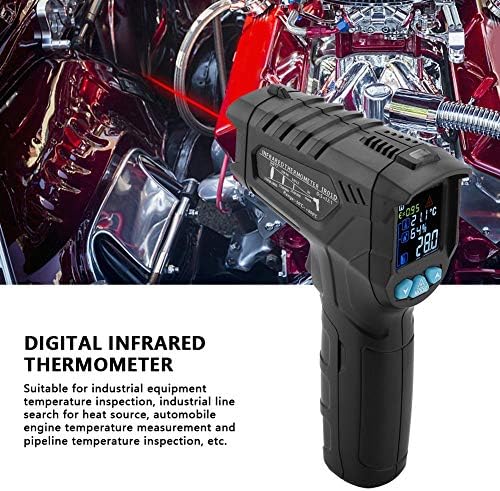
Figure 6.1: The thermometer being held, demonstrating the laser pointer for accurate targeting of the measurement area.
6.2 Nastavení emisivity
Emissivity (E) is a measure of an object's ability to emit infrared energy. Different materials have different emissivity values. The IR01D allows adjustment from 0.1 to 1.0 for accurate readings on various surfaces.
- Když je zařízení zapnuté, stiskněte tlačítko MODE button until the emissivity (E) indicator flashes on the display.
- Použijte UP a DOLŮ buttons to adjust the emissivity value. Refer to common emissivity tables for typical materials.
- Stiskněte tlačítko MODE button again to confirm the setting and exit emissivity adjustment mode.
6.3 Temperature Difference Alarm
The device features a temperature difference alarm, allowing you to set upper and lower temperature limits. If the measured temperature falls outside these limits, an alarm will sound or an indicator will appear.
- Stiskněte tlačítko MODE button repeatedly until the alarm setting mode is active (e.g., HI or LO alarm indicator flashes).
- Použijte UP a DOLŮ buttons to set the desired high or low temperature limit.
- Pokračujte v stisknutí MODE to set the other limit or exit the alarm setting mode.
6.4 Unit Conversion (Celsius/Fahrenheit)
The IR01D can display temperatures in both Celsius (℃) and Fahrenheit (℉).
- Když je zařízení zapnuté, stiskněte tlačítko MODE button until the temperature unit flashes.
- Použijte UP or DOLŮ button to toggle between ℃ and ℉.
- Stiskněte MODE znovu pro potvrzení.
7. Údržba
- Čištění: Otřete zařízení dočista měkkým hadříkemamp cloth. Do not use abrasive cleaners or solvents. Ensure the lens is clean for accurate readings.
- Skladování: Store the thermometer in a dry place, away from direct sunlight and extreme temperatures. The recommended storage temperature is -10℃ to 60℃ (14℉ to 140℉).
- Výměna baterie: Replace batteries when the low battery indicator appears on the display. Remove batteries if the device will not be used for an extended period to prevent leakage.
8. Řešení problémů
| Problém | Možná příčina | Řešení |
|---|---|---|
| Zařízení se nezapne. | Baterie jsou vybité nebo nesprávně nainstalované. | Zkontrolujte polaritu baterií. Vyměňte za nové baterie AAA. |
| Nepřesné údaje. | Dirty lens; incorrect emissivity setting; target too far or too small. | Clean the lens. Adjust emissivity for the target material. Ensure target fills the measurement spot. |
| Laser not working. | Laser function disabled; device malfunction. | Ensure laser is enabled in settings (if applicable). If not, contact support. |
| Display shows "OL" or "LO". | Teplota je mimo měřicí rozsah. | Ensure the target temperature is within -50℃ to 800℃. |
9. Specifikace
| Parametr | Hodnota |
|---|---|
| Model | IR01D |
| Rozsah měření teploty | -50 ℃ až 800 ℃ (-58 ℉ až 1472 ℉) |
| Rozsah teplot prostředí | -10℃ až 60℃ (14℉ až 140℉) |
| Environment Humidity Range | 0 % až 100 % RH |
| Poměr vzdálenosti k bodu (D:S) | 12:1 |
| Emisivita | 0.1 až 1.0 (nastavitelné) |
| Spektrum odezvy | 8 až 14 um |
| Polohování | 12-point ring indicating temperature sensitive zone |
| Výkon laseru | <1mW/630-670nm (Class 2) |
| Doba odezvy | <0.5 sekundy |
| Automatické vypnutí | 30 sekund (přibližně) |
| Uchovávání dat | Ano |
| Servisní teplota | 0℃ až 40℃ (32℉ až 104℉) |
| Skladovací teplota | -10℃ až 60℃ (14℉ až 140℉) |
| Napájení | 2 x 1.5V AAA baterie (nejsou součástí balení) |
| Hmotnost | Cca. 204 g (7.2 oz) |
| Rozměry (D x Š x V) | Přibližně 140 x 95 x 42 mm (5.5 x 3.7 x 1.7 palce) |
| Typ zobrazení | LCD (s podsvícením) |
| Materiál | Plast |
10. Záruka a podpora
Walfront products are designed for reliability and performance. For any questions, technical support, or warranty inquiries, please contact your retailer or visit the official Walfront store for assistance.
Official Walfront Store: Walfront Amazon Store
Ask a question about this manual
Ask about setup, troubleshooting, compatibility, parts, safety, or missing instructions. Manuals+ will review the question and use this page’s manual context to help answer it.