
Walfront TM630A
Walfront TM630A Digital Timer Switch User Manual
Model: TM630A
1. Úvod
This manual provides detailed instructions for the installation, operation, and maintenance of the Walfront TM630A 12V DC Mini LCD Digital Microcomputer Control Power Timer Switch. This device is designed for precise control of various electrical equipment, offering automated on/off scheduling for enhanced efficiency and convenience. Please read this manual thoroughly before use to ensure proper operation and safety.
2. Bezpečnostní informace
- Ujistěte se, že napájecí zdroj odpovídá objtage requirements of the device (DC 12V).
- Installation should be performed by qualified personnel to prevent electric shock or damage.
- Nevystavujte zařízení vodě, nadměrné vlhkosti ani extrémním teplotám.
- Před prováděním jakéhokoli zapojení nebo údržby odpojte napájení.
- Uchovávejte mimo dosah dětí.
3. Konec produktuview
The Walfront TM630A is a high-precision digital timer switch featuring an industrial-grade chip for strong anti-interference. It includes a built-in 1.2V/40mA rechargeable battery to retain programming information during power outages. The device supports up to 17 on/off settings for flexible scheduling.
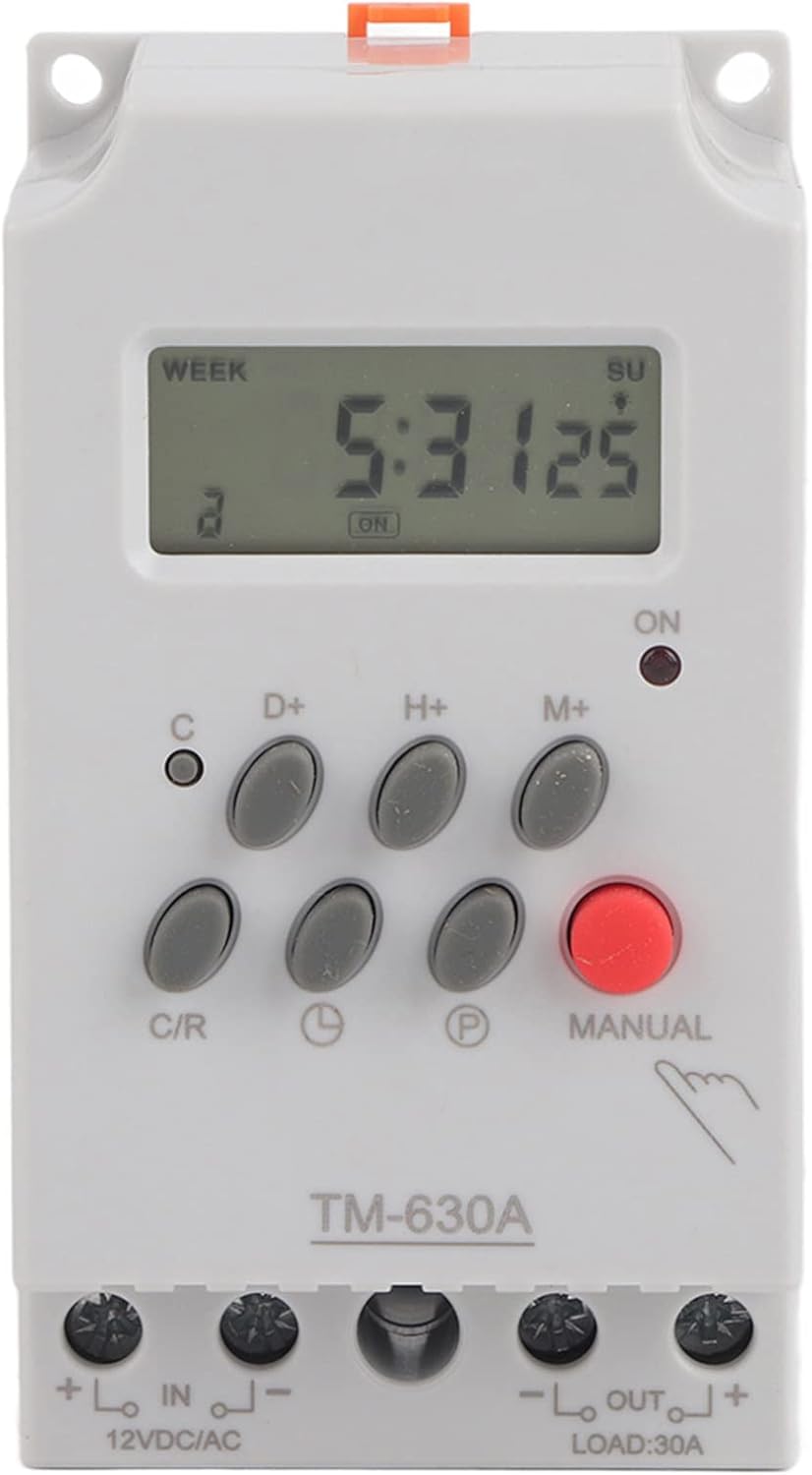
Přední view of the TM630A digital timer switch, showing the LCD display and control buttons.
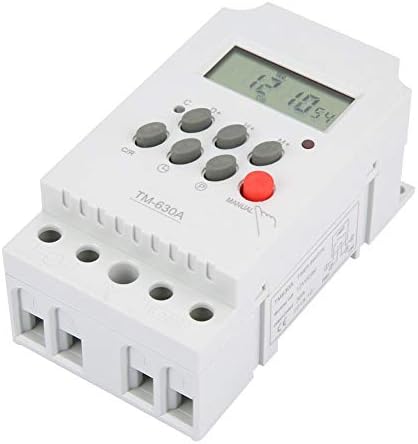
Úhlové view of the TM630A, highlighting its compact design and terminal blocks.

Zadní view of the TM630A, showing the DIN rail mounting clip.

Diagram illustrating the dimensions of the TM630A timer switch: 3.1 inches (depth), 2.2 inches (width), and 1.4 inches (height).
4. Nastavení a zapojení
The TM630A timer switch is designed for easy installation. It features two input terminals for power supply and two output terminals for the load. The wire slots accept wire sizes from 20AWG to 10AWG.
Schéma zapojení:
Connect the 12V DC power supply to the 'IN' terminals (marked '+' and '-'). Connect the device to be controlled (load) to the 'OUT' terminals (marked '+' and '-'). Ensure correct polarity for DC applications.
Caution: Always ensure power is disconnected before wiring to prevent electric shock.
5. Návod k obsluze
Počáteční nastavení:
- Odemkněte zařízení: Press the 'C/R' button four times to unlock the timer. The lock icon on the display will disappear.
- Nastavit aktuální čas:
- Press the 'D+' button to set the current day of the week.
- Press the 'H+' button to set the current hour.
- Press the 'M+' button to set the current minute.
Programování časů zapnutí/vypnutí:
The timer supports up to 17 ON/OFF programs. Follow these steps to set a program:
- Press the 'P' button once. The display will show '1 ON'. This is the first 'ON' setting.
- Use 'D+', 'H+', 'M+' buttons to set the desired day(s), hour, and minute for the first 'ON' event.
- Press the 'P' button again. The display will show '1 OFF'. This is the first 'OFF' setting.
- Use 'D+', 'H+', 'M+' buttons to set the desired day(s), hour, and minute for the first 'OFF' event.
- Repeat steps 1-4 for additional ON/OFF programs (up to 17).
- After setting all desired programs, press the clock icon button (usually labeled with a clock symbol) to return to the current time display.
Ruční ovládání:
Press the 'MANUAL' button to cycle through different modes: ON, AUTO, OFF. In 'AUTO' mode, the timer will follow the programmed schedule. In 'ON' or 'OFF' mode, the output will remain continuously on or off, overriding the schedule.
6. Údržba
The Walfront TM630A timer switch requires minimal maintenance. Keep the device clean and free from dust. Do not use abrasive cleaners. The internal rechargeable battery is designed to maintain settings during power interruptions; however, if the device is stored for extended periods without power, the battery may discharge. Connect the timer to a power source to recharge the internal battery if it fails to retain settings.
7. Řešení problémů
- Timer not responding or display is blank: Check power connections. Ensure the internal battery has sufficient charge by connecting the timer to power for several hours.
- Timer not executing programs:
- Ensure the device is unlocked (press 'C/R' four times).
- Verify that the timer is in 'AUTO' mode (check the 'MANUAL' button setting).
- Double-check programmed ON/OFF times for accuracy.
- Zobrazený nesprávný čas: Reset the current time using the 'D+', 'H+', 'M+' buttons.
- Device turns on/off unexpectedly: Review all programmed ON/OFF settings to identify any conflicts or unintended schedules.
8. Specifikace
| Funkce | Specifikace |
|---|---|
| Číslo modelu | Wal front3g6nkvs20r-01 (TM630A) |
| Vstupní objemtage | DC 12V |
| Počet programů | 17 nastavení ZAP/VYP |
| Zobrazit | LCD |
| Interní baterie | 1.2V / 40mA rechargeable |
| Rozměry (D x Š x V) | 3.1 cm x 2.2 cm x 1.4 cm |
| Hmotnost položky | 5.3 unce (0.15 kilogramů) |
| Materiál | Plast |
| UPC | 783335809516 |
9. Záruka a podpora
For warranty information and technical support, please refer to the Walfront official webnebo se obraťte na prodejce. Uschovejte si doklad o koupi pro případ reklamace.
Související dokumenty - TM630A
 |
User Manual: 12V/24V/36V 15A PWM DC Motor Speed Controller (GS00574) Operational guide and safety instructions for the GS00574 PWM DC Motor Speed Controller, featuring specifications and usage guidelines. |
 |
Product Manual: WALFRONT Electronic Transformer ESDB332.11 User manual and compliance information for the WALFRONT Electronic Transformer model ESDB332.11, including manufacturer details and usage instructions. |
 |
User Manual: Mini Cordless Rotating Tool Kit (Model 10112402562) User manual for the WALFRONT Mini Cordless Rotating Tool Kit, featuring 5-speed settings, USB charging, and usage instructions for engraving, sanding, and grinding. |
 |
WALFRONT DC Motor Speed Regulator User Manual (10102500106) User manual for the WALFRONT DC Motor Speed Regulator (Model 10102500106), featuring wireless remote control, 6V-28V PWM stepless speed regulation, and 5A capacity. |
 |
User Manual for WALFRONT 7.5KV 30mA Neon Light Electronic Transformer (NP-7500-30) User manual and safety instructions for the WALFRONT 7.5KV 30mA NP-7500-30 Neon Light Electronic Transformer. Includes manufacturer and compliance details. |
 |
Pressure Threshold Switch Circuit Guide - WALFRONT S40 Technical guide for the WALFRONT S40 pressure threshold switch, explaining the Wheatstone bridge and voltage comparator circuit operation. |
Ask a question about this manual
Ask about setup, troubleshooting, compatibility, parts, safety, or missing instructions. Manuals+ will review the question and use this page’s manual context to help answer it.