
1. Úvod
This manual provides instructions for the Zerone Universal Remote Control, designed as a replacement for various Haier TV models. It is compatible with Haier HTR-A18M, 55D3550, 40D3500M, and 48D3500 series televisions. This remote control offers direct access to digital TV functions without complex programming.

Image 1.1: The Zerone Universal Remote Control in use, demonstrating its compatibility with Haier HTR-A18M, 55D3550, 40D3500M, and 48D3500 TV models.
2. Nastavení
2.1 Instalace baterie
Dálkový ovladač vyžaduje k provozu dvě (2) baterie AAA (nejsou součástí balení). Pro instalaci baterií postupujte takto:
- Najděte přihrádku na baterie na zadní straně dálkového ovladače.
- Stiskněte západku a vysuňte kryt baterie.
- Vložte dvě baterie typu AAA a ujistěte se, že kladný (+) a záporný (-) pól správně shodují s označením uvnitř přihrádky.
- Zasuňte kryt baterie zpět na místo, dokud bezpečně nezapadne.
The remote is ready for use immediately after battery installation; no additional programming is required for compatible Haier TV models.

Obrázek 2.1: Detailní view of the remote control, highlighting the battery compartment for AAA battery installation.
3. Návod k obsluze
3.1 Základní funkce
This remote control provides standard functions for your Haier TV. Point the remote directly at your television's infrared receiver for optimal performance.
- Tlačítko napájení (U): Zapne nebo vypne televizor.
- Vstup: Vybírá zdroje video vstupu (HDMI, AV atd.).
- Číselná tlačítka (0-9): Přímý výběr kanálu.
- VOL +/-: Zvýší nebo sníží hlasitost.
- CH +/-: Přepíná kanály nahoru nebo dolů.
- ZTLUMIT: Ztlumí nebo zapne zvuk televizoru.
- MENU: Otevře hlavní nabídku televizoru.
- Navigační tlačítka (nahoru, dolů, vlevo, vpravo, OK): Procházení nabídek a potvrzování výběrů.
- ZPĚT / KONEC: Returns to the previous screen or exits the current menu.
- ZOBRAZIT: Zobrazuje informace o aktuálním kanálu.
- SAP / AUDIO: Vybere jazyk nebo režim zvuku.
- SPÁT: Nastaví časovač vypnutí.
- PICTURE / WIDE: Adjusts picture mode or aspect ratio.
- CH.LIST / FAVORITE: Accesses channel list or favorite channels.
- Media Control Buttons (Play, Pause, Fast Forward, Rewind): Ovládá přehrávání médií.
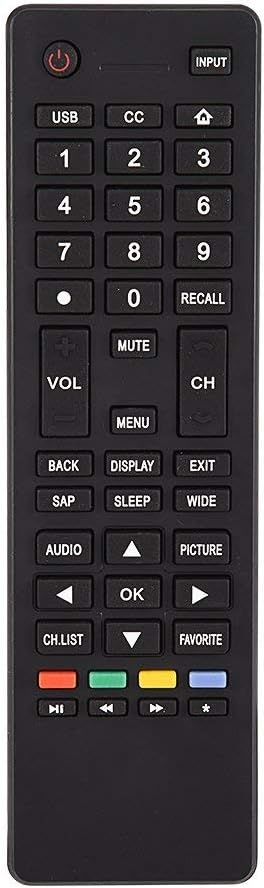
Obrázek 3.1: Konecview of the remote control's button layout for easy identification of functions.
3.2 Provozní rozsah
The remote control has a stable signal transmission distance of up to 10 meters (33 feet). Actual remote distance may vary depending on environmental factors and the specific model of your TV.
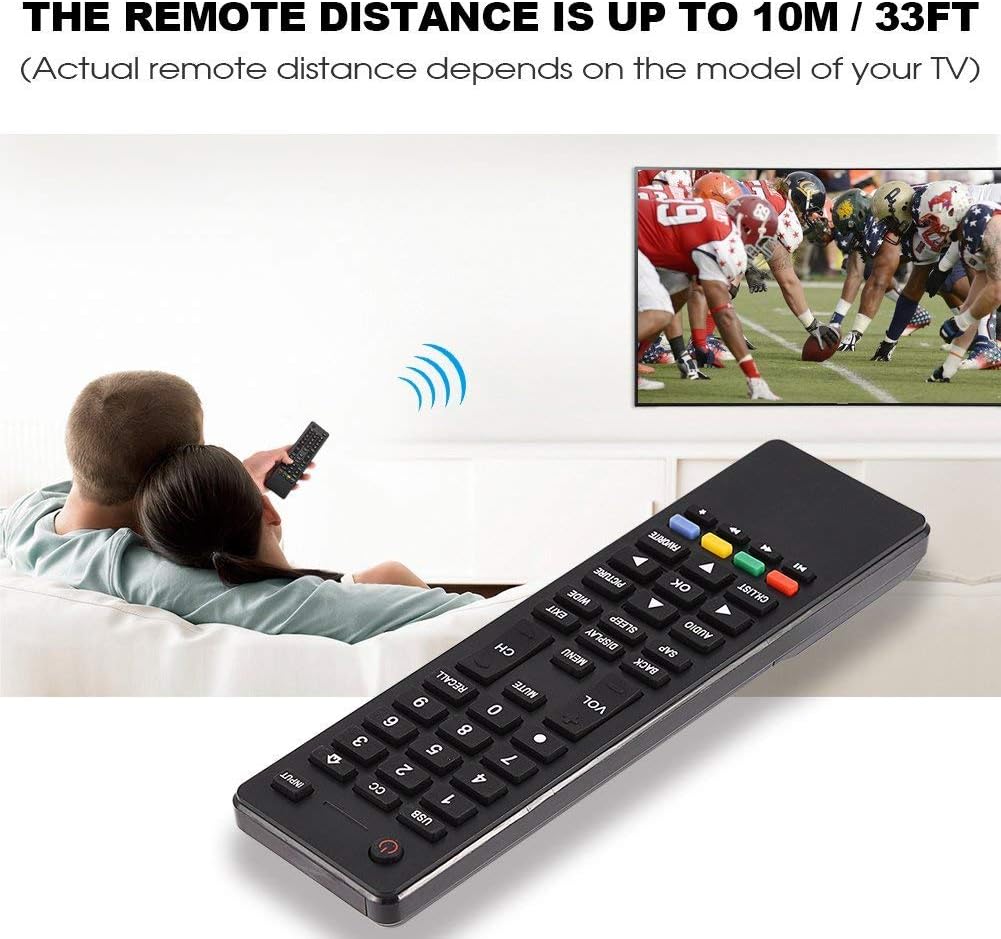
Image 3.2: Visual representation of the remote control's effective operating distance to the television.
4. Údržba
4.1 Čištění
K čištění dálkového ovladače použijte měkký, suchý hadřík. V případě odolných nečistot jej lehce setřete.ampen the cloth with water or a mild cleaning solution. Avoid using harsh chemicals or abrasive cleaners, as these can damage the remote's surface or internal components.
4.2 Péče o baterii
- Vyměňte baterie, když dálkový ovladač reaguje pomalu nebo přestane fungovat.
- Nekombinujte staré a nové baterie ani různé typy baterií.
- Pokud dálkový ovladač nebudete delší dobu používat, vyjměte baterie, abyste zabránili vytečení.
- Použité baterie zlikvidujte zodpovědně v souladu s místními předpisy.
5. Řešení problémů
5.1 Dálkové ovládání nereaguje
- Zkontrolujte baterie: Ensure batteries are inserted correctly with the correct polarity (+/-) and are not depleted. Replace with fresh AAA batteries if necessary.
- Zornost: Make sure there are no obstructions between the remote control and the TV's infrared sensor.
- Vzdálenost: Confirm you are within the effective operating range (up to 10 meters / 33 feet).
- TV kompatibilita: Verify that your TV model is listed as compatible (Haier HTR-A18M, 55D3550, 40D3500M, 48D3500).
5.2 Buttons Not Working Correctly
- Čistý dálkový ovladač: Dust or debris under buttons can cause malfunction. Refer to the Maintenance section for cleaning instructions.
- Kontrola baterie: Weak batteries can lead to inconsistent button responses. Replace batteries.
6. Specifikace
| Funkce | Detail |
|---|---|
| Značka | nula |
| Kompatibilní zařízení | Haier HTR-A18M, 55D3550, 40D3500M, 48D3500 TVs |
| Technologie připojení | Infračervený |
| Maximální dosah | 10 metrů (33 stop) |
| Typ baterie | 2 x AAA (nejsou součástí balení) |
| Typ ovladače | Ovládání tlačítkem |
| Materiál | ABS |
| Číslo modelu | Zerone9rnag3b5y4-cr |
| UPC | 647213811490 |

Image 6.1: Physical dimensions of the Zerone Universal Remote Control.
7. Informace o záruce
This product is offered as an Amazon Renewed item. Amazon Renewed products are professionally inspected and tested to work and look like new. If you are not satisfied with your purchase, renewed products are eligible for replacement or refund under the Amazon Renewed Guarantee.
Additionally, the manufacturer provides a 90denní omezená záruka. For specific details regarding the terms and conditions of this warranty, please refer to the documentation provided at the time of purchase or contact customer support.
8. Zákaznická podpora
If you encounter any issues or have questions regarding your Zerone Universal Remote Control that are not addressed in this manual, please contact the seller or Amazon Renewed customer service for assistance.
For Amazon Renewed Guarantee claims, please visit the Amazon Renewed program page or contact Amazon customer support directly.