
1. Úvod
This manual provides essential information for the safe and efficient operation of your Strong SRT 32HB3003 32-inch HD LED TV. Please read these instructions carefully before using the television and retain them for future reference.
2. Bezpečnostní informace
Vždy dodržujte následující bezpečnostní opatření, abyste předešli úrazu elektrickým proudem, požáru nebo poškození televizoru:
- Nevystavujte televizor dešti ani vlhkosti.
- Neotevírejte dvířka televizoruasing; veškerý servis svěřte kvalifikovanému personálu.
- Zajistěte řádné větrání kolem televizoru.
- Během bouřek nebo pokud televizor delší dobu nepoužíváte, odpojte jej ze zásuvky.
- Uchovávejte televizor mimo dosah zdrojů tepla a přímého slunečního záření.
3. Obsah balení
Ověřte, zda jsou v balení přítomny všechny položky:
- Strong SRT 32HB3003 LED TV
- Dálkové ovládání
- 2x AAA baterie
- TV stojan
- Uživatelská příručka

Image: The Strong SRT 32HB3003 TV packaging, highlighting key features such as DVB-T2/C/S2 tuner, HDMI, USB, and Dolby Audio.
4. Nastavení
4.1 Instalace stojanu
Instalace televizního stojanu:
- Televizor opatrně položte displejem dolů na měkký, čistý povrch, abyste zabránili poškození obrazovky.
- Zarovnejte základny stojanu s odpovídajícími otvory na spodní straně televizoru.
- Zajistěte stojany pomocí dodaných šroubů.
4.2 Připojení
Připojte externí zařízení k televizoru pomocí příslušných portů.
- Anténa/kabel: Connect your DVB-T2 or DVB-C antenna/cable to the 'ANT IN' port.
- Satelit: Connect your satellite dish to the 'SATELLITE IN' port for DVB-S2 reception.
- Zařízení HDMI: Use HDMI ports for high-definition devices like Blu-ray players, game consoles, or set-top boxes. HDMI 1 supports ARC (Audio Return Channel).
- Zařízení USB: Insert USB drives into the USB 2.0 ports for media playback.
- Modul CI+: Insert a CI+ module (Common Interface) into the CI+ slot for encrypted channels.
- Zvukový výstup: Use the Headphone jack for private listening or the Digital Optical Output (TOS-Link) for external audio systems.
- AV IN: U starších zařízení použijte port AV IN.

Obrázek: Zadní view of the Strong SRT 32HB3003 TV, illustrating the placement of connection ports including HDMI, USB, and antenna inputs.

Image: A diagram detailing the Common Interface (CI) slot and other connectivity options such as USB, headphone jack, AV IN, HDMI 1, HDMI 2, Satellite IN, and S/PDIF (digital optical audio out).
4.3 První instalace
After connecting the power cable and turning on the TV, the First Time Installation wizard will guide you through initial setup steps, including language selection, country, and channel scanning for DVB-T2, DVB-C, or DVB-S2.
5. Provoz
5.1 Dálkové ovládání Overview
Dálkový ovladač umožňuje přístup ke všem funkcím televizoru. Vložte do dálkového ovladače dvě baterie typu AAA a dbejte na správnou polaritu.

Image: The remote control for the Strong SRT 32HB3003 TV, featuring buttons for power, numerical input, volume control, channel selection, menu access, source input, and media playback functions.
5.2 Základní funkce
- Moc: Stiskněte tlačítko červené tlačítko napájení zapnout nebo vypnout televizor.
- Objem: Použijte VOL +/- tlačítka pro nastavení hlasitosti.
- Kanál: Použijte CH +/- tlačítka pro změnu kanálů.
- Ztlumit: Stiskněte tlačítko ZTLUMIT tlačítko pro dočasné ztlumení zvuku.
5.3 Výběr zdroje
Stiskněte tlačítko ZDROJ button on the remote control to select the desired input source (e.g., HDMI 1, HDMI 2, DVB-T2, DVB-C, DVB-S2, AV).
5.4 Navigace v nabídce
Stiskněte tlačítko MENU button to access the main menu. Use the arrow buttons to navigate and OK pro potvrzení výběru. ZADNÍ button returns to the previous menu or exits the current menu.
5.5 Přehrávání médií (USB)
Insert a USB storage device into one of the USB ports. The TV supports playback of photos, videos, and music files. Access the media player through the main menu or by selecting the USB source.
5.6 Elektronický programový průvodce (EPG)
Stiskněte tlačítko EPG tlačítko na view Elektronický programový průvodce, který zobrazuje programové plány digitálních kanálů.
5.7 Hotelový režim
The TV features a Hotel Mode, which allows for restricted access to certain settings and functions, ideal for hospitality environments. Consult the advanced settings menu for Hotel Mode configuration.
6. Údržba
6.1 Čištění
- Před čištěním vždy odpojte televizor ze zásuvky.
- K otření obrazovky a skříně použijte měkký, suchý hadřík.
- Na odolné skvrny lehceampOmyjte hadřík vodou nebo jemným, neabrazivním čisticím prostředkem speciálně určeným pro elektroniku.
- Never spray cleaning liquids directly onto the TV.
6.2 Skladování
If storing the TV for an extended period, ensure it is kept in a cool, dry place, protected from dust and extreme temperatures. It is recommended to use the original packaging for storage.
7. Řešení problémů
Pokud narazíte na problémy s televizorem, podívejte se na následující běžná řešení:
| Problém | Možná příčina / řešení |
|---|---|
| Žádná síla | Check if the power cable is securely connected. Ensure the power outlet is functional. |
| Žádný obraz, ale zvuk je přítomný | Zkontrolujte výběr vstupního zdroje. Ujistěte se, že jsou externí zařízení zapnutá a správně připojená. |
| Žádný zvuk, ale obraz je přítomen | Check volume level and mute status. Verify audio settings in the menu. |
| Dálkové ovládání nefunguje | Check and replace batteries. Ensure no obstructions between remote and TV sensor. |
| Špatná kvalita obrazu | Zkontrolujte připojení antény/kabelu. Upravte nastavení obrazu v nabídce. |
8. Specifikace
Detailed technical specifications for the Strong SRT 32HB3003 HD LED TV:
| Funkce | Specifikace |
|---|---|
| Číslo modelu | SRT 32HB3003 |
| Velikost obrazovky | 32 palců (80 cm) |
| Rezoluce | 1366 x 768 pixels (HD-Ready) |
| Technologie displeje | LED |
| Obnovovací frekvence | 60 Hz |
| Technologie tuneru | DVB-C, DVB-S2, DVB-T2 |
| HDMI porty | 2 (1x HDMI ARC) |
| Porty USB 2.0 | 2 |
| Ostatní rozhraní | Headphone, Digital Optical Out (TOS-Link), CI+ interface, AV IN |
| Speciální funkce | Electronic Program Guide (EPG), USB Media Playback, Parental Control, Hotel Mode |
| Spotřeba energie | 50 Wattů |
| Třída energetické účinnosti | A+ |
| Roční spotřeba energie | 45 kWh / rok |
| Rozměry produktu (Š x V x H) | 73.2 x 43.5 x 7.78 cm |
| Hmotnost | 4.15 kg |

Image: The energy efficiency label for the Strong SRT 32HB3003, indicating an A+ rating and an annual energy consumption of 45 kWh.
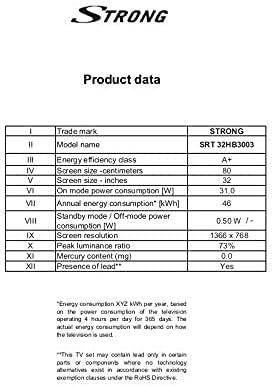
Image: A product data table providing detailed specifications for the Strong SRT 32HB3003, including screen size, resolution, and power consumption.
9. Záruka a podpora
Your Strong SRT 32HB3003 TV comes with a limited warranty. For specific warranty terms and conditions, please refer to the warranty card included in your product packaging or visit the official Strong website. For technical support, troubleshooting assistance, or service inquiries, please contact Strong customer service through their official channels.
Pro další pomoc prosím navštivte Strong official webmísto.