
Keba KeTop T50-xxx/67641/06
Uživatelská příručka Keba KeTop T50-xxx/67641/06
Model: KeTop T50-xxx/67641/06
1. Úvod
This manual provides essential information for the safe and efficient operation, setup, maintenance, and troubleshooting of the Keba KeTop T50-xxx/67641/06 industrial control panel. The KeTop T50-xxx/67641/06 is designed for robust performance in industrial environments, serving as a human-machine interface (HMI) for various control applications.
Please read this manual thoroughly before operating the device to ensure proper usage and to prevent damage or injury.
2. Bezpečnostní informace
Vždy dodržujte následující bezpečnostní opatření, abyste předešli zranění osob nebo poškození zařízení:
- Kvalifikovaný personál: Installation, operation, and maintenance should only be performed by qualified and authorized personnel.
- Odpojení napájení: Před zahájením jakékoli instalace, údržby nebo opravy vždy odpojte napájení.
- Podmínky prostředí: Operate the device within specified environmental limits (temperature, humidity, etc.).
- Nouzové zastavení: Familiarize yourself with the location and operation of the emergency stop button on the device and the connected system.
- Správa kabelů: Ujistěte se, že všechny kabely jsou správně vedeny a zajištěny, aby se předešlo nebezpečí zakopnutí nebo poškození.
3. Konec produktuview
The Keba KeTop T50-xxx/67641/06 is a robust handheld control panel designed for industrial applications. It features a display screen, various control buttons, and an emergency stop button, all integrated into an ergonomic housing.

Obrázek 1: Přední strana view of the KeTop T50-xxx/67641/06 control panel, showing the display, control buttons, and the attached red connection cable.
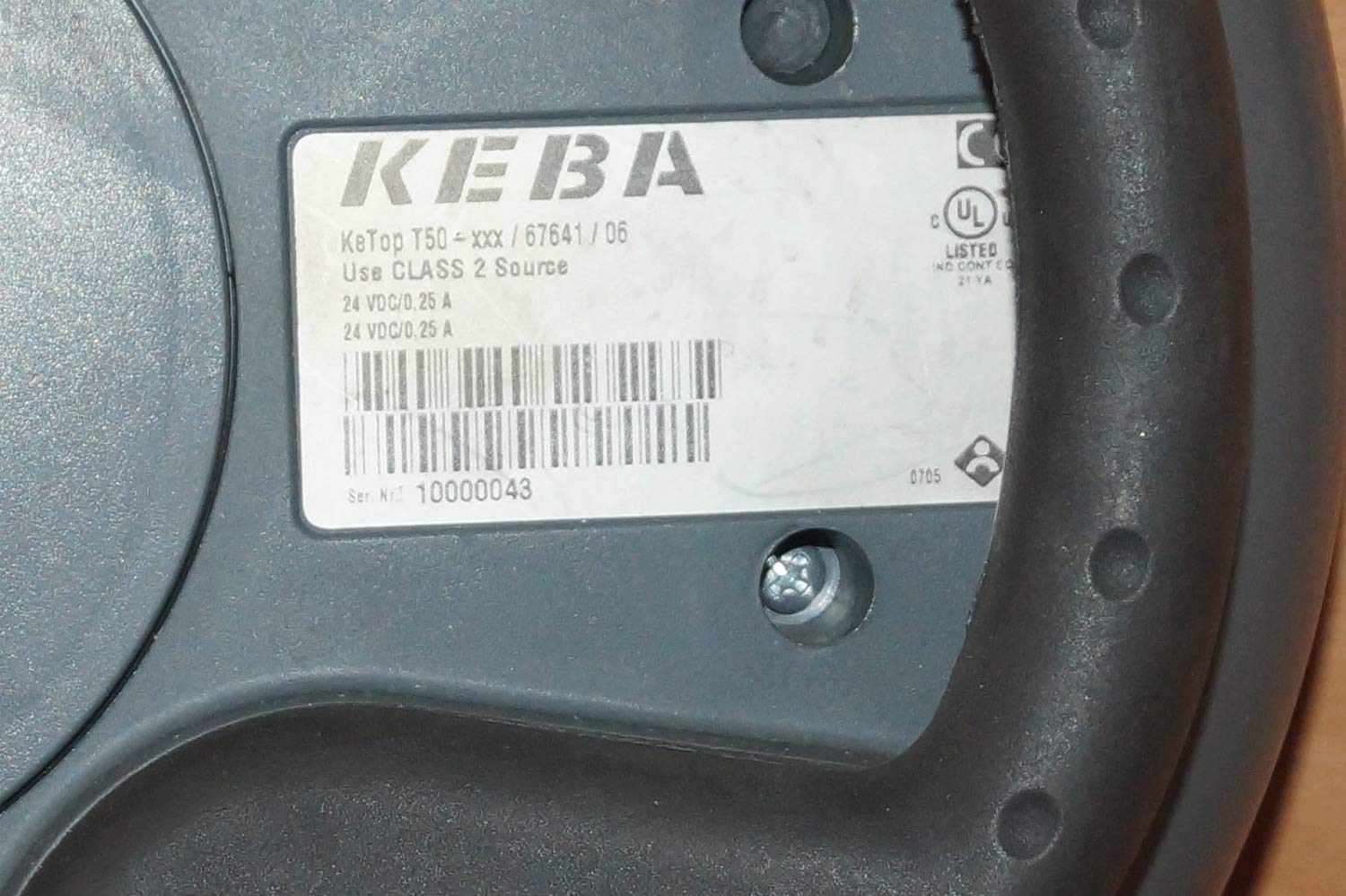
Figure 2: Rear label of the KeTop T50-xxx/67641/06, indicating model details and power requirements.
4. Nastavení a instalace
Before connecting the KeTop T50-xxx/67641/06, ensure the host system is powered off and secured.
- Zkontrolujte zařízení: Unpack the control panel and inspect it for any visible damage during transit.
- Připojte kabel: Connect the red multi-pin cable from the KeTop T50-xxx/67641/06 to the corresponding port on your industrial control system. Ensure the connection is secure and properly seated.
- Napájení: Verify that the power supply for the control system meets the specifications required by the KeTop T50-xxx/67641/06 (24 VDC/0.25 A).
- Montáž (volitelné): If applicable, use the integrated mounting points to secure the panel in a convenient location, or ensure it is placed on a stable surface when not handheld.
- Počáteční zapnutí: Once all connections are secure, power on the host system. The KeTop T50-xxx/67641/06 display should illuminate, indicating successful power-up.
5. Návod k obsluze
The KeTop T50-xxx/67641/06 serves as an interface for controlling industrial machinery. Specific operations will depend on the programming of the connected system.
- Navigace zobrazení: Use the directional buttons (if present) or touch screen (if applicable) to navigate through menus and display information.
- Funkční tlačítka: The various buttons around the display are typically assigned specific functions by the system integrator. Refer to your system's documentation for button assignments.
- Nouzové zastavení: In case of an emergency, press the large red emergency stop button immediately. This will typically halt all connected machine operations. Ensure the button is reset before resuming operations.
- Vstup dat: Use the integrated keypad or on-screen keyboard for data entry as required by the application.
- Zpětná vazba: Pay attention to visual cues on the display and any audible signals from the device or connected system.
6. Údržba
Regular maintenance ensures the longevity and reliable operation of your KeTop T50-xxx/67641/06.
- Čištění:
- Před čištěním odpojte napájení.
- Vnější povrchy otřete měkkým, damp tkanina.
- Do not use abrasive cleaners, solvents, or excessive moisture.
- Zajistěte, aby se do zařízení nedostala žádná kapalina.
- Kontrola kabelů: Periodically inspect the connection cable for signs of wear, cuts, or damage. Replace damaged cables immediately.
- Funkčnost tlačítka: Regularly test all buttons, including the emergency stop, to ensure they respond correctly.
- Skladování: Pokud zařízení nepoužíváte, skladujte jej v čistém a suchém prostředí, mimo dosah extrémních teplot a přímého slunečního záření.
7. Řešení problémů
Tato část obsahuje řešení běžných problémů. V případě složitějších problémů se obraťte na kvalifikovaný servisní personál.
| Problém | Možná příčina | Řešení |
|---|---|---|
| Zařízení se nezapne. | No power from host system; loose cable connection; faulty power supply. | Check host system power; ensure cable is securely connected; verify power supply output. |
| Displej je prázdný nebo bliká. | Insufficient power; cable issue; internal fault. | Verify power supply; check cable integrity; if problem persists, contact support. |
| Tlačítka nereagují. | Software issue on host system; physical button damage. | Restart the host system; inspect buttons for physical damage. |
| Emergency Stop button is stuck. | Problém s mechanismem tlačítek. | Do not force. Contact qualified service personnel immediately. |
8. Specifikace
| Funkce | Detail |
|---|---|
| Model | KeTop T50-xxx/67641/06 |
| Značka | Keba |
| Vstup napájení | 24 VDC / 0.25 A (as per device label) |
| ASIN | B07NSF65HM |
| Reference výrobce | 2186 |
| První dostupný termín | 10. května 2019 |
| Dostupnost náhradních dílů | Informace nejsou k dispozici |
9. Záruka a podpora
Information regarding specific warranty terms and conditions for the Keba KeTop T50-xxx/67641/06 is not provided in the product details. Please refer to the original purchase documentation or contact your supplier for warranty details.
For technical support or service inquiries, please contact the manufacturer, Keba, or your authorized distributor. Ensure you have the model number (KeTop T50-xxx/67641/06) and serial number (if applicable) ready when contacting support.
Ask a question about this manual
Ask about setup, troubleshooting, compatibility, parts, safety, or missing instructions. Manuals+ will review the question and use this page’s manual context to help answer it.