
1. Úvod
This manual provides detailed instructions for the installation, operation, and maintenance of your Everycom EC801B 80mm Thermal Printer. Please read this manual thoroughly before using the printer to ensure proper function and longevity of the device. The EC801B is a high-speed thermal receipt printer equipped with an auto-cutter and versatile connectivity options including USB and LAN.
2. Bezpečnostní informace
- DO NOT DISASSEMBLE THE PRINTER PERSONALLY. For any service-related queries, please contact Everycom support.
- The printer should be installed on a flat and solid surface to avoid vibration or impact damage.
- Ensure the power supply matches the printer's requirements to prevent electrical damage.
- Keep the printer away from water, dust, and direct sunlight.
3. Obsah balení
Ověřte prosím, zda jsou ve vašem balení obsaženy všechny níže uvedené položky:
- 1 x Everycom EC801B Thermal Receipt Printer
- 1 x napájecí adaptér
- 1 x datový kabel USB
- 1 x Paper Roll (Sample)
- 1 x Uživatelská příručka
- 1 x CD s ovladači

Image: Contents of the Everycom EC801B printer package, including the printer unit, power adapter, USB cable, sample paper roll, user manual, and driver CD.
4. Konec produktuview
Familiarize yourself with the various parts of your Everycom EC801B thermal printer.
4.1 Přední a horní část View

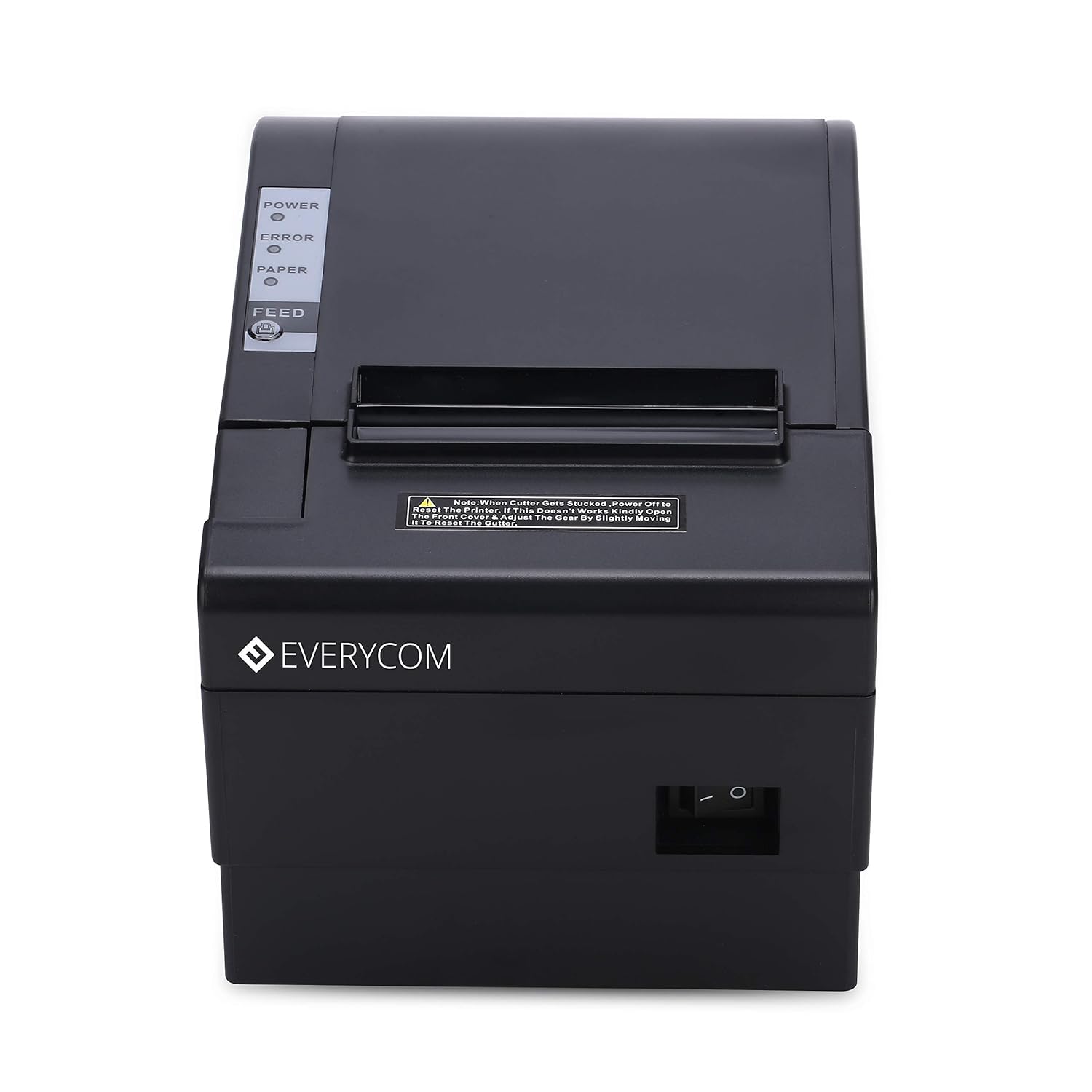
Obrázek: Přední strana view of the Everycom EC801B thermal printer, showing the paper output slot and control panel.

Obrázek: Nahoře view of the Everycom EC801B thermal printer, highlighting the control panel with POWER, ERROR, PAPER indicators, and the FEED button.
4.2 Ovládací panel
- Indikátor napájení: Illuminates when the printer is powered on.
- Indikátor CHYBY: Flashes or illuminates to indicate an error (e.g., paper out, cover open).
- PAPER Indicator: Illuminates when paper is present, flashes when paper is low.
- Tlačítko FEED: Press to advance paper. Hold to print a self-test page.
4.3 Rear Panel (Connectivity Ports)

Obrázek: Zadní view of the Everycom EC801B thermal printer, showing the power port, cash drawer port, Ethernet (LAN) port, and USB port.
- POWER Port: Připojuje se k napájecímu adaptéru.
- CASH Drawer Port: Connects to a compatible cash drawer.
- Port LAN (ethernet): Connects to a network for network printing.
- USB port: Connects to a computer via USB cable.
5. Nastavení
5.1 Fyzické umístění
Place the printer on a stable, flat surface. Ensure there is adequate space around the printer for ventilation and easy access to ports and paper loading.
5.2 Propojovací kabely
- Připojení napájení: Connect the power adapter to the printer's POWER port and then plug the adapter into a power outlet.
- Datové připojení (vyberte jedno):
- USB: Connect the USB data cable from the printer's USB port to an available USB port on your computer.
- LAN: Připojte ethernetový kabel z portu LAN tiskárny k síťovému routeru nebo přepínači.
- Cash Drawer (Optional): If using a cash drawer, connect its cable to the printer's CASH Drawer port.
5.3 Vkládání papíru
- Open the printer cover by pushing the cover open lever (if present) or lifting the top cover.
- Insert the 80mm thermal paper roll into the compartment, ensuring the paper feeds from the bottom and the leading edge extends out of the printer.
- Close the printer cover firmly until it clicks into place. Ensure there is no slack in the paper.

Obrázek: Nahoře view of the Everycom EC801B printer with the cover open, revealing the paper roll compartment.
5.4 Instalace ovladače
For the printer to communicate with your computer, drivers must be installed.
- Vložte dodaný disk CD s ovladači do mechaniky CD-ROM počítače.
- Follow the on-screen instructions to install the printer drivers. If your computer does not have a CD drive, drivers can typically be downloaded from the Everycom official webmísto.
- After installation, configure the printer settings through your operating system's printer management tools.
6. Návod k obsluze
6.1 Zapnutí/vypnutí
To power on the printer, ensure the power adapter is connected and press the power switch located on the side or rear of the printer. The POWER indicator light will illuminate. To power off, press the power switch again.
Obrázek: Přední strana view of the Everycom EC801B printer, showing the location of the power switch on the side.
6.2 Tisk stránky autotestu
A self-test page can confirm basic printer functionality and print quality without requiring a computer connection.
- Ujistěte se, že je tiskárna vypnutá a je vložen papír.
- Stiskněte a podržte KRMIVO tlačítko.
- Zatímco držíte KRMIVO tlačítko a zapněte tiskárnu.
- Uvolněte KRMIVO button once the printer starts printing. A self-test page will print, showing printer information and a samptisk.

Image: Everycom EC801B printer actively printing a self-test receipt with a QR code and text.
6.3 Basic Printing Operation
Once drivers are installed and the printer is connected, you can print from any application that supports printing. Select the Everycom EC801B from your list of available printers and initiate the print command.
6.4 Auto Cutter Function
The EC801B features an automatic cutter that will cut the receipt paper after each print job, or as configured in your printer settings/software.
7. Údržba
7.1 Čištění tiskárny
Pravidelné čištění pomáhá udržovat kvalitu tisku a prodlužuje životnost tiskárny.
- tisková hlava: Použijte vatový tampon lehceampjemně otřete termotiskovou hlavu isopropylalkoholem. Před použitím ji nechte zcela vyschnout.
- Dráha papíru: Use a soft, dry cloth to remove any paper dust or debris from the paper path.
- Vnější: Vnější povrch otřete měkkým, damp tkanina. Nepoužívejte agresivní chemikálie nebo abrazivní čisticí prostředky.
7.2 Výměna role papíru
When the PAPER indicator flashes or printing becomes faint, it's time to replace the paper roll. Follow the steps in Section 5.3 to load a new 80mm thermal paper roll.
8. Řešení problémů
Pokud se s tiskárnou setkáte s problémy, podívejte se na následující běžné problémy a jejich řešení:
| Problém | Možná příčina | Řešení |
|---|---|---|
| Tiskárna se nezapne | Žádné napájení, vadný adaptér | Check power cable connection, ensure outlet is working, try another adapter if available. |
| No printing / Blank output | Paper loaded incorrectly, no paper, print head issue, driver issue | Reload paper correctly (thermal side facing print head), replace paper roll, clean print head, reinstall drivers. |
| ERROR indicator on/flashing | Paper out, cover open, print head overheat | Check paper, close cover firmly, allow printer to cool down. |
| Špatná kvalita tisku | Dirty print head, low quality paper, old paper roll | Clean print head, use high-quality thermal paper, replace old paper. |
| Počítač nerozpoznává tiskárnu | Driver not installed, incorrect cable, port issue | Install/reinstall drivers, check USB/LAN cable connection, try a different port. |
If the problem persists after attempting these solutions, please contact Everycom customer support.
9. Specifikace
Key technical specifications for the Everycom EC801B Thermal Printer:
| Funkce | Detail |
|---|---|
| Model | EC801B |
| Technologie tisku | Tisk termální linkou |
| Rychlost tisku | 220 mm/s |
| Šířka papíru | 80 mm |
| Konektivita | USB, LAN (Ethernet) |
| Auto Cutter | Ano |
| Tiskový výstup | Monochromatický |
| Rozměry (DxŠxV) | 18.6 x 14.5 x 13.3 cm |
| Hmotnost položky | 1.2 kg |
| Výrobce | Everycom Electronics (Made in India) |
10. Záruka a podpora
The Everycom EC801B Thermal Printer comes with a 1-letá záruka od data nákupu. Tato záruka se vztahuje na výrobní vady a poruchy za běžných podmínek používání.
For technical assistance, troubleshooting, or warranty claims, please contact Everycom Customer Support:
- Bezplatné číslo: 1800 121 4480
- Customer Support Working Hours: Monday - Saturday, 10:00 AM - 6:30 PM (Except on Public Holidays)

Image: Everycom customer service contact details, including the toll-free number and working hours.