
1. Úvod
The OWON B41T+ is a high-precision 4 1/2 digit (21999 counts) True RMS digital multimeter designed for accurate electrical measurements. It features Bluetooth connectivity, allowing seamless integration with Android (4.3+) and iOS (7.0+) smartphones and tablets. This device supports various measurement functions including voltage, current, resistance, capacitance, frequency, duty cycle, and temperature. Advanced features include standalone data logging, graphical display of measurements on connected smart devices, and Japanese voice output for readings.
2. Bezpečnostní informace
Please read and understand all safety instructions before operating the OWON B41T+ Digital Multimeter. Failure to follow these instructions may result in electric shock, fire, or damage to the device.
- Always ensure the multimeter is in the correct function mode before connecting test leads to a circuit.
- Do not exceed the maximum input limits for any measurement range.
- Před každým použitím zkontrolujte měřicí kabely, zda nejsou poškozené. Poškozené kabely ihned vyměňte.
- Nepoužívejte multimetr ve vlhkém prostředí nebo během bouřek.
- Před měřením odporu, kapacity nebo vodivosti vždy odpojte napájení testovaného obvodu.
- Buďte opatrní při práci s objtagnad 30 V AC RMS, 42 V peak nebo 60 V DC, protože tyto faktory představují nebezpečí úrazu elektrickým proudem.
3. Konec produktuview a Komponenty
The OWON B41T+ Digital Multimeter is designed for ease of use and durability. Below are the main components and included accessories.
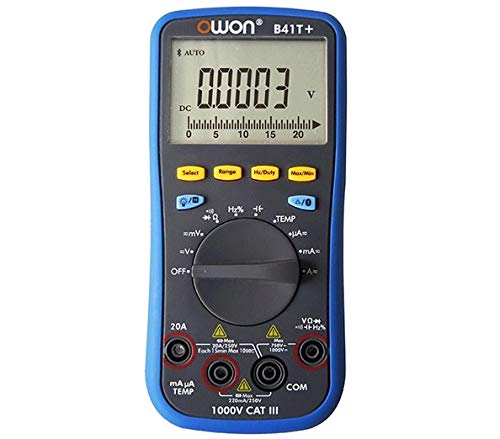
Obrázek 3.1: Přední a boční view of the OWON B41T+ Digital Multimeter, showing the display, function dial, and input jacks.
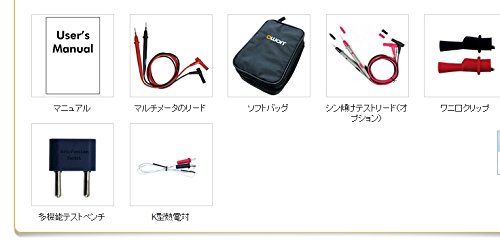
Obrázek 3.2: Included accessories: User's Manual, Multimeter test leads, Soft bag, K-type thermocouple (temperature probe), and a multi-function test bench adapter.
4. Nastavení
4.1 Instalace baterie
The OWON B41T+ is powered by batteries. To install or replace batteries:
- Ujistěte se, že je multimetr VYPNUTÝ.
- Vyhledejte kryt přihrádky na baterie na zadní straně zařízení.
- Pomocí šroubováku otevřete přihrádku na baterie.
- Vložte požadované baterie a dbejte na správnou polaritu.
- Bezpečně zavřete kryt prostoru pro baterie.
4.2 Instalace aplikace a párování přes Bluetooth
To utilize the smart device connectivity features, download the OWON multimeter application from your device's app store (compatible with Android 4.3+ and iOS 7.0+).
- Download and install the official OWON multimeter app on your smartphone or tablet.
- Turn on the OWON B41T+ multimeter.
- Povolte Bluetooth na svém chytrém zařízení.
- Open the OWON app and follow the on-screen instructions to search for and pair with your B41T+ device. The Bluetooth icon on the multimeter display will indicate a successful connection.
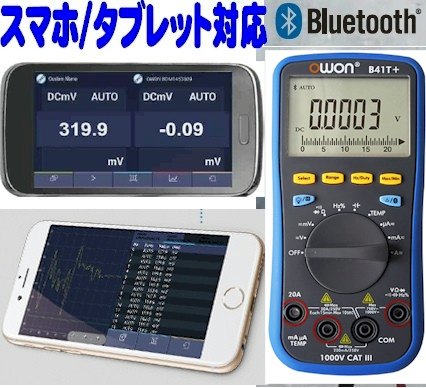
Obrázek 4.1: The OWON B41T+ multimeter displaying a measurement, with a smartphone screen showing the corresponding app interface.
5. Návod k obsluze
The OWON B41T+ offers a wide range of measurement functions. Use the central rotary dial to select the desired measurement mode.
5.1 Základní měření
Provedení základního měření:
- Select the appropriate function (e.g., V for voltage, A for current, Ω for resistance) using the rotary dial.
- Connect the test leads to the correct input jacks on the multimeter (e.g., COM and VΩmA for voltage/resistance, COM and 20A or mAμA for current).
- Připojte měřicí vodiče k testovanému obvodu nebo součástce.
- Read the measurement value on the multimeter's display.
5.2 Advanced Features with Bluetooth Connectivity
When connected to a smartphone or tablet via Bluetooth, the OWON B41T+ provides enhanced functionality:
- Záznam dat: Record measurement data over time directly to your smart device.
- Grafické zobrazení: View real-time measurement trends and historical data in graphical format.
- Voice Output: The device can announce measurement readings in Japanese, allowing for hands-free operation.
- Správa dat: Save, store, print, and email measurement data (CSV format) directly from the app.
- Připojení více zařízení: Connect two OWON B41T+ units simultaneously to your smart device to monitor two different parameters (e.g., voltage and current, or voltage and resistance) on a dual-screen display.
- Dálkové ovládání: Utilize remote desktop applications like TeamViewer to control the connected smartphone/tablet from anywhere, enabling remote monitoring and operation of the multimeter.

Obrázek 5.1: Illustration of advanced features including simultaneous measurement with two multimeters, data logging, graphical display, and voice output.
6. Specifikace
The following table details the technical specifications of the OWON B41T+ Digital Multimeter.

Obrázek 6.1: Detailed specifications including measurement ranges, resolution, and accuracy.
| Parametr | Rozsah | Rezoluce | Přesnost |
|---|---|---|---|
| DC svtage (V) | 220mV, 2.2V, 22V, 220V, 1000V | 0.01mV, 0.1mV, 1mV, 10mV, 0.1V | ±(0.05%+10dig) to ±(0.8%+25dig) |
| AC svtage (V) | 220mV, 2.2V, 22V, 220V, 750V | 0.01mV, 0.1mV, 1mV, 10mV, 0.1V | ±(1.0%+25dig) |
| DC proud (A) | 220μA, 2200μA, 22mA, 220mA, 20A | 0.01μA, 0.1μA, 1μA, 10μA, 1mA | ±(0.8%+10dig) to ±(2.0%+25dig) |
| Střídavý proud (A) | 220μA, 2200μA, 22mA, 220mA, 20A | 0.01μA, 0.1μA, 1μA, 10μA, 1mA | ±(1.5%+25dig) to ±(2.5%+35dig) |
| Odpor (Ω) | 220Ω, 2.2kΩ, 22kΩ, 220kΩ, 2.2MΩ, 22MΩ, 220MΩ | 0.01Ω, 0.1Ω, 1Ω, 10Ω, 100Ω, 1kΩ, 10kΩ | ±(0.4%+5dig) to ±(5%+10dig) |
| Kapacita (F) | 2.2nF, 22nF, 220nF, 2.2μF, 22μF, 220μF, 2.2mF, 22mF | 1pF, 10pF, 100pF, 1nF, 10nF, 100nF, 1μF, 10μF | ±(2.5%+15dig) |
| Frekvence (Hz) | 220Hz, 2.2kHz, 22kHz, 220kHz, 2.2MHz, 22MHz | 0.01Hz, 0.1Hz, 1Hz, 10Hz, 100Hz, 1kHz | ±(0.1%+4dig) |
| Pracovní cyklus | 0.1% - 99.9% (>1kHz) | 0.1 % | ±(1.2%+3dig) |
| Teplota (°C / °F) | -50 °C až 400 °C, -58 °F až 752 °F | 0.1 °C, 0.1 °F | ±(2.5%+3dig) to ±(1.2%+8dig) |
| Maximální počet | 21999 | ||
| Zobrazit S.ampling | 3krát za sekundu | ||
| Automatický rozsah | Ano | ||
| Datalogger | 10 hours, 10,000 points | ||
| Skutečné RMS | Ano | ||
| Podsvícení | Ano | ||
| Test diod | Ano | ||
| Test kontinuity | Ano | ||
| Nadproudová ochrana | CAT III 1000V, CAT IV 600V | ||
| Zdroj napájení | 3V (1.5V x 2) AA Alkaline Batteries | ||
| Bluetooth | Android 4.3+, iOS 7.0+ | ||
| Rozměry | 85 mm x 185 mm x 30 mm | ||
| Hmotnost | Přibl. 320 g | ||
7. Údržba
Proper maintenance ensures the longevity and accuracy of your OWON B41T+ Digital Multimeter.
- Čištění: Zařízení otřete suchým, měkkým hadříkem. Nepoužívejte abrazivní čisticí prostředky ani rozpouštědla.
- Výměna baterie: Replace batteries promptly when the low battery indicator appears on the display. Refer to Section 4.1 for battery installation instructions.
- Skladování: Multimetr skladujte na chladném a suchém místě mimo dosah přímého slunečního záření a extrémních teplot. Pokud jej skladujete delší dobu, vyjměte baterie, abyste zabránili vytečení elektrolytu.
- Testovací potenciální zákazníci: Regularly inspect test leads for any signs of wear, cuts, or damage. Replace them if necessary to ensure safe and accurate measurements.
8. Řešení problémů
If you encounter issues with your OWON B41T+ Digital Multimeter, refer to the following common problems and solutions:
| Problém | Možná příčina | Řešení |
|---|---|---|
| Zařízení se nezapne. | Vybité nebo nesprávně vložené baterie. | Vyměňte baterie a dbejte na správnou polaritu. |
| Nezobrazuje se žádný údaj nebo se zobrazuje „OL“ (přetížení). | Nesprávně zvolená funkce, přerušený obvod nebo měření překračuje rozsah. | Select the correct function. Check for proper circuit connection. Switch to a higher range if available. |
| Připojení Bluetooth se nezdařilo. | Bluetooth not enabled, app not running, or device out of range. | Ensure Bluetooth is on for both devices. Restart the app. Move devices closer. Check app compatibility with OS version. |
| Nepřesné údaje. | Damaged test leads, environmental interference, or incorrect measurement technique. | Inspect and replace test leads if damaged. Ensure proper connection. Avoid strong electromagnetic fields. |
9. Záruka a podpora
For warranty information and technical support, please refer to the documentation included with your purchase or visit the official OWON website. If you require further assistance, contact OWON customer service through their designated support channels.