
E-DC90053
Pokročilá přenosná autokamera Full HD 1080 - Uživatelská příručka
Zavedení
Thank you for choosing the Advanced Portable Dash Car Camcorder. This device is designed to provide reliable recording of road conditions in Full HD 1080p, helping to document events and protect your interests. This manual provides detailed instructions for setup, operation, and maintenance to ensure optimal performance of your dash cam.
Bezpečnostní informace
- Nepoužívejte zařízení za jízdy. Nastavení upravujte pouze tehdy, když je vozidlo bezpečně zaparkované.
- Ujistěte se, že je palubní kamera bezpečně upevněna a nebrání řidiči ve výhledu view nebo narušovat aktivaci airbagu.
- Nevystavujte zařízení extrémním teplotám, delšímu přímému slunečnímu záření nebo nadměrné vlhkosti.
- Use only the provided power adapter and cables. Using unauthorized accessories may damage the device and void the warranty.
- Keep the lens clean to ensure clear video recordings.
Obsah balení
Zaškrtněte prosím políčko u následujících položek:
- 1 x Advanced Portable Dash Car Camcorder (Full HD 1080)
- 1 x DC Car Charger
- 1 x Suction Holder
- 1 x Micro USB nabíjecí kabel
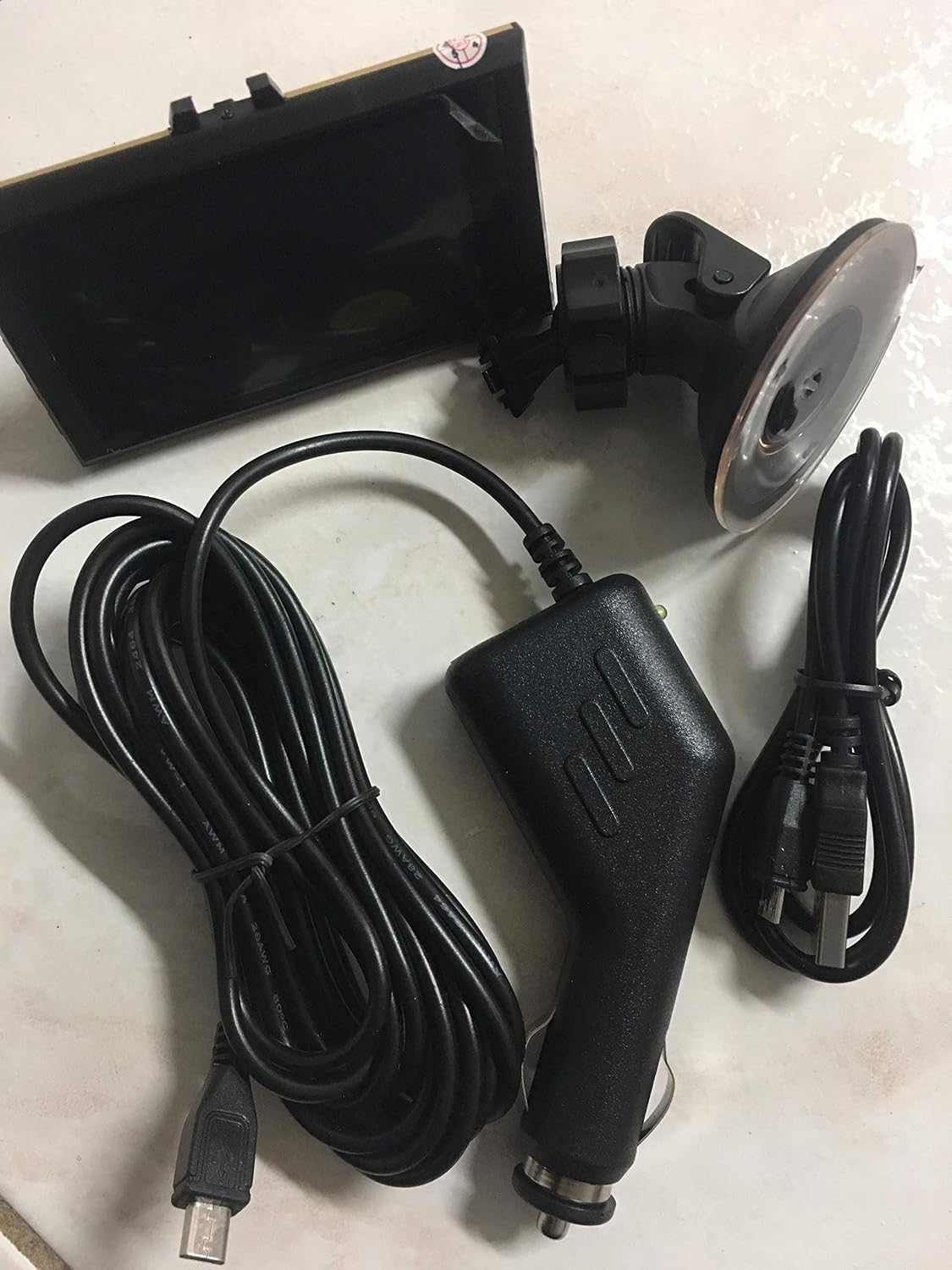
Image: All components included in the package, neatly arranged. This includes the main dash cam unit, the car charger, the suction cup mount, and a micro USB cable.
Konec produktuview
Familiarize yourself with the various parts of your dash cam.

Obrázek: Přední strana view of the dash cam, highlighting the main lens and the "FHD 1080P" marking on the device body. The device has a gold and black finish.

Image: Top-down perspective of the dash cam, providing a clearer view of the camera lens and the microphone (MIC) input. This angle also shows the mounting slot at the top.
Klíčové komponenty:
- Čočka: Zachytí video footage.
- 3" LCD displej: Pro viewing live footage, playback, and menu navigation.
- Montážní štěrbina: For attaching the suction holder.
- Mikrofon (MIC): Records audio inside the vehicle.
- USB port: Pro připojení napájení a přenos dat.
- Slot pro paměťovou kartu: Pro vložení karty microSD (není součástí balení).
Nastavení
1. Montáž Dash Cam
- Vyčistěte oblast čelního skla, kam chcete namontovat palubní kameru.
- Attach the suction holder to the dash cam's mounting slot.
- Press the suction cup firmly against the windshield and flip the lever to secure it. Ensure it does not obstruct your view.
- Adjust the angle of the dash cam to ensure the lens captures the road ahead clearly.
2. Připojení napájení
- Connect the Micro USB charging cable to the dash cam's USB port.
- Plug the DC Car Charger into your vehicle's cigarette lighter socket.
- Route the cable neatly to avoid interference with driving. The dash cam will typically power on automatically when the vehicle starts and power off when the engine is turned off.
3. Inserting a Memory Card (Not Included)
A microSD card (Class 10 or higher, up to 32GB recommended) is required for recording. Insert the card into the designated slot until it clicks into place. Ensure the dash cam is powered off before inserting or removing the memory card.
Návod k obsluze
Zapnutí/vypnutí
- Automatický: The dash cam will power on and begin recording automatically when connected to vehicle power and the engine starts. It will power off when the engine is turned off.
- Manuální: Press and hold the Power button (if available) to manually turn the device on or off.
Režimy záznamu
- Nepřetržité nahrávání: The dash cam records continuously in short segments (e.g., 1, 3, or 5 minutes). When the memory card is full, the oldest unlocked files will be overwritten (Loop Recording).
- Detekce pohybu: When enabled, the dash cam will automatically start recording if motion is detected in front of the vehicle while parked. This feature is typically used for parking surveillance.
- G-senzor (gravitační senzor): In the event of a sudden impact or collision, the G-Sensor will automatically lock the current video file, preventing it from being overwritten by loop recording. The sensitivity of the G-Sensor can usually be adjusted in the settings.
Navigace v nabídce
Use the buttons on the dash cam (typically Mode, Up, Down, OK/Record) to navigate through the menu options on the 3" LCD screen. Refer to the on-screen prompts for specific functions.
Přehrávání
Na view nahraná videa:
- Stop recording (if currently recording).
- Enter Playback Mode (usually by pressing the Mode button).
- Use the Up/Down buttons to select the desired video file.
- Press the OK button to play the video.
Nastavení data a času
It is important to set the correct date and time for accurate timestamps on your recordings. Access the System Settings menu to adjust these parameters.
Údržba
Čištění zařízení
- K čištění těla palubní kamery použijte měkký, suchý hadřík.
- For the lens, use a lens cleaning cloth or a microfiber cloth specifically designed for optics. Do not use abrasive cleaners or solvents.
Správa paměťových karet
- It is recommended to format the memory card regularly (e.g., once a month) within the dash cam's settings to ensure optimal performance and prevent data corruption. Formatting will erase all data on the card, so back up important files první.
- Replace the memory card if you experience frequent recording errors or file korupce.
Odstraňování problémů
| Problém | Možné řešení |
|---|---|
| Palubní kamera se nezapne. |
|
| Nahrávání se neočekávaně zastaví. |
|
| Video footage je rozmazané nebo nejasné. |
|
| G-senzor je příliš citlivý/nedostatečně citlivý. |
|
Specifikace
| Funkce | Detail |
|---|---|
| Rozlišení záznamu videa | 1080p Full HD |
| Obrazovka displeje | 3" LCD displej |
| View Úhel | 170 stupňů |
| Speciální funkce | G-Sensor, Motion Detection, Cycle Recording |
| Technologie připojení | USB |
| Typ montáže | Sací držák |
| Barva | Zlato |
| Hmotnost položky | 9 unce |
| Značka | Obecný |
| Model Number (Identified from packaging) | E-DC90053 |
Záruka a podpora
For warranty information or technical support, please refer to the contact details provided by your retailer or the product packaging. As this is a Generic branded product, specific warranty terms may vary by seller.
For general inquiries, you may also refer to the product's ASIN: B07N7YMPRM.
Ask a question about this manual
Ask about setup, troubleshooting, compatibility, parts, safety, or missing instructions. Manuals+ will review the question and use this page’s manual context to help answer it.