
Walfront inskam115
Walfront Wireless Endoscope Camera Inskam 115 User Manual
Model: inskam115
1. Konec produktuview
The Walfront Wireless Endoscope Camera Inskam 115 is a versatile inspection tool designed for various applications, including vehicle inspection, pipeline inspection, air conditioning inspection, and object retrieval. It features a wireless WiFi connection for real-time video viewing, recording, and photo capture. The camera is equipped with a mini 8mm waterproof LED lens and boasts an IP67 waterproof rating for the lens and tube. Its 6 adjustable LED lights ensure clear visibility in dark environments. The portable design with a flexible extension tube makes it easy to operate.
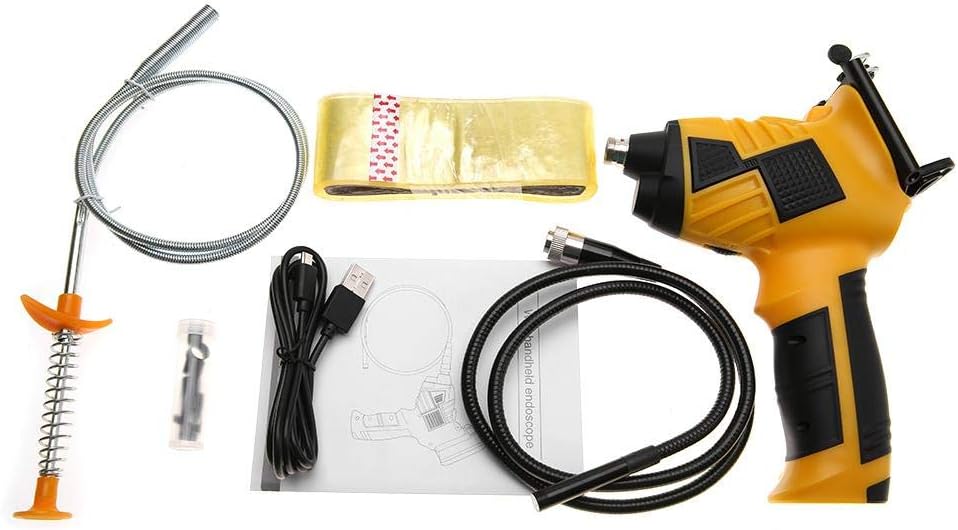
Figure 1: Walfront Inskam 115 Wireless Endoscope Camera and included accessories.
2. Bezpečnostní informace
- Do not use the device in explosive atmospheres, such as in the presence of flammable liquids, gases, or dust.
- Keep the device away from water and other liquids, except for the waterproof camera lens and tube (IP67 rated). The main unit is not waterproof.
- Nepokoušejte se zařízení rozebírat ani upravovat. Opravy by měl provádět pouze kvalifikovaný personál.
- Před použitím se ujistěte, že je zařízení plně nabité, abyste předešli přerušení během kontroly.
- Avoid direct eye exposure to the LED lights, as they can be bright.
- Pokud zařízení nepoužíváte, skladujte jej na chladném a suchém místě.
3. Obsah balení
Ověřte, zda jsou v balení přítomny všechny níže uvedené položky:
- 1 x Handle (Main Unit)
- 1 x Spool (for flexible cable storage)
- 1 x Transparent Adhesive (likely for mounting/securing)
- 1 x Stripper (unclear context, possibly a cable stripper or a tool for removing something)
- 1 x USB kabel (pro nabíjení)
- 1 x Uživatelská příručka
- 1 x Magnet (attachment for camera tip)
- 1 x Hook (attachment for camera tip)
- 1 x Mirror (attachment for camera tip, for side viewing)
- 1 x Protective Cap (for camera lens)
Figure 2: Contents of the Walfront Inskam 115 package, including the main unit, flexible cable, USB cable, and various attachments.
4. Specifikace
| Funkce | Popis |
|---|---|
| Model | inskam115 |
| Možnosti délky kabelu | 1 Meter (flexible), 3 Meter (flexible), 5 Meter (hard cable), 10 Meter (hard cable) |
| Materiál | ABS + kov |
| Obrazový snímač | CMOS |
| Rozlišení fotoaparátu | 1920x1080, 1280x720, 640x480 |
| Horizontální Viewúhel | 70° |
| Ohnisková vzdálenost | 40-5000 mm |
| Přenosová frekvence | 2400-2483.5 MHz |
| Minimální osvětlení | 0 Lux |
| Baterie | 1 x Lithium Battery, 3.7V, 2600mAh |
| LED světla | 6 pcs (adjustable brightness) |
| Vzdálenost přenosu WiFi | 10 m |
| Hodnocení voděodolnosti | IP67 (pouze pro objektiv/tubus) |
| Průměr čočky | 8 mm |
| Podporované systémy | Android 4.2 / iOS 8.0 and higher |
| Hmotnost | 739g ~ 1174g (approx., depending on cable length) |
| Rozměry produktu | 24 x 18 x 11 cm (obal) |

Figure 3: Approximate dimensions of the Walfront Inskam 115 main unit.
5. Nastavení
5.1 Nabíjení zařízení
Before first use, fully charge the endoscope. Connect the provided USB cable to the charging port on the handle and plug the other end into a standard USB power adapter (not included) or a computer USB port. The charging indicator light will show the charging status.
5.2 Instalace aplikace
To use the endoscope, you need to download the compatible application on your smartphone or tablet. Hledat "Inskam" or refer to the QR code in the printed user manual (if available) in your device's app store (Google Play Store for Android, Apple App Store for iOS). Install the application.
5.3 Připojení kamerové sondy
Carefully connect the endoscope camera probe cable to the designated port on the main handle unit. Ensure a secure connection. You can attach accessories like the magnet, hook, or mirror to the camera tip if needed for your inspection.
5.4 Attaching Your Smartphone (Optional)
The handle includes a phone holder. Extend the holder and securely place your smartphone or tablet into it. This allows for convenient viewing během provozu.

Figure 4: The endoscope handle with a smartphone securely mounted in the integrated holder.
6. Návod k obsluze
6.1 Powering On and WiFi Connection
- Press and hold the power button on the endoscope handle to turn it on. The WiFi indicator light will illuminate.
- On your smartphone/tablet, go to your WiFi settings.
- Locate and connect to the WiFi network named "Inskam_XXXX" (where XXXX is a unique identifier). No password is usually required.
- Once connected, open the Inskam application. The live video feed from the endoscope camera should appear on your screen.
6.2 Nastavení jasu LED diod
The endoscope features 6 adjustable LED lights around the camera lens. Use the brightness adjustment wheel or button on the handle (refer to the specific button layout in your printed manual) to increase or decrease the illumination as needed for clear viewing in dark areas.

Figure 5: The endoscope camera head with its 6 highly photosensitive LED lights, demonstrating adjustable brightness.
6.3 Pořizování fotografií a videí
Within the Inskam application, you will find buttons for capturing images and recording videos. Press the respective button to take a still photo or start/stop video recording. Captured media will be saved directly to your smartphone's gallery or the app's designated folder.

Figure 6: Detail of the endoscope handle, highlighting the phone holder and the dedicated picture/video capture button.
6.4 Aplikace Přamples
The Walfront Inskam 115 is suitable for a wide range of inspection tasks:
- Automobile Inspection: Examining engine components, hard-to-reach areas under the hood, or inside vehicle doors.
- Inspekce potrubí: Checking for blockages, corrosion, or damage in drains, pipes, and conduits.
- Air Conditioning Inspection: Inspecting ducts, vents, and internal components of AC units.
- Object Search: Retrieving small lost items from confined spaces.
- Údržba zařízení: Visual inspection of machinery for wear and tear without extensive disassembly.
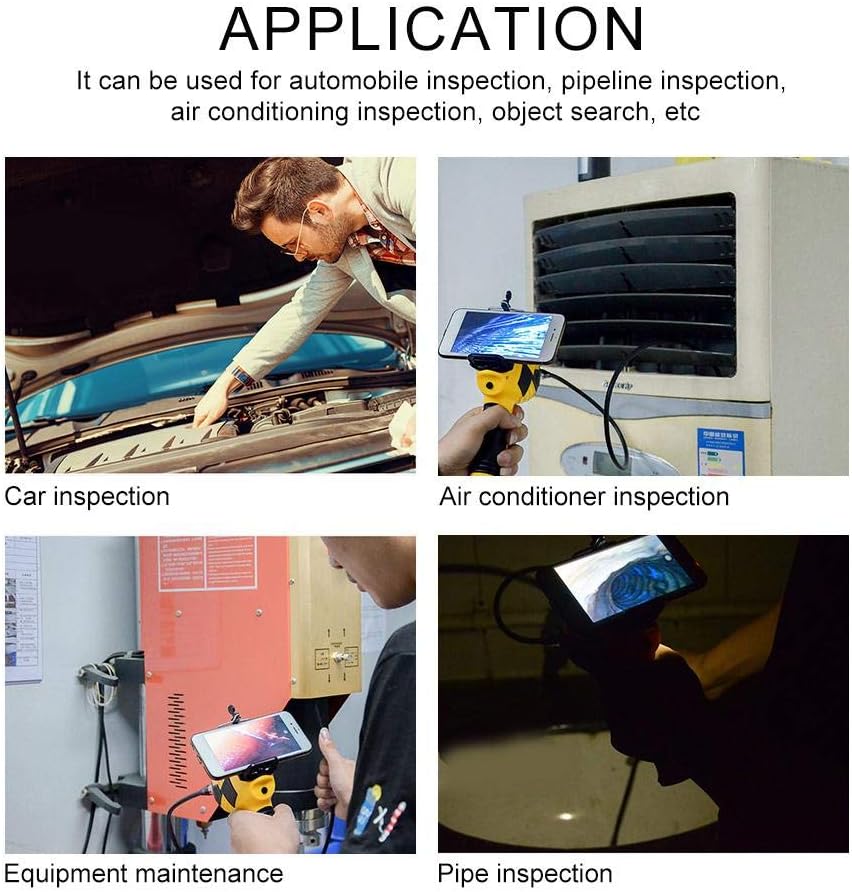
Obrázek 7: Přamples of how the Walfront Inskam 115 can be used for various inspection and maintenance tasks.
7. Údržba
- Čištění: Po každém použití, zejména ve špinavém nebo mokrém prostředí, jemně otřete objektiv a kabel kamery měkkým hadříkem.amp cloth. For stubborn dirt, a mild detergent can be used. Ensure the lens is dry before storage. Do not submerge the main handle unit in water.
- Skladování: Store the endoscope and its accessories in a clean, dry place, away from direct sunlight and extreme temperatures. Use the provided spool to neatly coil the camera cable to prevent kinks or damage.
- Péče o baterie: Chcete-li prodloužit životnost baterie, vyvarujte se častého úplného vybíjení. Pokud baterii skladujete delší dobu, nabijte ji každé několik měsíců přibližně na 50 %.
8. Řešení problémů
| Problém | Možná příčina | Řešení |
|---|---|---|
| No image on screen / App not connecting |
|
|
| Poor image quality / Dark image |
|
|
| Zařízení se nenabíjí |
|
|
9. Záruka a podpora
Walfront products are manufactured to high-quality standards. For information regarding warranty coverage, please refer to the warranty card included with your purchase or contact your retailer. If you encounter any issues or require technical assistance, please contact Walfront customer support through their official webwebu nebo kontaktních informací uvedených u vašeho produktu.
For further assistance, you may visit the Walfront store on Amazon: Walfront Amazon Store
10. Informace o likvidaci
This symbol on the product or its packaging indicates that this product shall not be treated as household waste. Instead, it shall be handed over to the applicable collection point for the recycling of electrical and electronic equipment. By ensuring this product is disposed of correctly, you will help prevent potential negative consequences for the environment and human health, which could otherwise be caused by inappropriate waste handling of this product. The recycling of materials will help to conserve natural resources. For more detailed information about recycling of this product, please contact your local city office, your household waste disposal service or the shop where you purchased the product.
Ask a question about this manual
Ask about setup, troubleshooting, compatibility, parts, safety, or missing instructions. Manuals+ will review the question and use this page’s manual context to help answer it.