
Zavedení
Thank you for choosing the NEC NP-MC372X Portable Projector. This manual provides essential information for the safe and efficient use of your projector. Please read these instructions thoroughly before operating the device and retain them for future reference. The NEC NP-MC372X is an XGA LCD projector designed for clear and bright presentations, offering 3700 lumens of brightness and a native resolution of 1024x768.
Bezpečnostní informace
Vždy dodržujte následující bezpečnostní opatření, abyste předešli požáru, úrazu elektrickým proudem nebo zranění:
- Neblokujte větrací otvory. Zajistěte dostatečný prostor kolem projektoru pro správné proudění vzduchu.
- Nedívejte se přímo do objektivu projektoru, když je zapnutýamp je zapnutý, protože jasné světlo může způsobit poškození očí.
- Neumisťujte projektor na nestabilní vozík, stojan nebo stůl.
- Unplug the projector from the power outlet before cleaning. Use a dry cloth for cleaning.
- Veškeré opravy svěřte kvalifikovanému servisnímu personálu.
Obsah balení
Ověřte, zda jsou v balení obsaženy všechny níže uvedené položky:
- NEC NP-MC372X Portable Projector
- Napájecí kabel
- HDMI kabel
- Dálkové ovládání
Konec produktuview
The NEC NP-MC372X is a versatile projector featuring an LCD display, 1024x768 native resolution, and 3700 lumens brightness. It includes a 1.2x zoom lens and offers a lamp life of up to 10,000 hours. Connectivity options include Dual HDMI, VGA, and USB.
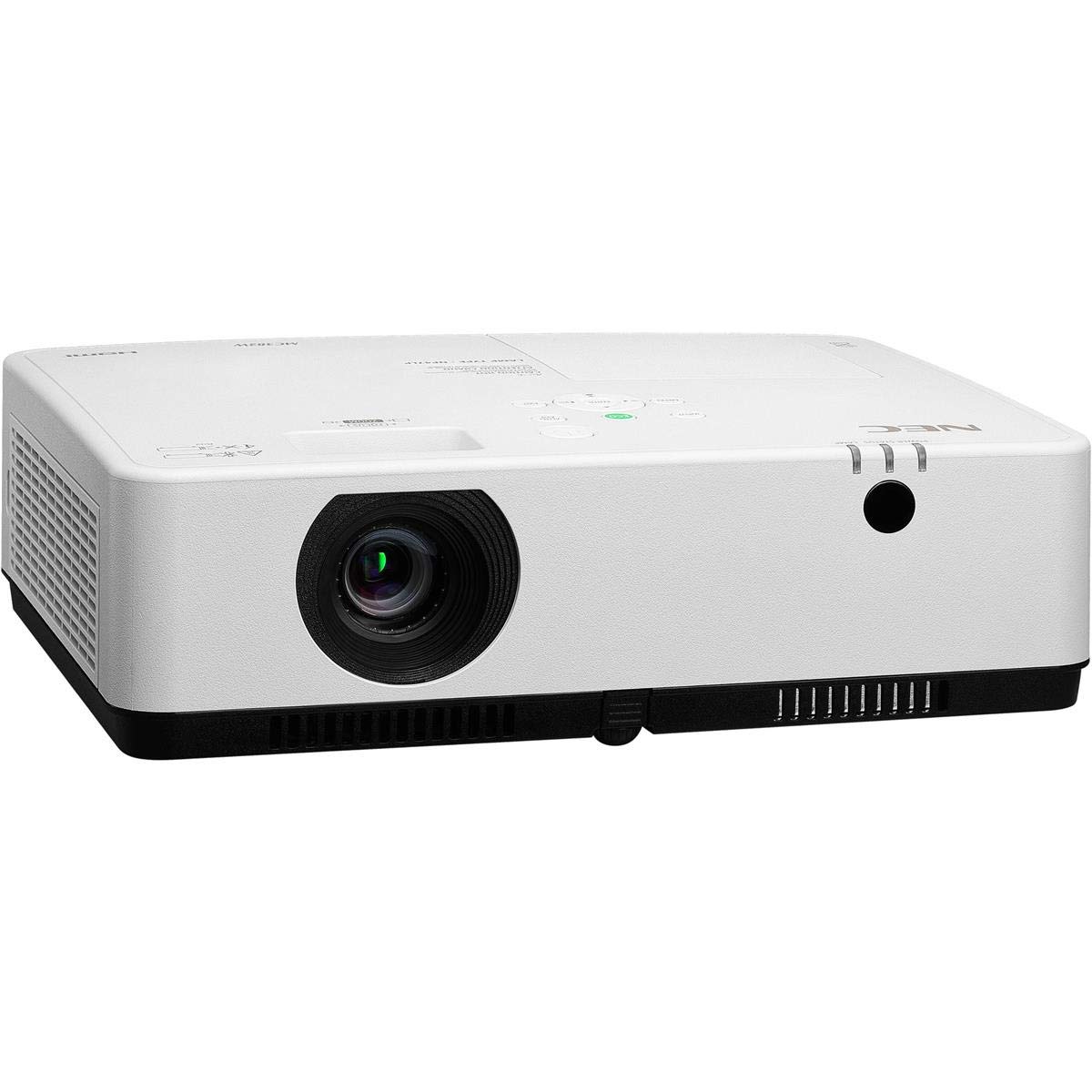
Obrázek 1: Přední a horní strana view of the NEC NP-MC372X Portable Projector, showing the lens and control panel.

Obrázek 2: Přední strana view of the projector, highlighting the projection lens.

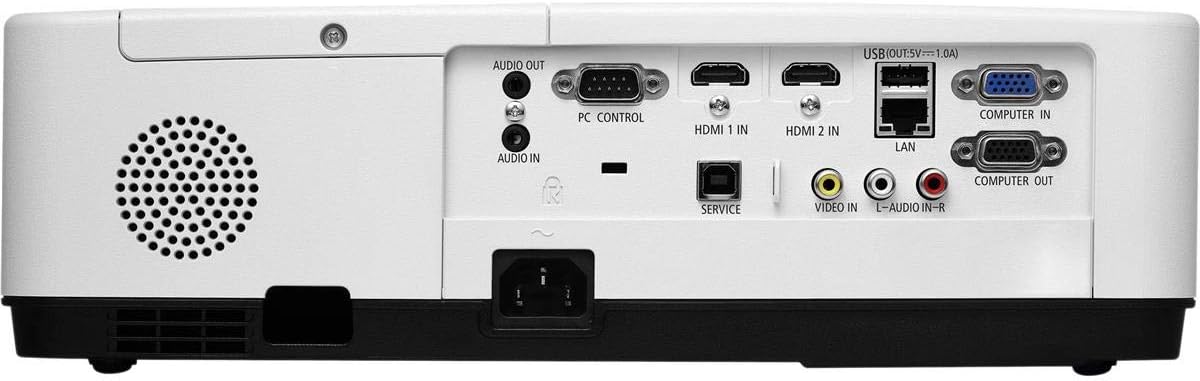
Obrázek 3: Zadní view of the projector, displaying the various input and output ports including HDMI, VGA, USB, LAN, and audio connections.
Obrázek 4: Strana view of the projector, showing the ventilation grille for heat dissipation.
Nastavení
Fyzické umístění
Place the projector on a stable, flat surface or mount it securely. Ensure the projector is positioned at an appropriate distance from the screen to achieve the desired image size. Maintain clear space around the projector for ventilation.
Připojovací zařízení
Refer to Figure 3 for port locations. Connect your source device (e.g., laptop, gaming console) to the projector using one of the following methods:
- HDMI: Use an HDMI cable to connect to either HDMI 1 IN or HDMI 2 IN.
- VGA: Use a VGA cable to connect to COMPUTER IN. For audio, connect a 3.5mm audio cable to AUDIO IN.
- USB: Connect a USB device to the USB port for direct media playback.
- LAN: Connect an Ethernet cable to the LAN port for network connectivity.
Zapnutí/vypnutí
1. Connect the power cable to the projector and a power outlet.
2. Press the power button on the projector or the remote control to turn on the projector.
3. To turn off, press the power button again. Confirm shutdown when prompted.
Návod k obsluze
Základní ovládání pomocí dálkového ovladače
Use the included remote control to navigate menus, select input sources, and adjust settings. Point the remote control towards the projector's remote sensor.
Výběr zdroje vstupu
Press the 'Input' button on the remote control or projector control panel to cycle through available input sources (HDMI 1, HDMI 2, Computer In, USB).
Úprava obrazu
- Soustředit: Otáčejte ostřícím kroužkem na objektivu, dokud nebude obraz ostrý.
- Lupa: Use the zoom ring on the lens to adjust the image size without moving the projector. The projector features a 1.2x optical zoom.
- Korekce lichoběžníkového zkreslení: If the image appears trapezoidal, use the keystone correction function in the projector menu to square the image.
Speciální funkce
- Multi Presenter: This feature allows multiple users to connect and display content wirelessly from their devices. Refer to the on-screen menu for setup instructions.
- USB Viewer Capability: Insert a USB drive into the USB port to directly view photos, videos, and documents without a connected computer.
- Skryté titulky: Enable closed captioning for compatible video sources through the projector's menu settings.
Údržba
Lamp Nahrazení
Projektor lamp has an operating life of up to 10,000 hours. When the lamp reaches the end of its life, a warning message will appear. Consult a qualified service technician for lamp výměnu, aby byla zajištěna správná instalace a bezpečnost.
Čištění
- Vnější: Otřete projektor casinměkkým, suchým hadříkem, který nepouští vlákna. V případě odolných skvrn lehceampa hadřík s vodou.
- Čočka: Use a professional lens cleaning kit or a soft, dry cloth specifically designed for optical lenses. Avoid harsh chemicals.
- Vzduchový filtr: Regularly check and clean the air filter to prevent dust buildup, which can affect performance and lamp life. Refer to the projector's on-screen menu for filter usage time.
Odstraňování problémů
Pokud narazíte na problémy, vyzkoušejte před kontaktováním podpory následující řešení:
- Bez obrázku: Ensure all cables are securely connected. Verify the correct input source is selected. Check if the lens cap is removed.
- Žádný zvuk: Confirm audio cables are connected (if applicable). Adjust volume on both the projector and the source device.
- Dálkové ovládání nefunguje: Check the batteries in the remote. Ensure there are no obstructions between the remote and the projector's sensor.
- Obrázek je rozmazaný: Upravte zaostřovací kroužek na objektivu. Ujistěte se, že projekční plocha je rovná.
- Upozornění na přehřátí: Ensure ventilation openings are not blocked. Clean the air filter if necessary.
Specifikace
| Funkce | Specifikace |
|---|---|
| Značka | NEC |
| Název modelu | MC372X |
| Číslo modelu | NP-MC372X |
| Typ zobrazení | LCD |
| Nativní rozlišení | 1024 x 768 (XGA) |
| Jas | 3700 XNUMX lumenů |
| Technologie připojení | HDMI, USB, VGA, LAN |
| Přiblížení | 1.2x optický |
| Provozní životnost světelného zdroje | 10,000 hodiny |
| Wattage | 267 watts (typical 120V) |
| Typ ovladače | Dálkové ovládání |
| Hmotnost položky | 7.1 libry |
| svtage | 120 voltů |
| UPC | 805736070248 |
Záruka a podpora
The NEC NP-MC372X Portable Projector comes with a 3letá omezená záruka. For warranty claims or technical support, please contact NEC customer service. You can find contact information on the official NEC webwebu nebo prostřednictvím prodejce vašeho produktu.