
Zavedení
This manual provides detailed instructions for the installation, operation, and maintenance of your AKASO Mirror Dash Cam 2K. Please read this manual thoroughly before using the device to ensure proper function and safety. This device is designed to record driving footage and assist with parking.
Obsah balení
Ověřte, zda jsou v balení přítomny všechny položky:
- AKASO Mirror Dash Cam 2K (Main Unit)
- Rear Camera with Extension Cable
- Nabíječka do auta
- GPS modul
- Montážní popruhy/pásy
- 32GB Micro SD karta
- Uživatelská příručka
- Cable Clips (optional, for cable management)
Konec produktuview
The AKASO Mirror Dash Cam 2K is a comprehensive vehicle recording system designed to enhance driving safety and provide evidence in case of incidents. It features a 12-inch touchscreen display, dual cameras for front and rear recording, advanced night vision, and parking assistance.

Obraz: The AKASO Mirror Dash Cam 2K main unit, showcasing its 12-inch display and key features such as Sony sensor, 2K UHD resolution, wide field of view, IPS touchscreen, GPS module, parking monitor, and night vision capabilities.
- Zobrazit: 12-inch IPS Touchscreen for intuitive control and clear viewIng.
- Přední kamera: Records in 1080P with a 170° wide-angle lens.
- Zadní kamera: Records in 1080P with a 170° wide-angle lens, providing a total 340° viewúhel.
- Noční vidění: Equipped with an advanced Sony IMX307 sensor and F1.8 6-glass fixed-focus lens for enhanced low-light performance.
- Parkovací monitor: Automatically records and saves video if an impact is detected while parked.
- G-senzor: Detects sudden movements or collisions and locks the current video footage, aby se zabránilo přepsání.
- Nahrávání ve smyčce: Continuously records, overwriting the oldest unlocked files, když je paměťová karta plná.
- GPS modul: Records driving route, speed, and location data (requires connection).
- Skladování: Podporuje Micro SD karty až do 128 GB (karta 32 GB je součástí balení).
Nastavení a instalace
Follow these steps to properly install your dash cam system.
1. Vložte Micro SD kartu
Before powering on, insert the provided 32GB Micro SD card (or another compatible card up to 128GB, Class 10 or higher) into the designated slot on the main unit. Ensure the card is inserted correctly until it clicks into place.
2. Mount the Main Unit
Připevněte palubní kameru v zrcátku na stávající zadní část vašeho vozidlaview mirror using the provided rubber mounting straps. Securely fasten the straps to prevent movement during driving.

Obraz: A close-up of the main dash cam unit, highlighting the adjustable front camera lens. The lens can be moved horizontally and rotated to achieve the optimal recording angle.
3. Nainstalujte zadní kameru
The rear camera can be installed either inside the rear window or externally near the license plate. For external installation, ensure it is mounted securely and the cable is routed safely into the vehicle, avoiding water ingress. Connect the rear camera cable to the main unit.
- Choose a suitable location for the rear camera (e.g., above the license plate or inside the rear window).
- Secure the camera using screws or adhesive tape.
- Route the rear camera cable to the front of the vehicle, concealing it along the headliner and A-pillars.
- Připojte kabel zadní kamery k určenému portu na hlavní jednotce palubní kamery.
- (Optional) If using the reverse assist function, connect the red wire from the rear camera cable to your vehicle's reverse light positive wire.
4. Připojte napájení
Plug the car charger into your vehicle's cigarette lighter socket and connect the other end to the main unit's power input. Route the power cable neatly to avoid obstructing your view or driving controls.
5. Connect GPS Module (Optional)
If included, connect the GPS module to its dedicated port on the main unit. Mount the GPS module on the dashboard or windshield where it has a clear view oblohy pro optimální příjem signálu.
Návod k obsluze
Zapnutí/vypnutí
- The dash cam will automatically power on and begin recording when your vehicle's ignition is turned on (if connected to a switched power source).
- To manually power on/off, press and hold the power button on the side of the unit.
Základní nahrávání
Once powered on, the dash cam will automatically start loop recording. Video fileZáznamy se ukládají po segmentech (např. 1, 3 nebo 5 minut) na kartu Micro SD. Po zaplnění karty se odemknou nejstarší záznamy. files budou přepsány.

Obraz: A graphic representation of loop recording, showing how the dash cam continuously records video in segments, overwriting the oldest files when the storage card is full, ensuring uninterrupted recording.
Ovládání dotykové obrazovky
The 12-inch IPS touchscreen allows for easy navigation and control:
- Přejetí doleva/doprava: Přepínání mezi předním fotoaparátem view, zadní kamera viewnebo zobrazení na rozdělené obrazovce.
- Swipe Up/Down (on camera view): Upravte svislost viewing angle of the selected camera.
- Klepněte na ikony: Access settings, playback, lock video, or take a photo.
G-senzor (nouzové nahrávání)
The built-in G-Sensor detects sudden impacts or collisions. When triggered, it automatically locks the current video file, čímž se zabrání jeho přepsání nahráváním ve smyčce. Tyto files are stored in a separate "Event" folder on the SD card.

Obraz: An illustration showing a car accident with a prominent padlock icon, indicating the G-Sensor's function to automatically lock and protect video footage during an impact.
Parkovací monitor
When enabled, the Parking Monitor function uses the G-Sensor to detect impacts while your vehicle is parked. If an impact is detected, the dash cam will automatically power on and record a short video, then power off. This requires a continuous power supply (e.g., hardwire kit, sold separately).
Reverse Assist / Parking Guidelines
When the vehicle is put into reverse (and the rear camera's red wire is connected to the reverse light), the display will automatically switch to the rear camera view with parking guidelines. These guidelines assist in safe parking.
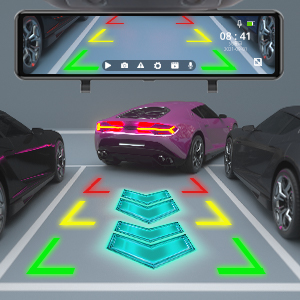
Obraz: The dash cam screen displaying the rear camera view with dynamic parking guidelines, assisting the driver in safely maneuvering into a parking space.
Funkce GPS
With the GPS module connected, the dash cam will record your vehicle's speed, location, and driving route. This data can be viewed using a dedicated GPS player software on a computer (software typically available for download from the manufacturer's webstránky).
Přehrávání
Access recorded videos directly on the dash cam's screen by tapping the playback icon. You can browse through front and rear camera footage. Alternatively, remove the Micro SD card and view files na počítači.
Údržba
- Cleaning Lenses and Screen: Use a soft, lint-free cloth to gently wipe the camera lenses and the display screen. Avoid abrasive materials or chemical cleaners.
- Správa karet Micro SD:
- Format the Micro SD card regularly (e.g., once a month) within the dash cam's settings to ensure optimal performance and prevent data corruption.
- Replace the Micro SD card if it shows signs of wear, errors, or reduced performance.
- Aktualizace firmwaru: Check the AKASO official website periodically for firmware updates. Follow the provided instructions carefully to update the device.
Odstraňování problémů
Pokud narazíte na problémy s palubní kamerou, podívejte se na následující běžné problémy a jejich řešení:
- Palubní kamera se nezapne.
- Ujistěte se, že je nabíječka do auta bezpečně zapojena do palubní kamery i do zásuvky zapalovače cigaret ve vozidle.
- Zkontrolujte, zda je zásuvka zapalovače cigaret ve vozidle napájena.
- Zkuste jinou autonabíječku nebo USB kabel, pokud je k dispozici.
- Dash cam stops recording or shows "Card Error".
- Format the Micro SD card within the dash cam's settings.
- Ensure the Micro SD card is Class 10 or higher and supports up to 128GB.
- Replace the Micro SD card if the issue persists, as it may be faulty.
- Špatná kvalita videa nebo rozmazaný obraz.
- Clean the front and rear camera lenses with a soft cloth.
- Ujistěte se, že z čoček byla odstraněna ochranná fólie (pokud existuje).
- Adjust the camera angle to avoid glare from the windshield or dashboard reflections.
- For night vision, ensure the windshield is clean.
- Rear camera not displaying or showing "No Signal".
- Zkontrolujte připojení kabelu zadní kamery k hlavní jednotce.
- Ensure the rear camera cable is not damaged.
- Verify the rear camera itself is properly installed and connected.
- GPS signal is weak or not acquired.
- Ensure the GPS module is connected and mounted in a location with a clear view of the sky (e.g., dashboard, top of windshield).
- Avoid placing the GPS module under metallic objects or tinted areas that might block the signal.
- Mirror unit shakes or vibrates.
- Ensure the mounting straps are securely tightened around your vehicle's original rearview zrcadlo.
- Adjust the position to ensure a snug fit.
Specifikace
| Funkce | Detail |
|---|---|
| Rozměry produktu | 10.04 x 2.76 x 1.5 palce |
| Hmotnost položky | 2.33 libry |
| Číslo modelu položky | 13 |
| Baterie | 1 lithium-iontová baterie (součástí balení) |
| Značka | AKASO |
| Název modelu | AKASO Mirror Dash Cam 2K |
| Typ služby vozidla | Auto |
| Technologie připojení | USB |
| Speciální funkce | G-senzor |
| Rozlišení záznamu videa | 1080p (přední a zadní) |
| Typ montáže | Zadníview Držák na zrcadlo |
| Barva | Černý |
| Pole View | 170 stupňů (přední a zadní) |
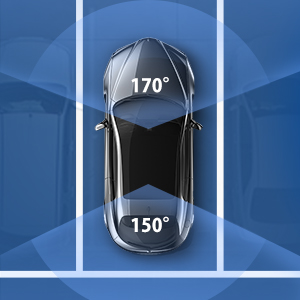
Obraz: An overhead diagram of a car illustrating the wide field of view provided by the dash cam system, covering 170 degrees at the front and 150 degrees at the rear for comprehensive coverage.

Obraz: A visual representation of the dash cam's ability to operate in various environmental conditions, depicted by a split image showing a snowy landscape with a snowflake and a desert scene with a sun icon.
Záruka a podpora
AKASO products come with a standard warranty. For specific warranty terms, technical support, or customer service inquiries, please refer to the warranty card included in your package or visit the official AKASO website. You can also contact AKASO customer support directly for assistance.
Official AKASO Webmísto: AKASO Store on Amazon
Důležité bezpečnostní informace
- Do not operate the dash cam or access its settings while driving.
- Ujistěte se, že je palubní kamera nainstalována na místě, které nebrání řidiči ve výhledu view nebo narušovat bezpečnostní prvky vozidla.
- Use only the original car charger provided or a certified replacement.
- Do not expose the device to extreme temperatures, direct sunlight for prolonged periods, or moisture.
- Udržujte zařízení mimo dosah dětí.