
1. Úvod a konecview
The LiNKFOR Digital Optical Audio 3x1 Switch is designed to expand the optical audio input capabilities of your audio system. It allows you to connect up to three optical fiber signal sources (SPDIF/TosLink) to a single SPDIF/TosLink receiving device, such as a soundbar, amplifier, or headphones. This device is ideal for managing multiple digital audio sources without constantly plugging and unplugging cables.
It supports various audio formats including LPCM2.0, DTS, and Dolby-AC3 at 96Khz. Please note that it does not support 7.1CH Dolby Digital Plus or Dolby TrueHD, as these formats cannot be transmitted via fiber optic cable and require an HDMI cable for transmission.
The switch supports long-distance signal transmission up to 40 meters (130 feet) when using optical fiber cables with loss less than 0.2Db/m. Its high-grade aluminum alloy design ensures overall shielding without signal interference, contributing to high-quality audio signal transmission. Additionally, it features over-voltagochrana, která zabraňuje poškození nekompatibilními napájecími adaptéry.
2. Obsah balení
Zkontrolujte prosím obsah balení, abyste se ujistili, že jsou přítomny všechny položky:
- 1 x LiNKFOR Digital Optical Audio 3x1 Switch (Model ULKVC233c)
- 1 x jednotka dálkového ovládání
- 1 x 1m Optical Cable
- 1 x Napájecí kabel USB
- 2 x AAA baterie (pro dálkové ovládání)
- 1 x Uživatelská příručka

3. Vlastnosti produktu a diagramy
The LiNKFOR Digital Optical Audio 3x1 Switch features a compact design with clearly labeled ports and indicators for ease of use.
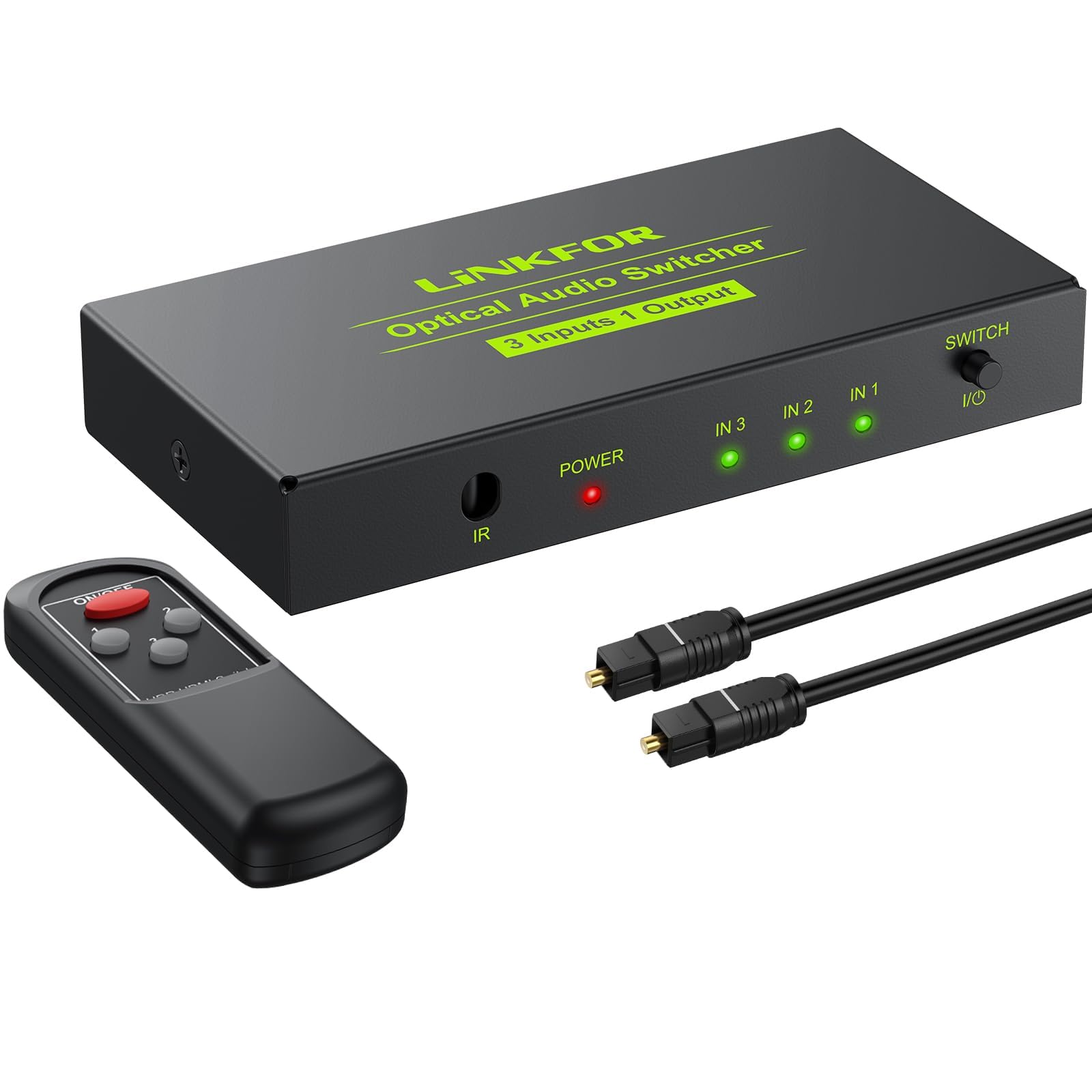
3.1. Uspořádání zařízení
- Vstupní porty (IN 1, IN 2, IN 3): Connect your optical audio source devices here.
- Output Port (OUT): Connect your optical audio receiving device here.
- USB 5V Power Input: Connect the provided USB power cable to power the device.
- IR přijímač: Pro příjem signálů z dálkového ovladače.
- Vyberte přepínač: Button to manually cycle through input sources.
- Input Indicators (IN 1, IN 2, IN 3): LEDs illuminate to show the currently selected input.
- Indikátor napájení: LED illuminates when the device is powered on.
3.2. Rozměry

3.3. Funkce dálkového ovládání

4. Nastavení a instalace
Follow these steps to set up your LiNKFOR Digital Optical Audio 3x1 Switch:
- Připojení vstupních zdrojů: Use optical fiber cables to connect your source devices (e.g., PS3, Blue-Ray player, DVD, HDTV) to the IN 1, IN 2, and IN 3 ports on the switch.
- Připojení výstupního zařízení: Connect your optical audio receiving device (e.g., soundbar, amplifier, headphones) to the OUT port on the switch using an optical fiber cable.
- Připojte napájení: Connect the provided USB power cable to the DC 5V input port on the switch. Plug the other end of the USB cable into a 5V USB power source (e.g., a USB wall adapter, TV USB port, or computer USB port). The Power indicator LED will light up.

4.1. Ukázkové video s nastavením
5. Návod k obsluze
Once all connections are made and the device is powered on, you can select your desired audio input source:
- Ruční přepínání: Press the 'Select Switch' button on the front panel of the device to cycle through the input sources (IN 1, IN 2, IN 3). The corresponding input indicator LED will light up to show the active source.
- Přepínání na dálkové ovládání: Use the provided remote control to directly select an input source by pressing the corresponding number button (1, 2, or 3). Ensure the remote is pointed towards the IR Receiver on the switch.

6. Řešení problémů
If you encounter issues with your LiNKFOR Digital Optical Audio 3x1 Switch, please refer to the following common problems and solutions:
- Žádný zvukový výstup:
- Ensure all optical cables are securely connected to both the source devices, the switch, and the receiving device.
- Verify that the switch is powered on and the Power indicator LED is lit.
- Check that the correct input source is selected on the switch (the corresponding IN LED should be lit).
- Confirm that your audio source device is outputting audio in a supported format (LPCM2.0, DTS, or Dolby-AC3).
- Ujistěte se, že vaše přijímací zařízení (soundbar, amplifier) is set to the correct optical input and supports the incoming audio format.
- Distorted or Intermittent Sound:
- Check optical cables for damage or kinks. Replace if necessary.
- Ensure the optical cable is not excessively long or of poor quality, which can lead to signal degradation.
- Verify that the audio format from the source is compatible and not an unsupported format like 7.1CH Dolby Digital Plus.
- Dálkové ovládání nefunguje:
- Check if the batteries in the remote control are correctly inserted and have sufficient power. Replace if needed.
- Ensure there are no obstructions between the remote control and the IR Receiver on the switch. Maintain a clear line of sight.
- Confirm the remote control is within its effective operating range (typically up to 5 meters).
- Problém s napájením:
- Ensure the USB power cable is securely connected to both the switch and the power source.
- Try a different 5V USB power source or adapter.
- Zařízení má pře-objtage protection; ensure you are using a compatible 5V power supply.
7. Specifikace
| Funkce | Popis |
|---|---|
| Rozměry produktu | 3.7 x 1.85 x 0.72 palce (95 x 47 x 15.5 mm) |
| Hmotnost položky | 8.1 unce |
| Číslo modelu položky | ULKVC233c |
| Barva | Černý |
| Typ konektoru | Optical (Toslink/SPDIF) |
| Typ kabelu | Optický |
| Kompatibilní zařízení | DVD Player, Personal Computer, Speaker, Television, Xbox |
| Podporované zvukové formáty | LPCM2.0/DTS/Dolby-AC3 (96Khz) |
| Maximální výstupní vzdálenost | 40m / 130ft (with <0.2Db/m optical cable loss) |
| Napájení | DC 5V (přes USB kabel) |
| Kontrolní metoda | Manuální tlačítko, IR dálkové ovládání |
8. Záruka a podpora
This LiNKFOR product comes with a jednoletá záruka výrobce. Additionally, customers are entitled to bezplatná doživotní technická podpora. For any questions, troubleshooting assistance, or warranty claims, please contact LiNKFOR customer service.