
Konec produktuview
The Xtrasaver TY-49B is a replacement remote control for select Westinghouse LED HD DVD Combo TV models. It offers full functionality for controlling your television and its integrated DVD player without requiring any programming. This remote is designed to provide a direct replacement experience for your original remote.
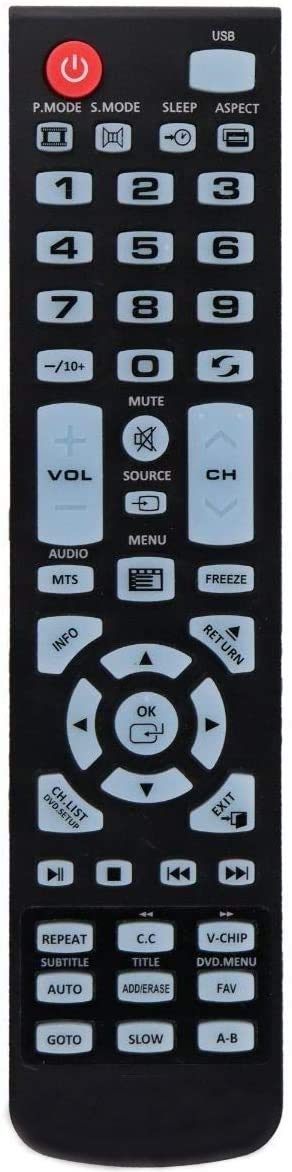
Image of the Xtrasaver TY-49B Replacement Remote Control, showing its black casinrozložení tlačítek g a tlačítek.
Kompatibilita
This remote control is compatible with the following Westinghouse LED HD DVD Combo TV models:
- WD24HB6101 (24 inch)
- WD32HKB1001 (32 inch)
- WD49FB1018
- WD40HB1170
- WD32HB1120
- WD32HB1390
- WD24HAB101
- WD19HN1108
Nastavení
Vkládání baterií
Dálkové ovládání vyžaduje dvě baterie AAA (nejsou součástí balení).
- Najděte přihrádku na baterie na zadní straně dálkového ovladače.
- Posuňte kryt baterie dolů pro otevření.
- Vložte dvě baterie typu AAA a ujistěte se, že kladný (+) a záporný (-) pól správně shodují s označením uvnitř přihrádky.
- Zasuňte kryt baterie zpět na místo, dokud bezpečně nezapadne.
The remote is ready for use immediately after battery insertion; no programming is required.
Návod k obsluze
The Xtrasaver TY-49B remote provides access to all standard functions of your compatible Westinghouse TV and DVD player.
Základní funkce
| Tlačítko | Funkce |
|---|---|
| MOC | Zapíná nebo vypíná televizor. |
| INPUT / SOURCE | Cycles through available input sources (e.g., HDMI, AV, DVD). |
| VOL +/- | Nastavuje úroveň hlasitosti. |
| CH +/- | Změní televizní kanál. |
| ZTLUMIT | Ztlumí nebo zruší ztlumení zvuku televizoru. |
| MENU | Přístup k hlavní nabídce televizoru. |
| NAVIGAČNÍ TLAČÍTKA (Up, Down, Left, Right, OK/ENTER) | Používá se k navigaci v nabídkách a potvrzování výběrů. |
| DVD CONTROLS (PLAY, PAUSE, STOP, FF, REW, NEXT, PREV) | Controls DVD playback functions when using the integrated DVD player. |
| ČÍSELNÁ TLAČÍTKA (0-9) | Přímý výběr kanálů nebo zadávání číselných hodnot. |
Údržba
Čištění
To clean the remote control, wipe it with a soft, dry cloth. Do not use liquid cleaners or abrasive materials, as these can damage the remote.
Výměna baterie
Replace batteries when the remote's response becomes inconsistent or stops working. Always replace both batteries at the same time with new AAA batteries. Do not mix old and new batteries or different types of batteries.
Odstraňování problémů
| Problém | Možné řešení |
|---|---|
| Dálkový ovladač nereaguje. | Check if batteries are inserted correctly with correct polarity. Replace batteries if they are old or depleted. Ensure there are no obstructions between the remote and the TV's IR sensor. |
| Nefunkční konkrétní tlačítka. | Clean the remote surface and buttons. If the issue persists, replace batteries. If still unresolved, the remote may be faulty. |
| TV not turning on/off. | Ensure the TV is plugged into a power outlet and is not in standby mode. Point the remote directly at the TV's IR sensor. |
Specifikace
- Model: TY-49B
- Kompatibilní zařízení: Westinghouse LED HD DVD Combo Televisions
- Zdroj napájení: 2 x AAA baterie (nejsou součástí balení)
- Barva: Černý
- Rozměry: Přibližně 7.8 x 1.89 x 0.87 palce (20 x 4.8 x 2.2 cm)
- Hmotnost: Přibližně 8 unce (227 gramů) (bez baterií)
- Speciální funkce: Ergonomický design
- Číslo modelu položky: 689405000831