
1. Úvod
Welcome to the user manual for your new HONOR View 20 smartphone. This guide provides essential information to help you set up, operate, and maintain your device. The HONOR View 20 is a powerful Dual-SIM 4G/LTE smartphone featuring a stunning design, advanced camera capabilities, and robust performance.
Key features include a 6.4-inch IPS LCD display, a 48-megapixel primary camera, a 25-megapixel front camera, a HiSilicon Kirin 980 octa-core processor, 6GB of RAM, and 128GB of internal storage. It runs on Android 9.0 (Pie) with HONOR's Magic UI.
2. Nastavení
2.1. Instalace SIM karty
The HONOR View 20 supports Dual-SIM functionality. To install your SIM cards:
- Vyhledejte držák SIM karty na boku zařízení.
- K otevření zásuvky použijte dodaný nástroj pro vysunutí SIM karty.
- Carefully place your Nano-SIM cards into the designated slots. Ensure they are correctly oriented.
- Jemně zatlačte zásobník zpět do zařízení, dokud nezapadne na místo.
Kompatibilita se sítí:
This smartphone is compatible with GSM networks such as AT&T and T-Mobile. It will NOT work with CDMA networks like Verizon, Sprint, or US Cellular. Please verify network compatibility with your provider before use.
2.2. Počáteční zapnutí
Press and hold the Power button (located on the right side of the device) until the HONOR logo appears. Follow the on-screen instructions to complete the initial setup, including language selection, Wi-Fi connection, and Google account setup.

Obrázek 2.1: Strana view of the HONOR View 20, highlighting the SIM card tray and physical buttons.
3. Obsluha vašeho zařízení
3.1. Displej a uživatelské rozhraní
The HONOR View 20 features a 6.4-inch IPS LCD capacitive touchscreen with a resolution of 1080 x 2310 pixels. The device runs on Android 9.0 (Pie) with HONOR's Magic UI, offering a smooth and intuitive user experience. The front camera is integrated into a 'punch-hole' cutout in the display, maximizing screen real estate.
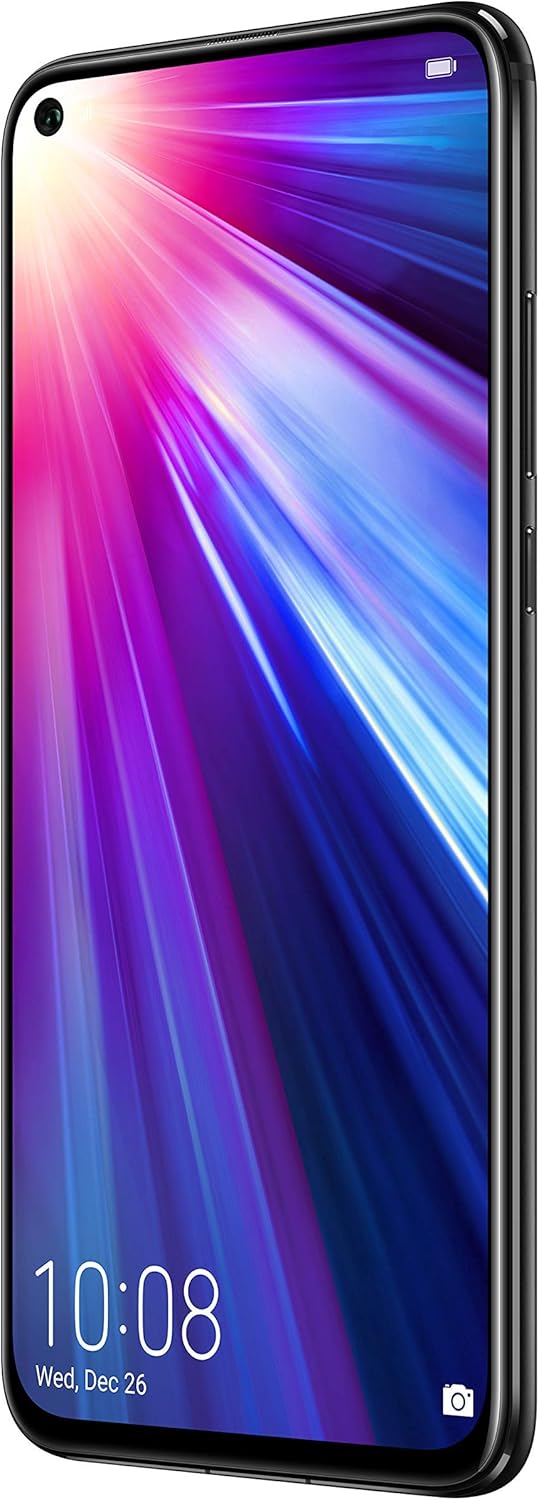
Obrázek 3.1: Přední strana view of the HONOR View 20, showcasing the 6.4-inch display and punch-hole front camera.
3.2. Snímač otisků prstů
For secure and convenient unlocking, the HONOR View 20 is equipped with a rear-mounted fingerprint sensor. Simply place your registered finger on the sensor to unlock the device or authorize payments.

Obrázek 3.2: Zadní view of the HONOR View 20, highlighting the fingerprint sensor and the distinctive V-pattern design.
3.3. Baterie a nabíjení
The device is powered by a 4000mAh Lithium-Polymer battery, offering an average life of 96 hours under typical usage. It supports fast charging via its USB Type-C port located at the bottom of the device.

Obrázek 3.3: Spodní část view of the HONOR View 20, showing the USB Type-C port for charging and data transfer.
3.4. Procesor a výkon
The HONOR View 20 is powered by the HiSilicon Kirin 980 (7 nm) octa-core processor, ensuring smooth multitasking and efficient performance for demanding applications and games. It comes with 6GB of RAM for seamless operation.
3.5. Audio
The device includes a 3.5mm headphone jack, allowing you to connect your preferred wired headphones for audio playback.
4. Funkce fotoaparátu
The HONOR View 20 is equipped with advanced camera technology for both photography and videography.
4.1. Systém zadní kamery
The rear camera system features a powerful 48-megapixel primary sensor (f/1.8, 1/2", 0.8µm, PDAF) for high-resolution photos. It is complemented by a TOF 3D stereo camera, which measures time-of-flight to accurately gauge depth, enabling advanced augmented reality (AR) features and artificial bokeh effects.
4.2. Přední kamera
For selfies and video calls, the device has a 25-megapixel front camera (f/2.0, 27mm) integrated into the display's punch-hole cutout. It supports HDR for improved image quality in various lighting conditions.
4.3. Nahrávání videa
The HONOR View 20 can record videos at 4K resolution at 30 frames per second (fps), 1080p at 30fps, and 720p at 960fps, with gyro-EIS for enhanced stabilization.
4.4. Camera Modes and AI Features
The camera offers a variety of modes and AI-powered enhancements:
- 48MP AI Ultra Clarity: Utilizes artificial intelligence to boost scene details for incredibly clear and high-resolution still images, especially suitable for scenery and static objects.
- Noční režim: Enhances low-light images, capturing more detail and brightness in dark environments.
- Režim Portrét: Creates a blurred background (bokeh effect) to make subjects stand out, effectively isolating people in photos.
- Režim clony: Allows adjustment of the aperture for creative depth-of-field control.
- Zpomalený pohyb: Records videos at high frame rates for dramatic slow-motion playback.
- Light Painting: A specialized mode for capturing light trails, such as traffic lights or star trails.
- Časová prodleva: Compresses long periods of time into short video clips.
- Artist Mode: Applies artistic filters and effects to your photos.
- Filtr: A selection of filters to enhance the mood and style of your images.
- 3D Panorama: Captures immersive panoramic shots.
- HDR (vysoký dynamický rozsah): Improves detail in both bright and dark areas of a photo.
- AR Lens: Utilizes the TOF 3D camera for augmented reality applications and effects.
5. Specifikace
| Funkce | Detail |
|---|---|
| Značka | ČEST |
| Název modelu | View 20 |
| Operační systém | Android 9.0 (koláč) |
| Procesor | HiSilicon Kirin 980 (7 nm), Octa-core |
| BERAN | 6 GB |
| Skladování | 128 GB (nerozšiřitelná) |
| Velikost obrazovky | 6.4 palce |
| Typ zobrazení | IPS LCD |
| Rezoluce | 1080 x 2310 pixelů |
| Zadní kamera | 48 MP (f/1.8) + TOF 3D stereo camera |
| Přední kamera | 25 MP (f/2.0) |
| Rozlišení záznamu videa | 4K (30 fps) |
| Kapacita baterie | 4000 XNUMX mAh |
| Počet slotů pro SIM karty | Duální SIM |
| Technologie připojení | Wi-Fi, 4G LTE, GSM |
| Biometrické zabezpečení | Fingerprint Recognition (rear-mounted) |
| Jack pro sluchátka | 3.5 mm |
| Hmotnost položky | 180 gramů |
| Barva | Půlnoční černá |
6. Řešení problémů
If you encounter issues with your HONOR View 20, consider the following general troubleshooting steps:
- Zařízení nereaguje: Stiskněte a podržte tlačítko napájení po dobu přibližně 10–15 sekund pro vynucení restartu.
- Problémy s připojením k síti: Ensure your SIM cards are correctly inserted. Check your network settings (Settings > Wireless & networks > Mobile network). Verify with your carrier that your plan supports the device's network bands.
- Vybíjení baterie: Zavřete nepoužívané aplikace běžící na pozadí. Snižte jas obrazovky. Vypněte nepotřebné funkce, jako je Wi-Fi, Bluetooth nebo GPS, když je nepoužíváte.
- Selhání aplikace: Vymažte mezipaměť a data problematické aplikace (Nastavení > Aplikace > [Název aplikace] > Úložiště > Vymazat mezipaměť/Vymazat data). Pokud problém přetrvává, odinstalujte a znovu nainstalujte aplikaci.
- Aktualizace softwaru: Ensure your device's software is up to date (Settings > System > Software update). Updates often include bug fixes and performance improvements.
7. Údržba
To ensure the longevity and optimal performance of your HONOR View 20, dodržujte tyto pokyny pro údržbu:
- Udržujte v čistotě: Regularly wipe the screen and back of the device with a soft, lint-free cloth. Avoid harsh chemicals or abrasive materials.
- Aktualizace softwaru: Install system updates as they become available to benefit from the latest features, security patches, and performance enhancements.
- Péče o baterie: Avoid extreme temperatures. Do not let the battery completely drain frequently. Use the original charger for optimal charging.
- Záloha dat: Regularly back up your important data (photos, contacts, documents) to cloud storage or a computer to prevent loss.
- Ochranné doplňky: Zvažte použití ochranné fólie na displej a ochranného pouzdra, které ochrání váš displej před poškrábáním a nechtěným pádem.
8. Záruka a podpora
For detailed warranty information and customer support, please refer to the official HONOR webnebo se obraťte na místního prodejce. Uschovejte si doklad o koupi pro případ reklamace.