
Zavedení
This manual provides essential information for the safe and efficient use of your Brondi Stallion HEAVY DUTY mobile phone. The Brondi Stallion is a rugged device designed for durability, featuring IP68 certification for total water and dust protection, dual SIM capability, and a 2.4-inch display. Please read this manual thoroughly before operating your device.
Nastavení
Obsah balení
Než začnete, ujistěte se, že balení obsahuje všechny položky:
- Brondi Stallion Mobile Phone
- Baterie
- Sluchátka
- Charger (USB cable and power adapter)
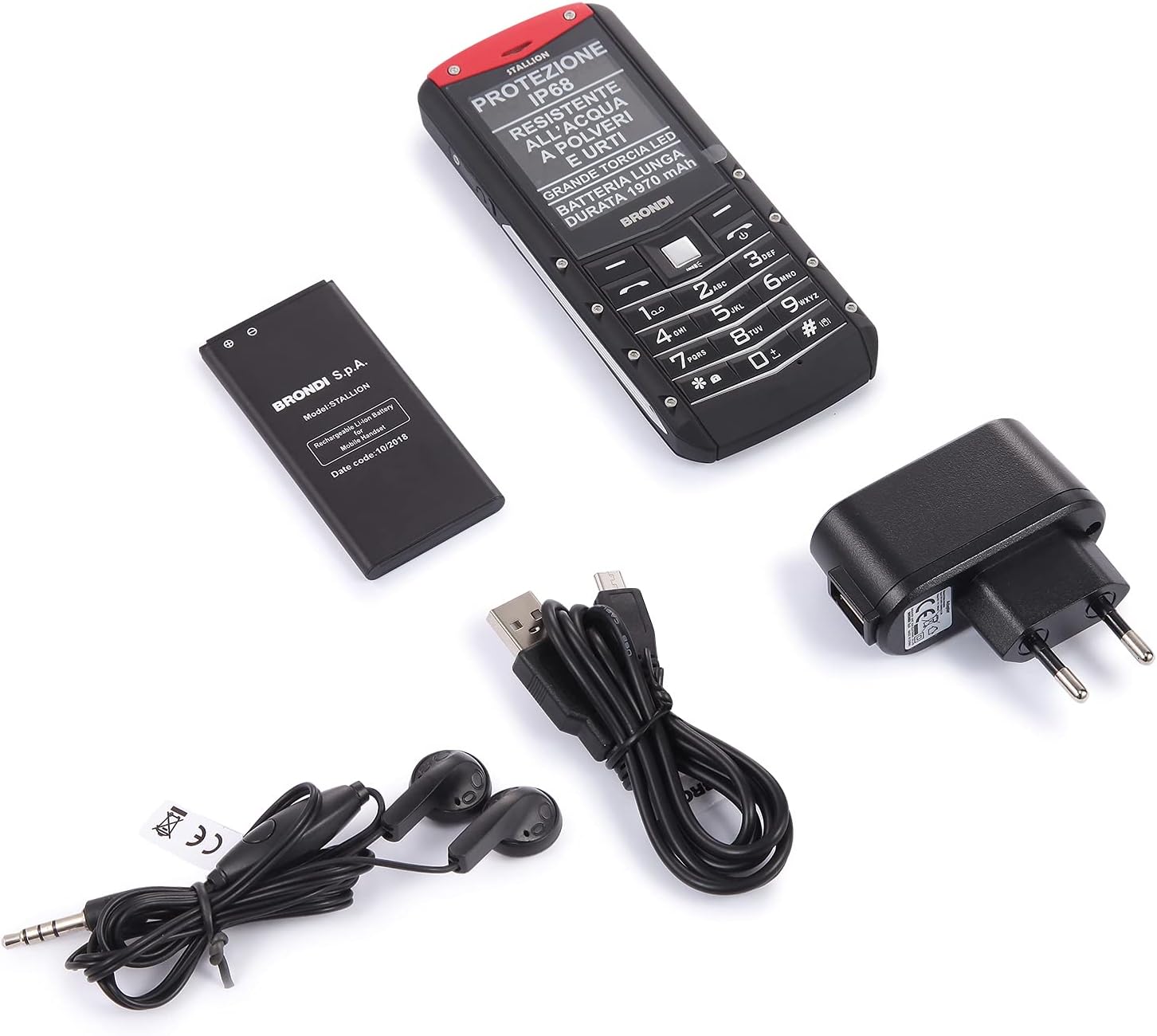
Image: Contents of the Brondi Stallion HEAVY DUTY package, including the phone, battery, charger, and earphones.
Inserting the SIM Card(s) and Battery
- Opatrně sejměte zadní kryt telefonu.
- Insert your SIM card(s) into the designated slot(s). This device supports Dual SIM functionality.
- Vložte baterii do jejího prostoru a ujistěte se, že kontakty jsou správně zarovnány.
- Replace the back cover, ensuring it is securely fastened to maintain the IP68 seal.
Nabíjení zařízení
- Connect the micro-USB end of the charging cable to the phone's charging port.
- Connect the USB power adapter to a wall outlet.
- Allow the phone to charge fully before initial use. The charging indicator will show the battery status.
Zapnutí/vypnutí
- Zapnutí: Stiskněte a podržte tlačítko napájení, dokud se obrazovka nerozsvítí.
- Vypnutí: Stiskněte a podržte tlačítko Napájení a poté z možností vyberte možnost „Vypnout“.
Návod k obsluze

Obrázek: Přední a zadní strana view of the Brondi Stallion HEAVY DUTY mobile phone, showcasing jeho robustní konstrukce.
Základní funkce
- Uskutečňování hovorů: Zadejte telefonní číslo pomocí klávesnice a stiskněte tlačítko Volat.
- Přijímání hovorů: Stiskněte tlačítko Volat, když telefon zvoní.
- Odesílání zpráv: Navigate to the 'Messages' menu, select 'New Message', enter your text, and send to the desired contact.
- Duální SIM: The phone supports two SIM cards. You can select which SIM to use for calls or messages from the phone's settings or during the action.
Fotoaparát
The Brondi Stallion features a 1.3 MP rear camera. To use the camera:
- V hlavní nabídce přejděte do aplikace „Fotoaparát“.
- Frame your subject on the display.
- Press the designated button to capture a photo.
LED svítilna
The phone is equipped with a large LED torch. Access this feature from the shortcuts or the main menu to activate/deactivate the light.
Zvukové funkce
- Reproduktor: The phone includes a loudspeaker for hands-free calls or media playback.
- Sluchátka: Connect the included earphones to the 3.5mm jack for private listening or hands-free communication.
- Bluetooth: Enable Bluetooth in the settings to connect to compatible wireless accessories.
- FM rádio: The phone has a built-in FM radio function, which can often be used without earphones.
Údržba

Obrázek: Zadní view of the Brondi Stallion HEAVY DUTY, highlighting the IP68 water and dust resistance rating.
Odolnost proti vodě a prachu (IP68)
The Brondi Stallion is IP68 certified, meaning it is protected against dust ingress and can withstand immersion in water up to 1.5 meters for 30 minutes. To maintain this protection:
- Ensure all port covers (charging port, earphone jack) are securely closed before exposing the phone to water or dust.
- Do not intentionally submerge the phone in water beyond the specified depth or duration.
- If the phone gets wet, dry it thoroughly with a clean cloth before charging or opening any ports.
Čištění
Use a soft, dry cloth to clean the phone's exterior. Avoid using harsh chemicals or abrasive materials, which can damage the device's surface or compromise its water resistance.
Péče o baterie
- Nevystavujte baterii extrémním teplotám.
- Používejte pouze originální nabíječku dodanou se zařízením.
- Pokud telefon nebudete delší dobu používat, nabijte baterii před uskladněním přibližně na 50 %.
Port Covers
The protective rubber covers for the charging port and earphone jack are crucial for maintaining the phone's IP68 rating. Handle them with care, as they can be fragile. Ensure they are always properly sealed when not in use.
Odstraňování problémů
Běžné problémy a řešení
- Telefon se nezapíná: Ujistěte se, že je baterie správně vložena a nabitá. Připojte nabíječku a zkuste to znovu.
- Žádný síťový signál: Check if the SIM card is properly inserted. Verify that you are in an area with network coverage. Restart the phone.
- Nelze uskutečňovat/přijímat hovory: Check your SIM card balance or subscription status. Ensure the phone is not in airplane mode.
- Problémy se zvukem: Check the volume settings. Ensure earphones are properly connected if in use. Clean the speaker grille if it appears blocked.
ILIAD SIM Card Specific Setup
If you are using an ILIAD SIM card and experience connectivity issues, particularly if the phone does not connect to the network automatically, follow these steps:
- Insert the ILIAD SIM card into a 4G-compatible smartphone.
- In the smartphone's network settings, manually select the network type to 3G or GSM.
- Perform a manual network search and select ILIAD z dostupných sítí.
- Once the ILIAD SIM card has successfully connected to the network in the smartphone, reinsert it into your Brondi Stallion. It should now connect to the ILIAD network.
Specifikace

Obrázek: Boční view of the Brondi Stallion HEAVY DUTY mobile phone, showing its robust profile.
| Funkce | Specifikace |
|---|---|
| Značka | Brondi |
| Název modelu | Hřebec |
| Operační systém | Proprietární |
| Memory Capacity (Max Flash Supported) | 32 GB |
| Velikost obrazovky | 2.4 palce |
| Rezoluce | 320 x 240 pixelů |
| Poskytovatel bezdrátových služeb | Všichni dopravci |
| Buněčná technologie | 2G |
| Technologie připojení | USB |
| Barva | Černý |
| Sloty pro SIM karty | Duální SIM |
| Vstup | Micro-USB |
| Úroveň odolnosti proti vodě | IP68 (vodotěsný) |
| Rozlišení zadní kamery | 1.3 MP |
| Kapacita baterie | 1970 XNUMX mAh |
| Rozměry | 5.7 x 1.6 x 13.9 cm |
| Doba hovoru | 6 hodiny |
| Modelový rok | 2019 |
Informace o záruce
The Brondi Stallion HEAVY DUTY mobile phone comes with a 2-letá záruka from the date of purchase. This warranty covers manufacturing defects under normal use. Please retain your proof of purchase for warranty claims. The warranty does not cover damage caused by misuse, accidents, unauthorized repairs, or failure to follow the instructions in this manual.
Podpora
For further assistance, technical support, or warranty claims, please refer to the contact information provided with your product packaging or visit the official Brondi webwebu. Než budete kontaktovat podporu, mějte připravený model produktu a sériové číslo.