
1. Úvod
The Cellularline EASYSPORT GPS is a smartwatch designed for sports enthusiasts, enabling comprehensive monitoring of athletic performance. Its integrated GPS allows tracking of workout routes without needing a smartphone. The ultra-bright touch display ensures clear visibility of settings in various outdoor conditions. With IP68 certification, the Easysport GPS is suitable for use during showering or swimming, making it an ideal companion for achieving fitness goals.
2. Obsah balení
Zkontrolujte prosím, zda jsou v balení přítomny všechny položky:
- Cellularline EASYSPORT GPS Smartwatch
- Charging Cable / Charging Dock
- Uživatelská příručka (tento dokument)
3. Konec produktuview
Familiarize yourself with the components of your EASYSPORT GPS smartwatch.
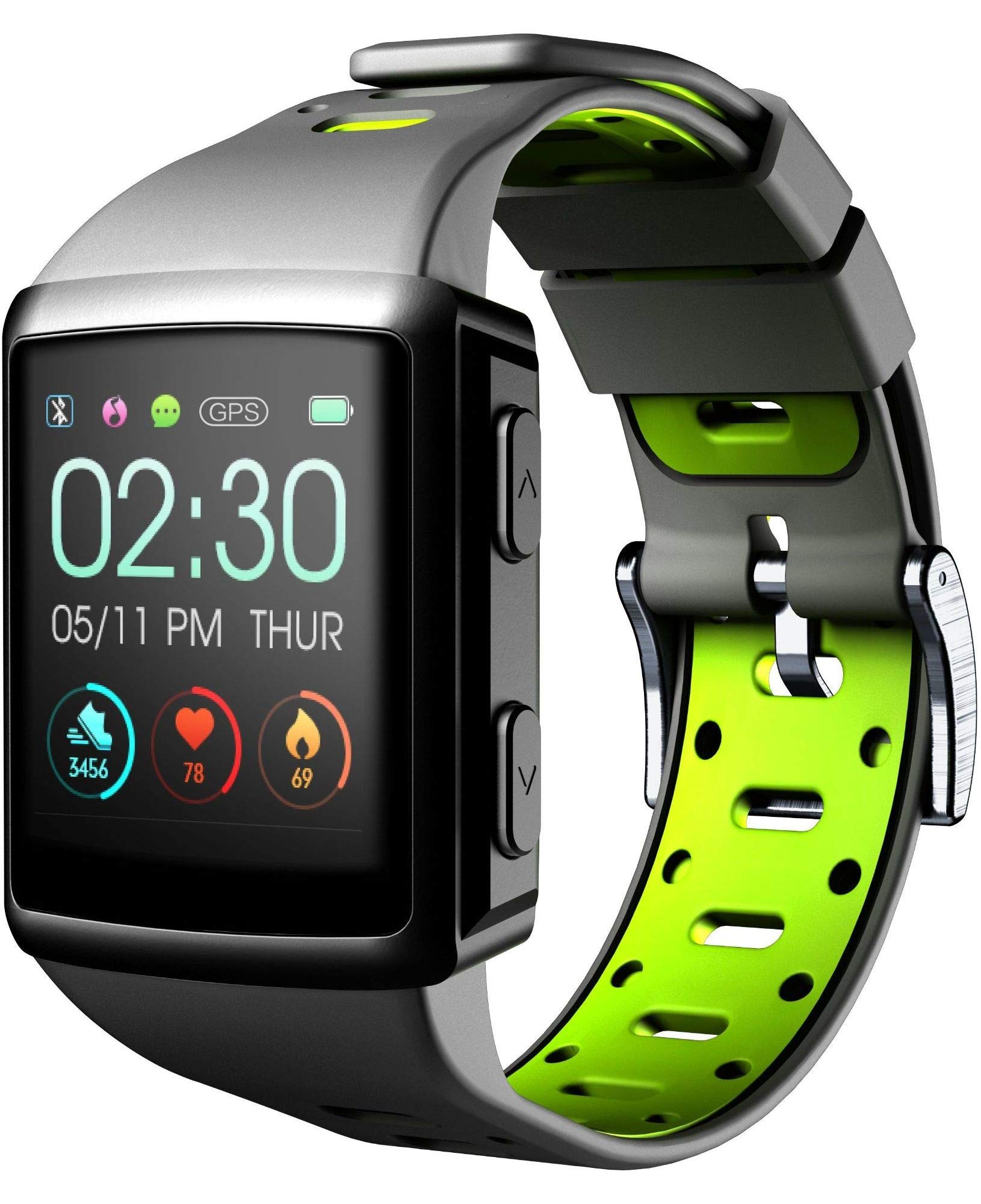
Obrázek 3.1: Přední view of the smartwatch display, showing current time, date, and activity metrics like steps, heart rate, and calories burned.

Obrázek 3.2: Úhlové view of the smartwatch, highlighting the sporty lime and black silicone strap and the physical control buttons on the side.

Obrázek 3.3: Zadní view of the smartwatch, illustrating the integrated heart rate (HR) sensor designed for continuous monitoring during activities.
4. Nastavení
4.1 Nabíjení zařízení
Before first use, fully charge your EASYSPORT GPS smartwatch. A full charge typically takes approximately 3 hours.
- Connect the charging cable to the charging dock.
- Align the smartwatch with the charging dock's contacts until it securely snaps into place.
- Plug the USB end of the charging cable into a compatible USB power adapter (not included) or a computer's USB port.
- Displej bude indikovat stav nabíjení.

Obrázek 4.1: The smartwatch connected to its charging dock, illustrating the charging process.
4.2 Zapnutí/vypnutí
- Zapnutí: Press and hold the power button (usually located on the side) for a few seconds until the screen lights up.
- Vypnutí: Navigate to the settings menu on the smartwatch, locate the "Power Off" option, and confirm. Alternatively, press and hold the power button until a power-off prompt appears, then confirm.
4.3 Párování s chytrým telefonem
To unlock the full potential of your smartwatch, pair it with your smartphone via Bluetooth.
- Ujistěte se, že je na vašem smartphonu povoleno Bluetooth.
- Download and install the companion app for Cellularline EASYSPORT GPS from your smartphone's app store.
- Otevřete aplikaci a podle pokynů na obrazovce vytvořte účet nebo se přihlaste.
- In the app, select "Add Device" or "Pair New Device" and choose "EASYSPORT GPS" from the list of available devices.
- V případě potřeby potvrďte požadavek na párování na smartphonu i chytrých hodinkách.
5. Návod k obsluze
5.1 Navigace na dotykové obrazovce
The EASYSPORT GPS features a responsive touchscreen for intuitive navigation.
- Přejetí nahoru/dolů: Procházení nabídek nebo oznámení.
- Přejetí doleva/doprava: Přístup k různým widgetům nebo rychlým nastavením.
- Klepněte na: Vyberte položku nebo potvrďte akci.
- Stiskněte a podržte: Může aktivovat specifické funkce nebo přizpůsobit ciferníky hodinek.
5.2 Sledování GPS
The integrated GPS allows you to track your distance and route during outdoor activities without needing your smartphone.
- Start an outdoor activity (e.g., running, cycling) from the sports mode menu on your smartwatch.
- Ensure you are in an open area for optimal GPS signal acquisition.
- The smartwatch will automatically begin tracking your route and distance.
- Review your activity data, including maps, in the companion app after syncing.
5.3 Heart Rate Monitoring (HR Function)
The smartwatch continuously monitors your heart rate, providing valuable insights into your fitness and workout intensity.
- Ensure the smartwatch is worn snugly on your wrist, with the sensor making good contact with your skin.
- Access the heart rate widget or start a workout to view údaje o tepové frekvenci v reálném čase.
- Historical heart rate data can be viewv doprovodné aplikaci.

Obrázek 5.1: The smartwatch display showing heart rate data (e.g., 78 bpm) along with steps and calories, indicating active monitoring.
5.4 Notifications and Caller ID
Stay connected with full text notifications and caller ID directly on your wrist.
- Once paired with your smartphone, the smartwatch will display incoming call names (Caller ID) and full text of messages from WhatsApp, Twitter, and other social applications.
- Manage notification settings through the companion app on your smartphone.
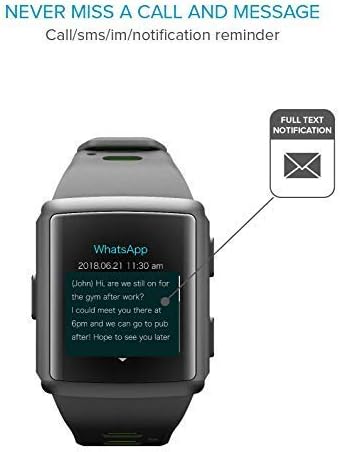
Obrázek 5.2: The smartwatch screen showing a detailed WhatsApp message notification, demonstrating the full text display feature.
6. Údržba
6.1 Water Resistance (IP68 Certified)
The EASYSPORT GPS is IP68 certified, meaning it is resistant to dust and can withstand immersion in water up to 1.5 meters for 30 minutes. This makes it suitable for showering and swimming.
- Rinse the smartwatch with fresh water after exposure to chlorinated or salt water.
- Nestiskávejte tlačítka pod vodou.
- Avoid exposing the device to hot water, steam, or high-pressure water jets.
- Voděodolnost není trvalá a může se časem v důsledku běžného opotřebení snižovat.

Obrázek 6.1: Visual representation of the smartwatch's IP68 certification, showing its suitability for water-related activities like swimming and showering.
6.2 Čištění
Clean your smartwatch regularly to maintain its appearance and functionality.
- Otřete obrazovku a řemínek měkkým hadříkemamp, hadřík nepouštějící vlákna.
- Nepoužívejte drsné chemikálie ani abrazivní čisticí prostředky.
- Před nabíjením se ujistěte, že jsou nabíjecí kontakty čisté a suché.
7. Řešení problémů
If you encounter issues with your EASYSPORT GPS smartwatch, try the following solutions:
| Problém | Možné řešení |
|---|---|
| Zařízení se nezapne | Ensure the device is fully charged. Connect it to the charging dock and power source for at least 30 minutes. |
| Nelze spárovat se smartphonem |
|
| GPS nesleduje přesně | Ujistěte se, že se nacházíte v otevřeném venkovním prostoru s volným view oblohy. Před zahájením aktivity počkejte na získání signálu GPS. |
| Oznámení se nezobrazují |
|
| Hodnoty tepové frekvence jsou nepřesné | Ujistěte se, že chytré hodinky máte pevně na zápěstí, ne příliš těsně ani příliš volně. Vyčistěte senzor na zadní straně zařízení. |
8. Specifikace
| Funkce | Detail |
|---|---|
| Název modelu | Easysport GPS |
| Číslo modelu | BTEASYSPORTHRGPSK |
| Značka | Buněčná linie |
| Technologie připojení | Bluetooth |
| Standard bezdrátové komunikace | Bluetooth |
| GPS | Integrovaný GPS |
| Typ zobrazení | LCD dotykový displej |
| Velikost obrazovky | 2 palců |
| Speciální funkce | Touchscreen, Heart Rate Monitor, GPS |
| Úroveň odolnosti proti vodě | IP68 (vodotěsnost do 1.5 metrů) |
| Materiál pásku | Silikon |
| Barva | Limetková, černá |
| Podporovaná aplikace | GPS (and companion app for notifications/data sync) |
| Kompatibilní zařízení | chytré telefony |
| Zamýšlené publikum | Unisex dospělý |
9. Záruka a podpora
The Cellularline EASYSPORT GPS Smartwatch comes with a warranty as specified by the manufacturer. For detailed warranty information and support, please refer to the official Cellularline webnebo kontaktujte jejich zákaznický servis.
- Typ záruky: Celý život
- For technical support, troubleshooting assistance, or warranty claims, please visit the Cellularline official webmísto or contact their authorized service center.