
Zavedení
This manual provides essential information for the safe and effective use of your Canon PowerShot SX740 HS Digital Camera. Please read it thoroughly before operating the camera to ensure proper handling and to maximize its features. The Canon PowerShot SX740 HS is a compact digital camera featuring a 20.3-megapixel CMOS sensor, 40x optical zoom, 4K video recording capabilities, and built-in Wi-Fi and Bluetooth connectivity.

Obrázek 1: Přední strana view of the Canon PowerShot SX740 HS Digital Camera with the lens retracted.
Co je v krabici
Ověřte, zda balení obsahuje všechny následující položky:
- Digitální fotoaparát Canon PowerShot SX740 HS
- Lithium-iontová baterie NB-13L
- Nabíječka baterií CB-2LH
- Řemínek na zápěstí
- HDMI kabel
- Stativ
- SanDisk 64GB SDHC Memory Card
- Premium Camera Case
- High Speed USB Card Reader
Nastavení
1. Nabíjení a instalace baterie
- Insert the NB-13L battery into the CB-2LH charger.
- Zapojte nabíječku do elektrické zásuvky. Kontrolka nabíjení bude ukazovat stav nabíjení.
- Po úplném nabití vyjměte baterii z nabíječky.
- Otevřete kryt přihrádky na baterie na spodní straně fotoaparátu.
- Vložte nabitou baterii do přihrádky a dbejte na správnou orientaci. Bezpečně zavřete kryt.
2. Vložení paměťové karty
- Otevřete kryt slotu paměťové karty, který se obvykle nachází poblíž prostoru pro baterii.
- Insert the SDHC memory card with the label facing the front of the camera until it clicks into place.
- Zavřete kryt slotu paměťové karty.
3. Počáteční zapnutí a základní nastavení
- Stisknutím tlačítka napájení zapněte fotoaparát.
- Postupujte podle pokynů na obrazovce a nastavte datum, čas a jazyk.
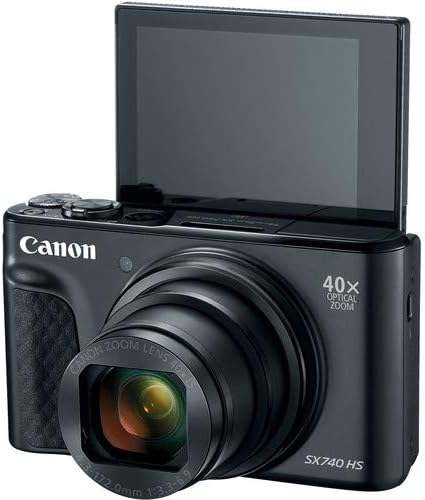
Obrázek 2: Přední strana view of the camera with the LCD screen tilted upwards, ready for use.
Obsluha fotoaparátu
1. Zapnutí/vypnutí
Stiskněte tlačítko MOC tlačítko umístěné na horní straně kamery pro její zapnutí nebo vypnutí.
2. Režimy fotografování
The camera offers various shooting modes. Use the mode dial or menu options to select:
- Automatický režim: For simple point-and-shoot operation, where the camera automatically adjusts settings.
- Programový (P) režim: Umožňuje větší kontrolu nad nastavením, zatímco fotoaparát nastavuje expozici.
- Scénické režimy: Optimized settings for specific scenarios like portraits, landscapes, or night scenes.
- Feature Assistant: Provides on-screen explanations to help you understand and use various camera features.
3. Operace zoomu
The camera features a 40x optical zoom lens. Use the zoom lever around the shutter button to zoom in (telephoto) or out (wide-angle). Digital zoom can extend the range further, but may reduce image quality.

Obrázek 3: Přední strana view of the camera with the lens extended for zooming.
4. Zaostřování
The camera primarily uses autofocus. Point the camera at your subject and half-press the shutter button to focus. The focus frame will appear on the LCD screen. For specific situations, manual focus options may be available in the menu.
5. Nahrávání videa
To record videos, switch to video mode (if available via a dedicated button or mode dial) or press the dedicated movie recording button. The camera supports 4K video capture. Press the button again to stop recording.
6. Používání výklopné LCD obrazovky
The 3.0-inch LCD screen can tilt 180 degrees, allowing for easy framing of selfies or shots from various angles. Adjust the screen to your desired position.

Obrázek 4: Zpět view fotoaparátu, zobrazující LCD displej a rozložení ovládacích prvků.
7. Připojení Wi-Fi a Bluetooth
The camera features built-in Wi-Fi and Bluetooth for connecting to compatible mobile devices. Download the Canon Camera Connect app to your smartphone or tablet to transfer images, remotely control the camera, and share photos.
- Enable Wi-Fi or Bluetooth in the camera's menu.
- Open the Canon Camera Connect app on your mobile device and follow the pairing instructions.
Údržba
1. Čištění fotoaparátu
- Čočka: Use a soft, lint-free cloth or a lens brush to gently remove dust. For smudges, use a specialized lens cleaning solution and cloth. Avoid touching the lens directly with your fingers.
- LCD obrazovka: Wipe gently with a soft, dry cloth. Do not use harsh chemicals.
- Tělo fotoaparátu: Use a soft, dry cloth to wipe away dust and dirt.
2. Péče o baterie
- Pokud baterie nepoužíváte, skladujte je na chladném a suchém místě.
- Abyste prodloužili životnost baterie, vyhněte se častému úplnému vybíjení.
- Pokud fotoaparát nebudete delší dobu používat, vyjměte z něj baterii.
3. Skladování
When storing the camera for long periods, ensure it is clean, dry, and stored in a protective case to prevent dust and damage. Remove the battery and memory card.
Odstraňování problémů
Pokud narazíte na problémy s fotoaparátem, podívejte se na následující běžná řešení:
- Fotoaparát se nezapne: Ujistěte se, že je baterie plně nabitá a správně vložená. Pokud je k dispozici, zkuste jinou nabitou baterii.
- Chyba paměťové karty: Check if the memory card is inserted correctly. Format the card (this will erase all data) if the error persists, or try a different compatible SDHC card.
- Obrázky jsou rozmazané: Ensure the lens is clean. Check your focus settings and make sure the camera has successfully focused on your subject before taking the shot. Use optical image stabilization for handheld shots.
- Problémy s připojením přes Wi-Fi/Bluetooth: Ensure Wi-Fi/Bluetooth is enabled on both the camera and your mobile device. Restart both devices and try pairing again. Confirm the Canon Camera Connect app is up to date.
- Blesk se nespustí: Check the flash mode settings. Ensure the flash is popped up if it's a manual pop-up type.
For more complex issues or persistent problems, please consult the official Canon support webnebo kontaktujte zákaznický servis.
Specifikace
| Funkce | Specifikace |
|---|---|
| Název modelu | Fotoaparát PowerShot SX740 HS |
| Rozlišení foto snímače | 20.3 megapixelů |
| Optický zoom | 40x |
| Formát záznamu videa | 4K |
| Obrazový procesor | Canon DIGIC 8 |
| Konektivita | Bluetooth, HDMI, USB, Wi-Fi |
| Typ zobrazení | Naklápěcí LCD displej |
| Stabilizace obrazu | Optický |
| Typ baterie | Lithium-iontová (NB-13L) |
| Kompatibilní paměť | SDHC (up to 64 GB) |
| Nepřetržité fotografování | 10 snímků za sekundu |
| Podporováno File Formát | JPEG, RAW |
Záruka a podpora
Your Canon PowerShot SX740 HS Digital Camera is covered by a manufacturer's warranty. Please refer to the warranty card included with your product for specific terms and conditions. For technical support, service, or additional information, please visit the official Canon website or contact Canon customer service directly. Keep your purchase receipt as proof of purchase for warranty claims.
Online zdroje: Canon USA Official Webmísto