
1. Úvod
The nJoy Aten Pro 1000VA is an advanced Uninterruptible Power Supply (UPS) designed to provide reliable power protection for sensitive electronic equipment. This online double-conversion UPS ensures a continuous, clean power supply, safeguarding your devices against power outages, svtage fluctuations, and surges. It features a pure sine wave output, an LCD display for real-time status, and communication ports for comprehensive management.
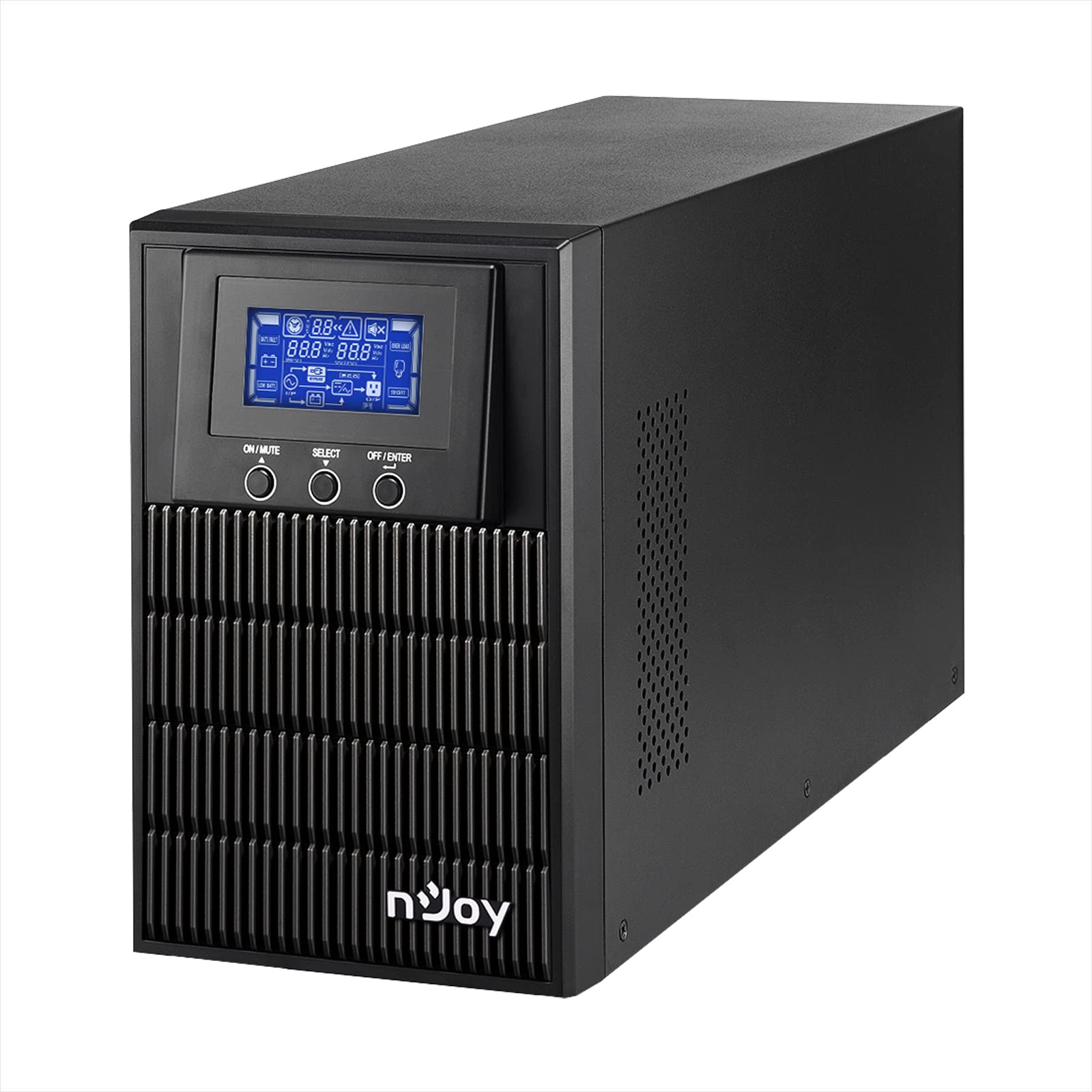
Figure 1: nJoy Aten Pro 1000VA UPS Front View
This image shows the front of the nJoy Aten Pro 1000VA UPS, highlighting its compact tower design and the integrated LCD display panel with control buttons.

Obrázek 2: Klíčové vlastnostiview
This image visually summarizes the main features of the nJoy Aten Pro 1000VA UPS, including its online double-conversion technology, 1000VA/900W capacity, dual 12V@9.0Ah batteries, USB interface, LCD display, pure sine wave output, and SNMP capability.
2. Bezpečnostní informace
Please read and follow all safety instructions carefully before installing, operating, or maintaining the UPS.
- This UPS is designed for indoor use only.
- Neotevírejte UPS casing. Uvnitř nejsou žádné součásti, které by mohl uživatel opravit. Veškerý servis svěřte kvalifikovanému servisnímu personálu.
- Ujistěte se, že je UPS připojena k řádně uzemněné zásuvce střídavého proudu.
- Neblokujte větrací otvory. Zajistěte dostatečné proudění vzduchu kolem UPS.
- Neumísťujte UPS na přímé sluneční světlo, do blízkosti zdrojů tepla nebo do prostředí s nadměrnou prašností, vlhkostí nebo korozivními látkami.
- Před prováděním jakékoli údržby nebo čištění odpojte UPS od zdroje střídavého proudu.
- Baterie mohou představovat riziko úrazu elektrickým proudem a vysokého zkratového proudu. Dodržujte následující bezpečnostní opatření:
- Sundejte hodinky, prsteny nebo jiné kovové předměty.
- Používejte nástroje s izolovanými rukojeťmi.
- Používejte gumové rukavice a boty.
3. Vlastnosti a komponenty produktu
The nJoy Aten Pro 1000VA UPS is equipped with several features and ports for optimal performance and connectivity.
3.1 Přední panel

Obrázek 3: Přední panelview
This image displays the front panel of the UPS, showing the LCD screen that provides real-time status updates and the three control buttons: ON/MUTE, SELECT, and OFF/ENTER.
- LCD displej: Shows real-time status information such as AC mode, battery mode, charge level, battery level, input voltage, výstupní objemtage, overload, fault, and low battery.
- ON/MUTE Button: Powers on the UPS or mutes the alarm.
- Tlačítko VYBRAT: Navigates through LCD display menus.
- OFF/ENTER Button: Powers off the UPS or confirms selections.
3.2 Zadní panel

Obrázek 4: Připojení na zadním panelu
This image illustrates the rear panel of the UPS, detailing the various connection ports and components, including RS232, Schuko outputs, circuit breaker, intelligent slot, USB, and AC input.
- Rozhraní RS232: Pro sériovou komunikaci s počítačem.
- Schuko Outputs (3): Connect your critical devices here for battery backup and surge protection.
- Jistič: Poskytuje ochranu proti přetížení.
- Intelligent Slot (SNMP): For optional SNMP card for network management.
- USB rozhraní: Pro komunikaci s počítačem přes USB.
- AC vstup: Connect the UPS to the main AC power supply.
4. Pokyny k nastavení
4.1 Vybalení a kontrola
- Carefully unpack the UPS and inspect it for any shipping damage. If any damage is found, do not install the unit and contact your dealer.
- Verify that all accessories are included: UPS unit, USB cable, RS232 cable, and user manual.
4.2 Umístění
- Umístěte UPS do čistého, suchého a teplotně kontrolovaného prostředí.
- Pro správné větrání zajistěte kolem UPS dostatečný volný prostor (alespoň 20 cm).
- Avoid placing the UPS near water or excessive humidity.
4.3 Počáteční nabíjení
- Before initial use, connect the UPS to a standard AC power outlet for at least 4 hours to ensure the batteries are fully charged. This will maximize battery runtime.
4.4 Připojení zařízení
- Connect your computer, monitor, and other critical devices to the Schuko output receptacles on the rear panel of the UPS.
- Do not connect laser printers or strip heaters to the UPS outputs, as these devices can draw significant power and overload the UPS.
- Připojte UPS do elektrické zásuvky pomocí dodaného napájecího kabelu.
4.5 Instalace softwaru (volitelné)
For advanced monitoring and management, install the UPS management software on your computer.

Figure 5: UPS Management Software
This image shows a graphical representation of the UPS management software interface, illustrating its capabilities for monitoring UPS status, scheduling operations, and configuring settings across various operating systems like Mac OS, Linux, and Windows.
- Connect the UPS to your computer using either the USB or RS232 cable.
- Install the provided management software (compatible with Mac OS, Linux, Windows).
- The software allows for:
- Real-time status visualization.
- Scheduling of power on/off and battery tests.
- Comprehensive UPS configuration.
5. Návod k obsluze
5.1 Zapnutí/vypnutí UPS
- Zapnout: Stiskněte a podržte ON/MUTE button until you hear a beep. The UPS will perform a self-test and then enter AC mode.
- Vypnout: Stiskněte a podržte OFF/ENTER button until the UPS powers down.
5.2 Informace na LCD displeji
LCD displej poskytuje důležité informace o stavu UPS. Použijte VYBRAT button to cycle through different display modes.
- AC režim: Indicates the UPS is operating on utility power.
- Režim baterie: Indicates the UPS is operating on battery power (during an outagE).
- Úroveň nabití: Shows the current load percentage.
- Úroveň baterie: Zobrazuje zbývající kapacitu baterie.
- Vstupní objemtage: Current incoming AC voltage.
- Výstupní objemtage: Current outgoing AC voltage.
- Přetížení: Indicates connected equipment exceeds UPS capacity.
- Chyba: Indicates a system error.
- Slabá baterie: Warning that battery power is critically low.
5.3 Eko režim
The Eco Mode feature helps reduce energy consumption. When the input voltage is within the acceptable range, the UPS will bypass the inverter and directly supply power from the utility, increasing energy efficiency. This mode can be configured via the management software.

Figure 6: Key Operational Features
This image highlights three core operational features of the UPS: Pure Sine Wave output for clean power, Zero Transfer Time for seamless power transition, and Eco Mode for energy efficiency.
6. Údržba
6.1 Péče o baterie a jejich výměna
- The UPS uses sealed lead-acid batteries (2 x 12V/9Ah). These batteries are designed for a specific lifespan.
- To maximize battery life, ensure the UPS is always connected to AC power to keep the batteries charged.
- Batteries are user-replaceable by qualified personnel only. Contact NJOY support or a certified technician for battery replacement.
- Staré baterie zlikvidujte správným způsobem v souladu s místními předpisy.
6.2 Čištění
- Před čištěním se ujistěte, že je UPS vypnutá a odpojená od napájení.
- K otření vnější strany UPS použijte měkký, suchý hadřík.
- Nepoužívejte tekuté nebo aerosolové čisticí prostředky.
- Pravidelně čistěte větrací otvory, abyste zabránili hromadění prachu.
7. Řešení problémů
If the UPS is not operating correctly, refer to the following table for common issues and solutions.
| Problém | Možná příčina | Řešení |
|---|---|---|
| UPS se nezapne. | No AC input power; Low battery. | Ensure the power cord is securely connected. Allow the UPS to charge for at least 4 hours. |
| UPS is in battery mode frequently. | Unstable AC input power; High sensitivity setting. | Check the utility power quality. Adjust the UPS input voltage sensitivity via software if necessary. |
| Overload warning on LCD. | Too many devices connected; Connected devices draw too much power. | Disconnect non-essential equipment. Ensure total load does not exceed 900W. |
| Krátká výdrž baterie. | Batteries not fully charged; Batteries reaching end of life. | Allow the UPS to charge for 24 hours. Consider battery replacement if batteries are old. |
| UPS vydává nepřetržitý alarm. | Overload; Battery fault; System fault. | Check LCD for specific error codes. Reduce load. If alarm persists, contact support. |
For issues not listed here, or if problems persist, please contact NJOY customer support.
8. Specifikace
Detailed technical specifications for the nJoy Aten Pro 1000VA UPS.
| Funkce | Specifikace |
|---|---|
| Číslo modelu | PWUP-OL100AP-AZ01B |
| Kapacita | 1000 VA / 900 W |
| Typ UPS | On-line Double Conversion |
| Jmenovitý vstupní objemtage | 110 – 300 VAC |
| Jmenovitý výstupní objemtage | 230 Vac (± 1% in battery mode) |
| Frekvenční rozsah | 40 Hz ~ 70 Hz |
| Výstupní zásuvky | 3x Schuko |
| Doba přenosu (AC na DC) | Nula |
| Doba přepnutí (z měniče do bypassu) | 4 ms |
| Komunikační porty | USB, RS232 (Optional: Smart SNMP card) |
| Provozní teplota | 0 ~ 40 °C |
| Účinnost | až 90 % |
| Typ baterie | 2 x 12V/9Ah Sealed Lead-Acid |
| Rozměry (D x Š x V) | 28.2 x 14.5 x 22 cm |
| Hmotnost | 7 kg |
8.1 Graf běhové doby
The following chart illustrates the approximate battery runtime based on the connected load.
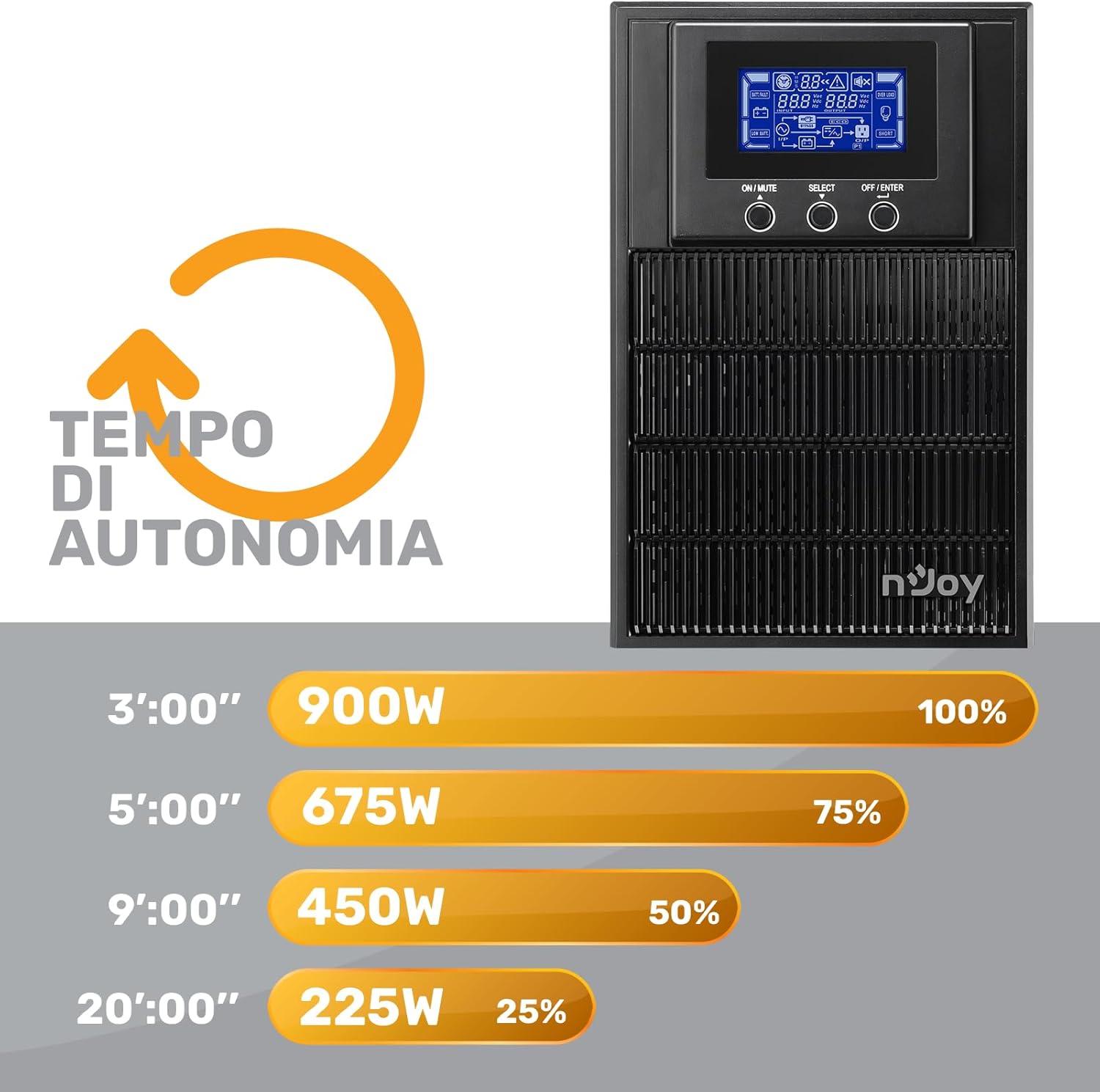
Figure 7: Battery Runtime vs. Load
This graph shows the estimated battery runtime in minutes for the nJoy Aten Pro 1000VA UPS at different load percentages. Za example, at 100% load (900W), the runtime is approximately 3 minutes, while at 25% load (225W), it can last up to 20 minutes.
- 100% Load (900W): Approximately 3 minutes
- 75% Load (675W): Approximately 5 minutes
- 50% Load (450W): Approximately 9 minutes
- 25% Load (225W): Approximately 20 minutes
9. Záruka a podpora
NJOY provides a comprehensive warranty and dedicated customer support for the Aten Pro series.
- Záruční doba: The nJoy Aten Pro UPS comes with a 3-letá záruka. Batteries are covered by a 1-letá záruka.
- Zákaznická podpora: Our professional customer service team is available to provide prompt and quality assistance. If you require help or support before, during, or after your purchase, please do not hesitate to contact NJOY customer service. Refer to your product packaging or the NJOY official webweb pro konkrétní kontaktní údaje.