
1. Konec produktuview
The Itek SIISBE 3.0 is a gaming middle tower PC case designed to combine high-level features with a modern aesthetic. It features a fully perforated front panel for optimal airflow and a tempered glass side panel with a convenient hinged closure, allowing for easy access and showcasing your internal components.
The case comes equipped with three 12 cm ARGB fans: two located at the front and one at the rear. These fans can be controlled via a dedicated button on the front panel or through your motherboard's ARGB software, providing customizable lighting effects and efficient cooling.
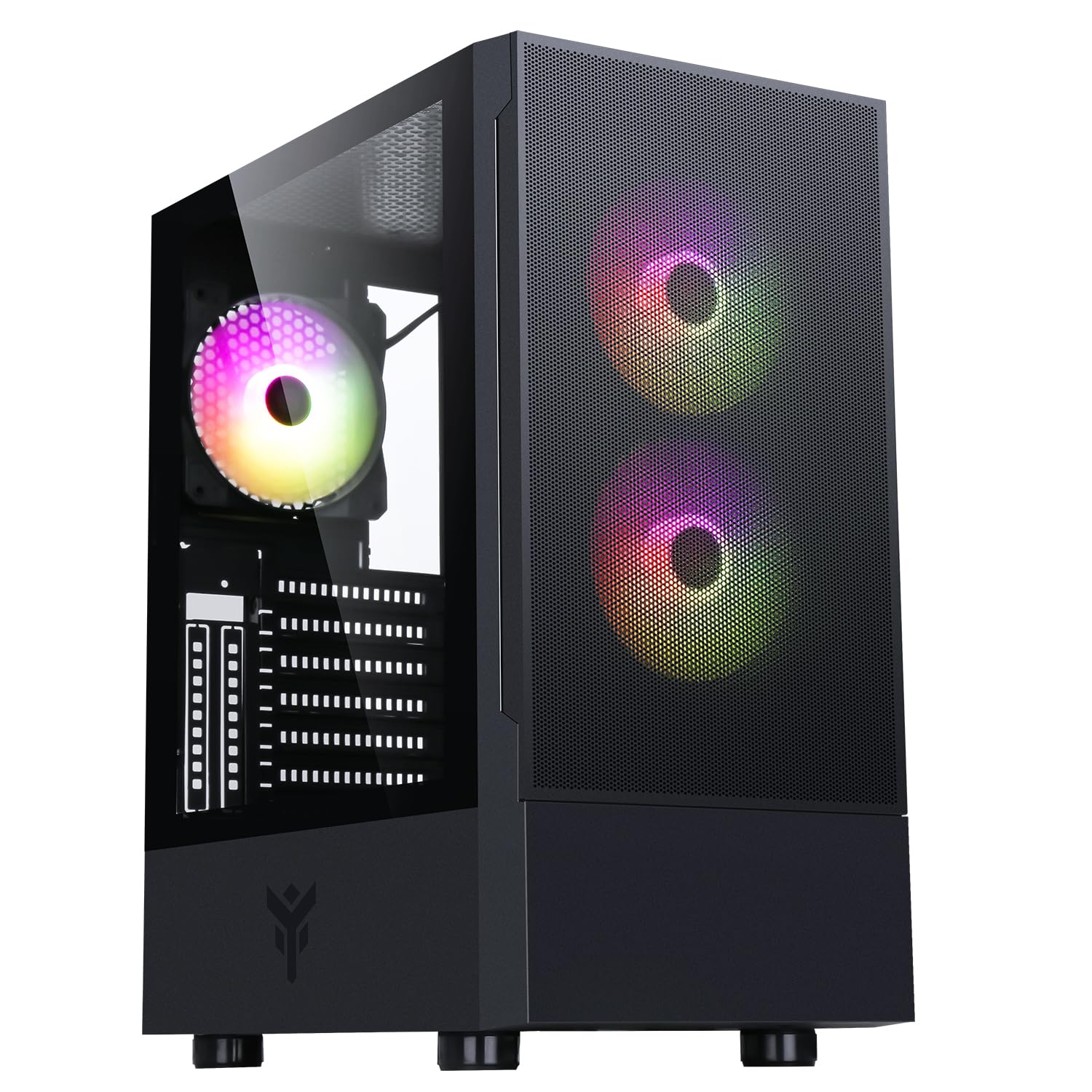
Obrázek 1: Přední strana view of the Itek SIISBE 3.0 Gaming PC Case, showcasing the perforated front panel and tempered glass side panel.
The SIISBE 3.0 supports a wide range of hardware, including ATX, Micro-ATX, and Mini-ITX motherboards. It accommodates graphics cards up to 315 mm in length, CPU coolers up to 160 mm in height, and liquid cooling radiators up to 280 mm. The case also offers 28 mm of space for efficient cable management, ensuring a clean and organized build.
2. Nastavení a instalace
2.1 Příprava případu
- Vybalte krabici a odstraňte veškerý balicí materiál.
- Open the tempered glass side panel by gently pulling it open from the hinge.
- Locate the accessory box inside the case, which contains screws and other mounting hardware.
2.2 Instalace základní desky
- Install the necessary standoffs for your motherboard form factor (ATX, Micro-ATX, or Mini-ITX) onto the motherboard tray.
- Opatrně umístěte základní desku na distanční sloupky a zarovnejte otvory pro šrouby.
- Zajistěte základní desku dodanými šrouby.

Obrázek 2: Vnitřní view of the Itek SIISBE 3.0, highlighting the motherboard mounting area and cable routing options.
2.3 Instalace jednotky napájecího zdroje (PSU)
- Mount the PSU in the dedicated bottom compartment of the case.
- Zajistěte zdroj šrouby ze zadní strany skříně.
2.4 Instalace úložného disku
- Install 2.5-inch SSDs or 3.5-inch HDDs into the designated internal bays. Refer to the case's internal layout for specific mounting points.
- Zajistěte pohony příslušnými šrouby.

Figure 3: Rear internal view of the Itek SIISBE 3.0, showing the motherboard tray, SSD mounting points, and ampprostor pro správu kabelů.
2.5 Instalace grafické karty a rozšiřující karty
- Odstraňte potřebné kryty rozšiřujících slotů ze zadní strany skříně.
- Vložte grafickou kartu nebo jiné rozšiřující karty do slotů PCIe na základní desce.
- Secure the cards with screws. The case supports graphics cards up to 315 mm in length.
2.6 Instalace chladicího systému
- The case includes three 12 cm ARGB fans (two front, one rear). Connect their power and ARGB cables to the motherboard or the integrated fan controller.
- For additional cooling, install extra fans or a liquid cooling radiator (up to 280 mm) in the designated mounting points.
- Install your CPU cooler. The case supports CPU coolers up to 160 mm in height.
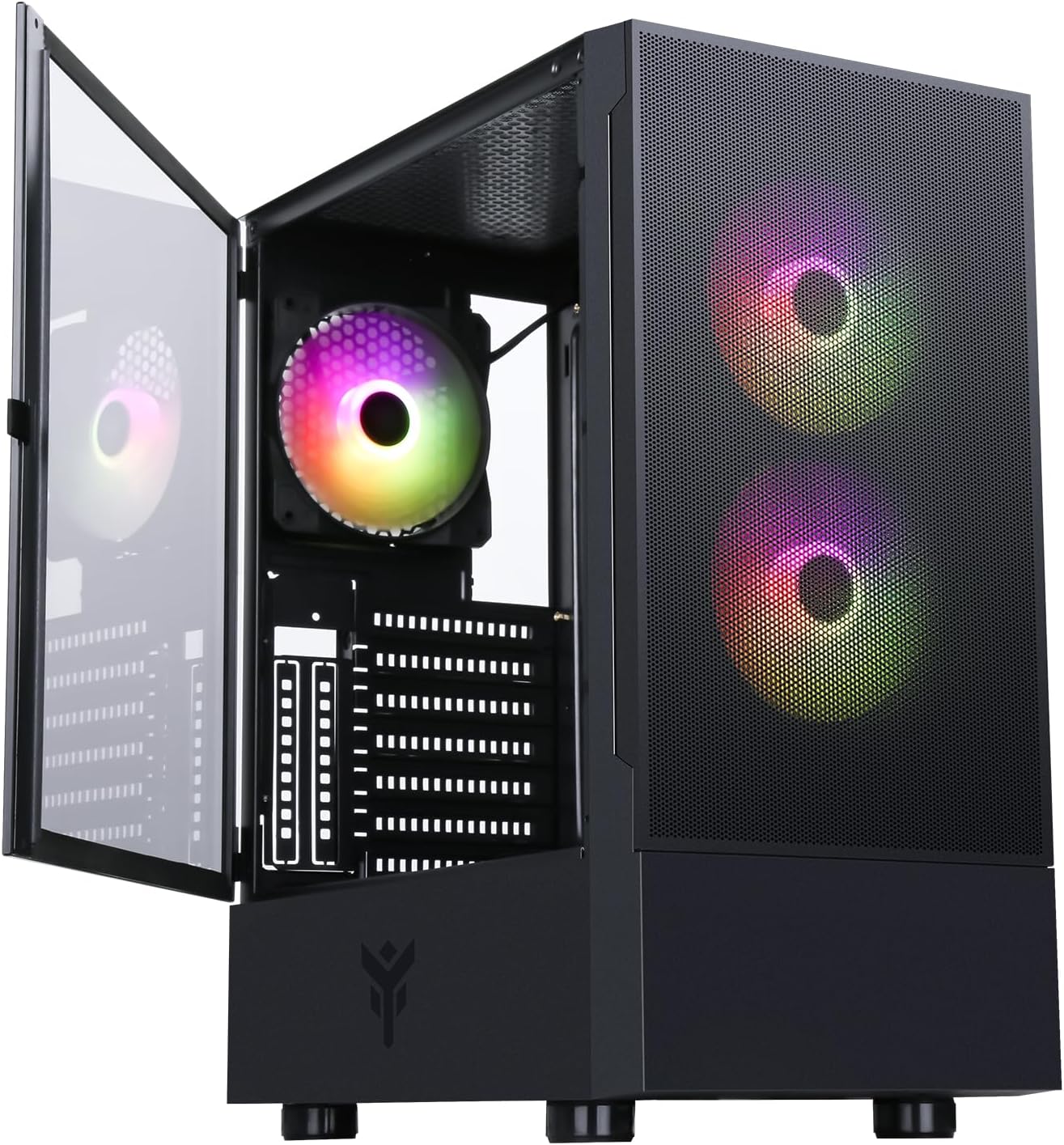
Figure 4: The Itek SIISBE 3.0 with its hinged tempered glass panel open, revealing the pre-installed ARGB fans and internal layout.
2.7 Správa kabelů
- Utilize the 28 mm cable management space behind the motherboard tray to route and organize all power and data cables.
- Use cable ties (not included) to secure cables and maintain optimal airflow.
3. Návod k obsluze
3.1 Zapnutí
- Ensure all components are correctly installed and connected.
- Připojte napájecí kabel k napájecímu zdroji a do zásuvky ve zdi.
- Press the power button located on the top I/O panel of the case to start your system.
3.2 Ovládání ventilátoru ARGB
- The pre-installed ARGB fans can be controlled via the dedicated LED control button on the front panel. Press the button to cycle through various lighting modes and colors.
- Alternatively, if the fans are connected to an ARGB header on your motherboard, you can use the motherboard's proprietary software (e.g., ASUS Aura Sync, MSI Mystic Light, Gigabyte RGB Fusion) to synchronize and customize the lighting effects.
3.3 Přední I/O porty
- The front I/O panel includes USB 3.0 and USB 2.0 ports for connecting peripherals and external storage devices.
- Audio jacks are also available for headphones and microphones.
4. Údržba
4.1 Čištění prachového filtru
- The SIISBE 3.0 case is equipped with dust filters to prevent dust buildup inside. Regularly check and clean these filters.
- Gently remove the dust filters (typically located on the top, front, and/or bottom) and clean them with compressed air or by rinsing them with water. Ensure they are completely dry before re-installing.
4.2 Obecné čištění
- Použijte měkký, damp cloth to wipe down the exterior surfaces of the case, including the tempered glass panel. Avoid abrasive cleaners.
- Pro vnitřní čištění použijte stlačený vzduch k odstranění prachu z ventilátorů, chladičů a dalších součástí. Před čištěním se ujistěte, že je systém vypnutý a odpojený od sítě.
5. Řešení problémů
This section provides general troubleshooting tips for common issues. For more specific problems, consult the manuals for your individual PC components (motherboard, PSU, GPU, etc.) or contact Itek support.
5.1 Systém se nezapne
- Zkontrolujte připojení napájení: Ensure the PSU is properly connected to the wall outlet and the power switch on the PSU is in the 'ON' position. Verify all internal power cables (24-pin ATX, 8-pin CPU, PCIe, SATA) are securely connected to the motherboard and components.
- Konektory na předním panelu: Confirm that the front panel power switch cable is correctly connected to the motherboard's front panel header.
5.2 Fans Not Spinning / ARGB Not Working
- Připojení ventilátoru: Verify that the fan power cables are securely connected to the motherboard fan headers or the integrated fan controller.
- ARGB připojení: Ensure ARGB cables are correctly connected to the motherboard's ARGB header or the case's ARGB controller.
- Software/Button Control: If using the case's LED button, try pressing it to cycle modes. If using motherboard software, ensure it is installed and configured correctly.
5.3 Problémy s přehřátím
- Proud vzduchu: Ensure fans are installed in the correct orientation for optimal airflow (front fans typically intake, rear/top fans exhaust).
- Nahromadění prachu: Vyčistěte prachové filtry a vnitřní součásti podle pokynů v části Údržba.
- Správa kabelů: Improve cable routing to reduce obstructions to airflow.
6. Specifikace
| Funkce | Specifikace |
|---|---|
| Výrobce | ITEK |
| Číslo modelu položky | ITGCASIB30 |
| Značka | Itek |
| Kompatibilita základní desky | ATX, Micro ATX, Mini ITX |
| Typ pouzdra | Střední věž |
| Doporučené použití produktu | Gaming, Professional |
| Barva | Černý |
| Materiál | Tvrzené sklo |
| Typ montáže napájecího zdroje | Spodní montáž |
| Způsob chlazení | Vzduch |
| Název modelu | Case SIISBE 3.0 |
| Velikost ventilátoru | 120 milimetrů |
| Total Expansion Slots | 7 |
| Total USB 2.0 Ports | 2 |
| Total USB 3.0 Ports | 1 |
| Celkový počet portů USB | 4 |
| Vlastnosti produktu | LED Control Button, Dust Filter, Integrated Fan |
| Maximální výška chladiče CPU | 160 milimetrů |
| Number of Internal Bays | 7 |
| Kompatibilní zařízení | ATX Motherboards, Full-size Graphics Cards, Standard Cooling Solutions |
| Počet fanoušků | 3 |
| Světlá barva | RGB |
| Rozměry položky (D x Š x V) | 37.6 D x 37.6 Š x 44.6 V centimetrů |
7. Informace o záruce
Specific warranty details for the Itek SIISBE 3.0 PC Case may vary by region and retailer. Please refer to the warranty card included with your product or visit the official Itek webweb, kde najdete nejpřesnější a nejaktuálnější informace o záruce.
Uschovejte si doklad o koupi (účtenku nebo fakturu), bude potřebný pro případné reklamace.
8. Zákaznická podpora
For technical assistance, product inquiries, or support regarding your Itek SIISBE 3.0 PC Case, please contact Itek customer support through their official channels.
- Oficiální Webmísto: Visit the Itek official webweb s zdrojovými zdroji podpory, častými dotazy a kontaktními informacemi.
- E-mailová podpora: Look for a support email address on the Itek webmísto.
- Telefonická podpora: Check the Itek webweb s regionálními telefonními čísly podpory.
When contacting support, please have your product model (SIISBE 3.0) and item model number (ITGCASIB30) ready to help expedite the process.