
1. Úvod
This manual provides essential information for the installation, operation, and maintenance of your Itek Meshcore 36B Gaming Tower PC Case. Please read this manual thoroughly before beginning assembly to ensure proper setup and safe usage. Keep this manual for future reference.
Bezpečnostní informace
- Před instalací nebo údržbou vždy odpojte napájení všech součástí.
- S tvrzenými skleněnými panely zacházejte opatrně, aby nedošlo k jejich rozbití.
- Avoid exposing the case to extreme temperatures or humidity.
- Udržujte malé části mimo dosah dětí.
2. Obsah balení
Ověřte, zda jsou v balení přítomny všechny komponenty:
- Itek Meshcore 36B PC Case
- 4 x 14cm ARGB Fans (3 pre-installed in front, 1 pre-installed in rear)
- ARGB Fan Hub
- Accessory box (screws, cable ties, standoffs, etc.)
- Uživatelská příručka (tento dokument)
3. Konec produktuview
The Itek Meshcore 36B is an ATX gaming tower designed for optimal airflow, ease of assembly, and modern aesthetics. It features a perforated mesh front panel, four pre-installed ARGB fans, and a tempered glass side panel.
Klíčové vlastnosti
- Excellent Airflow: Full mesh front panel and four pre-installed ARGB fans (3 front, 1 rear) for efficient cooling.
- Boční panel z tvrzeného skla: Poskytuje jasné view of internal components and RGB lighting.
- Moderní konektivita: Includes 2x USB 3.0 ports and 1x USB-C port on the front/side I/O panel.
- Organizovaný interiér: Separate compartment for the power supply unit (PSU) and storage drives (HDD/SSD) for clean cable management.
- Široká kompatibilita: Supports ATX motherboards, graphics cards up to 420mm, CPU coolers up to 174mm, and liquid cooling radiators up to 360mm.
Identifikace součásti

Obrázek 3.1: Přední strana view of the Itek Meshcore 36B PC case, showcasing the mesh front panel and three 14cm ARGB fans.

Figure 3.2: Angled front-side view, highlighting the tempered glass panel and front I/O ports (USB 3.0, Type-C).

Obrázek 3.3: Zadní strana view, illustrating the rear exhaust fan and expansion slots.

Obrázek 3.4: Interiér view from the tempered glass side, detailing the motherboard tray and component layout.
4. Nastavení a instalace
Follow these steps for assembling your PC components within the Itek Meshcore 36B case.
4.1 Příprava případu
- Umístěte pouzdro na stabilní, rovný povrch.
- Carefully remove the tempered glass side panel by unscrewing the thumb screws at the rear and gently pulling the panel away. Set it aside on a soft, non-abrasive surface.
- Remove the solid metal side panel on the opposite side to access the cable management area.
4.2 Instalace základní desky
- Nainstalujte kryt I/O (pokud není předem připojen k základní desce) do zadního otvoru skříně.
- Align the motherboard with the standoffs in the case. Ensure the standoffs match your ATX motherboard's screw holes.
- Zajistěte základní desku pomocí dodaných šroubů. Nepřetahujte je.
4.3 Instalace jednotky napájecího zdroje (PSU)
- Vyhledejte přihrádku napájecího zdroje ve spodní zadní části skříně.
- Slide the PSU into the compartment from the rear of the case, ensuring the fan faces downwards (if the case has a bottom vent) or upwards.
- Zajistěte zdroj šrouby ze zadní strany skříně.
4.4 Instalace úložného disku (HDD/SSD)
The case features dedicated bays for 3.5" HDDs and 2.5" SSDs, typically located in the PSU shroud area or behind the motherboard tray.
- For 3.5" HDDs: Slide the drive into the designated drive cage and secure with screws.
- For 2.5" SSDs: Mount the SSD onto the designated brackets, usually found behind the motherboard tray, and secure with screws.
4.5 Instalace grafické karty a rozšiřující karty
- Odstraňte potřebné kryty rozšiřujících slotů ze zadní strany skříně.
- Vložte grafickou kartu nebo jinou rozšiřující kartu do příslušného slotu PCIe na základní desce.
- Secure the card with the provided screw or latch mechanism.
4.6 Správa kabelů
The Meshcore 36B offers 21mm of cable management space behind the motherboard tray.
- Route all necessary cables (PSU, data, front panel) through the cutouts in the motherboard tray.
- Use the included cable ties to bundle and secure cables, ensuring they do not obstruct airflow or interfere with side panel closure.
- Connect the front panel connectors (USB 3.0, USB-C, audio, power/reset switches, LED indicators) to the corresponding headers on your motherboard.
- Connect the ARGB fan hub to your motherboard's ARGB header (if available) for software control, or use the integrated controller for basic lighting effects. Ensure all fans are connected to the hub.
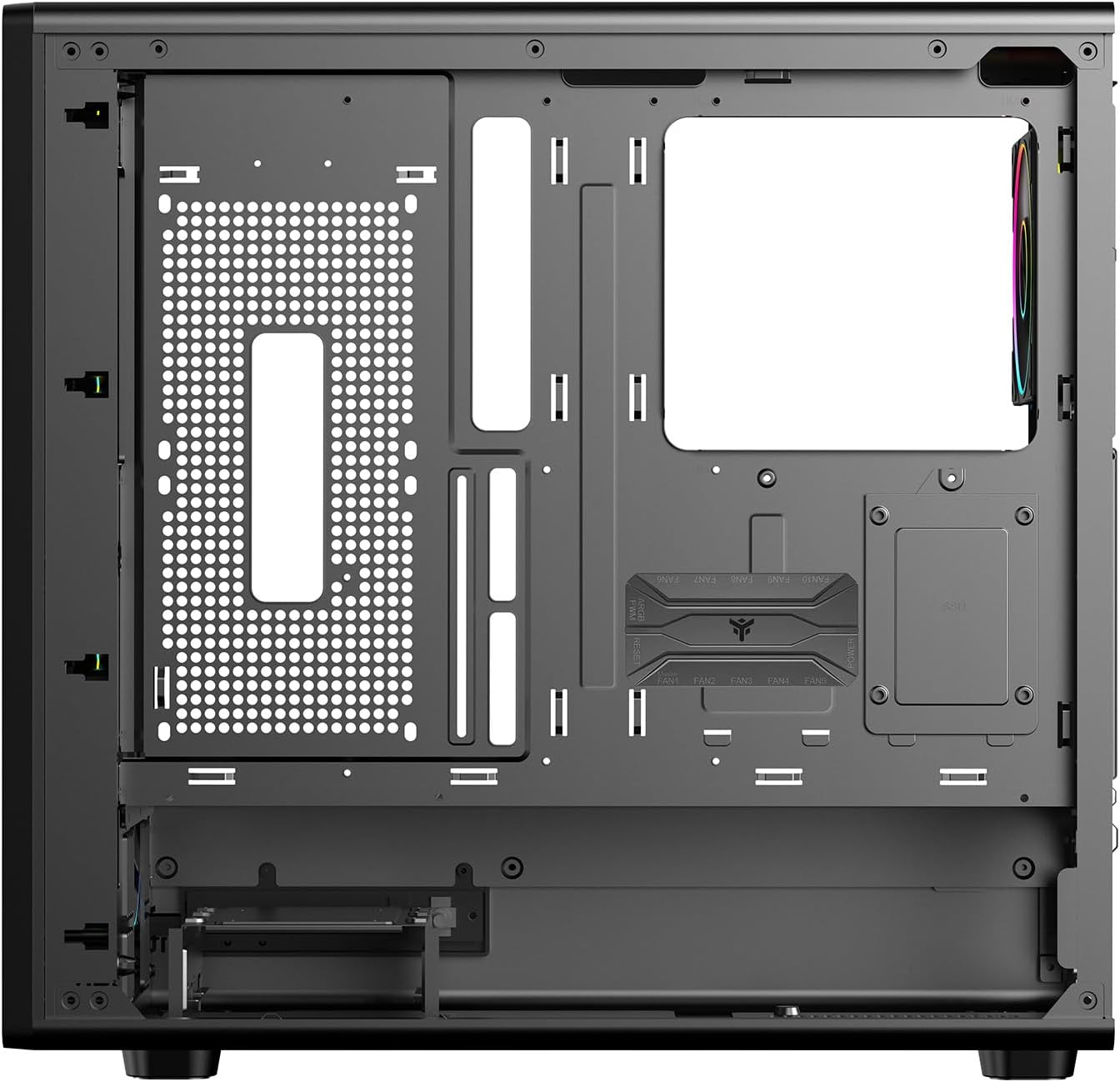
Obrázek 4.1: Interiér view from the backplate side, illustrating cable management options.
5. Návod k obsluze
5.1 Zapnutí
- Once all components are installed and cables are connected, replace both side panels.
- Připojte monitor, klávesnici, myš a další periferie.
- Připojte napájecí kabel k napájecímu zdroji a do zásuvky ve zdi.
- Přepněte vypínač na zdroji do polohy „ON“.
- Press the power button on the front panel of the case to start your computer.
5.2 Front Panel Connectivity
The front/side I/O panel provides convenient access to:
- 2 porty USB 3.0: Pro vysokorychlostní přenos dat s kompatibilními zařízeními.
- 1 x USB-C Port: For modern USB Type-C devices.
- Audio konektory: Pro sluchátka a mikrofony.
- Vypínač: Zapnutí/vypnutí systému.
- Resetovací tlačítko: Chcete-li restartovat systém.
- LED indikátory: For power and HDD activity.
5.3 Ovládání osvětlení ARGB
The pre-installed ARGB fans are connected to an ARGB hub. Lighting can be controlled in two ways:
- Ovládání softwaru základní desky: If the ARGB hub is connected to a compatible 3-pin 5V ARGB header on your motherboard, you can use your motherboard's RGB software (e.g., ASUS Aura Sync, MSI Mystic Light, Gigabyte RGB Fusion) to synchronize and customize lighting effects.
- Integrated Controller: If not connected to a motherboard ARGB header, the hub typically has a button (often labeled 'LED' or 'RGB') on the case's front I/O panel or directly on the hub itself to cycle through pre-set lighting modes and colors.
6. Údržba
Pravidelná údržba pomáhá zajistit optimální výkon a dlouhou životnost vaší počítačové skříně.
6.1 Čištění prachového filtru
The Meshcore 36B includes dust filters to prevent dust buildup inside the case. These filters should be cleaned periodically.
- Locate and remove the dust filters (typically on the top, front, and/or bottom of the case).
- Filtry čistěte stlačeným vzduchem, měkkým kartáčem nebo opláchnutím vodou (před opětovnou instalací se ujistěte, že jsou zcela suché).
- Znovu nainstalujte prachové filtry.
6.2 Obecné čištění
- Použijte měkký, damp hadříkem k otření vnějších povrchů. Nepoužívejte abrazivní čisticí prostředky.
- Na tvrzené sklo použijte čistič skla a hadřík z mikrovlákna, abyste zabránili šmouhám.
- Pravidelně používejte stlačený vzduch k odstranění prachu z vnitřních součástí a lopatek ventilátoru.
7. Řešení problémů
If you encounter issues with your PC case, refer to the following common problems and solutions.
7.1 Ventilátory se netočí / ARGB se nerozsvítí
- Zkontrolujte připojení napájení: Ensure all fans are properly connected to the ARGB hub, and the hub itself is receiving power from the PSU (usually via a SATA power connector).
- Check ARGB Signal: If using motherboard software control, verify the ARGB hub is connected to a 3-pin 5V ARGB header on the motherboard and that the software is correctly configured.
- Try Integrated Controller: If motherboard control fails, try using the physical button on the case or hub to cycle through lighting modes.
7.2 Front Panel USB/Audio Ports Not Working
- Verify Motherboard Connections: Ensure the USB 3.0, USB-C, and audio headers from the front panel are securely connected to the correct pins on your motherboard. Refer to your motherboard manual for header locations.
- Zkontrolujte ovladače: Ensure you have installed the latest chipset and audio drivers for your motherboard.
7.3 Přehřátí systému
- Clean Dust Filters: Ensure dust filters are clean and not obstructing airflow.
- Check Fan Orientation: Verify that fans are installed with correct airflow direction (front fans typically intake, rear/top fans exhaust).
- Improve Cable Management: Poor cable management can restrict airflow. Re-route cables for better air circulation.
8. Specifikace
| Funkce | Specifikace |
|---|---|
| Značka | Itek |
| Název modelu | Itek Case MESHCORE 36B |
| Číslo modelu | ITGCAMC36B |
| Typ pouzdra | Věž |
| Kompatibilita základní desky | ATX |
| Materiál | Kov, plast, tvrzené sklo |
| Barva | Černý |
| Způsob chlazení | Vzduch |
| Předinstalované ventilátory | 4 x 14cm ARGB Fans (3 Front, 1 Rear) |
| Přední I / O porty | 2 x USB 3.0, 1 x USB-C |
| Maximální délka GPU | 420 mm |
| Maximální výška chladiče CPU | 174 mm |
| Podpora kapalného chlazení | Až 360 mm |
| Prostor pro správu kabelů | 21 mm |
| Další funkce | Dust Filter, Perforated Front, ARGB Lighting, Integrated Fan |
9. Záruka a podpora
9.1 Záruka na produkt
The Itek Meshcore 36B PC Case comes with a Záruka 24 měsíců from the date of purchase. This warranty covers manufacturing defects and faulty components under normal use. It does not cover damage caused by misuse, accidents, unauthorized modifications, or improper installation.
9.2 Technická podpora
For technical assistance, troubleshooting beyond this manual, or warranty claims, please contact Itek customer support through their official website or the retailer where the product was purchased. Please have your product model number (ITGCAMC36B) and proof of purchase ready when contacting support.


