
Itek ITMC30V201FHD
Uživatelská příručka k 30palcovému zakřivenému monitoru iTek GGC
Model: ITMC30V201FHD
Vítejte
Thank you for choosing the iTek GGC 30-inch Curved Monitor. This manual provides essential information for setting up, operating, and maintaining your new monitor. Please read it thoroughly before use to ensure optimal performance and safety.
Důležité bezpečnostní pokyny
To prevent damage and ensure safe operation, please observe the following precautions:
- Nevystavujte monitor dešti, vlhkosti ani extrémním teplotám.
- Zajistěte dostatečné větrání kolem monitoru. Neblokujte větrací otvory.
- Používejte pouze napájecí adaptér dodaný s monitorem.
- Na napájecí kabel nepokládejte těžké předměty.
- Pokud monitor nebudete delší dobu používat, odpojte napájecí kabel ze zásuvky.
- Nepokoušejte se monitor opravovat sami. Veškerý servis svěřte kvalifikovanému personálu.
- Clean the monitor screen and casinměkkým, suchým hadříkem. Nepoužívejte abrazivní čisticí prostředky ani rozpouštědla.
Obsah balení
Zkontrolujte prosím balení, zda neobsahuje následující položky:
- iTek GGC 30-inch Curved Monitor
- Stojan na monitor (základna a krk)
- Napájecí adaptér a kabel
- Kabel DisplayPort
- HDMI kabel
- Uživatelská příručka
- Šrouby pro montáž stojanu
Konec produktuview
The iTek GGC 30-inch Curved Monitor is designed for an immersive viewing experience, ideal for gaming and professional use. It features a WFHD (2560x1080) resolution, a high 200Hz refresh rate, and a rapid 1ms MPRT response time.

Key Performance Highlights
- 200Hz Refresh Rate & AMD FreeSync Technology: Experience ultra-smooth visuals and tear-free gaming with a high refresh rate and adaptive sync technology.

Figure 2: 200Hz Refresh Rate and AMD FreeSync Technology in action. - Flicker-Free & Low Blue Light: Designed to reduce eye strain during prolonged use, providing a more comfortable viewzkušenosti.

Figure 3: Flicker-Free and Low Blue Light features for eye comfort. - 1 ms doba odezvy MPRT: Minimizes motion blur and ghosting, crucial for fast-paced games and action sequences.

Figure 4: Rapid Refresh Rate and Response Time for smooth visuals. - Zakřivený displej 1800R: The immersive curvature brings the edges of the screen closer to your field of view, enhancing depth perception and reducing distortion.

Figure 5: 1800R Curved Display for an immersive experience.
Nastavení
Sestavení stojanu
- Opatrně vyjměte komponenty monitoru a stojanu z obalu.
- Attach the stand neck to the monitor panel using the provided screws. Ensure it clicks securely into place or is fastened tightly.
- Připevněte základnu stojanu k hrdlu stojanu a zajistěte ji pomocí šroubu s křídlovou hlavou nebo šroubů zespodu.
- Sestavený monitor umístěte na stabilní, rovný povrch.
Připojení monitoru
The iTek GGC monitor offers multiple connectivity options for various devices:
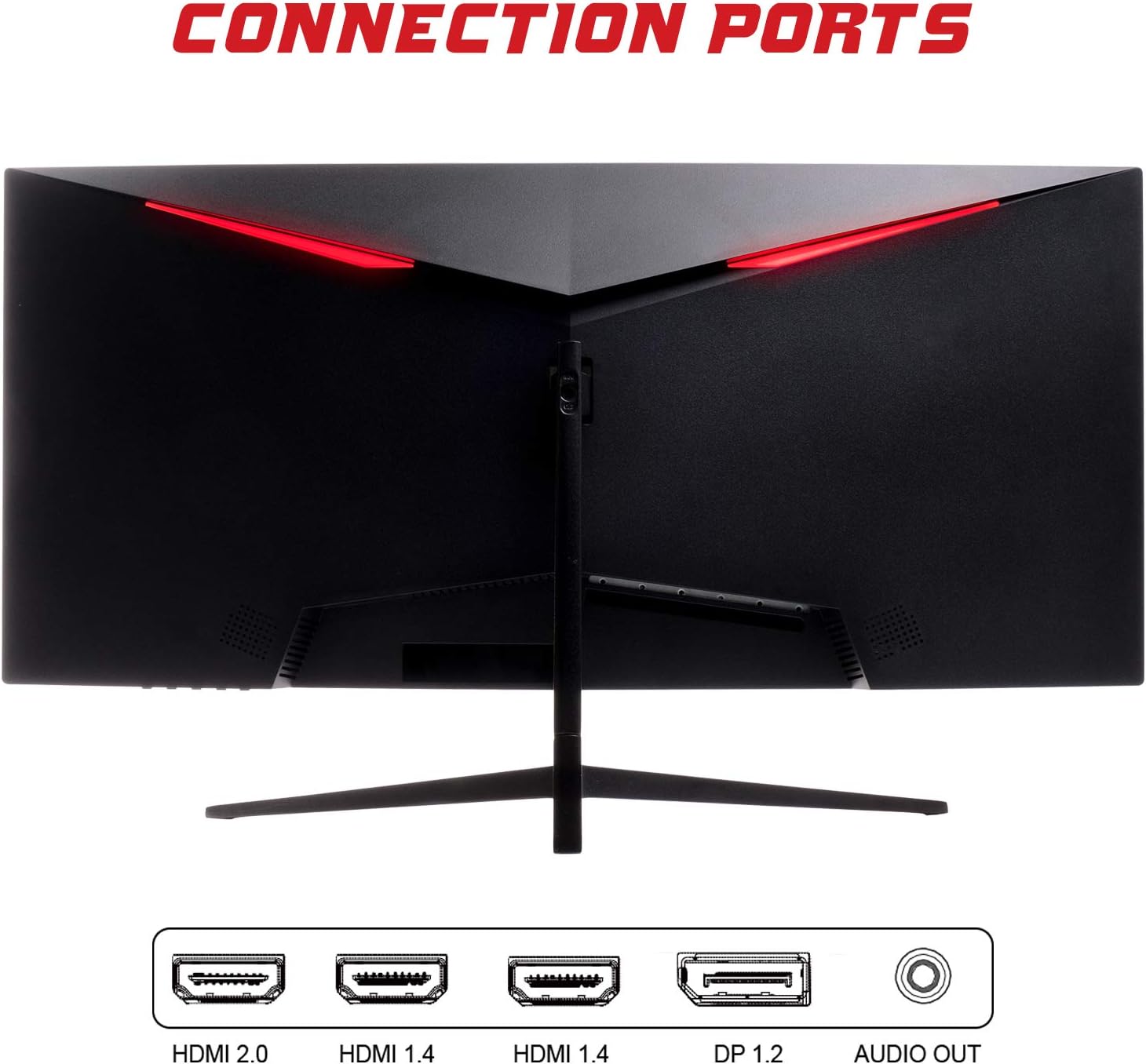
- DisplayPort (DP 1.2): For high-resolution and high-refresh-rate connections to your PC.
- HDMI (HDMI 2.0, HDMI 1.4 x2): Connect to PCs, gaming consoles, and other multimedia devices. HDMI 2.0 supports higher refresh rates at certain resolutions.
- Audio výstup: Připojte externí reproduktory nebo sluchátka.
Po připojení video kabelu připojte napájecí adaptér k monitoru a poté do elektrické zásuvky.
Obsluha monitoru
Zapnutí/vypnutí
Stisknutím tlačítka napájení, které se obvykle nachází na spodní nebo zadní straně monitoru, jej zapnete nebo vypnete. Kontrolka napájení se rozsvítí, když je monitor zapnutý.
Nabídka na obrazovce (OSD).
The OSD menu allows you to adjust various monitor settings. Use the buttons on the monitor (typically on the back or bottom right) to navigate the menu.
- Nastavení obrazu: Upravte jas, kontrast, ostrost a gamu.
- Nastavení barev: Upravte teplotu barev, odstín a sytost.
- Výběr vstupu: Ručně přepínejte mezi vstupy DisplayPort a HDMI.
- Zvuk: Upravte hlasitost zvukového výstupu.
- Nastavení systému: Access language, OSD timeout, and reset options.
- Herní vlastnosti: Enable/disable FreeSync, adjust response time overdrive, and activate crosshair overlays if available.
Údržba
Správná péče zajistí dlouhou životnost vašeho monitoru:
- Před čištěním vždy vypněte monitor a odpojte napájecí kabel.
- K jemnému otření obrazovky použijte měkký hadřík, který nepouští vlákna. V případě odolných skvrn lehceampOtřete hadřík vodou nebo jemným, neabrazivním čističem obrazovek.
- Vyčistěte monitor casinměkkým, suchým hadříkem.
- Avoid spraying liquids directly onto the screen or casing.
- Do not use benzene, thinner, ammonia-based cleaners, or abrasive materials.
Odstraňování problémů
If you encounter issues with your monitor, please refer to the following table for common problems and solutions:
| Problém | Možné řešení |
|---|---|
| Žádná síla | Ensure the power cable is securely connected to the monitor and the power outlet. Check if the power outlet is working. |
| Žádný signál / Prázdná obrazovka | Verify the video cable (DisplayPort or HDMI) is firmly connected to both the monitor and your computer. Select the correct input source via the OSD menu. Ensure your computer is powered on and not in sleep mode. |
| Blikání nebo nestabilita obrazu | Check the video cable connection. Try a different cable or port. Ensure your graphics card drivers are up to date. Adjust the refresh rate in your computer's display settings. |
| Poor image quality (blurry, distorted colors) | Adjust brightness, contrast, and color settings in the OSD menu. Ensure the display resolution on your computer matches the monitor's native resolution (2560x1080). |
| Nezní žádný zvuk z audio výstupu | Check the audio cable connection to your speakers/headphones. Verify the volume setting in the OSD menu and on your computer. Ensure the correct audio output device is selected in your computer's sound settings. |
Technické specifikace
| Funkce | Specifikace |
|---|---|
| Značka | Itek |
| Model | ITMC30V201FHD |
| Velikost obrazovky | 30 palce |
| Typ panelu | VA |
| Zakřivení | R1800 |
| Rezoluce | 2560 x 1080 (WFHD) |
| Poměr stran | 21:9 |
| Obnovovací frekvence | 200 Hz |
| Doba odezvy | 1 ms MPRT |
| Jas | 350 cd/m² |
| Kontrastní poměr | 3000:1 |
| Viewúhel | 178° (horizontálně/vertikálně) |
| Konektivita | 1x DisplayPort 1.2, 1x HDMI 2.0, 2x HDMI 1.4, Audio Out |
| Speciální funkce | HDR Ready, FreeSync, Low Blue Light, Flicker Free, VESA Mountable |
| Rozměry produktu (se stojanem) | 70.68 x 40.89 x 18.48 cm |
| Hmotnost | 6.9 kg |
Energetická účinnost

For detailed energy consumption information and product registration, please refer to the official EPREL database:
Záruka a podpora
Your iTek GGC monitor is backed by a manufacturer's warranty. Please retain your proof of purchase for warranty claims.
- Zaručená podpora produktů: This product is guaranteed to have support available until at least January 1, 2031.
- For technical support, warranty inquiries, or service requests, please contact iTek customer service through their official webnebo kontaktní informace poskytnuté při nákupu.
Ask a question about this manual
Ask about setup, troubleshooting, compatibility, parts, safety, or missing instructions. Manuals+ will review the question and use this page’s manual context to help answer it.