
Zavedení
Děkuji za nákupasing the 2BOOM Journey BX510R Bluetooth Wireless Boombox Stereo Speaker. This manual provides essential information for setting up, operating, and maintaining your device. Please read these instructions carefully before use to ensure proper function and to maximize your listening experience.
Vlastnosti produktu
- Bezdrátové připojení Bluetooth
- Integrated FM Radio
- Dual 4-inch Sub-Woofers for enhanced bass
- Dobíjecí baterie pro přenosné použití
- Splash-proof design for outdoor durability
- Durable metal grill and rubberized exterior
- Multiple input options: USB, TF (Micro SD) card, AUX In
- Pohodlná rukojeť
Konec produktuview
Familiarize yourself with the various components and controls of your 2BOOM Journey BX510R speaker.

Obrázek 1: Celkově view of the 2BOOM Journey BX510R speaker highlighting key features like splash-proof design and durable metal grill.

Obrázek 2: Top panel controls and physical features. This image shows the layout of the control buttons: Previous, Play/Pause, Next, Volume -/+, and Mode. It also indicates the rubberized exterior, metal grills, and the carry handle.
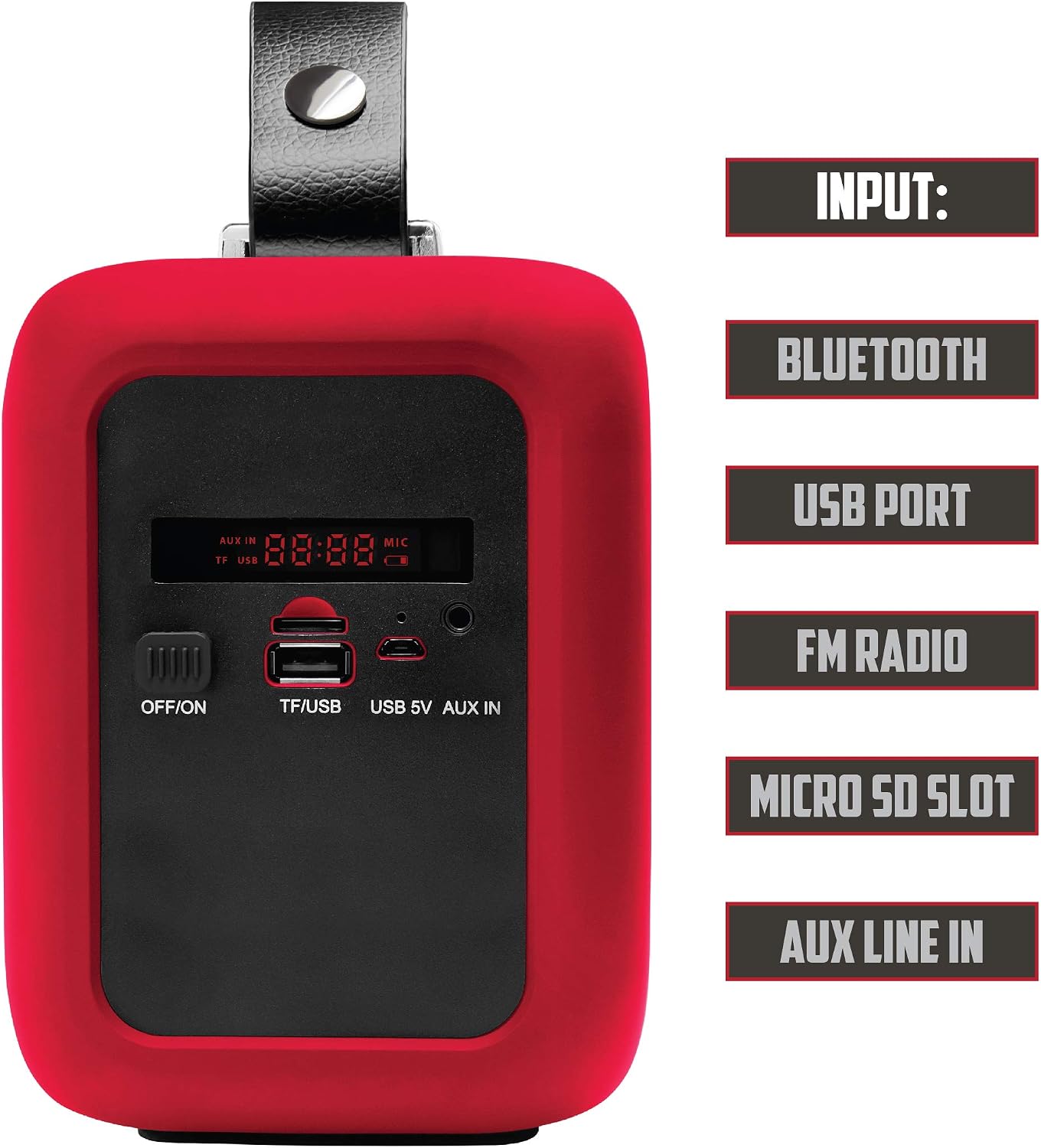
Obrázek 3: Side panel inputs. This image details the various input ports: OFF/ON switch, TF/USB slot for Micro SD cards and USB drives, USB 5V charging port, and AUX IN port. The digital display is also visible.
Nastavení
1. Nabíjení reproduktoru
- Locate the USB 5V charging port on the side panel (refer to Figure 3).
- Connect the provided USB charging cable to the speaker's USB 5V port.
- Zapojte druhý konec kabelu USB do kompatibilního napájecího adaptéru USB (není součástí balení) nebo do portu USB počítače.
- The charging indicator (if available) will illuminate during charging and turn off or change color when fully charged.
- Pro optimální výdrž baterie reproduktor před prvním použitím plně nabijte.
2. Zapnutí/vypnutí
- To power on, slide the OFF/ON switch (refer to Figure 3) to the 'ON' position. The speaker will emit an audible tone and the display will light up.
- To power off, slide the OFF/ON switch to the 'OFF' position.
Návod k obsluze
1. Režim Bluetooth
- Power on the speaker. It will automatically enter Bluetooth pairing mode, indicated by a flashing Bluetooth icon on the display or an audible prompt.
- Na svém mobilním zařízení (chytrém telefonu, tabletu atd.) povolte Bluetooth a vyhledejte dostupná zařízení.
- Select "2BOOM Journey" from the list of devices.
- Once paired, the speaker will confirm with an audible tone, and the Bluetooth icon on the display will stop flashing.
- Nyní můžete přehrávat zvuk ze zařízení přes reproduktor.
- Use the Play/Pause button (Figure 2) to control playback.
- Use the Previous/Next buttons (Figure 2) to skip tracks.
2. Režim FM rádia
- Press the 'MODE' button (Figure 2) repeatedly until "FM" appears on the display.
- Pro automatické prohledávání a ukládání dostupných FM stanic stiskněte a podržte tlačítko „Přehrát/Pozastavit“. Reproduktor stanice automaticky prohledá a uloží.
- Use the 'Previous' and 'Next' buttons (Figure 2) to navigate between saved stations.
3. Přehrávání z USB/TF karty
- Insert a USB flash drive or a TF (Micro SD) card into the respective port on the side panel (Figure 3).
- Reproduktor se automaticky přepne do režimu USB nebo TF karty a začne přehrávat zvuk files. Pokud ne, stiskněte tlačítko „MODE“ pro výběr správného vstupu.
- Use the Play/Pause button (Figure 2) to control playback.
- Use the Previous/Next buttons (Figure 2) to skip tracks.
4. Režim AUX vstupu
- Connect one end of a 3.5mm audio cable (not included) to the AUX IN port on the speaker (Figure 3).
- Připojte druhý konec audio kabelu do konektoru pro sluchátka nebo audio výstupu vašeho externího zařízení.
- Press the 'MODE' button (Figure 2) repeatedly until "AUX" appears on the display.
- Audio will now play from your external device through the speaker. Control playback from your external device.
5. Ovládání hlasitosti
- Press the 'Volume -' button (Figure 2) to decrease the volume.
- Press the 'Volume +' button (Figure 2) to increase the volume.
Údržba
- Čištění: K čištění vnější strany reproduktoru používejte měkký, suchý hadřík. Nepoužívejte abrazivní čisticí prostředky ani rozpouštědla.
- Skladování: Pokud reproduktor delší dobu nepoužíváte, skladujte jej na chladném a suchém místě mimo dosah přímého slunečního záření a extrémních teplot.
- Péče o baterie: Chcete-li prodloužit životnost baterie, vyvarujte se častého úplného vybíjení. Reproduktor pravidelně nabíjejte, i když jej nepoužíváte neustále.
- Vystavení vodě: While the speaker is splash-proof, do not submerge it in water or expose it to heavy rain. Ensure all port covers (if present) are securely closed when near water.
Odstraňování problémů
| Problém | Řešení |
|---|---|
| Reproduktor se nezapne. | Ensure the battery is charged. Connect the speaker to a power source using the USB charging cable. Check the ON/OFF switch position. |
| Žádný zvuk. | Increase the volume on both the speaker and your connected device. Ensure the correct input mode (Bluetooth, FM, USB, AUX) is selected. Check cable connections for AUX mode. |
| Nelze spárovat přes Bluetooth. | Ensure the speaker is in Bluetooth pairing mode (flashing indicator). Make sure Bluetooth is enabled on your device and it's within 32.8ft (10m) range. Try unpairing and re-pairing. Turn off and on both devices. |
| Příjem FM rádia je špatný. | Move the speaker to a location with better signal reception. Extend any external antenna if available (not explicitly mentioned for this model, but a general tip). |
| USB/TF karta nepřehrává. | Ensure the card/drive is inserted correctly. Check that the audio files are in a compatible format (e.g., MP3). Press the 'MODE' button to select the correct input. |
Specifikace

Obrázek 4: Visual representation of the speaker's technical specifications.
| Funkce | Detail |
|---|---|
| Model | BX510R |
| Verze Bluetooth | V2.1 |
| Frekvenční rozsah | 90Hz - 20KHz |
| Vzdálenost Bluetooth | Až 32.8 stop (10 metrů) |
| Jednotka řidiče | 2 x 3 palce |
| Průměr subwooferu | 4 palce |
| Kapacita baterie | 1200 XNUMX mAh |
| svtage | AC 100-240V / DC 5V 1.3A |
| Výstup reproduktoru | 2 x 3.5 W (RMS) |
| Maximální výstupní výkon reproduktoru | 120 XNUMX wattů (špička) |
| Technologie připojení | Bluetooth, USB |
| Zdroj napájení | Baterie |
Bezpečnostní informace
- Nevystavujte reproduktor extrémním teplotám, přímému slunečnímu záření ani vysoké vlhkosti.
- Vyvarujte se pádu reproduktoru nebo jej nevystavujte silným nárazům.
- Nepokoušejte se reproduktor rozebírat ani upravovat. Zrušíte tím platnost záruky a můžete způsobit poškození nebo zranění.
- Uchovávejte reproduktor mimo dosah zdravotnických zařízení, mohlo by dojít k jejich narušení.
- Dispose of the battery according to local regulations. Do not dispose of batteries in fire.
- Používejte pouze specifikovaný nabíjecí objemtage (DC 5V 1.3A).
Záruka a podpora
Specific warranty information for the 2BOOM Journey BX510R is not provided in this manual. Please refer to the product packaging or the retailer where you purchased the device for warranty details.
For technical support or further assistance, please contact 2BOOM customer service through their official webnebo kontaktní informace poskytnuté při nákupu.