
Zavedení
This manual provides instructions for the Easytry123 replacement remote control, model Easytry4921. This remote is designed to be compatible with various Saba LED and LCD HDTV models, including LED26V11, SBV1943H, SBV2243H, SCB1909W, SCB1910VX, LED32PV412, and S19104DVD. Please read this manual carefully before use to ensure proper operation.
Důležitá poznámka:
- This is a replacement remote control. Some advanced functions of your original TV remote may not be supported.
- Ensure your TV model is listed in the compatible models for full functionality.
- Batteries are not included with this remote control.
Nastavení
1. Instalace baterie
Dálkový ovladač vyžaduje k provozu dvě (2) baterie typu AAA. Pro instalaci baterií postupujte takto:
- Najděte kryt prostoru pro baterie na zadní straně dálkového ovladače.
- Stiskněte jazýček a posuňte kryt dolů, abyste otevřeli přihrádku.
- Vložte dvě baterie typu AAA a ujistěte se, že kladný (+) a záporný (-) pól správně odpovídají označením uvnitř přihrádky. Nesprávná instalace může vést k nefunkčnosti dálkového ovladače.
- Zasuňte kryt přihrádky na baterie zpět na místo, dokud bezpečně nezacvakne.
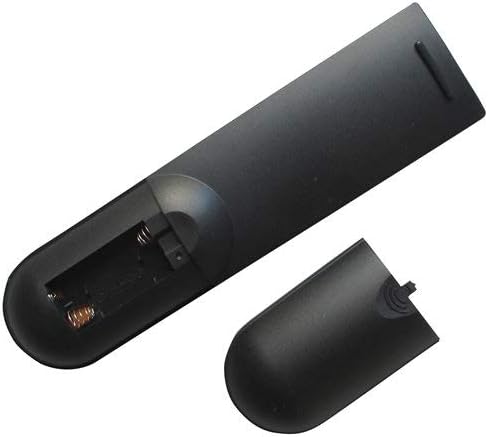
Image: Back of the remote control with the battery cover removed, revealing the battery compartment. This shows where to insert the AAA batteries.

Image: Back of the remote control with the battery cover partially removed, illustrating the correct orientation for battery insertion.
After installing the batteries, the remote control is ready for use. No programming is typically required for this replacement remote.
Návod k obsluze
This remote control operates using infrared (IR) technology. Ensure there is a clear line of sight between the remote control and the TV's IR receiver for optimal performance.
Základní funkce:
- Vypínač: Zapíná nebo vypíná televizor.
- Kanál nahoru/dolů: Změní televizní kanál.
- Zvýšení/Snížení hlasitosti: Upravuje hlasitost zvuku televizoru.
- Tlačítko ztlumení: Ztlumí nebo zapne zvuk televizoru.
- Tlačítko Vstup/Zdroj: Cyklicky prochází dostupné vstupní zdroje (např. HDMI 1, AV, komponentní).
- Číselná tlačítka (0-9): Přímý výběr televizních kanálů.
- Tlačítko nabídky: Accesses the TV's on-screen menu.
- Navigation Buttons (Up, Down, Left, Right, OK/Enter): Používá se k navigaci v nabídkách televizoru a potvrzování výběrů.
Refer to your television's original user manual for specific functions and menu navigation details, as these may vary by TV model.
Údržba
Čištění dálkového ovladače
K čištění dálkového ovladače použijte měkký, suchý hadřík. V případě odolných nečistot lehceampen the cloth with water or a mild, non-abrasive cleaner. Do not use harsh chemicals or immerse the remote control in water.
Výměna baterie
Replace the batteries when the remote control's response becomes sluggish or stops working. Always replace both batteries at the same time with new AAA batteries. Do not mix old and new batteries, or different types of batteries, as this can lead to leakage or damage.
Bezpečnost baterie:
- Pokud dálkový ovladač nebudete delší dobu používat, vyjměte baterie.
- Použité baterie zlikvidujte v souladu s místními předpisy.
- Udržujte baterie mimo dosah dětí.
Odstraňování problémů
| Problém | Možná příčina | Řešení |
|---|---|---|
| Dálkové ovládání nefunguje. |
|
|
| Některé funkce nefungují. |
|
|
| Dálkové ovládání funguje přerušovaně. |
|
|
Specifikace
- Model: Easytry4921
- Značka: Easytry123
- Kompatibilní zařízení: Saba LED/LCD HDTVs (LED26V11, SBV1943H, SBV2243H, SCB1909W, SCB1910VX, LED32PV412, S19104DVD)
- Technologie připojení: Infračervený (IR)
- Typ ovladače: Ovládání tlačítkem
- Zdroj napájení: 2 x AAA baterie (nejsou součástí balení)
- Speciální funkce: Ergonomický design
Záruka a podpora
Information regarding specific warranty terms for this Easytry123 replacement remote control is not provided in the product details. For any support inquiries or further assistance, please contact the seller directly through the platform where the purchase was made.
Please refer to the original product listing or your purchase documentation for any available warranty information.