
1. Úvod
The Brinno Empower TLC2000 is a versatile time lapse camera designed for capturing long-term projects, creative videos, and monitoring activities. It offers three distinct capture modes: Time Lapse, Step Video, and Stop Motion, delivering high-quality footage in HDR and Full HD resolutions. With its flexible scheduling capabilities and long-lasting battery, the TLC2000 is suitable for various indoor and outdoor applications.
2. Co je v krabici
Prosím, ověřte, zda jsou v balení přítomny všechny položky:
- Brinno Empower TLC2000 Time Lapse Camera
- Přepravní pouzdro
- USB kabel
- Uživatelská příručka (tento dokument)
- Montážní spona
- Palcový šroub
- 2 AA baterií (součástí balení)
3. Konec produktuview
Familiarize yourself with the components of your Brinno TLC2000 camera.

Obrázek 3.1: Přední strana View. This image displays the front of the Brinno TLC2000 camera, highlighting the central lens and the Brinno branding at the bottom.

Obrázek 3.2: Zadní View. This image shows the back of the camera, featuring the LCD screen and the 'Previous', 'OK/Return', and 'Next' control buttons below it.

Obrázek 3.3: Strana View (Porty). This image illustrates the side of the camera with the MicroSD card slot and USB port clearly visible.
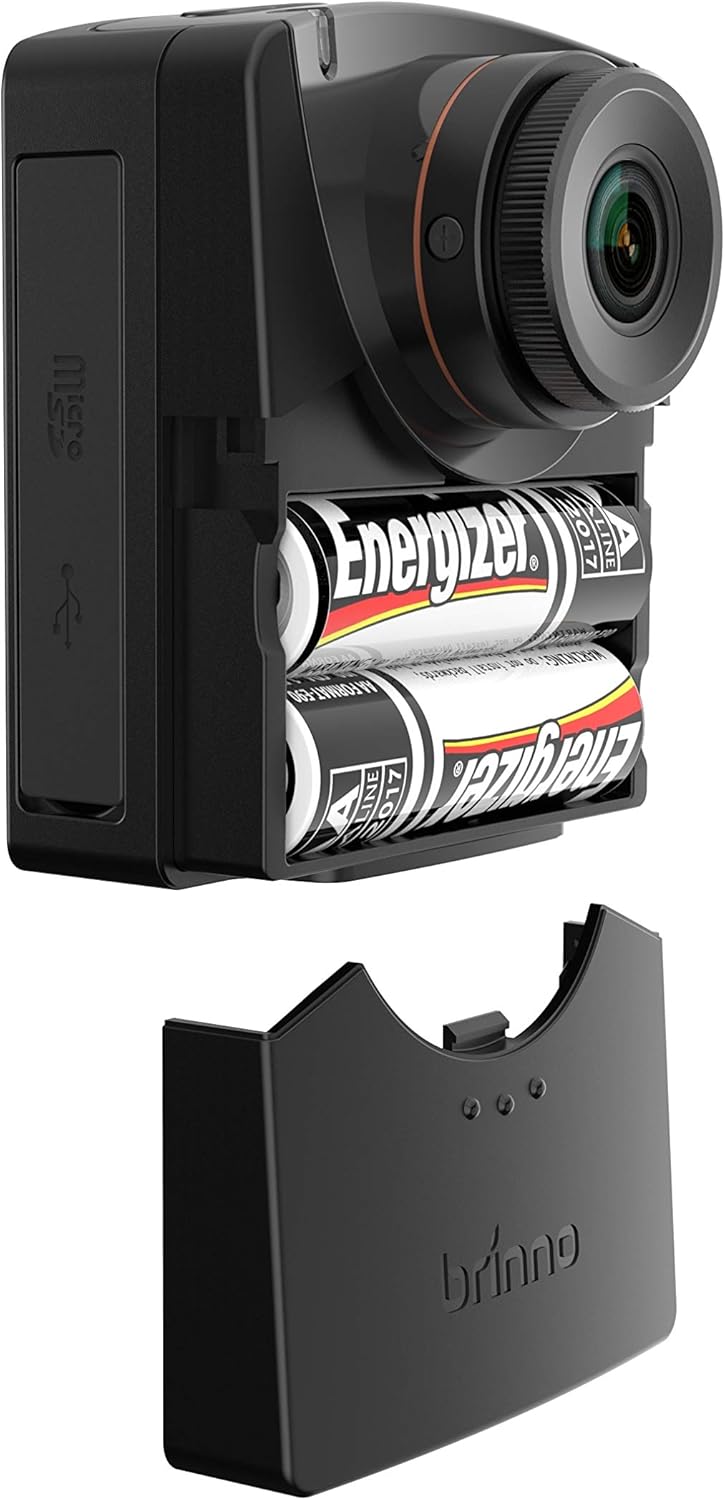
Obrázek 3.4: Přihrádka na baterie. This image shows the camera with its battery compartment open, revealing the two AA batteries required for operation.
4. Nastavení
4.1. Instalace baterie
- Open the battery compartment cover located on the side of the camera (refer to Figure 3.4).
- Vložte dvě (2) baterie typu AA a dbejte na správnou polaritu (+/-) vyznačenou uvnitř přihrádky.
- Bezpečně zavřete kryt bateriového prostoru.
4.2. Instalace karty MicroSD
- Vyhledejte slot pro kartu MicroSD na boku kamery (viz obrázek 3.3).
- Gently insert a compatible MicroSD card (up to 128GB, Class 10 or higher recommended) into the slot until it clicks into place.
- Chcete-li kartu vyjmout, zatlačte ji dovnitř, dokud nevyskočí.
4.3. Zapnutí/vypnutí
- Zapnutí: Stiskněte a podržte tlačítko napájení (obvykle umístěné nahoře nebo na boku), dokud se nerozsvítí LCD obrazovka.
- Vypnutí: Stiskněte a podržte tlačítko napájení, dokud se obrazovka nevypne.
4.4. Počáteční nastavení
Upon first power-on or after battery replacement, you may need to set the date, time, and language. Use the 'Previous' and 'Next' buttons to navigate and the 'OK/Return' button to confirm selections on the LCD screen.
5. Provozní režimy
The Brinno TLC2000 offers three primary recording modes:
- Časosběr: Captures still images at predefined intervals (e.g., every 5 seconds, 1 minute) and automatically stitches them into a video file. Ideal for documenting construction projects, plant growth, or weather changes.
- Krokové video: Records short video clips at set intervals. This mode is suitable for capturing events with more motion between frames, such as traffic flow or crowd movements.
- Zastavení pohybu: Allows for manual capture of individual frames, providing precise control for creating animated sequences. Each press of the capture button records one frame.
5.1. Flexible Schedule Setup
The camera supports a flexible scheduling feature, allowing you to specify recording days of the week and specific hours. This ensures the camera only records when needed, conserving battery life and storage space. Access this feature through the camera's menu settings on the LCD screen.
5.2. Image Quality and Lenses
The TLC2000 captures images in HDR (High Dynamic Range) and Full HD (1080p) resolutions, providing clear and detailed visuals. It features a CS-mount interface, making it compatible with Brinno BCS zoom-in lenses for enhanced optical flexibility and framing precision.
6. Údržba
6.1. Čištění
- K čištění těla fotoaparátu použijte měkký, suchý hadřík.
- For the lens, use a lens cleaning cloth and specialized lens cleaning solution. Avoid abrasive materials.
6.2. Aktualizace firmwaru
Brinno periodically releases firmware updates to improve camera performance and address issues. It is recommended to check the official Brinno website for the latest firmware version (e.g., 2020 Updated Firmware) and follow the provided instructions for installation. Keeping your firmware updated ensures optimal functionality.
7. Řešení problémů
- Problém: Krátká životnost baterie
- Řešení: While the TLC2000 features a proprietary power control system, actual battery life can vary based on recording intervals, temperature, and battery quality. For extended projects, especially outdoors, consider using an external power source or Brinno's ATH2000 housing which accommodates additional AA batteries.
- Issue: Settings Reset After Battery Change
- Řešení: This is a known characteristic of some firmware versions. Always re-check and re-apply your desired settings (date, time, recording mode, schedule) after replacing batteries.
- Issue: Video Files Split into Multiple Segments
- Řešení: The camera may split video files into segments (e.g., around 500MB) during long recordings. This is often due to file system limitations. You may need to use video editing software to combine these segments into a single continuous video.
- Issue: Corrupted or Intermittent Footage
- Řešení: Ensure you are using a high-quality, genuine MicroSD card (Class 10 or higher). Format the MicroSD card regularly within the camera's settings. If the issue persists, try a different MicroSD card. Ensure the camera's firmware is up to date.
- Issue: Display is Dim or Difficult to See
- Řešení: The LCD screen's brightness may be limited, especially in bright sunlight. Try to shade the screen when framing shots or reviewing footage. Ensure the screen protection film (if any) has been removed.
8. Specifikace
| Funkce | Detail |
|---|---|
| Rozměry produktu | 1.65 x 2.36 x 2.76 palce |
| Hmotnost položky | 3 unce |
| Číslo modelu položky | TLC 2000 |
| Baterie | Potřebné 2 AA baterie (součástí balení) |
| Technologie fotosenzoru | CMOS |
| Rozlišení záznamu videa | 1080p (Full HD) |
| Maximální ohnisková vzdálenost | 35 milimetrů |
| Maximální clona | 2 milimetrů |
| Typ paměti Flash | Micro SD |
| Velikost obrazovky | 2 palce |
| Technologie připojení | USB |
| Barva | Černý |
| Výrobce | Brinno |
| Datum první dostupnosti | 5. prosince 2018 |
9. Záruka a podpora
The Brinno Empower TLC2000 camera comes with a 30denní záruka vrácení peněz a a omezená 1letá záruka od data nákupu. Tato záruka se vztahuje na výrobní vady a zajišťuje, že výrobek bude při běžném používání fungovat dle určení.
For technical support, warranty claims, or to access the latest firmware updates, please visit the official Brinno website or contact Brinno customer service directly. Keep your proof of purchase for warranty validation.
Pro více informací můžete navštívit Brinno Store on Amazon.