
1. Konec produktuview
The Sato One-Touch Timer TM-22 is a versatile digital timer designed for various timing needs, from kitchen use to laboratory applications. It combines ease of use with practical features to enhance your daily tasks.
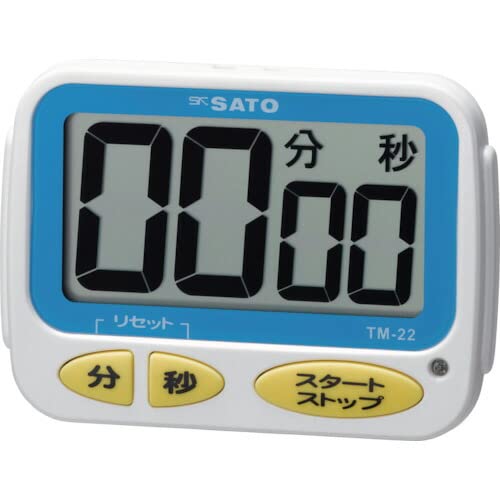
Obrázek 1: Přední strana view of the Sato One-Touch Timer TM-22. The timer features a clear digital display and control buttons.
Klíčové vlastnosti:
- Automatic Reset Alarm: The alarm sounds for 5 seconds at the set time and automatically resets to the initial set time.
- Jednoduchá obsluha: The primary key is for starting; no complex operations are required to stop the timer's alarm cycle.
- Dual Notification: Alerts users with both sound (70dB) and light.
- Drip-Proof Construction: Designed to resist splashes, making it suitable for kitchen environments.
- Více možností montáže: Equipped with a magnet on the back for attachment to metal surfaces and a strap for hanging.
- Funkce odpočítávání a počítání: Supports both decreasing a přírůstekasing time measurements.
2. Nastavení
Instalace baterie:
The TM-22 timer requires one AAA battery for operation. A battery is included with the unit.
- Najděte kryt přihrádky na baterie na zadní straně časovače.
- Posuňte nebo odepněte kryt pro otevření přihrádky.
- Vložte jednu baterii typu AAA a ujistěte se, že kladný (+) a záporný (-) pól správně odpovídají označením uvnitř přihrádky.
- Bezpečně nasaďte kryt prostoru pro baterie.
The timer should power on, and the display will show '00:00' or the last set time.
3. Návod k obsluze
The TM-22 timer features both countdown and count-up functionalities.
3.1. Odpočítávací časovač
This function allows you to set a specific duration, and the timer will count down to zero.
- Nastavit čas: Use the 'M' (Minute) button and 'S' (Second) button to adjust the desired countdown duration. The timer can be set from 1 second up to 99 minutes and 59 seconds.
- Zahájit odpočítávání: Press the 'START' button to begin the countdown.
- Upozornění na alarm: When the time reaches zero, an alarm will sound for 5 seconds, accompanied by a flashing light.
- Automatický reset: After the 5-second alarm, the timer automatically resets to the initial set time, ready for the next countdown without manual intervention.
- Pozastavit/Zastavit: To pause the countdown, press the 'START' button again. To resume, press 'START' once more. To clear the set time, press the 'RESET' button (if available) or hold the 'START' button for a few seconds.
3.2. Count-up Timer
This function measures elapsed time from zero.
- Start Count-up: Ensure the timer display shows '00:00'. If not, press the 'RESET' button to clear any previous settings. Press the 'START' button to begin counting upwards from zero.
- Pozastavit/Pokračovat: To pause the count-up, press the 'START' button. To resume, press 'START' again.
- Resetovat: To reset the count-up timer to '00:00', press the 'RESET' button (if available) or hold the 'START' button for a few seconds while paused.
4. Údržba
Čištění:
To maintain the timer's appearance and functionality:
- Wipe the exterior of the timer with a soft, dry cloth.
- Do not use abrasive cleaners, solvents, or chemical agents, as these may damage the casing nebo displej.
- The timer is drip-proof, but do not immerse it in water or expose it to heavy splashing.
Výměna baterie:
Replace the battery when the display becomes dim or the timer's functions become erratic.
- Follow the battery installation steps outlined in the "2. Setup" section.
- Always use a fresh AAA battery.
- Použité baterie zlikvidujte v souladu s místními předpisy.
5. Řešení problémů
If you encounter issues with your TM-22 timer, refer to the following common problems and solutions:
| Problém | Možná příčina | Řešení |
|---|---|---|
| Časovač se nezapne. | Baterie je vybitá nebo nesprávně nainstalovaná. | Zkontrolujte polaritu baterie. Vyměňte za novou baterii AAA. |
| Display is faint or flickering. | Nízká kapacita baterie. | Vyměňte baterii AAA. |
| Alarm se nespouští. | Volume obstruction or internal issue. | Ensure the speaker is not covered. Check battery level. If problem persists, contact support. |
| Timer does not reset automatically after alarm. | This feature is specific to the countdown function. | Ensure you are using the countdown function. For count-up, manual reset is required. |
6. Specifikace
| Funkce | Detail |
|---|---|
| Číslo modelu | TM-22 |
| Maximální časování | 99 minut 59 sekund |
| Minimum Timing | 1 sekunda |
| Rozměry (V x Š x H) | 67 mm x 93 mm x 20 mm |
| Hmotnost | 96 g |
| Zdroj napájení | 1x AAA baterie (součástí balení) |
| Hlasitost alarmu | 70 dB |
| Funkce | Countdown, Count-up |
| Speciální funkce | Drip-proof construction, Magnet on back, Hanging strap, Sound and light notification |
7. Záruka a podpora
For warranty information, technical assistance, or customer support regarding your Sato One-Touch Timer TM-22, please contact your authorized retailer or the manufacturer, Sato Corporation. Keep your purchase receipt as proof of purchase.
Please visit the official Sato webweb, kde najdete nejaktuálnější informace o podpoře a kontaktní údaje.