
Alpha EK 60
Uživatelská příručka k elektronickému klavíru Alpha EK-60 s 61 klávesami
Portable Digital Keyboard with Audio Input, Microphone Input, Headphone Output, 255 Tones, Rhythms, LED Display
1. Úvod
Děkuji za nákupasing the Alpha EK-60 61-Key Electronic Piano Keyboard. This manual provides detailed instructions for the proper setup, operation, and maintenance of your new instrument. The EK-60 is designed to offer a rich musical experience with its versatile features, including a wide range of tones and rhythms, intelligent teaching functions, and various connectivity options. Please read this manual thoroughly before using the product to ensure optimal performance and longevity.
2. Bezpečnostní informace
Abyste předešli úrazu elektrickým proudem, požáru nebo poškození jednotky, dodržujte prosím následující bezpečnostní opatření:
- Do not expose the keyboard to rain or moisture.
- Do not place objects filled with liquids, such as vases, on the keyboard.
- Neblokujte žádné ventilační otvory.
- Používejte pouze určený napájecí adaptér.
- Nerozebírejte ani neupravujte jednotku. Veškerý servis svěřte kvalifikovanému personálu.
- Uchovávejte mimo dosah malých dětí.
3. Obsah balení
Zkontrolujte prosím, zda jsou v balení obsaženy všechny následující položky:
- 1 x Alpha 61-Key Standard Keyboard EK-60
- 1 x Nastavitelný stojan
- 1 x držák na noty
- 1 x napájecí adaptér
- 1 x Uživatelská příručka (tento dokument)
4. Konec produktuview
Familiarize yourself with the components of your Alpha EK-60 keyboard.
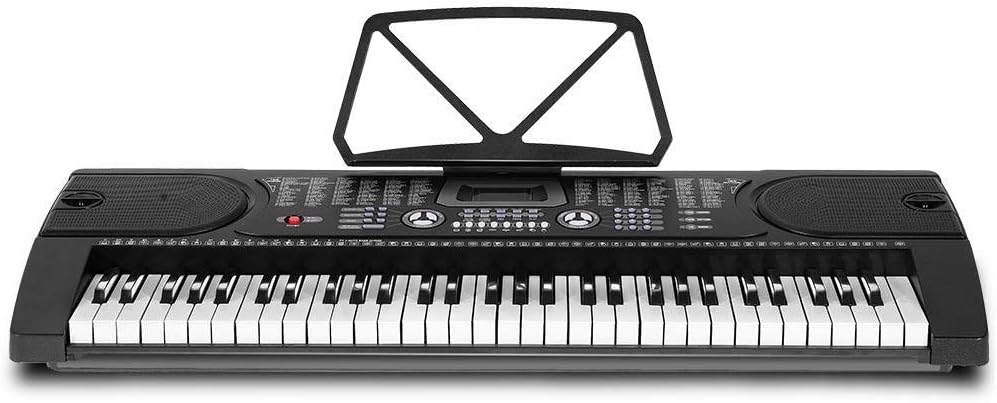
Obrázek 4.1: Shora dolů view of the Alpha EK-60 keyboard, highlighting the control panel, integrated speakers, and the 61 standard piano keys.

Figure 4.2: Detail of the LED display for convenient settings adjustment and the battery compartment for portable use.

Obrázek 4.3: View of the multiple jacks including Audio Input, Microphone Input, and Headphone Output for versatile connectivity.
Klíčové vlastnosti:
- 61-Key Standard Piano Keyboard
- LED display for easy navigation
- 24 demo skladeb
- 255 timbres (instrument sounds)
- 255 rhythms (accompaniment styles)
- 61 kinds of keyboard percussions
- 8 Panel Percussions
- Master volume, accompaniment volume, and tempo control
- Intelligent teaching function: one-key, follow and ensemble function
- Funkce programování rytmu
- Auto chord and chord timbre option
- Funkce nahrávání a přehrávání
- Sustain and vibrato effects
- Microphone input and speaker output
- Headphone jack for silent practice
- Battery powered option (6 x AA-size batteries, not included)
5. Nastavení
5.1 Sestavení stojanu
- Unpack all components of the adjustable stand.
- Connect the horizontal support bars to the vertical legs, ensuring they are securely fastened.
- Adjust the height of the stand to your preferred playing position using the adjustment knobs. The stand is adjustable from 59cm to 79cm in height.
- Place the keyboard securely on top of the assembled stand.
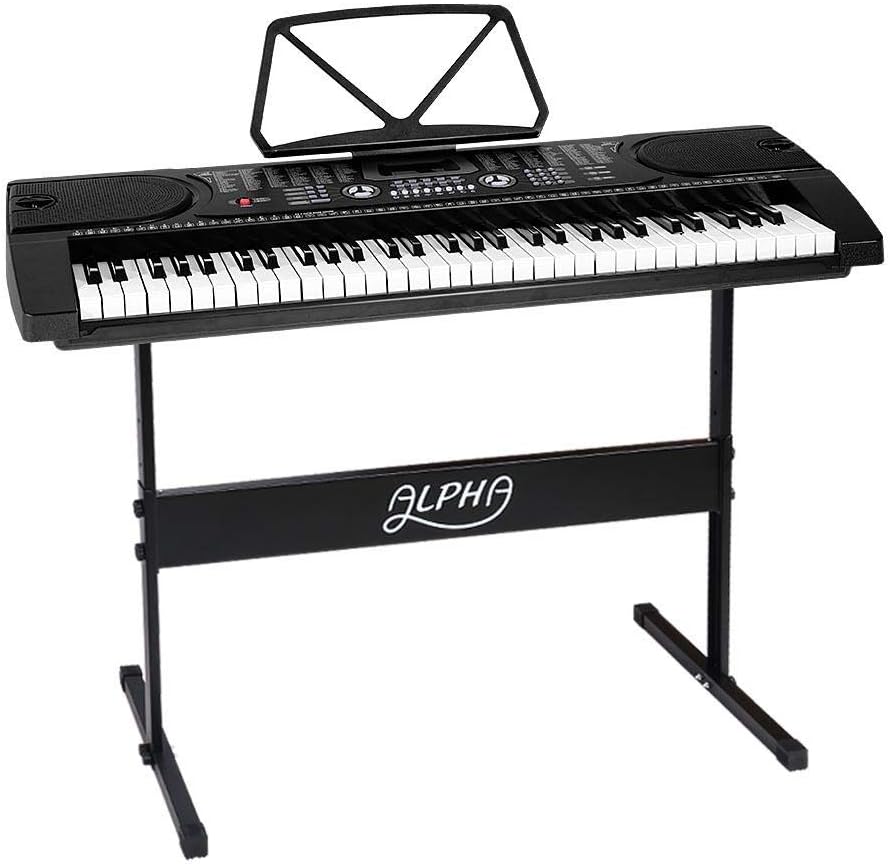
Figure 5.1: The Alpha EK-60 keyboard fully assembled on its adjustable stand, ready for use.
5.2 Napájení klávesnice
The Alpha EK-60 can be powered by the included AC adaptor or by batteries.
Používání napájecího adaptéru:
- Connect the DC plug of the power adaptor to the DC 9V input jack on the rear of the keyboard.
- Zapojte síťový adaptér do standardní zásuvky.
Použití baterií:
- Vyhledejte přihrádku na baterie na spodní straně klávesnice.
- Otevřete kryt bateriového prostoru.
- Insert 6 x AA-size batteries (not included), ensuring correct polarity (+/-).
- Bezpečně zavřete kryt bateriového prostoru.
Note: When using batteries, disconnect the AC adaptor. The keyboard will automatically switch to battery power if the adaptor is removed.
6. Návod k obsluze
6.1 Základní obsluha
- Zapnutí/vypnutí: Stiskněte tlačítko MOC tlačítko pro zapnutí nebo vypnutí klávesnice.
- Ovládání hlasitosti: Použijte HLAVNÍ HLASITOST knoflík pro nastavení celkové úrovně zvuku.
- Ovládání tempa: Použijte TEMPO tlačítka pro nastavení rychlosti rytmů a demo skladeb.
6.2 Výběr tónů a rytmů
- Tones (Timbre): Stiskněte tlačítko TÉMBR button, then use the number pad or +/- buttons to select from 255 different instrument sounds. The selected timbre number will appear on the LED display.
- Rytmy: Stiskněte tlačítko RYTMUS button, then use the number pad or +/- buttons to select from 255 accompaniment rhythms. Press START/STOP zahájit nebo ukončit rytmus.
6.3 Intelligent Teaching Function
The EK-60 features a 3-step intelligent teaching system to help you learn to play.
- Jeden klíč: Plays the melody of a demo song by pressing any key.
- Následovat: Waits for you to play the correct note before proceeding with the melody.
- Spolu: Plays the accompaniment while you play the melody.
To use, select a demo song, then press the desired teaching mode button (JEDEN KLÍČ, NÁSLEDOVATnebo SOUBOR).
6.4 Nahrávání a přehrávání
The keyboard allows you to record your performances.
- Stiskněte tlačítko REC button to start recording. The LED display will indicate recording mode.
- Zahrajte si požadovanou melodii.
- Stiskněte tlačítko HRÁT tlačítko pro zastavení nahrávání a přehrání nahrané hry.
6.5 Konektivita
- Sluchátkový jack: Připojte sluchátka k SLUCHÁTKA zvedák pro tiché cvičení.
- Vstup pro mikrofon: Připojte mikrofon k MIC VSTUP jack to sing along while playing.
- Audio vstup/výstup: Použijte AUDIO VSTUP to connect external audio devices (e.g., MP3 player) and the AUDIO VÝSTUP to connect to external speakers or an ampživější.
7. Údržba
Proper care will ensure the longevity of your Alpha EK-60 keyboard.
- Čištění: Wipe the keyboard with a soft, dry cloth. For stubborn dirt, use a slightly damp cloth and then wipe dry immediately. Do not use abrasive cleaners, waxes, or solvents.
- Skladování: When not in use for extended periods, store the keyboard in a cool, dry place away from direct sunlight and extreme temperatures. If using batteries, remove them before long-term storage to prevent leakage.
- Zacházení: Zabraňte pádu klávesnice na zem nebo jejímu vystavení silným nárazům.
8. Řešení problémů
If you encounter any issues with your keyboard, refer to the following table for common problems and solutions.
| Problém | Možná příčina | Řešení |
|---|---|---|
| Žádný zvuk | Volume is too low; Power is off; Headphones connected; Faulty power connection. | Increase master volume; Turn on power; Disconnect headphones; Check power adaptor or replace batteries. |
| Klávesy nereagují | Keyboard is in a teaching mode; Internal malfunction. | Exit teaching mode; Power cycle the keyboard. If issue persists, contact support. |
| Rhythm/Demo song not playing | Rhythm/Demo song not selected; START/STOP button not pressed. | Select a rhythm/demo song; Press START/STOP. |
| Zkreslený zvuk | Volume too high; External device connected incorrectly. | Reduce volume; Check connections of external devices. |
Pokud problém přetrvává i po vyzkoušení těchto řešení, kontaktujte zákaznickou podporu.
9. Specifikace
| Funkce | Popis |
|---|---|
| Model | EK-60 |
| Klíče | 61 Standard Piano Keys |
| Key Width | 1.9 cm |
| Tones (Timbres) | 255 |
| Rytmy | 255 |
| Demo písně | 24 |
| Maximální polyfonie | 8 |
| Konektivita | Audio Input, Audio Output, Headphone Jack (3.5mm), Microphone Input (3.5mm) |
| Napájení | AC Adaptor (DC 9V) or 6 x AA-size batteries (not included) |
| Rozměry (klávesnice) | 86 cm (d) x 32.5 cm (š) |
| Dimensions (Overall with Stand) | 86cm (L) x 32.5cm (W) x 59-79cm (H) |
| Hmotnost | 6.2 kg |
| Barva | Černý |

Figure 9.1: Detailed dimensions of the Alpha EK-60 keyboard and its adjustable stand.
10. Záruka a podpora
10.1 Informace o záruce
The Alpha EK-60 keyboard comes with a 1-letá záruka from the date of purchase. This warranty covers manufacturing defects and ensures the product is free from defects in material and workmanship under normal use. It does not cover damage caused by misuse, accident, unauthorized modification, or normal wear and tear.
10.2 Zákaznická podpora
For any queries, technical assistance, or warranty claims, please contact the seller or manufacturer directly. Please have your purchase receipt and product model number (EK-60) ready when contacting support.
Ask a question about this manual
Ask about setup, troubleshooting, compatibility, parts, safety, or missing instructions. Manuals+ will review the question and use this page’s manual context to help answer it.