
1. Konec produktuview
The MakerHawk USB DC-DC Buck Regulator Module is a step-down power supply designed to efficiently convert a higher input voltage to a stable 5.2V output. This module features dual USB output ports, making it suitable for charging various mobile devices. It offers high conversion efficiency and is compact for integration into different projects.

2. Bezpečnostní informace
- Vstupní objemtage Limit: Zajistěte vstupní objtage does not exceed 26V. Exceeding this limit can cause permanent damage to the module's chip.
- Polarita: The positive and negative input terminals must not be reversed. Incorrect polarity will damage the module.
- Opatření pro manipulaci: When the module is powered on and operating, avoid touching the circuit board, especially the sampling resistor and IC pins. Contact with these components can lead to damage or unstable output voltage.
- Aktuální hodnocení: The maximum output current is 3A. Exceeding this limit may cause overheating and potential failure. If using high-drain devices, consider adding a heatsink.
- Podmínky prostředí: Use the module in a dry environment, away from moisture and extreme temperatures.
3. Vlastnosti produktu
- Wide Input Voltage Rozsah: Operates with DC input from 6V to 26V.
- Stabilní výstup: Provides a regulated DC 5.2V output voltage.
- Duální USB výstup: Equipped with two USB ports for simultaneous charging of multiple devices.
- High Output Current: Delivers up to 3A total output current, suitable for fast charging.
- Vysoká účinnost konverze: Achieves up to 98% conversion efficiency, minimizing power loss.
- Široká kompatibilita: Compatible with various phone models including Android, iPhone, Huawei, Millet, and Nokia.
- Load LED Indicator: Features an LED indicator to show load status.
4. Specifikace
| Specifikace | Hodnota |
|---|---|
| Vstupní objemtage Dosah | DC 6V - 26V |
| Výstupní objemtage | DC 5.2V |
| Výstupní proud | 3A (max.) |
| Účinnost konverze | Up to 98% (Max) |
| Klidový proud | 25uA |
| Přepínací frekvence | 435 kHz |
| Rozměry | 1.1 x 1.3 x 0.31 palce (přibližně 28 mm x 33 mm x 8 mm) |
| Hmotnost | 22 gramů (přibližně 0.776 unce) |
| Číslo modelu | 4350466194 |


5. Nastavení a připojení
To set up the MakerHawk USB DC-DC Buck Regulator Module, follow these steps:
- Identify Input Terminals: Locate the "IN+" (input positive) and "IN-" (input negative) terminals on the module.
- Připojte vstupní napájení: Connect your DC power source (6V-26V) to the input terminals. Ensure correct polarity: positive to IN+ and negative to IN-. Refer to Image 5.1 for input mode identification.
- Ověření výstupu: Once input power is connected, the module will provide 5.2V output through the dual USB ports.


Working Circuit Schematic
For advanced users or troubleshooting, the working circuit schematic provides a detailed view of the module's internal connections and components.

6. Provoz
Once the module is correctly connected to a power source within the specified input voltage range (6V-26V), it will automatically regulate the output to 5.2V. You can then plug your USB-powered devices into the dual USB output ports for charging.
- Nabíjecí zařízení: Connect your smartphone, tablet, or other USB-powered devices to either of the two USB output ports.
- Indikátor zatížení: The module includes a load LED indicator. This LED will illuminate when a device is connected and drawing current, confirming active operation.
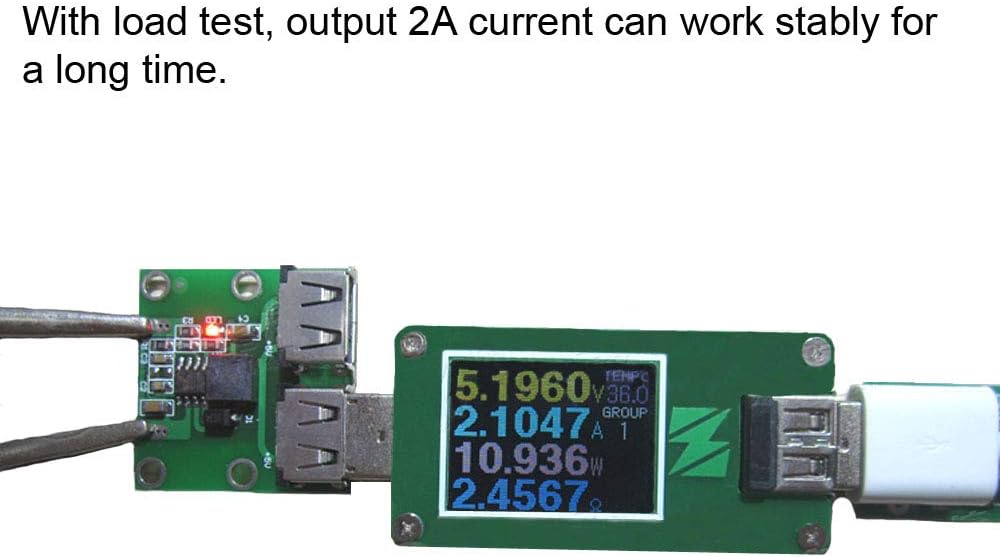
- Current Distribution: The total 3A output current is shared between the two USB ports. If two devices are connected, the current will be distributed between them. For optimal charging, ensure the combined current draw does not exceed 3A.
7. Údržba
The MakerHawk USB DC-DC Buck Regulator Module is designed for reliable operation with minimal maintenance. Follow these guidelines to ensure its longevity:
- Čištění: Keep the module clean and free from dust and debris. Use a soft, dry cloth for cleaning. Avoid using liquids or solvents.
- Skladování: Store the module in a cool, dry place when not in use.
- Inspekce: Periodically inspect the module for any signs of physical damage, loose connections, or discoloration which might indicate overheating.
- Řízení tepla: While designed for efficiency, prolonged operation at maximum load (3A) may generate heat. If integrating into an enclosed space, ensure adequate ventilation. For continuous high-current applications, consider adding a small heatsink to the main IC.
8. Řešení problémů
If you encounter issues with your MakerHawk USB DC-DC Buck Regulator Module, refer to the following common problems and solutions:
- No Output Voltage:
- Zkontrolujte, zda vstupní voltage je v rozsahu 6V-26V.
- Verify that the input polarity (IN+ and IN-) is correct.
- Ujistěte se, že jsou všechna připojení bezpečná a že nejsou uvolněné dráty.
- Zkontrolujte modul, zda není viditelně poškozen.
- Výstupní objemtage is Incorrect or Unstable:
- Potvrďte vstupní objemtage je stabilní a v daném rozsahu.
- Ensure no components on the circuit board (sampling resistor, IC pins) are being touched or shorted during operation.
- Reduce the load to check if the issue is due to overcurrent.
- Přehřátí modulu:
- Check if the total output current draw exceeds the 3A maximum.
- Ensure adequate ventilation around the module, especially if enclosed.
- Consider adding a heatsink if operating continuously at high loads.
- Zařízení se nenabíjí:
- Verify the USB cable is functional and properly connected.
- Test with a different USB device to rule out device-specific issues.
- Check if the module is receiving power and providing output voltage.
9. Záruka a podpora
MakerHawk is committed to providing excellent customer service. If you have any questions or encounter issues with your product, please contact the MakerHawk after-sales service team. They are available to assist you promptly.
To contact support, please visit the MakerHawk store page on Amazon and click "Ask a question" to send an email. Your satisfaction is a priority.