
Zavedení
This manual provides instructions for the setup, operation, and maintenance of your Zelotes T20 Ergonomic Vertical Mouse. Please read this manual thoroughly before using the product to ensure proper function and longevity.
Konec produktuview
The Zelotes T20 is an ergonomic vertical mouse designed to promote a natural hand and wrist posture, reducing strain during extended use. It features adjustable DPI settings and multiple programmable buttons for enhanced control.

Figure 1: Zelotes T20 Ergonomic Vertical Mouse. This image displays the overall design of the mouse, highlighting its vertical orientation and LED lighting.
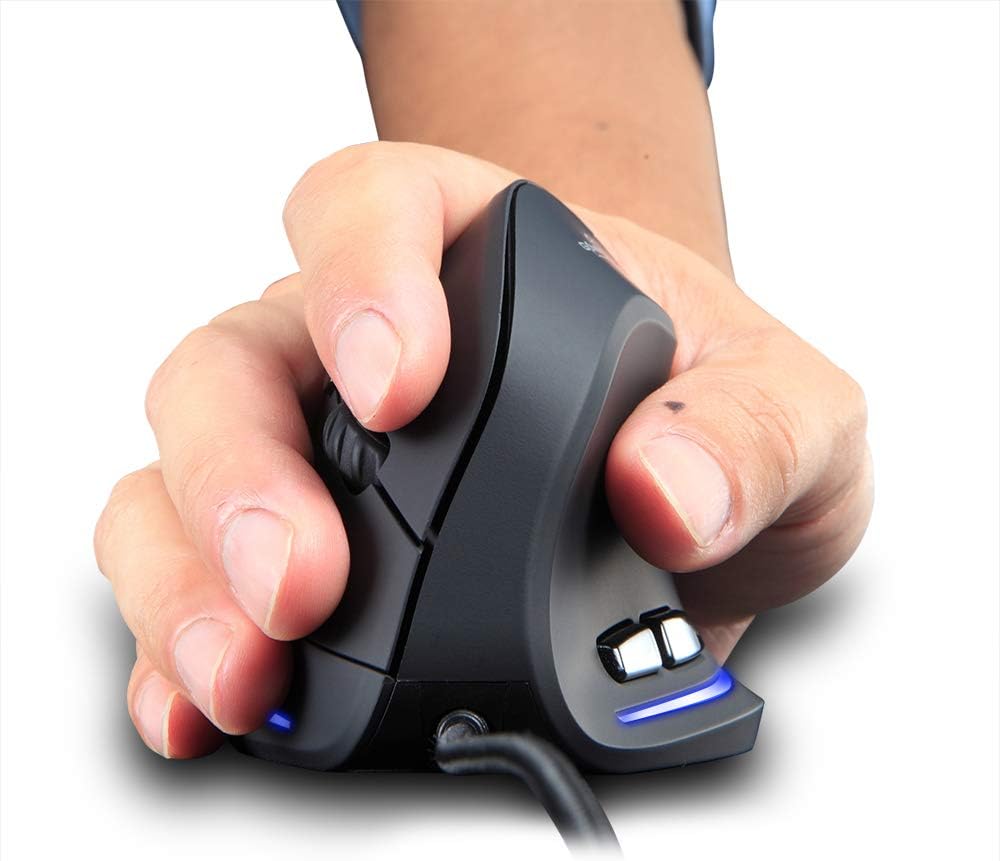
Figure 2: Proper hand placement on the Zelotes T20 mouse. This image illustrates how the vertical design allows for a natural handshake grip, intended to reduce wrist strain.

Figure 3: Ergonomic comparison. This diagram contrasts the natural wrist posture with a vertical mouse against the twisted posture often associated with traditional horizontal mice, emphasizing fatigue reduction.
Obsah balení
Ověřte, zda jsou v balení přítomny všechny položky:
- 1 x Zelotes Ergonomic Vertical Mouse
- 1 x Návod k obsluze (tento dokument)
Nastavení
- Připojte myš: Plug the USB cable of the Zelotes T20 mouse into an available USB port on your computer.
- Instalace ovladače: The mouse is plug-and-play. Your operating system should automatically detect and install the necessary drivers. No additional software installation is typically required.
- Odstraňte ochrannou fólii: Before use, locate and remove the protective film from the "Bigfoot pads" on the underside of the mouse for optimal gliding performance.

Figure 4: Underside of the mouse. This image shows the Teflon material pads and indicates the location of the protective film that should be removed before initial use.
Návod k obsluze
Funkce tlačítek
The Zelotes T20 mouse features 6 buttons for various functions:
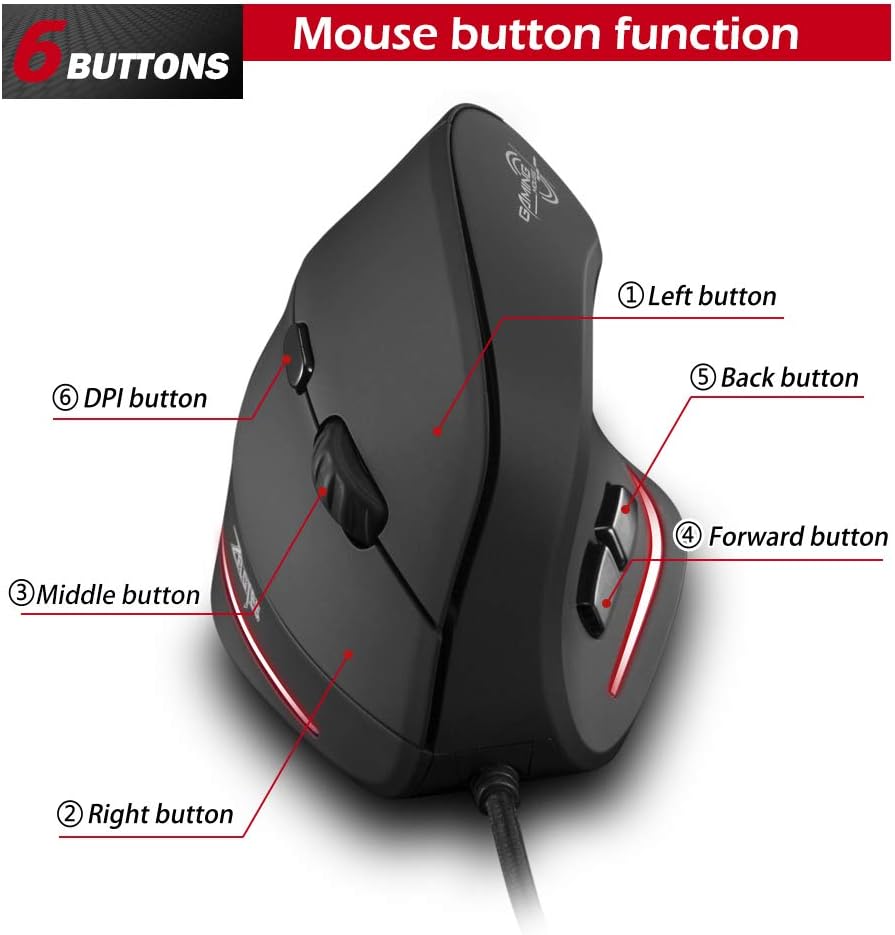
Figure 5: Mouse button layout. This diagram labels each of the six buttons: Left, Right, Middle (scroll wheel click), Forward, Back, and DPI adjustment button.
- Levé tlačítko: Standardní funkce levého kliknutí.
- Pravé tlačítko: Standardní funkce kliknutí pravým tlačítkem myši.
- Prostřední tlačítko (rolovací kolečko): Klikatelné rolovací kolečko pro funkce kliknutí prostředním tlačítkem myši.
- Tlačítko vpřed: Naviguje vpřed web prohlížeče popř file průzkumníci.
- Tlačítko Zpět: Naviguje zpět web prohlížeče popř file průzkumníci.
- Tlačítko DPI: Upravuje citlivost myši (DPI).
Nastavení DPI (citlivosti)
The mouse offers four adjustable DPI settings to suit different tasks and preferences. Press the DPI button (Button 6 in Figure 5) to cycle through the settings. Each DPI level is indicated by a specific LED light color:
- 1200 DPI: Blue light hint
- 1600 DPI: Dark purple light hint
- 2400 DPI: Red light hint
- 3200 DPI: Light purple light hint
The light will stay on for approximately 3 seconds when switching DPI settings to indicate the current level.

Figure 6: DPI adjustment and LED indicators. This image illustrates the DPI button and the color coding for each of the four sensitivity settings.
Using Forward/Back Keys
The dedicated Forward and Back buttons (Buttons 4 and 5 in Figure 5) provide quick navigation. These buttons are designed to streamline browsing through web pages or folders, reducing the need for on-screen clicks.

Figure 7: Forward and Back navigation buttons. This image highlights the placement of the forward and back buttons, designed for convenient web a file navigace.
Údržba
- Čištění: K čištění povrchu myši použijte měkký, suchý hadřík. V případě odolných nečistot použijte lehceamp Lze použít hadřík, abyste zajistili, že se do myši nedostane žádná tekutina.
- Údržba senzoru: Udržujte optický senzor na spodní straně myši čistý a bez prachu nebo nečistot, abyste zajistili přesné sledování.
- Péče o kabely: Abyste předešli poškození, vyhněte se ostrým ohybům nebo nadměrnému tahání za kabel USB.

Figure 8: Mouse surface texture. This image provides a close-up view of the mouse's surface, described as smooth for comfortable handling.
Odstraňování problémů
- Myš nereaguje:
- Ujistěte se, že je kabel USB bezpečně zapojený do funkčního portu USB v počítači.
- Zkuste zapojit myš do jiného USB portu.
- Restartujte počítač.
- Nepřesné sledování:
- Vyčistěte optický senzor na spodní straně myši.
- Ensure you are using the mouse on a suitable surface (e.g., a mouse pad). Highly reflective or transparent surfaces may cause issues.
- Upravte nastavení DPI pomocí tlačítka DPI.
- Tlačítka nefungují správně:
- Ověřte, zda je myš správně připojena.
- Vyzkoušejte myš na jiném počítači, abyste zjistili, zda je problém s myší nebo s nastavením počítače.
Specifikace
| Funkce | Detail |
|---|---|
| Model | T20 |
| Číslo tlačítka | 6 tlačítek |
| Sledovací systém | Optický |
| Délka USB kabelu | 1.8 m |
| Pracovní svtage/Aktuální | 5V/100mA |
| Život tlačítka | 5 milionůkrát |
| Roller Life | 1.2 million turns |
| Rozměry produktu (D x Š x V) | 110 x 72 x 75 mm (4.33 x 2.83 x 2.95 palce) |
| Hmotnost produktu | 160 ± 5g (5.6 ounces) |
| Rozlišení (DPI) | 1200-1600-2400-3200 |
| Míra návratnosti (míra dotazování) | 125 Hz |
| Kompatibilita | Windows 2000/ME/XP (x64)/Vista/7/8/10, Mac OS X (over V10.4), Linux |

Figure 9: Product dimensions. This image provides detailed measurements of the mouse from various angles.
Záruka a podpora
Informace o záruce nebo technickou podporu získáte od oficiálního webnebo kontaktujte jejich zákaznický servis. Uschovejte si účtenku jako doklad o koupi.