
Zavedení
This document serves as an instructional guide for the Easytry123 replacement remote control. This remote is designed to operate various Power Acoustik car stereo systems. As a replacement unit, some advanced or specific functions of your original device may not be fully supported. Please ensure your stereo system model is listed as compatible before use.
Note: This remote control does not include batteries or a printed manual. This digital guide provides all necessary instructions.
Obsah balení
- 1 x Easytry123 Replacement Remote Control (Model: Easytry4552)
Batteries are not included and must be purchased separately. Typically, two AAA batteries are required.
Nastavení
Instalace baterie
To begin using your remote control, you must first install the batteries. Follow these steps:
- Najděte kryt prostoru pro baterie na zadní straně dálkového ovladače.
- Slide the cover downwards or press the release tab (if present) and lift to open the compartment.
- Insert two new AAA batteries, ensuring the positive (+) and negative (-) terminals align correctly with the markings inside the compartment. Incorrect insertion can prevent the remote from functioning.
- Zasuňte kryt přihrádky na baterie zpět na místo, dokud bezpečně nezacvakne.
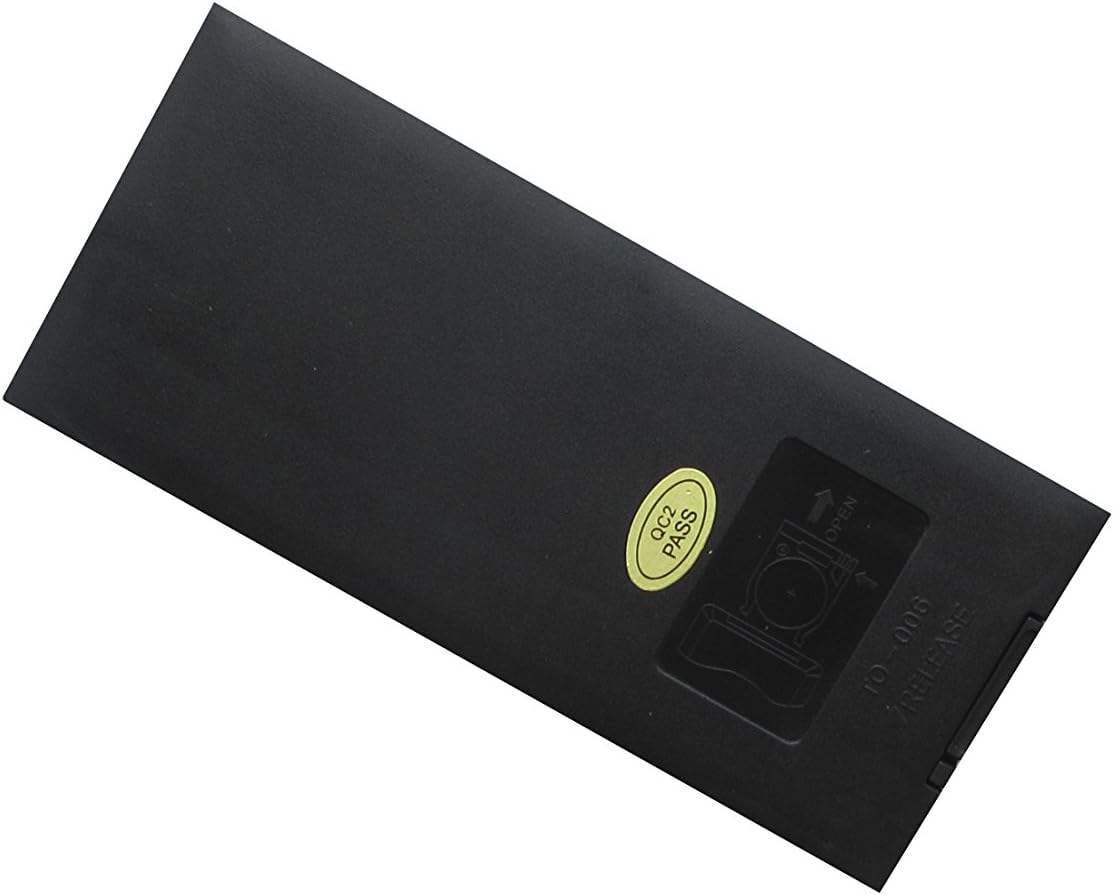
Obrázek 1: Zadní view of the remote control, highlighting the battery compartment. The compartment cover slides open to allow for battery insertion.
Návod k obsluze
The Easytry123 remote control operates using infrared (IR) technology. For optimal performance, ensure there is a clear line of sight between the remote's IR emitter (located at the front top) and the IR receiver on your car stereo system. Point the remote directly at the stereo unit.

Obrázek 2: Přední view of the remote control, displaying all buttons and their typical layout.
Základní funkce
Below are common functions found on the remote control. Button labels may vary slightly, but their general purpose remains consistent:
- Tlačítko napájení (Ⓘ): Zapíná nebo vypíná stereo systém.
- Zvýšení/snížení hlasitosti (VOL+/VOL-): Zvyšuje nebo snižuje hlasitost zvuku.
- Ztlumit: Ztlumí zvukový výstup. Dalším stisknutím zvuk obnovíte.
- Play/Pause (⏸/⏸⏸): Controls playback of media (e.g., CD, DVD, USB).
- Seek/Track Skip (⏮︎/⏭︎): Skips to the next or previous track/chapter, or seeks radio frequencies.
- Nabídka/Nastavení: Accesses the stereo system's main menu or setup options.
- Navigační tlačítka (▲▼◄►): Používá se k navigaci v nabídkách a možnostech.
- Enter/OK: Potvrzuje výběr v nabídkách.
- Numerická klávesnice (0-9): Direct input for track numbers, radio frequencies, or other numerical selections.
- režim: Switches between different audio sources (e.g., Radio, CD, AUX, Bluetooth).
- Vysunout: Ejects a disc from the player.
For specific functions related to your Power Acoustik stereo model, refer to the original user manual of your stereo system.
Údržba
Správná péče prodlouží životnost vašeho dálkového ovladače:
- Čištění: Dálkový ovladač otřete měkkým, suchým hadříkem. V případě odolné nečistoty lehceampOpláchněte hadřík vodou. Nepoužívejte agresivní chemikálie ani abrazivní čisticí prostředky.
- Výměna baterie: Replace batteries when the remote's response becomes sluggish or it stops working. Always replace both batteries at the same time with new ones.
- Skladování: Dálkový ovladač skladujte na chladném a suchém místě mimo dosah přímého slunečního záření a extrémních teplot. Pokud jej skladujete delší dobu, vyjměte baterie, abyste zabránili vytečení.
Odstraňování problémů
If your remote control is not functioning as expected, try the following solutions:
- Dálkové ovládání nereaguje:
- Zkontrolujte, zda jsou baterie vloženy správně se správnou polaritou (+/-).
- Vyměňte baterie za nové.
- Ensure there are no obstructions between the remote and the stereo system's IR receiver.
- Make sure you are pointing the remote directly at the stereo system.
- Některé funkce nefungují:
- As a replacement remote, some specific or advanced functions of your original stereo system may not be supported. This is normal for universal or replacement remotes.
- Verify that your stereo model is listed as compatible with this remote.
Specifikace
| Funkce | Popis |
|---|---|
| Číslo modelu | Easytry4552 |
| Značka | Easytry123 |
| Kompatibilní zařízení | Power Acoustik PTID-3600T, PTID-3200, PTID-3200T, PTID-3600, PD-710T, PD-710BT, PD-344 Audio Car Stereo Systems |
| Technologie připojení | Infračervený (IR) |
| Typ ovladače | Ovládání tlačítkem |
| Speciální funkce | Ergonomický design |
| Zdroj napájení | 2 x AAA baterie (nejsou součástí balení) |
| Země původu | Čína |
Záruka a podpora
As a replacement part, this product typically follows the return and refund policies of the retailer from which it was purchased. For any issues or questions regarding the remote control, please contact the seller directly through your purchase platform. Keep your order information readily available for faster assistance.