
1. Přesview
The Graigar HGM6120NC is an advanced automatic generator controller designed for monitoring and controlling genset systems. It integrates digital, intelligent, and network techniques to provide comprehensive automatic start/stop, data measurement, alarm protection, and remote control capabilities.
This controller features an LCD display with multiple language options for user-friendly operation. It utilizes micro-processing technology for precise measurements, value adjustments, timing, and threshold settings. All parameters can be configured directly from the front panel or via a PC using USB or RS485 interfaces.
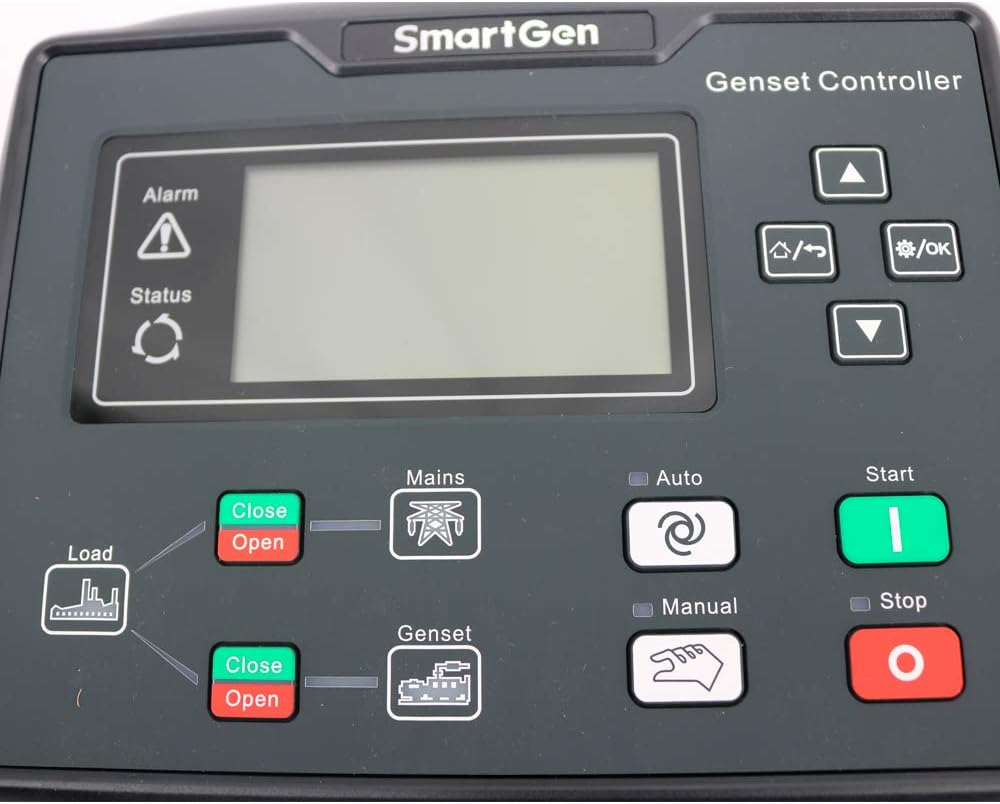
Obrázek 1.1: Přední strana view of the Graigar HGM6120NC Generator Controller, showing the LCD screen and control buttons.
2. Klíčové vlastnosti
- Automatic control and monitoring system for gensets.
- Functions include automatic start/stop, data measurement, and alarm protection.
- Supports three remote functions: remote control, remote measure, and remote communication.
- LCD display with optional interface languages: Chinese, English, Spanish, Russian, Portuguese, Turkish, Polish, and French.
- Micro-processing technique for precision measurement, value adjustment, timing, and threshold setting.
- Parameters configurable from the front panel or via USB/RS485 interface with a PC.
3. Nastavení a instalace
Proper installation is crucial for the safe and reliable operation of the HGM6120NC controller. Ensure all power is disconnected before beginning installation.
3.1 Vybalení a komponenty
Upon unboxing, verify that all components are present, including the controller unit, mounting hardware, and the instruction manual.

Image 3.1: The HGM6120NC controller shown with its included mounting brackets and screws.
Video 3.1: Overview of the Graigar HGM6120NC Automatic Start Module, demonstrating its physical appearance and included accessories. This video helps in identifying components during unboxing.
3.2 Panel Cutout and Mounting
The controller requires a panel cutout of 186 x 141 mm. Secure the controller using the provided mounting hardware. Ensure adequate space for wiring connections at the rear.

Obrázek 3.2: Úhlové view of the HGM6120NC, highlighting the front panel and the green terminal blocks for connections on the sides and bottom.
3.3 Zapojení kabeláže
Refer to the detailed wiring diagram on the back of the unit and in the included manual for all electrical connections. Ensure all connections are secure and comply with local electrical codes.
- Napájení: Connect DC (8-35)V to the designated terminals.
- Vstupy senzorů: Connect engine temperature, oil pressure, and fuel level sensors.
- Výstupní relé: Connect to fuel, crank, auxiliary outputs, and generator/mains contactors.
- svtage Vstupy: Connect genset voltage (U, V, W, N2) and mains voltage (R, S, T, N1).
- Komunikační porty: USB and RS485 ports are available for PC connection and remote communication.
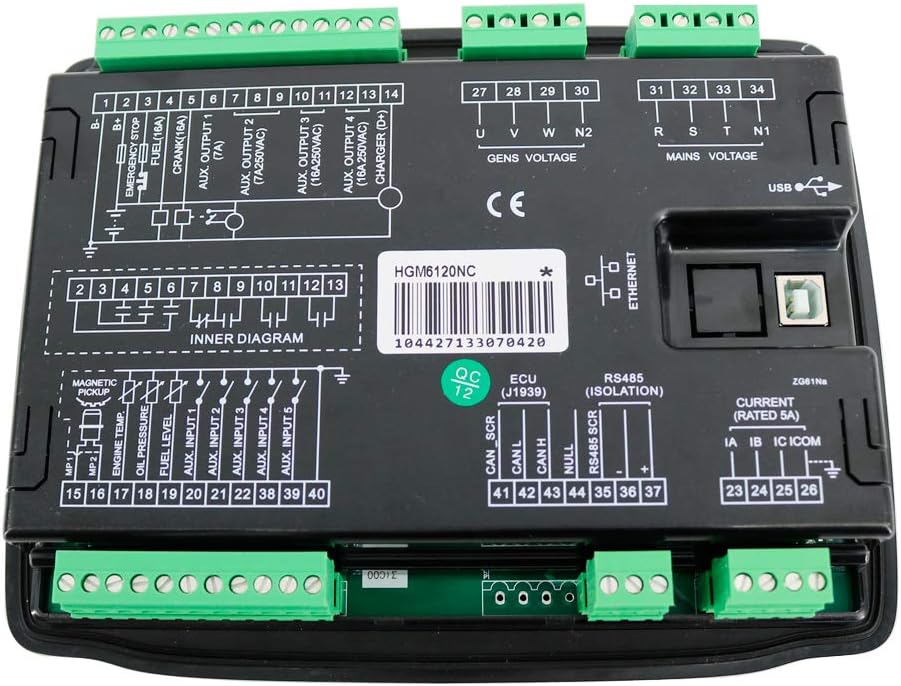
Obrázek 3.3: Zadní strana view of the HGM6120NC controller, displaying the comprehensive wiring diagram and various terminal blocks for power, sensors, outputs, and communication.
4. Návod k obsluze
The HGM6120NC controller offers several operating modes and functions accessible via its front panel buttons.
4.1 Ovládací prvky na předním panelu
| Tlačítko/Indikátor | Funkce/Popis |
|---|---|
| Alarm / Status | Indicators for system alarms and operational status. |
| Load (Close/Open) | Controls the load connection to the power source. |
| Mains (Close/Open) | Controls the connection to the utility mains power. |
| Genset (Close/Open) | Controls the connection to the generator power. |
| Auto | Activates automatic operation mode for the genset. |
| Manuál | Aktivuje manuální režim provozu. |
| Start (Green) | Initiates the generator start sequence in manual mode. |
| Zastavit (červená) | Stops the generator. |
| Šipky nahoru / dolů | Navigation through menu options and parameter adjustment. |
| Nabídka / OK | Vstupuje do menu a potvrzuje výběry. |
4.2 Automatický provoz
- Stiskněte tlačítko Auto button to engage automatic mode.
- The controller will monitor mains power. If mains power fails, the controller will automatically start the genset.
- Once the genset is stable, the controller will transfer the load to the genset.
- When mains power returns, the controller will transfer the load back to the mains and shut down the genset after a cool-down period.
4.3 Ruční provoz
- Stiskněte tlačítko Manuál button to engage manual mode.
- Stiskněte tlačítko Start button to manually start the genset.
- Použijte Load Close/Open buttons to manually control load transfer.
- Stiskněte tlačítko Zastávka button to manually stop the genset.
5. Údržba
Regular maintenance ensures the longevity and optimal performance of your HGM6120NC controller.
- Čištění: Keep the controller's front panel clean and free of dust. Use a soft, dry cloth. Avoid abrasive cleaners or solvents.
- Kontroly připojení: Periodically inspect all wiring connections for tightness and signs of corrosion. Loose connections can lead to intermittent operation or damage.
- Aktualizace softwaru: Zkontrolujte výrobce webNavštivte webové stránky, kde najdete veškeré dostupné aktualizace firmwaru, abyste zajistili, že váš ovladač bude mít nejnovější funkce a opravy chyb.
- Podmínky prostředí: Abyste předešli poškození, zajistěte, aby provozní prostředí zůstalo v rámci specifikovaného rozsahu teploty a vlhkosti.
6. Řešení problémů
If you encounter issues with your HGM6120NC controller, consider the following basic troubleshooting steps:
- Ovladač se nezapíná:
- Verify the DC power supply (8-35V) is correctly connected and providing the correct voltage.
- Check for any blown fuses in the power supply circuit.
- Genset Not Starting Automatically:
- Ensure the controller is in Auto režimu.
- Check mains power input connections and settings.
- Verify all engine protection sensors (oil pressure, temperature) are functioning correctly and not triggering false alarms.
- Problémy se zobrazením:
- If the display is blank or unreadable, check power supply.
- Ensure operating temperature is within the specified range.
- Communication Errors (USB/RS485):
- Verify cable connections are secure.
- Ensure correct drivers are installed on the PC.
- Check communication settings (baud rate, parity) match between the controller and PC software.
For persistent issues, consult the full technical manual or contact Graigar customer support.
7. Specifikace
| Parametr | Hodnota |
|---|---|
| Napájení | DC (8–35) V |
| Rozměry pouzdra | 209 x 166 x 45 mm |
| Výřez panelu | 186 x 141 mm |
| Provozní teplota | (-25 ~ 70) ℃ |
| Hmotnost | 0.56 kg |
| Materiál | Plast |
| Typ zobrazení | LCD |
| Výrobce | Graigar |
8. Záruka a podpora
For warranty information, technical support, or service inquiries, please refer to the official Graigar documentation included with your product or visit the manufacturer's official webmísto.
It is recommended to register your product to receive updates and support notifications.