
1. Úvod
The Zerone Sport Action DV Camera is a compact and portable device designed for capturing high-definition video during various outdoor activities. Featuring 1080P and 720P recording options, a 120-degree wide-angle lens, and an IPX-4 waterproof aluminum alloy shell, this camera is built for durability and ease of use. It includes a built-in microphone for audio recording and provides vibration feedback for operational status.
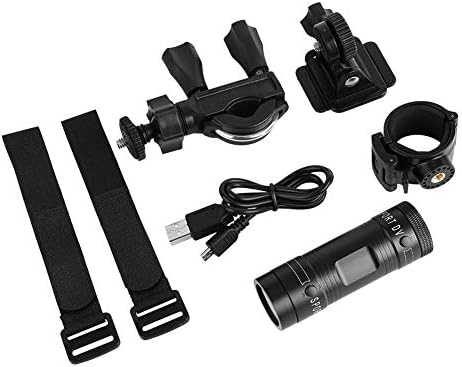
Image 1.1: The Zerone Sport Action DV Camera unit.
2. Bezpečnostní informace
- Nevystavujte fotoaparát extrémním teplotám ani přímému slunečnímu záření po delší dobu.
- While the camera features an IPX-4 waterproof rating, it is designed to withstand splashes and light rain. Do not submerge or soak the camera in water.
- Udržujte zařízení mimo dosah silných magnetických polí.
- Use only the specified charging cable and power adapter to prevent damage.
- Nepokoušejte se fotoaparát rozebírat ani upravovat, mohlo by dojít ke ztrátě záruky a poškození.
- Pokud fotoaparát nepoužíváte, skladujte jej na suchém a chladném místě.
3. Obsah balení
Zkontrolujte prosím balení, zda jsou všechny položky přítomny:
- Zerone Sport Action DV Camera Unit
- USB nabíjecí kabel
- Mounting Accessories (e.g., bike mount, helmet mount, strap mounts)
- Dobíjecí baterie (může být předinstalována)
- Uživatelská příručka (tento dokument)
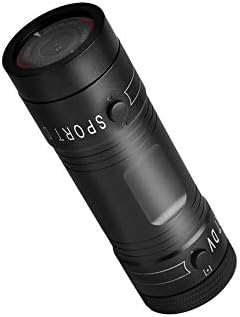
Image 3.1: Contents of the Zerone Sport Action DV Camera package, showing the camera, USB cable, and various mounting options.
4. Fotoaparát skončilview
Seznamte se s komponenty a ovládacími prvky fotoaparátu.
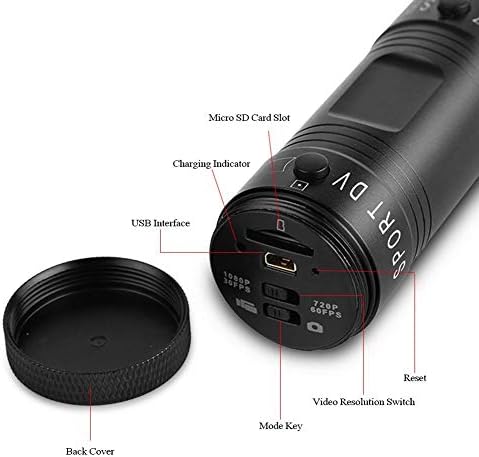
Obrázek 4.1: Detailní view of the camera's rear end, highlighting the Micro SD card slot, USB interface, charging indicator, mode key, video resolution switch (1080P 30fps / 720P 60fps), and reset button.
- Slot pro kartu Micro SD: Insert your Micro SD card here. A card is required for operation.
- Indikátor nabíjení: Displays charging status. A red light indicates charging; it turns off when fully charged.
- USB rozhraní: Pro nabíjení a připojení k počítači.
- Tlačítko režimu: Used to switch between recording modes (e.g., video, photo).
- Video Resolution Switch: Selects between 1080P 30fps and 720P 60fps recording resolutions.
- Resetovací tlačítko: Slouží k resetování zařízení, pokud přestane reagovat.
- Power Button (Front): Located on the front side of the camera.
- Record/Stop Button (Back): Located on the back side of the camera.
5. Nastavení
5.1 Nabíjení baterie
- Connect the camera to a USB power source (e.g., computer, wall adapter) using the provided USB cable.
- The červené světlo on the back of the camera will illuminate, indicating that it is charging.
- Po úplném nabití červená kontrolka zhasne.
- Note: If the camera blinks red and blue when plugged in, it indicates that an SD card is not inserted. This is not a charging indicator.
5.2 Vložení Micro SD karty
A Micro SD card (not included) is required for recording video and photos. The camera supports Micro SD cards up to a certain capacity (check product packaging for maximum supported size, typically 32GB or 64GB for similar devices).
- Odšroubujte zadní kryt fotoaparátu.
- Locate the Micro SD card slot (refer to Image 4.1).
- Opatrně vložte kartu Micro SD do slotu, dokud nezacvakne. Ujistěte se, že je karta správně orientována.
- Replace the back cover, ensuring it is securely tightened to maintain water resistance.
5.3 Montáž fotoaparátu
The camera comes with various mounting accessories for different applications.
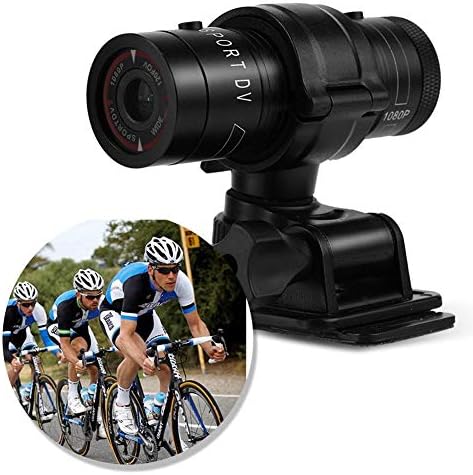
Image 5.1: The camera attached to a bicycle handlebar, demonstrating one of its mounting options.
- Držák na kolo: Použijte třamp mount to attach the camera securely to bicycle handlebars or other tubular structures.
- Držák na helmu: Utilize the adhesive or strap mounts to fix the camera to a helmet.
- Strap Mounts: For attaching to various gear or body parts.
Ensure all mounts are securely fastened before engaging in activities to prevent the camera from falling.
6. Ovládání fotoaparátu
6.1 Zapnutí/vypnutí
- Pro zapnutí stiskněte a podržte Tlačítko napájení (front switch) until the camera vibrates.
- Chcete-li přístroj vypnout, stiskněte a podržte tlačítko Tlačítko napájení again until the camera vibrates once.
6.2 Selecting Video Resolution
Before recording, select your desired video resolution using the switch on the back of the camera (refer to Image 4.1).
- Posuňte přepínač do polohy "1080P 30fps" for Full HD video at 30 frames per second.
- Posuňte přepínač do polohy "720P 60fps" for HD video at 60 frames per second.
6.3 Nahrávání videa
- Ujistěte se, že je kamera zapnutá.
- Stiskněte tlačítko Tlačítko Record/Stop (back switch) to start recording. The camera will vibrate three times to indicate recording has started.
- Nahrávání zastavíte stisknutím tlačítka Tlačítko Record/Stop again. The camera will vibrate once to indicate recording has stopped.
6.4 Připojení k počítači
K převodu files or access recorded content:
- Ujistěte se, že je fotoaparát vypnutý.
- Připojte fotoaparát k počítači pomocí dodaného kabelu USB.
- The camera will be recognized as a removable storage device.
- You can then access and transfer your video files.
7. Údržba
- Čištění: K čištění těla fotoaparátu používejte měkký, suchý hadřík. Na objektiv použijte speciální hadřík a roztok na čištění objektivů. Nepoužívejte abrazivní materiály.
- Skladování: When not in use for extended periods, store the camera in a cool, dry place. Ensure the battery is partially charged (around 50%) to prolong its lifespan.
- Voděodolnost: Regularly check that the back cover is securely tightened to maintain the IPX-4 water resistance. Avoid exposing the USB port or SD card slot to moisture when the cover is open.
- Péče o baterie: Avoid fully discharging the battery frequently. Recharge it when the low battery indicator appears.
8. Řešení problémů
| Problém | Možná příčina | Řešení |
|---|---|---|
| Fotoaparát se nezapne. | Baterie je vybitá. | Plně nabijte fotoaparát. |
| Camera blinks red and blue, then turns off. | No Micro SD card inserted or card is faulty. | Insert a functional Micro SD card. Ensure it is properly seated. |
| Nelze nahrávat video. | Žádná karta Micro SD, karta je plná nebo je zobrazena chyba karty. | Insert a Micro SD card, delete old filenebo kartu naformátujte (tím se vymažou všechna data). |
| Špatná kvalita videa. | Lens is dirty; low light conditions; incorrect resolution setting. | Clean the lens. Ensure adequate lighting. Select 1080P resolution for higher detail. |
| Fotoaparát nereaguje. | Softwarová závada. | Use a thin object (like a paperclip) to press the Tlačítko Reset (refer to Image 4.1). |
9. Specifikace
| Funkce | Detail |
|---|---|
| Značka | nula |
| Číslo modelu | Zeronefg3h149y2s |
| Rozlišení záznamu videa | 1080p (30fps), 720p (60fps) |
| Úhel objektivu | 120-degree A+ grade wide-angle |
| Hodnocení voděodolnosti | IPX-4 (splash-proof) |
| Materiál pláště | Hliníková slitina |
| Technologie fotosenzoru | CMOS |
| Maximální clona | 1.8 milimetrů |
| Typ paměti Flash | Micro SD (card not included) |
| Formát záznamu videa | AVI |
| Podporovaný formát zvuku | AAC, MP3, PCM, FLAC, or Dolby Digital/AC-3 |
| Technologie připojení | USB |
| Hmotnost položky | 10.8 unce (cca 306 gramů) |
| Rozměry produktu | 11.81 x 6.3 x 5.91 palců (přibližně 30 x 16 x 15 cm) |
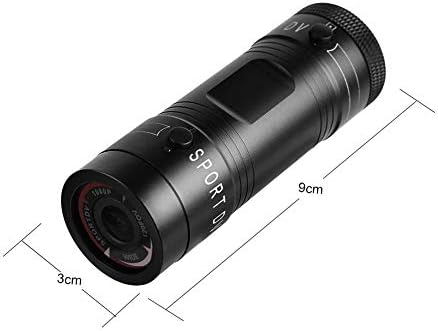
Image 9.1: Physical dimensions of the camera, showing a length of 9cm and a diameter of 3cm.
10. Záruka a podpora
Informace o záruce a technickou podporu naleznete v dokumentaci dodané s vaším nákupem nebo se obraťte přímo na prodejce/výrobce. Uschovejte si doklad o koupi pro případné reklamace.
Manufacturer: Zerone
For further assistance, you may visit the Zerone Store on Amazon: Zerone Store