
Zavedení
This manual provides instructions for the Easytry123 replacement remote control, designed for use with various Sanyo LCD HDTV television models. This remote offers essential functions for operating your compatible Sanyo television.
Důležitá poznámka:
- This is a replacement remote control. While it provides core functionality, some advanced or specific features of your original Sanyo remote may not be supported.
- Ensure your television model is listed in the compatibility section to guarantee proper function.
Obsah balení
Balíček obsahuje:
- 1 x Easytry123 Replacement Remote Control (Model: Easytry4382)
Batteries and an instruction manual are not included with this product.
Nastavení
Instalace baterie
The remote control requires two (2) AA batteries (not included) for operation. Follow these steps to install the batteries:
- Najděte kryt prostoru pro baterie na zadní straně dálkového ovladače.
- Zatlačte na západku a posuňte kryt dolů, abyste jej sejměli.
- Insert two AA batteries, ensuring the positive (+) and negative (-) terminals align correctly with the markings inside the compartment. Incorrect installation can prevent the remote from functioning.
- Zasuňte kryt přihrádky na baterie zpět na místo, dokud bezpečně nezacvakne.
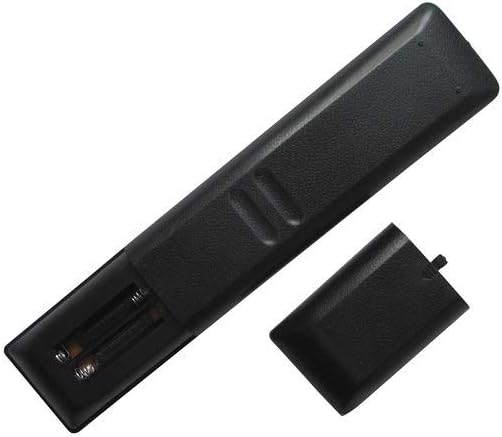
Obrázek: Zadní view of the remote control with the battery cover open, revealing the battery slots.
Návod k obsluze
Point the remote control directly at your Sanyo television's infrared sensor. Ensure there are no obstructions between the remote and the TV.

Obrázek: Přední strana view dálkového ovladače se zobrazením všech tlačítek.
Základní funkce
- MOC: Zapíná nebo vypíná televizi.
- POČET TLAČÍTEK (0-9): Přímý výběr kanálů.
- CH +/-: Postupně mění kanály.
- VOL +/-: Nastavuje úroveň hlasitosti.
- ZTLUMIT: Silences or restores the television audio.
- VSTUP: Cyklicky přepíná dostupné vstupní zdroje (např. HDMI, AV).
- JÍDELNÍ LÍSTEK: Přístup k hlavní nabídce televizoru.
- DIRECTIONAL PAD (Up, Down, Left, Right): Prochází možnostmi nabídky.
- ZADEJTE: Potvrzuje výběr v nabídce.
- VÝSTUP: Ukončí aktuální nabídku nebo zobrazení na obrazovce.
- INFO: Zobrazuje informace o aktuálním programu nebo vstupu.
Doplňkové funkce
Depending on your specific Sanyo TV model, the following buttons may provide additional functionality:
- OBRÁZEK: Přístup k nastavení obrazu.
- ZVUK: Přístup k nastavení zvuku.
- SPÁT: Nastaví časovač pro automatické vypnutí televizoru.
- NA ČASOVAČI: Sets a timer for the TV to turn on automatically.
- PLAY/PAUSE/STOP/REW/FF: Controls for media playback if your TV supports it (e.g., USB media).
- SUB CH: Sub-channel selection.
- ODVOLÁNÍ: Vrátí se k předchozímu viewed kanál.
- POMOC: Accesses on-screen help.
Údržba
Čištění
K čištění dálkového ovladače použijte měkký, suchý hadřík. V případě odolných nečistot jej lehce setřete.ampen the cloth with water or a mild, non-abrasive cleaner. Avoid using harsh chemicals or abrasive materials, as these can damage the remote's surface or buttons.
Výměna baterie
Replace batteries when the remote's response becomes sluggish or stops working. Always replace both AA batteries at the same time with new ones. Do not mix old and new batteries, or different types of batteries.
Skladování
If the remote control will not be used for an extended period, remove the batteries to prevent leakage, which can damage the remote's internal components.
Odstraňování problémů
- Dálkové ovládání nereaguje:
- Zkontrolujte, zda jsou baterie správně vloženy se správnou polaritou.
- Vyměňte staré baterie za nové baterie typu AA.
- Ensure there is a clear line of sight between the remote control and the TV's infrared sensor. Remove any obstructions.
- Try operating the remote closer to the TV.
- Některé funkce nefungují:
- As a replacement remote, it may not support all advanced or specific functions of your original Sanyo remote. Refer to your TV's original manual for specific feature compatibility.
- Ověřte, zda je model vašeho televizoru uveden jako kompatibilní s tímto dálkovým ovladačem.
Specifikace
| Číslo modelu | Easytry4382 |
| Značka | Easytry123 |
| Kompatibilní zařízení | Sanyo LCD HDTV Televisions (Models: FXVF, FXVB, FXVC, FXVG, FXVL, FXVM, AVM3651, AVM3651G, DS27510, DS27820, DS31820, DS32830, DS32830H) |
| Technologie připojení | Infračervený (IR) |
| Typ ovladače | Ovládání tlačítkem |
| Zdroj napájení | 2 x AA baterie (nejsou součástí balení) |
Záruka a podpora
For warranty information and customer support, please refer to the seller or manufacturer directly. This product is typically covered by a limited warranty against manufacturing defects. Keep your purchase receipt as proof of purchase.
For further assistance or inquiries, please contact the Easytry123 customer service or the retailer from whom you purchased this remote control.