
Zavedení
Thank you for choosing the MARVO KG925G Mechanical Gaming Keyboard. This manual provides essential information for setting up, operating, maintaining, and troubleshooting your new keyboard. Please read this manual carefully before use to ensure optimal performance and longevity of your device.
Obsah balení
Ověřte, zda jsou v balení přítomny všechny položky:
- MARVO KG925G Mechanical Gaming Keyboard
- Uživatelská příručka (tento dokument)
Nastavení
Systémové požadavky
- Operační systém: Windows 8 nebo novější
- K dispozici port USB 2.0
Připojení klávesnice
- Vyhledejte na počítači volný port USB 2.0.
- Plug the USB connector of the MARVO KG925G keyboard into the USB port.
- Operační systém automaticky vyhledá a nainstaluje potřebné ovladače. Tento proces může chvíli trvat.
- Once the drivers are installed, the keyboard's backlighting will illuminate, indicating it is ready for use.
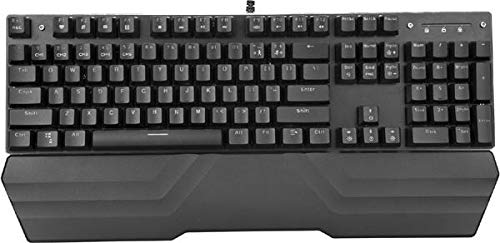
Image: The MARVO KG925G Mechanical Gaming Keyboard with its USB cable connected, ready for use. The keyboard features a wrist rest and illuminated keys.
Návod k obsluze
Základní funkce klávesnice
The MARVO KG925G functions as a standard QWERTY keyboard for typing and general computer use.
Multimediální klávesy
The keyboard includes dedicated multimedia functions, typically accessed via the Fn key combined with the F-keys (F1-F12). Refer to the keycap legends for specific functions such as volume control, media playback, and launching applications.
- Fn + F1–F12: Access various multimedia and system functions.
Ovládání podsvícení
The MARVO KG925G features customizable backlighting. Specific key combinations are used to change lighting modes, brightness, and speed. Consult the keyboard's keycap legends or the manufacturer's website for detailed instructions on advanced lighting customization.
- Režimy osvětlení: Typically cycled using a dedicated key or Fn + a specific key (e.g., Scroll Lock, Pause Break, or a dedicated lighting key).
- Nastavení jasu: Often controlled by Fn + Up/Down arrow keys.
Údržba a péče
Správná údržba zajistí dlouhou životnost a výkon vaší klávesnice.
- Čištění: K otření povrchu klávesnice použijte měkký, suchý hadřík. Pro důkladnější čištění použijte nádobku se stlačeným vzduchem k odstranění prachu a nečistot z prostoru mezi klávesami. Nepoužívejte agresivní chemikálie ani abrazivní materiály.
- Rozlití: In case of liquid spills, immediately unplug the keyboard from your computer. Turn it upside down to drain any liquid and allow it to dry completely for at least 24-48 hours before reconnecting. Do not attempt to use the keyboard while it is wet.
- Skladování: Klávesnici skladujte na chladném a suchém místě mimo dosah přímého slunečního záření a extrémních teplot.
Odstraňování problémů
If you encounter issues with your MARVO KG925G keyboard, refer to the following common solutions:
| Problém | Možné řešení |
|---|---|
| Klávesnice nereaguje. |
|
| Backlighting is not working. |
|
| Keys are not registering correctly. |
|
Specifikace
- Model: KG925G
- Značka: MARVO
- Konektivita: USB 2.0
- Typ klávesnice: Mechanická herní klávesnice
- Vlastnosti: Illumination, Wrist Rest, Multimedia Keys
- Kompatibilní OS: Windows 8 a vyšší
- Rozměry: Přibližně 47.5 x 18.7 x 8.4 cm (18.7 x 7.4 x 3.3 palce)
Záruka a podpora
For warranty information and technical support, please refer to the warranty card included with your product or visit the official MARVO webUschovejte si doklad o koupi pro případ reklamace.