
1. Úvod
Thank you for choosing the Easytry123 Replacement Remote Control. This remote is designed to provide convenient control for various Goodman AC Air Conditioner models. It is an infrared, button-controlled device, engineered for ease of use.
Compatible Goodman AC Models include: WMC-24-1-KFAA, WMH241, WMH181A, HDP181A, HG31ES, WMH121, HG31AS, WMH241A.
Important Note: As a replacement unit, this remote control may not support all functions of your original air conditioner remote. Please verify compatibility with your specific AC model before use.
2. Nastavení: Instalace baterie
Your Easytry123 Replacement Remote Control requires two (2) AAA batteries (not included) for operation. Follow these steps to install the batteries:
- Najděte přihrádku na baterie na zadní straně dálkového ovladače.
- Stiskněte západku a posuňte kryt přihrádky na baterie dolů, abyste jej otevřeli.
- Vložte dvě baterie typu AAA a ujistěte se, že kladný (+) a záporný (-) pól správně shodují s označením uvnitř přihrádky.
- Zasuňte kryt přihrádky na baterie zpět na místo, dokud bezpečně nezacvakne.
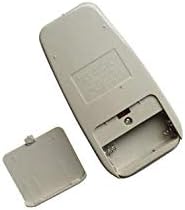
Figure 1: Back of the remote control with the battery cover removed, illustrating the battery compartment for AAA batteries.
After installing the batteries, the remote control is ready for use.
3. Návod k obsluze
To operate your Goodman AC Air Conditioner using the Easytry123 Replacement Remote Control, follow these general guidelines:
- Point the Remote: Ensure the remote control is pointed directly at the infrared receiver on your Goodman AC unit. Obstructions between the remote and the AC unit can prevent proper communication.
- Zapnutí/vypnutí: Stiskněte tlačítko MOC tlačítko pro zapnutí nebo vypnutí klimatizace.
- Upravit teplotu: Použijte TEMP UP (▲) a SNÍŽENÍ TEPLOTY (▼) buttons to set your desired temperature.
- Vyberte režim: Stiskněte tlačítko MODE button to cycle through available operating modes such as Cool, Fan, Dry, or Heat (if supported by your AC unit).
- Rychlost ventilátoru: Použijte RYCHLOST VENTILÁTORU button to adjust the fan's intensity (e.g., Low, Medium, High, Auto).
- Funkce časovače: If your AC unit and this replacement remote support timer functions, refer to your AC unit's original manual for specific timer settings.
Familiarize yourself with the buttons on the remote and their corresponding functions. Due to the nature of replacement remotes, some advanced features present on your original remote may not be available or function identically.
4. Údržba
Správná péče a údržba prodlouží životnost vašeho dálkového ovladače:
- Čištění: Dálkový ovladač otírejte měkkým, suchým hadříkem. Nepoužívejte tekuté čisticí prostředky, abrazivní houbičky ani chemická rozpouštědla, protože by mohla poškodit povrch nebo vnitřní součásti.
- Výměna baterie: Replace batteries promptly when the remote's range decreases or it stops responding. Always replace both batteries at the same time with new AAA batteries. Do not mix old and new batteries, or different types of batteries.
- Skladování: Pokud dálkový ovladač nebudete delší dobu používat, vyjměte baterie, abyste zabránili vytečení a možnému poškození. Dálkový ovladač skladujte na chladném a suchém místě mimo dosah přímého slunečního záření a extrémních teplot.
- Vyhněte se kapkám: Protect the remote from physical impact. Dropping the remote can damage its internal circuitry.
5. Řešení problémů
If you encounter issues with your Easytry123 Replacement Remote Control, please refer to the following troubleshooting steps:
- Dálkové ovládání nereaguje:
- Zkontrolujte baterie. Ujistěte se, že jsou vloženy správně se správnou polaritou (+/-).
- Vyměňte baterie za nové AAA baterie.
- Ensure there are no obstructions between the remote control and the AC unit's infrared receiver.
- Confirm you are within the effective operating range of the AC unit (typically within 20 feet and direct line of sight).
- Některé funkce nefungují:
- As a replacement remote, some specific or advanced functions of your original AC remote may not be supported. This is normal for universal or replacement remotes.
- Verify that your AC unit model is listed as compatible in the introduction section of this manual.
- AC Unit Not Responding to Any Remote:
- Ensure the AC unit itself is powered on and receiving electricity.
- Consult your Goodman AC unit's original user manual for troubleshooting steps related to the AC unit's receiver.
6. Specifikace
| Značka | Easytry123 |
| Číslo modelu | Easytry3659 |
| Kompatibilní zařízení | Goodman AC Air Conditioners (specific models listed in Introduction) |
| Technologie připojení | Infračervený |
| Typ ovladače | Ovládání tlačítkem |
| Typ baterie | 2 x AAA baterie (nejsou součástí balení) |
| Speciální funkce | Ergonomický design |
7. Záruka a podpora
For any questions, concerns, or support regarding your Easytry123 Replacement Remote Control, please contact the seller directly through the platform where you made your purchase.
Please note that the product typically comes with a return policy of 30 days from the date of purchase. Refer to your purchase details for specific return and warranty information.