
MIFA X1
Návod k použití bezdrátových sluchátek MIFA X1 True Wireless
Model: X1
Konec produktuview
The MIFA X1 True Wireless Earbuds offer a seamless audio experience with Bluetooth 5.0 connectivity, stereo sound, and a portable charging case. Designed for comfort and durability, these earbuds are sweatproof and suitable for various activities.
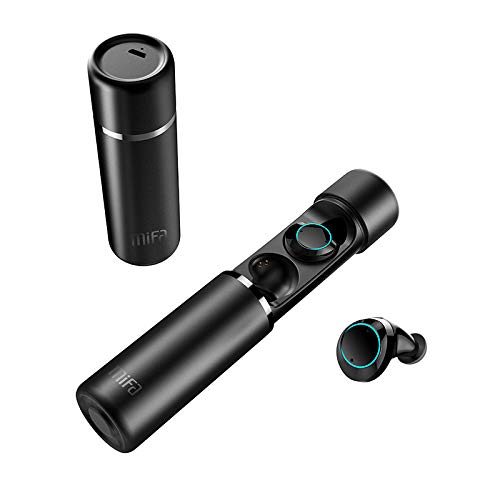
An image displaying the MIFA X1 True Wireless Earbuds. The cylindrical charging case is shown both closed and open, revealing the earbuds inside. One earbud is also shown outside the case.
Obsah balení
- MIFA X1 True Wireless Earbuds
- Přenosné nabíjecí pouzdro
- Multi-sized Ear Gels (S, M, L)
- USB nabíjecí kabel
- Uživatelská příručka (tento dokument)
Nastavení
1. Počáteční nabíjení
Before first use, ensure both the earbuds and the charging case are fully charged. Remove any protective films from the earbud charging contacts if present.
- Vložte sluchátka do nabíjecího pouzdra.
- Connect the charging case to a power source using a standard USB charging cable.
- Charging indicators on the case and/or earbuds will show charging status.
2. Spárování se zařízením
The MIFA X1 earbuds feature one-step pairing.
- Ensure Bluetooth is enabled on your smartphone or other device.
- Vyjměte obě sluchátka z nabíjecího pouzdra. Automaticky se zapnou a přejdou do režimu párování.
- On your device, search for Bluetooth devices and select "MIFA X1" from the list.
- Po připojení hlasový pokyn potvrdí úspěšné spárování.
Note: If only one earbud connects, place both back into the case, then remove them again to re-initiate pairing.
Návod k obsluze
Nošení sluchátek
- Choose the ear gels that provide the most comfortable and secure fit for optimal sound quality and stability.
- Gently insert the earbuds into your ears and rotate them slightly to ensure a snug fit.
Základní ovládání (dotykové ovládání)
| Funkce | Akce |
|---|---|
| Zapnout | Take out of charging case (automatic) |
| Vypnout | Place into charging case (automatic) |
| Přehrát/Pozastavit hudbu | Jediným klepnutím na kterékoli sluchátko |
| Další stopa | Dvakrát klepněte na pravé sluchátko |
| Předchozí stopa | Dvojité klepnutí na levé sluchátko |
| Přijmout/ukončit hovor | Jediným klepnutím na kterékoli sluchátko |
| Odmítnout hovor | Stiskněte a podržte jedno ze sluchátek po dobu 2 sekund |
| Aktivujte hlasového asistenta (Siri, Google Assistant) | Trojité klepnutí na kterékoli sluchátko |
Údržba
- Čištění: Pravidelně čistěte sluchátka a nabíjecí pouzdro měkkým, suchým hadříkem, který nepouští vlákna. Nepoužívejte agresivní chemikálie ani abrazivní materiály.
- Kontakty pro nabíjení: Pro zajištění správného nabíjení se ujistěte, že jsou nabíjecí kontakty na sluchátkách i pouzdře čisté a bez nečistot.
- Skladování: Pokud sluchátka nepoužíváte, uložte je do nabíjecího pouzdra, aby byla chráněna a zůstávala nabitá.
- Voděodolnost: The earbuds are sweatproof, but not fully waterproof. Avoid submerging them in water or exposing them to heavy rain.
Odstraňování problémů
- Sluchátka se nespárují: Place both earbuds back into the charging case, then remove them simultaneously. This should force them to re-sync.
- Sluchátka se nepřipojují k zařízení:
- Ujistěte se, že je na vašem zařízení povoleno Bluetooth.
- Forget "MIFA X1" from your device's Bluetooth settings and attempt to pair again.
- Ujistěte se, že jsou sluchátka nabitá.
- Z jednoho sluchátka žádný zvuk:
- Zkontrolujte, zda jsou obě sluchátka nabitá.
- Zkuste obě sluchátka vložit zpět do pouzdra a znovu je vyjmout.
- Perform a factory reset (if applicable, consult MIFA support for specific instructions if this manual doesn't detail it).
- Problémy s nabíjením:
- Ujistěte se, že je nabíjecí kabel bezpečně připojen k pouzdru i ke zdroji napájení.
- Vyčistěte nabíjecí kontakty na sluchátkách a uvnitř pouzdra.
- Zkuste jiný nabíjecí USB kabel a napájecí adaptér.
Specifikace
| Funkce | Detail |
|---|---|
| Název modelu | X1 |
| Technologie připojení | Bluetooth 5.0 |
| Technologie bezdrátové komunikace | Bluetooth |
| Režim zvukového výstupu | Stereo |
| Formát mikrofonu | Vestavěný |
| Kontrolní metoda | Dotek |
| Umístění uší | V uchu |
| Výdrž baterie (sluchátka) | Až 4 hodin |
| Celková výdrž baterie (s nabíjecím pouzdrem) | Až 12 hodin |
| Materiál | Plast |
| Speciální funkce | Mikrofon v ceně, odolný proti potu |
| Výrobce | MIFA Innovations LLC |
Informace o záruce
This product typically comes with a manufacturer's warranty. Please refer to the warranty card included in your product packaging or visit the official MIFA website for detailed warranty terms and conditions. A 30-day warranty is generally provided.
Zákaznická podpora
For further assistance, technical support, or inquiries regarding your MIFA X1 True Wireless Earbuds, please visit the official MIFA website or contact their customer service department. Contact information can usually be found on the product packaging or the official brand webmísto.
Ask a question about this manual
Ask about setup, troubleshooting, compatibility, parts, safety, or missing instructions. Manuals+ will review the question and use this page’s manual context to help answer it.