
1. Úvod
Děkuji za nákupasing the MIFA A30 Bluetooth Speaker. This manual provides essential information for setting up, operating, and maintaining your device. Please read it thoroughly before use to ensure optimal performance and longevity of your speaker.
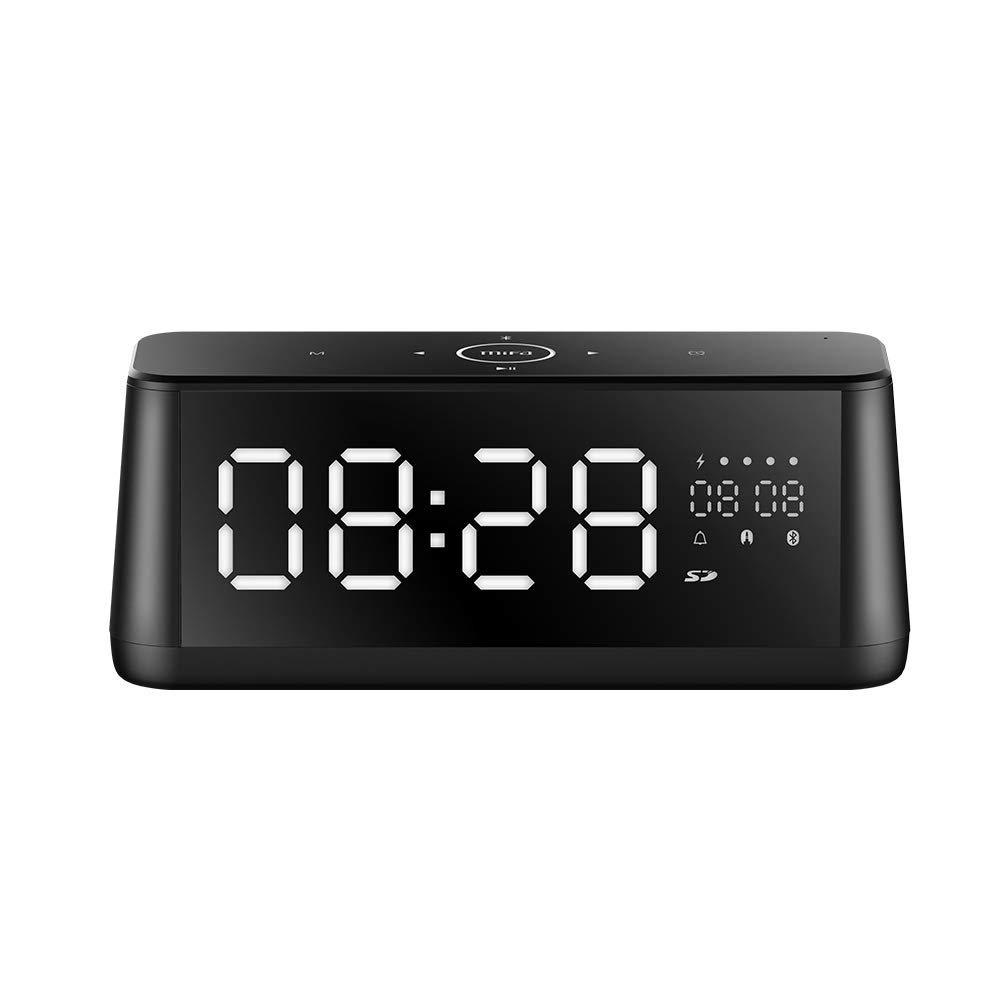
Obrázek 1.1: Přední strana view of the MIFA A30 Bluetooth Speaker, displaying the time on its large LED screen.
2. Bezpečnostní informace
- Nevystavujte reproduktor extrémním teplotám, přímému slunečnímu záření ani vysoké vlhkosti.
- Vyvarujte se pádu reproduktoru nebo jej nevystavujte silným nárazům.
- Zařízení sami nerozebírejte, neopravujte ani neupravujte. V případě jakýchkoli oprav se obraťte na autorizovaný servisní personál.
- Keep the speaker away from water and other liquids, despite its waterproof rating, to prevent damage to ports when open.
- Používejte pouze určený nabíjecí kabel a adaptér.
- Reproduktor čistěte měkkým, suchým hadříkem. Nepoužívejte abrazivní čisticí prostředky.
3. Obsah balení
Zkontrolujte prosím balení, zda neobsahuje následující položky:
- MIFA A30 Bluetooth Speaker
- USB nabíjecí kabel
- 3.5mm audio kabel
- Uživatelská příručka (tento dokument)
4. Konec produktuview
4.1. Součásti
The MIFA A30 speaker features a robust design with advanced audio components for high-quality sound reproduction.

Obrázek 4.1: Rozložený view illustrating the internal components of the MIFA A30, including two 15-watt drivers and two low-frequency passive radiators.
4.2. Ovládací panel a porty
The speaker's top panel features capacitive touch controls, and the rear panel houses various connectivity ports.
Obrázek 4.2: Shora dolů view of the MIFA A30 control panel, indicating the functions of each touch button for mode, playback, volume, and clock adjustment.
- Tlačítko M (režim): Krátkým stisknutím přepínáte mezi režimy Bluetooth, TF karta a AUX.
- Ovládání Bluetooth: Long press to turn off Bluetooth, short press to turn on.
- Tlačítko předchozí stopy: Krátkým stisknutím přejdete na předchozí skladbu.
- Play/Pause/Hands-Free Button: Krátkým stisknutím přehrajete/pozastavíte hudbu. Krátkým stisknutím přijmete/ukončíte hovory. Dlouhým stisknutím odmítnete hovory.
- Tlačítko Next Track: Krátkým stisknutím přejdete na další skladbu.
- Tlačítko hodin: Long press for clock adjustment.
- Zvýšit hlasitost: Otočením ve směru hodinových ručiček zvýšíte hlasitost.
- Snížit hlasitost: Otočením proti směru hodinových ručiček snížíte hlasitost.
- Mikrofon: Vestavěný mikrofon pro hands-free hovory.
- LED displej: Shows time, date, battery level, and current mode.
5. Nastavení
5.1. Nabíjení reproduktoru
Before first use, fully charge the speaker. Connect the provided USB charging cable to the speaker's charging port and the other end to a USB power adapter (not included) or a computer's USB port. The LED display will indicate charging status.
5.2. Zapnutí/vypnutí
- Zapnutí: Press and hold the Play/Pause button until the LED display lights up.
- Vypnutí: Press and hold the Play/Pause button until the LED display turns off. The speaker will automatically screen out and power off to save battery after a period of inactivity.
6. Návod k obsluze
6.1. Párování Bluetooth
- Ensure the speaker is powered on and in Bluetooth mode (indicated by the Bluetooth icon on the LED display). If not, short press the 'M' button to switch to Bluetooth mode.
- Na svém smartphonu nebo tabletu povolte Bluetooth a vyhledejte dostupná zařízení.
- Select "MIFA A30" from the list of devices.
- Once paired, the speaker will emit a confirmation sound, and the Bluetooth icon on the display will stop flashing.
- The speaker will automatically re-connect to the last paired device when powered on, if the device is within range.
6.2. Přehrávání zvuku
- Přehrát/pozastavit: Krátce stiskněte tlačítko Přehrát/Pozastavit.
- Další skladba: Short press the Next Track button.
- Předchozí skladba: Short press the Previous Track button.
- Nastavení hlasitosti: Otočením ovladače hlasitosti po směru hodinových ručiček hlasitost zvýšíte, proti směru hodinových ručiček snížíte.
6.3. Hands-free volání
Při připojení k chytrému telefonu přes Bluetooth:
- Přijmout hovor: Krátce stiskněte tlačítko Přehrát/Pozastavit.
- Ukončit hovor: Během hovoru krátce stiskněte tlačítko Přehrát/Pozastavit.
- Odmítnout hovor: Dlouze stiskněte tlačítko Přehrát/Pozastavit, když přichází hovor.
6.4. Přehrávání z TF karty
- Insert a Micro-SD (TF) card with supported audio files (FLAC/APE/MP3/WMA/WAV) into the TF card slot.
- Short press the 'M' button to switch to TF Card mode. The speaker will automatically begin playing music from the card.
6.5. Vstup AUX
- Connect one end of the 3.5mm audio cable to the speaker's AUX input port and the other end to the audio output of your device (e.g., MP3 player, computer).
- Short press the 'M' button to switch to AUX mode.
- Zvuk se nyní bude přehrávat přes reproduktor z připojeného zařízení.
6.6. Clock and Display Settings
- Nastavení hodin: Long press the Clock button to enter time setting mode. Use the Next/Previous buttons to adjust values and the Play/Pause button to confirm.
- Display Luminance: The LED display has 7 adjustable luminance levels. Refer to the full product documentation for specific adjustment steps, typically involving short presses of the Clock button or a combination with volume controls.
7. Údržba
- Čištění: Wipe the speaker's surface with a soft, dry, lint-free cloth. Do not use liquid or aerosol cleaners.
- Skladování: Pokud reproduktor delší dobu nepoužíváte, skladujte jej na chladném a suchém místě, mimo dosah přímého slunečního záření a extrémních teplot.
- Péče o baterie: Chcete-li prodloužit životnost baterie, vyvarujte se častého úplného vybíjení. Reproduktor pravidelně nabíjejte, i když jej nepoužíváte.
8. Řešení problémů
| Problém | Možná příčina | Řešení |
|---|---|---|
| Reproduktor se nezapne. | Slabá baterie. | Nabíjejte reproduktor alespoň 2 hodiny. |
| Žádný zvuk. | Příliš nízká hlasitost; nesprávný režim; zařízení není připojeno. | Increase speaker and device volume. Ensure correct mode (Bluetooth/AUX/TF Card). Re-pair Bluetooth device or check AUX cable connection. |
| Párování Bluetooth selhalo. | Reproduktor není v režimu párování; zařízení je příliš daleko; rušení. | Ensure speaker is in Bluetooth mode. Move device closer to speaker. Turn off other Bluetooth devices. Try forgetting "MIFA A30" on your device and re-pairing. |
| TF Card not playing. | Nesprávný režim; nepodporováno file format; card error. | Switch to TF Card mode. Ensure files are FLAC/APE/MP3/WMA/WAV. Reinsert TF card or try a different card. |
9. Specifikace
| Funkce | Detail |
|---|---|
| Název modelu | A30 |
| Typ reproduktoru | Regál |
| Technologie připojení | Bluetooth 4.2, Auxiliary (3.5mm), Micro-SD (TF Card) |
| Režim zvukového výstupu | Stereo |
| Maximální výstupní výkon reproduktoru | 30 wattů (2 x 15W měniče) |
| Vylepšení basů | Two low-frequency boosters |
| Kapacita baterie | 4000 XNUMX mAh |
| Prázdno | Up to 10-12 hours (depending on volume and content) |
| Kontrolní metoda | Kapacitní dotykový panel |
| Zobrazit | 7.2" x 2.8" Mirror LED Screen with 106 LEDs, 7-level adjustable luminance |
| Podporované zvukové formáty | FLAC/APE/MP3/WMA/WAV |
| Vestavěný mikrofon | Yes, for hands-free calls |
| Vodotěsný | Yes (Note: Ensure ports are covered for water resistance) |
| Barva | Černý |
| Typ montáže | Stolní držák |
10. Záruka a podpora
The MIFA A30 Bluetooth Speaker typically comes with a 30-day warranty from the date of purchase, covering manufacturing defects. Please retain your proof of purchase for warranty claims.
For technical support, troubleshooting assistance beyond this manual, or warranty inquiries, please contact MIFA customer service through their official website or the retailer where the product was purchased. Provide your product model (A30) and purchase details when seeking support.