
1. Úvod
The Optex ORT 8930-HD is a digital terrestrial receiver designed to receive free-to-air digital programs broadcast in MPEG2/MPEG4 format, compatible with DVB-T2 and HEVC/H.265 standards. This device connects to your television via HDMI or SCART. It features a USB input for future software updates, multimedia file playback (photos, music, videos), and direct recording to an external USB storage device (not included).
This manual provides detailed instructions for the proper installation, operation, and maintenance of your Optex ORT 8930-HD receiver. Please read it thoroughly before use to ensure optimal performance and to prevent damage.
2. Bezpečnostní informace
- Zajistěte dostatečné větrání kolem zařízení, aby nedošlo k přehřátí.
- Do not expose the receiver to rain, moisture, or extreme temperatures.
- Neumisťujte zařízení do blízkosti zdrojů tepla, jako jsou radiátory nebo kamna.
- Používejte pouze napájecí adaptér dodaný s jednotkou.
- Neotevírejte casing; veškerý servis svěřte kvalifikovanému personálu.
- Během bouřek nebo pokud přístroj delší dobu nepoužíváte, odpojte napájecí kabel ze zásuvky.
3. Obsah balení
Ověřte, zda jsou v balení přítomny všechny položky:
- 1 x Optex ORT 8930-HD Digital Receiver
- 1 x Dálkové ovládání
- 1 x Uživatelská příručka
4. Konec produktuview
4.1 Přední panel

Obrázek 1: Přední view of the Optex ORT 8930-HD receiver, showing the display, USB port, and control buttons.
The front panel includes a digital display for channel numbers, a USB 2.0 port for external storage, and basic control buttons (CH+, CH-, Power).
4.2 Zadní panel
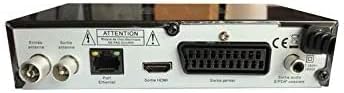
Obrázek 2: Zadní view of the Optex ORT 8930-HD receiver, displaying various connectivity ports.
Zadní panel nabízí následující připojení:
- Antenna In/Out: IEC 9.52 mm connectors for terrestrial antenna.
- HDMI výstup: For connecting to an HD television.
- SCART Connector: For connecting to older televisions.
- S/PDIF Coaxial Audio: Digitální audio výstup.
- Příkon: For the external power adapter.
4.3 Dálkové ovládání

Obrázek 3: The remote control unit for the Optex ORT 8930-HD receiver.
The remote control allows full operation of the receiver, including power, channel selection, volume, menu navigation, recording functions, and multimedia playback controls.
5. Nastavení
5.1 Připojení antény
- Connect your terrestrial antenna cable to the "Antenna In" port on the rear panel of the receiver.
- If you wish to loop the antenna signal to another device, connect a coaxial cable from the "Antenna Out" port to the input of the next device.
5.2 Připojení k televizoru
Vyberte jeden z následujících způsobů připojení:
- HDMI (doporučeno pro HD): Connect an HDMI cable from the "HDMI Output" port on the receiver to an available HDMI input on your television.
- SCART: Connect a SCART cable from the "SCART Connector" on the receiver to the SCART input on your television.
5.3 Připojení napájení
- Connect the power adapter to the power input port on the receiver.
- Zapojte napájecí adaptér do vhodné zásuvky.
5.4 Počáteční skenování kanálů
- Zapněte televizor a vyberte správný vstupní zdroj (HDMI nebo SCART) odpovídající vašemu připojení.
- Power on the Optex ORT 8930-HD receiver.
- The first-time setup wizard should appear. Follow the on-screen instructions to perform an automatic channel search. This will scan for all available digital terrestrial channels in your area.
- If the wizard does not appear, navigate to the "Menu" > "Installation" > "Automatic Search" using the remote control.
6. Návod k obsluze
6.1 Základní obsluha
- Zapnutí/vypnutí: Stiskněte tlačítko MOC na dálkovém ovladači nebo na předním panelu.
- Výběr kanálu: Použijte CH+ / CH- tlačítek nebo zadejte číslo kanálu přímo pomocí numerické klávesnice.
- Ovládání hlasitosti: Použijte VOL+ / VOL- tlačítka.
- Ztlumit: Stiskněte tlačítko ZTLUMIT tlačítko pro dočasné ztlumení zvuku.
6.2 Správa kanálů
- Automatické/Manuální vyhledávání: Přístup přes Menu > Instalace to rescan for channels.
- Funkce LCN: The Logical Channel Numbering (LCN) function automatically sorts channels into a logical order. This can usually be enabled/disabled in the installation menu.
- Favorite List: Create personalized lists of your preferred channels for quick access. Refer to the on-screen menu for instructions on adding and managing favorite channels.
6.3 Nahrávání a přehrávání
To use recording and multimedia playback features, connect a USB storage device (e.g., USB flash drive or external hard drive) to the USB port on the front panel.
- Nahrávání na USB: Stiskněte tlačítko REC na dálkovém ovladači spusťte nahrávání aktuálního programu. Stiskněte ZASTÁVKA pro ukončení nahrávání.
- Timeshift Function: This allows you to pause live TV and resume watching later. Activate Timeshift via the remote control (usually a dedicated button or through the menu).
- Přehrávání multimédií: Access the multimedia player via the Menu. You can browse and play music, photo, and video files stored on your connected USB device.
6.4 Elektronický programový průvodce (EPG)
Stiskněte tlačítko EPG tlačítko na dálkovém ovladači view Elektronický programový průvodce, který zobrazuje programové plány nadcházejících vysílání.
6.5 Rodičovský zámek
Set up a parental lock to restrict access to certain channels or programs. This feature is typically found in the Menu > Nastavení systému > Rodičovská kontrola sekce.
6.6 Funkce časovače
The timer function allows you to schedule the receiver to turn on/off or record a specific program at a set time. Access this feature through the Menu.
6.7 Software Update via USB
Pravidelně kontrolujte informace od výrobce website for available software updates. Download the update file to a USB drive and follow the instructions in the Menu > Nastavení systému > Aktualizace softwaru section to install it.
7. Údržba
- Čištění: Use a soft, dry cloth to clean the exterior of the receiver. Do not use liquid or aerosol cleaners.
- Větrání: Ujistěte se, že ventilační otvory na zařízení nejsou zablokované, aby nedošlo k jeho přehřátí.
- Software: Keep the receiver's software updated to ensure optimal performance and access to the latest features.
8. Řešení problémů
| Problém | Možná příčina | Řešení |
|---|---|---|
| Žádná síla | Napájecí kabel odpojený; vadná zásuvka. | Zkontrolujte připojení napájecího kabelu; zkuste jinou zásuvku. |
| No signal / No channels | Antenna not connected; incorrect input source on TV; no channel scan performed. | Check antenna connection; select correct TV input; perform an automatic channel scan. |
| Dálkové ovládání nefunguje | Vybité baterie; překážka mezi dálkovým ovladačem a přijímačem. | Vyměňte baterie; zajistěte nerušený výhled na infračervený senzor přijímače. |
| Nahrávání na USB nefunguje | USB device not connected or formatted incorrectly; insufficient storage space. | Ensure USB device is properly connected; format USB device (FAT32/NTFS); check available space. |
| Zařízení se zasekává nebo nereaguje | Dočasná softwarová závada. | Disconnect power for a few seconds, then reconnect. If problem persists, check for software updates. |
9. Specifikace
| Funkce | Detail |
|---|---|
| Model | ORT 8930-HD |
| Značka | Optex |
| Typ tuneru | Pozemní (DVB-T2) |
| Dekódování videa | HEVC/H.265, MPEG-2.5 |
| Konektivita | 1x HDMI, 1x SCART, 1x USB 2.0, 1x S/PDIF Coaxial Audio, Antenna In/Out |
| Kapacita kanálu | Over 1000 channels |
| Záznam | External USB media (PVR function) |
| Přehrávání multimédií | Music, Photos, Videos |
| Speciální funkce | Timeshift, EPG, Parental Lock, Favorite List, Multi-language Menu, LCN, 5V Antenna Power, Timer Function, Dolby Digital+ compatible |
| Režim zvukového výstupu | [SOM] |
| Konfigurace prostorového zvuku reproduktorů | 5.1 |
| Výkon | 5 wattů |
| Hmotnost produktu | 600 g |
10. Záruka a podpora
Specific warranty information is not provided within this manual. Please refer to the warranty card included with your purchase, contact your retailer, or visit the official Optex webpodrobné záruční podmínky naleznete na webu.
For technical support or service inquiries, please contact your local Optex distributor or the customer service department as indicated on the product packaging or manufacturer's webmísto.