
Kreativní MF8360
Kreativní S.tage 2.1 Soundbar System Uživatelská příručka
Model: MF8360
Zavedení
This manual provides detailed instructions for the setup, operation, maintenance, and troubleshooting of your Creative Stage 2.1 Channel Under-Monitor Soundbar with Subwoofer. Please read this manual thoroughly before using the product to ensure proper and safe operation.
Co je v krabici
Po vybalení zkontrolujte, zda jsou součástí balení všechny následující komponenty:
- Kreativní S.tage Soundbar
- Kreativní S.tage Subwoofer
- Dálkové ovládání
- 3.5mm Stereo to Stereo Cable
- Rychlý průvodce
- Wall Mounting Kit (screws and wall plugs)
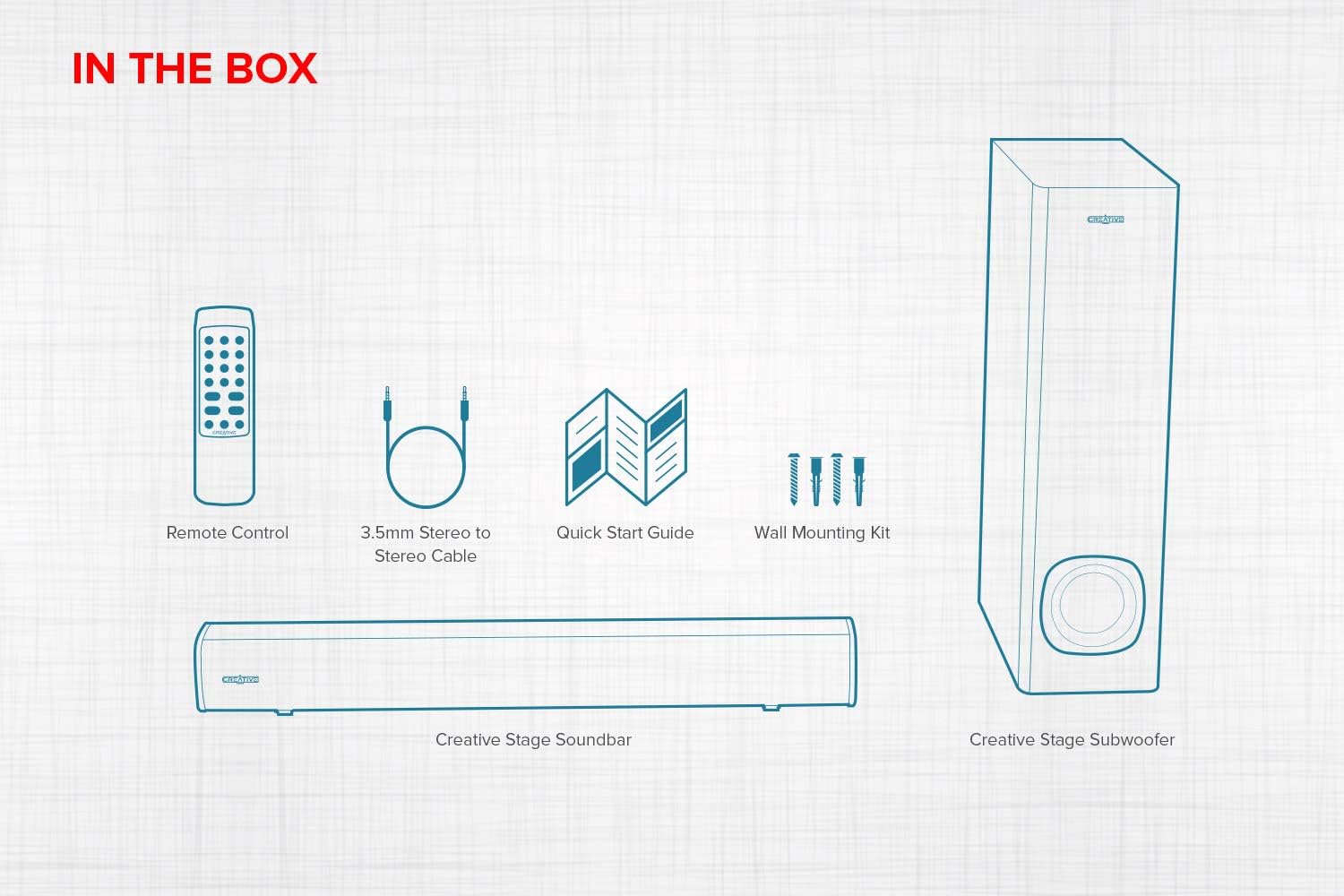
Figure 1: Contents of the Creative Stage 2.1 Soundbar System package.
This image displays all the items you should find inside the product packaging: the main soundbar unit, the separate subwoofer, a remote control, a 3.5mm audio cable, a quick start guide, and a wall mounting kit.
Nastavení
1. Umístění
Kreativní Stage soundbar is designed to fit neatly under a PC monitor or TV. The subwoofer can be placed on the floor near the soundbar for optimal bass performance. Alternatively, the soundbar can be wall-mounted using the included kit.

Figure 2: Recommended placement options for the Creative Stage soundbar.
This image illustrates two common setups: the soundbar positioned directly beneath a computer monitor on a desk, and the soundbar mounted on a wall below a television, demonstrating its versatility for different environments.
2. Připojení
Connect the subwoofer to the soundbar. The subwoofer connects wirelessly to the soundbar. Ensure both units are powered on and within range for automatic pairing.
Kreativní Stage offers multiple connectivity options:
- TV (ARC): Connect an HDMI cable from the soundbar's HDMI ARC port to your TV's HDMI ARC port. This allows audio from your TV to play through the soundbar and enables control of the soundbar volume using your TV remote.
- Optický vstup: Use an optical cable to connect the soundbar to your TV or other audio source for high-quality digital audio.
- Bluetooth: Pair your mobile device, computer, or other Bluetooth-enabled device wirelessly with the soundbar.
- 3.5mm AUX vstup: Connect devices with a 3.5mm audio output using the provided stereo cable.
- USB MP3: Insert a USB flash drive (up to 32GB, FAT32 format) with MP3 audio files into the USB port on the soundbar for direct playback.

Obrázek 3: Přesview of compatible devices and connectivity options.
This diagram visually represents the broad compatibility of the Creative Stage soundbar, showing it can connect to televisions, desktop and laptop computers, and various mobile devices such as smartphones and tablets.
3. Zapnout
Connect the soundbar's power cable to a wall outlet. The soundbar is powered by a single built-in power plug. The subwoofer will automatically connect to the soundbar once both are powered.
Návod k obsluze
Pomocí dálkového ovládání
The included remote control provides full command over the soundbar's functions. Ensure batteries are inserted correctly (batteries not included).

Figure 4: Remote control in use for the Creative Stage soundbar.
This image shows the convenience of the remote control for operating the soundbar from a distance, highlighting its ease of use in a living room setting. A detailed view of the remote control is also provided.
- Vypínač: Zapne nebo vypne soundbar.
- Ovládání hlasitosti: Nastavuje celkovou úroveň hlasitosti.
- Výběr zdroje: Cycles through input modes (Bluetooth, Optical, TV ARC, AUX-in, USB MP3).
- Předvolby EQ: Select from optimized audio modes such as Filmy, Hudba, Koncerta Hraní.
- Nastavení výšek/basů: Fine-tune the high and low frequencies to your preference.
- Ovládání přehrávání: For USB MP3 mode, controls include Play/Pause, Skip Forward, and Skip Backward.
USB MP3 Playback
The soundbar supports direct playback of MP3 files z USB flash disku.
- Insert a USB flash drive (formatted to FAT32, up to 32GB) containing MP3 filedo USB portu na boku soundbaru.
- Select the USB input source using the remote control.
- Use the remote's playback controls to manage your music.

Figure 5: USB MP3 playback functionality.
Tento obrázek nabízí detailní záběr view of the soundbar's USB port, demonstrating how a USB flash drive can be inserted for direct MP3 audio playback without needing an external music device.
Údržba
Pro zajištění dlouhé životnosti a optimálního výkonu vašeho zařízení Creative Stage soundbar system, follow these maintenance guidelines:
- Čištění: Use a soft, dry cloth to wipe down the soundbar and subwoofer. Do not use liquid cleaners or aerosol sprays directly on the units.
- Větrání: Zajistěte dostatečné větrání soundbaru a subwooferu. Neblokujte žádné větrací otvory.
- Prostředí: Neumísťujte jednotky na přímé sluneční světlo, do blízkosti zdrojů tepla nebo do míst s vysokou vlhkostí či extrémními teplotami.
- Kabely: Periodically check all cables for any signs of damage. Replace damaged cables immediately.
Odstraňování problémů
If you encounter any issues with your Creative Stage soundbar system, refer to the following common problems and solutions:
| Problém | Možná příčina | Řešení |
|---|---|---|
| Žádná síla | Napájecí kabel není připojen nebo zásuvka není aktivní. | Ensure the power cable is securely plugged into the soundbar and a working wall outlet. Try a different outlet. |
| Žádný zvuk | Vybrán nesprávný vstupní zdroj, příliš nízká hlasitost nebo nesprávně připojené kabely. |
|
| Subwoofer nereprodukuje basy | Subwoofer not paired or volume too low. |
|
| Dálkové ovládání nefunguje | Dead batteries, obstructed signal, or incorrect aiming. |
|
| Problémy s párováním pomocí rozhraní Bluetooth | Device too far, soundbar not in pairing mode, or previous connection interference. |
|
Specifikace
| Funkce | Detail |
|---|---|
| Název modelu | Kreativní S.tage |
| Číslo modelu | MF8360 |
| Typ reproduktoru | 2.1 Channel Soundbar System with Subwoofer |
| Maximální výstupní výkon reproduktoru | Špičkový výkon 160 W. |
| Technologie připojení | Bluetooth, Optical, TV (ARC), 3.5mm AUX-in, USB MP3 |
| Technologie bezdrátové komunikace | Bluetooth |
| Dosah Bluetooth | Až 10 metrů (33 stop) |
| Konektivita subwooferu | Bezdrátový |
| Typ ovladače | Dálkové ovládání |
| Doporučená použití | For Computers, For Gaming Consoles, For Televisions |
| Rozměry produktu (soundbar) | Approx. 23.7" W x 2.95" D x 2.75" H (602mm x 75mm x 70mm) |
| Rozměry produktu (subwoofer) | Approx. 6.69" D x 6.69" W x 16.06" H (170mm x 170mm x 408mm) |
| Hmotnost položky | 2.6 Pounds (total system weight) |
| Zdroj napájení | Elektrický kabel |
| UPC | 054651192379 |
Note: Dimensions for soundbar and subwoofer are estimated based on the combined product dimensions provided (6.69"D x 23.7"W x 16.06"H) and typical component sizes. Actual individual dimensions may vary slightly.
Informace o záruce
Kreativní Stage 2.1 Soundbar System comes with a Omezená záruka. For specific terms and conditions, including warranty period and coverage details, please refer to the warranty card included in your product packaging or visit the official Creative webUschovejte si doklad o koupi pro případ reklamace.
Podpora
For further assistance, technical support, or to download the latest drivers and firmware updates, please visit the official Creative support webmísto:
You may also find helpful resources and FAQs on the product's Amazon page or by contacting Creative customer service directly.
Ask a question about this manual
Ask about setup, troubleshooting, compatibility, parts, safety, or missing instructions. Manuals+ will review the question and use this page’s manual context to help answer it.