
1. Úvod
This manual provides essential instructions for the proper setup, operation, and maintenance of your Brondi Adara Cordless Phone. Please read this guide thoroughly before using the device to ensure optimal performance and safety. The Brondi Adara is a DECT GAP compatible cordless telephone featuring a large backlit alphanumeric display, high-sensitivity hands-free function, and caller ID.
2. Bezpečnostní informace
- Nevystavujte telefon ani základnovou jednotku vodě ani vlhkosti.
- Vyhněte se extrémním teplotám, přímému slunečnímu záření nebo prašnému prostředí.
- Use only the provided power adapter and batteries. Using unauthorized accessories may damage the device and void the warranty.
- Nepokoušejte se zařízení otevírat ani opravovat sami. Veškerý servis svěřte kvalifikovanému personálu.
- Keep the phone away from medical devices such as pacemakers, as it may cause interference.
- Baterie zlikvidujte zodpovědně v souladu s místními předpisy.
3. Obsah balení
Ověřte, zda jsou v balení přítomny všechny položky:
- Brondi Adara Handset
- Brondi Adara Base Unit
- Napájecí adaptér pro základní jednotku
- Kabel telefonní linky
- Rechargeable Batteries (NiMH)
- Uživatelská příručka (tento dokument)
4. Konec produktuview
Familiarize yourself with the main components of your Brondi Adara cordless phone.
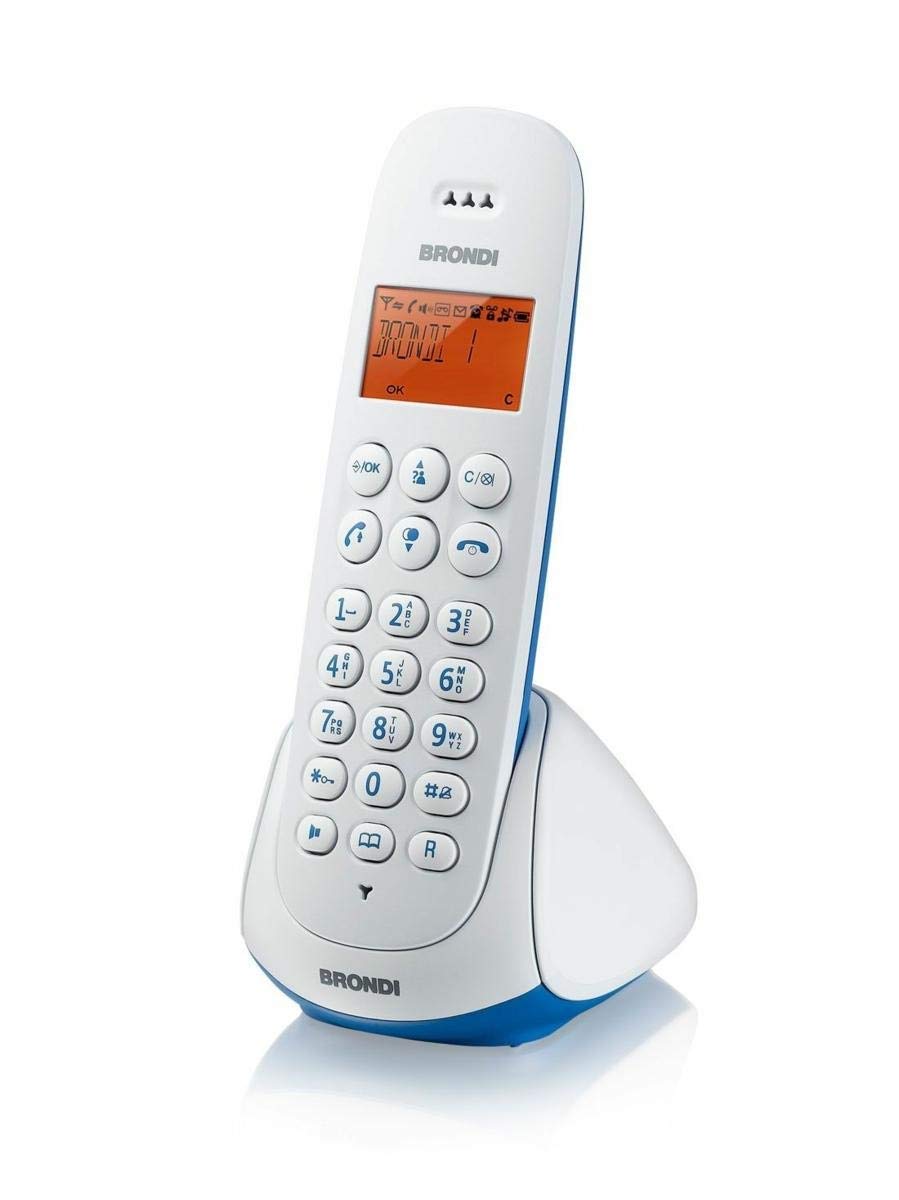
Image 1: Brondi Adara Cordless Phone, showing the handset and base unit.
4.1 sluchátko
- Zobrazit: Large alphanumeric backlit screen for menu navigation and call information.
- Klávesnice: Standard numeric keys (0-9), *, #, and function keys.
- Tlačítko volání (zelené): Uskutečnění nebo přijetí hovoru.
- Tlačítko pro ukončení hovoru (červené): Ukončení hovoru nebo návrat do pohotovostního režimu.
- Navigační klávesy: For scrolling through menus and options.
- Hands-Free Button: To activate or deactivate the speakerphone during a call.
- Tlačítka hlasitosti: To adjust earpiece or speaker volume.
4.2 základní jednotka
- Nabíjecí kolébka: For charging the handset batteries.
- Tlačítko STRÁNKA: Chcete-li najít ztracený sluchátko.
- Zásuvka: Pro připojení napájecího adaptéru.
- Telephone Line Socket: For connecting to the telephone wall outlet.

Image 2: Brondi Adara Cordless Phone, illustrating key features and components.
5. Nastavení
Follow these steps to set up your Brondi Adara cordless phone:
- Nainstalujte baterie: Open the battery compartment on the back of the handset. Insert the supplied rechargeable batteries, ensuring correct polarity. Close the compartment.
- Connect Base Unit Power: Plug the small end of the power adapter into the 'DC IN' socket on the base unit. Plug the other end into a standard electrical wall outlet.
- Připojení telefonní linky: Plug one end of the telephone line cord into the 'LINE' socket on the base unit. Plug the other end into your telephone wall outlet.
- Nabíjení telefonu: Place the handset on the base unit's charging cradle. The display will indicate charging. Allow the handset to charge for at least 12-15 hours before initial use, even if the display shows a full battery. This ensures optimal battery performance.
- Registrace sluchátka (pokud je to nutné): Your handset is usually pre-registered to the base. If not, or if you are adding additional handsets (up to 5 total), refer to the 'DECT GAP Pairing' section in Operating Instructions.
6. Návod k obsluze
6.1 Uskutečnění hovoru
- Zvedněte sluchátko ze základny nebo stiskněte Volání tlačítko.
- Vytočte požadované telefonní číslo pomocí klávesnice.
- Stiskněte tlačítko Volání button again if you dialed before picking up, or wait for the call to connect.
6.2 Přijetí hovoru
Když zazvoní telefon:
- Stiskněte tlačítko Volání tlačítko pro odpověď.
- Alternatively, if the auto-answer feature is enabled, simply lift the handset from the base.
6.3 Funkce handsfree
Během hovoru stiskněte Hands-free tlačítko pro aktivaci hlasitého odposlechu. Dalším stisknutím přepnete zpět na sluchátko.
6.4 ID volajícího
If you subscribe to Caller ID service from your telephone provider, the caller's number (and name, if available) will be displayed on the handset screen before you answer the call. You can review past calls in the call log menu.
6.5 DECT GAP Pairing (Registering Additional Handsets)
Your Brondi Adara base unit supports up to 5 DECT GAP compatible handsets. To register a new handset:
- Na základní jednotce stiskněte a podržte tlačítko STRANA button for approximately 5 seconds until the registration indicator on the base starts flashing.
- On the handset you wish to register, navigate to the 'Registration' or 'Add Handset' option in the menu.
- Follow the on-screen prompts to enter the PIN (usually '0000' by default).
- Once registered, the handset display will confirm successful pairing.
7. Údržba
7.1 Čištění
Wipe the handset and base unit with a soft, dry, lint-free cloth. Do not use cleaning sprays, waxes, or solvents.
7.2 Péče o baterii
- Vždy používejte určené dobíjecí baterie.
- For optimal battery life, fully charge the handset for 12-15 hours before first use.
- Pokud se sluchátko nebude delší dobu používat, vyjměte baterie, abyste zabránili jejich vytečení.
- Replace batteries when their performance significantly degrades (e.g., shorter talk time).
8. Řešení problémů
If you encounter issues with your Brondi Adara phone, refer to the following common problems and solutions:
| Problém | Možná příčina | Řešení |
|---|---|---|
| Žádný oznamovací tón | Base unit not powered or telephone line disconnected. | Check power adapter connection to base and wall outlet. Ensure telephone line cord is securely connected to base and wall jack. |
| Nelze uskutečňovat/přijímat hovory | Handset out of range, low battery, or line issue. | Move closer to the base unit. Place handset on base to charge. Check if other phones on the same line are working. |
| Špatná kvalita zvuku / Statický šum | Interference from other electronic devices, handset too far from base. | Move base unit away from other electrical appliances (TVs, computers). Move handset closer to the base. |
| Sluchátko se nenabíjí | Handset not properly seated, dirty charging contacts, or faulty batteries. | Ensure handset is correctly placed on the base. Clean charging contacts on both handset and base with a dry cloth. Replace old batteries. |
| ID volajícího se nezobrazuje | No Caller ID subscription or service issue. | Contact your telephone service provider to ensure Caller ID service is active. |
9. Specifikace
| Funkce | Detail |
|---|---|
| Značka | BRONDI |
| Číslo modelu | 10273841 |
| Typ telefonu | Bezdrátový |
| Barva | Světle modrá/bílá |
| Materiál | Akrylonitrilbutadienstyren (ABS) |
| Zdroj napájení | Napájení z baterie |
| Typ vytáčení | Jedna klávesnice |
| Typ systému odpovědí | Digitální |
| Kompatibilní zařízení | PSTN, ISDN |
| Víceřádkový provoz | Jednořádkový provoz |
| ID volajícího | Ano |
| Doba hovoru | 7 hodiny |
10. Záruka a podpora
For warranty information, technical support, or service inquiries, please refer to the warranty card included with your product or visit the official BRONDI webUschovejte si doklad o koupi pro případ reklamace.