
1. Úvod
Děkuji za nákupasing the auna V-20 Vertical Stereo System. This manual provides essential information for the safe and efficient operation of your device. Please read it thoroughly before use and keep it for future reference.
2. Bezpečnostní pokyny
- Před použitím zařízení si pečlivě přečtěte všechny pokyny.
- Udržujte zařízení mimo dosah vody, vlhkosti a extrémních teplot.
- Neblokujte žádné ventilační otvory.
- Používejte pouze nástavce/příslušenství specifikované výrobcem.
- Odpojte zařízení během bouřky nebo když se delší dobu nepoužívá.
- Veškeré opravy svěřte kvalifikovanému servisnímu personálu.
- Neotevírejte casing; uvnitř nejsou žádné součásti, které by mohl uživatel opravit.
3. Obsah balení
Zkontrolujte prosím, zda jsou přítomny všechny položky:
- 1 x auna V-20 Vertical Stereo System
- 1 x Remote Control (including 2 x 1.5V AAA batteries)
- 1 x napájecí adaptér
- 1 x Removable Stand Base
- 1 x Wire Antenna
- User Manual (English and German)
4. Konec produktuview
The auna V-20 is a versatile micro stereo system featuring a vertical design. It includes a CD player, DAB+ and FM radio, Bluetooth, NFC, USB, and AUX connectivity. The system can be used with its stand or mounted on a wall.

Figure 4.1: The auna V-20 Vertical Stereo System shown with its remote control in a modern living room environment.
Ovládací prvky a displej na předním panelu
The front panel features a sleek design with a motorized CD drive cover and an LED display that shows time and operational information. Control buttons are located on the top edge of the unit.
Připojení zadního panelu
The rear panel provides various connection ports for external devices and power.
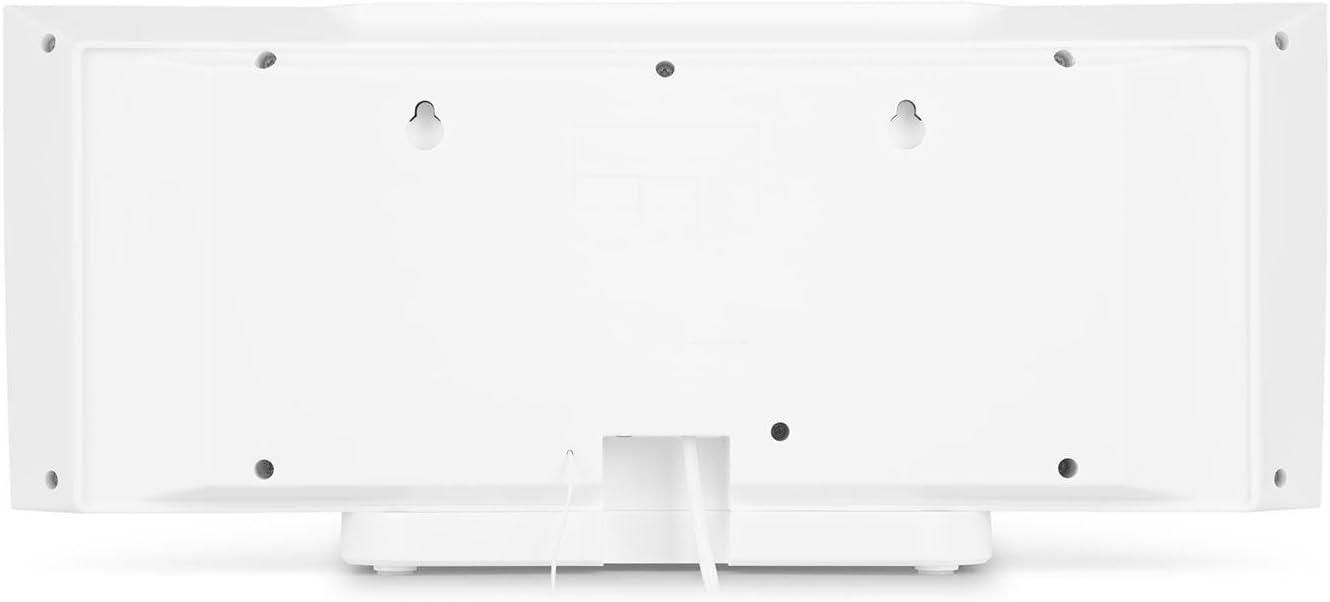
Obrázek 4.2: Zadní view of the auna V-20, highlighting the USB port and AUX input.
Dálkové ovládání
The included remote control allows for convenient operation of all functions from a distance.

Obrázek 4.3: Detailní view of the remote control for the auna V-20 stereo system.
5. Nastavení
5.1 Možnosti umístění
The auna V-20 offers flexible placement:
- Montáž na stojan: Attach the removable stand base for desktop or shelf placement. Ensure the unit is stable on a flat surface.
- Montáž na stěnu: The unit can be mounted on a wall to save space. Use appropriate wall mounting hardware (not included) and ensure the wall can support the unit's weight.

Obrázek 5.1: Zadní view illustrating the wall mounting points and the stand attachment area.
5.2 Připojení napájení
Connect the provided power adapter to the DC IN port on the rear of the unit, then plug it into a standard wall outlet (AC 230V, 50 Hz).
5.3 Připojení antény
Extend the wire antenna for optimal DAB+ and FM radio reception. Adjust its position for the best signal quality.
6. Návod k obsluze
6.1 Zapnutí/vypnutí a pohotovostní režim
Stiskněte tlačítko V POHOTOVOSTNÍM REŽIMU button on the unit or remote control to switch the system on or put it into standby mode.
6.2 Výběr režimu
Stiskněte tlačítko FUNKCE button on the unit or the dedicated mode buttons (FM/DAB, USB, CD, AUDIO IN, BLUETOOTH) on the remote control to switch between different audio sources.
6.3 Ovládání hlasitosti
Upravte hlasitost pomocí VOL+ a VOL- buttons on the unit or remote control. The LED display will show the current volume level.
6.4 Nastavení ekvalizéru
The system features a 2-band equalizer and equalizer presets. Use the EQ button on the remote control to cycle through presets or adjust bass/treble. The X-BASS function can be activated for enhanced bass.
7. Bluetooth and NFC Connectivity
7.1 Párování Bluetooth
To stream music wirelessly from your smartphone, tablet, or laptop:
- Switch the stereo system to Bluetooth mode. The LED display will indicate pairing mode.
- Povolte na svém mobilním zařízení Bluetooth a vyhledejte dostupná zařízení.
- Select "auna V-20" from the list to pair. Once connected, you can play audio from your device.

Figure 7.1: A smartphone being used to connect to the auna V-20 via Bluetooth.
7.2 Připojení NFC
For intuitive pairing with NFC-enabled devices:
- Ujistěte se, že máte na svém mobilním zařízení povoleno NFC.
- Gently swipe your NFC-enabled device over the NFC sensor on the auna V-20.
- The devices will automatically pair via Bluetooth.

Obrázek 7.2: Detail view of the NFC sensor for quick device pairing.
8. Ovládání CD přehrávače
The auna V-20 features an MP3-compatible CD player with a motorized drive.

Figure 8.1: The motorized CD player mechanism with a disc inserted.
8.1 Vkládání CD
- Stiskněte tlačítko OTEVŘÍT/ZAVŘÍT button to open the motorized CD cover.
- Carefully place a CD (CD, CD-R/RW, MP3-CD) onto the spindle with the label side facing you.
- Stiskněte OTEVŘÍT/ZAVŘÍT again to close the cover. The system will automatically switch to CD mode and begin playback.
8.2 Ovládací prvky přehrávání
- Přehrát/pozastavit: Stiskněte PLAY/PAUSE pro spuštění nebo pozastavení přehrávání.
- Přeskočit skladby: Použijte PŘESKOČTE dopředu or PŘESKOČIT ZPĚT tlačítka pro navigaci mezi skladbami.
- Stop: Stiskněte tlačítko ZASTÁVKA tlačítko pro ukončení přehrávání.
- Opakování/Náhodné: Použijte OPAKOVAT a NÁHODNÝ buttons on the remote for playback options.
- Programovatelné přehrávání: The system supports programmable title display for custom playlists.
9. Ovládání rádia (DAB+/FM)
The auna V-20 features both DAB+ digital radio and analog FM radio with RDS function.
9.1 Selecting Radio Mode
Stiskněte tlačítko FM/DAB button on the remote control to switch between FM and DAB+ modes.
9.2 Automatické vyhledávání stanic
In either FM or DAB+ mode, press the SKENOVAT button on the remote control to automatically scan and store available stations. The system can store up to 20 presets per reception type.
9.3 Manual Tuning and Presets
- Ruční ladění: Použijte TUNE +/- buttons on the remote control for fine-tuning.
- Ukládání předvoleb: Once a station is found, press the PRESET button, then use the number buttons (0-9, 10+) to assign a preset number. Press ENTER potvrdit.
- Vyvolání předvoleb: Press the corresponding number button on the remote control to quickly access a saved station.
- Info tlačítko: V režimu DAB+ stiskněte INFO button to display additional information such as artist, title, album, or news.
10. Přehrávání z USB
The auna V-20 allows playback of MP3 audio filepřímo z USB flash disku.
10.1 Připojení USB zařízení
- Insert your USB stick into the USB port on the rear of the unit.
- Switch the stereo system to USB mode using the USB tlačítko na dálkovém ovladači.
- The system will automatically detect and begin playing MP3 files.
10.2 USB Playback Controls
Playback controls (Play/Pause, Skip, Stop, Repeat, Random) are similar to CD player operation. Use the FOLDER button on the remote to navigate through folders on the USB device.
11. Vstup AUX
Connect external audio devices such as MP3 players, CD players, or computers using the AUX input.
11.1 Připojení externího zařízení
- Connect a 3.5mm audio cable (not included) from the headphone jack or audio output of your external device to the AUX IN port on the rear of the auna V-20.
- Switch the stereo system to AUDIO IN mode using the AUDIO VSTUP tlačítko na dálkovém ovladači.
- Play audio from your external device. The sound will be output through the auna V-20 speakers.
12. Údržba
12.1 Čištění
- Před čištěním zařízení vždy odpojte ze zásuvky.
- K čištění vnějších povrchů používejte měkký, suchý hadřík.
- Nepoužívejte abrazivní čisticí prostředky, vosky ani rozpouštědla, protože by mohly poškodit povrchovou úpravu.
- V případě potřeby použijte na čočky CD speciální čistič.
12.2 Obecná péče
- Nepokládejte na jednotku těžké předměty.
- Udržujte jednotku mimo přímé sluneční světlo a zdroje tepla.
- Zajistěte řádné větrání kolem jednotky, abyste zabránili přehřátí.
13. Řešení problémů
| Problém | Možná příčina | Řešení |
|---|---|---|
| Žádná síla | Napájecí kabel není připojen; vadná zásuvka | Zkontrolujte připojení napájecího kabelu, zkuste jinou zásuvku |
| Žádný zvuk | Volume too low; incorrect source selected; mute activated | Increase volume; select correct source; deactivate mute |
| CD se nepřehrává | CD inserted incorrectly; CD dirty/scratched; unsupported format | Reinsert CD correctly; clean or replace CD; ensure CD is compatible (CD, CD-R/RW, MP3-CD) |
| Špatný příjem rádia | Anténa není vysunutá; slabý signál | Extend and adjust antenna position; try moving the unit to a different location |
| Párování Bluetooth se nezdařilo | Zařízení je příliš daleko; Bluetooth není povoleno; nesprávný postup párování | Ensure devices are close; enable Bluetooth on mobile device; follow pairing instructions (Section 7.1) |
14. Specifikace
| Funkce | Detail |
|---|---|
| Značka | auna |
| Model | V-20 |
| Číslo dílu | AUVZ-1100-ghfr |
| Rozměry produktu | 51 x 25 x 16 cm |
| Hmotnost | 2.6 kg |
| Zdroj napájení | Elektrický |
| Wattage | 27 wattů |
| Režim zvukového výstupu | Stereo |
| Konfigurace reproduktorů | 2.0 |
| Podporované zvukové formáty | MP3 |
| Typ média | CD, MP3 |
| Typy konektorů | Bluetooth, NFC, USB, AUX |
| Bluetooth kompatibilní | Ano |
| Verze Bluetooth | 2.1 + EDR |
| Bluetooth Profile | A2DP |
| Kompatibilní zařízení | Smartphone, tablet, MP3 player |
| Speciální funkce | Snadné použití |
| Baterie dálkového ovládání | 2 x 1.5 V AAA (součástí balení) |
| Frekvenční rozsah DAB+ | 174 - 240 MHz (Band III) |
15. Záruka a podpora
This product is covered by a manufacturer's warranty. For detailed warranty information, please refer to the documentation provided at the time of purchase or contact auna customer support.
If you encounter any issues not covered in the troubleshooting section, or require further assistance, please contact auna customer service through their official webstránky nebo vašeho prodejce.