
Zavedení
This manual provides detailed instructions for the operation and maintenance of your BOBLOV BT-S3 Helmet Headset. The BT-S3 is designed for motorcycle communication, offering hands-free calling, music playback, FM radio, and intercom functionality for riders. Please read this manual thoroughly before using the device to ensure proper function and safety.
Obsah balení
Ověřte, zda jsou v balení obsaženy všechny níže uvedené položky:
- 1 x BOBLOV BT-S3 Helmet Intercom Unit
- 1 x Stereo Headphones (with microphone)
- 1 x Mounting Clip & Screws
- 1 x Šroubovák
- 1 x USB nabíjecí kabel
- 1 x Uživatelská příručka
- 1 x Velcro Pad (for mounting)
- 1 x audio linka

Obrázek 1: All components included in the BOBLOV BT-S3 package.
Konec produktuview
Ovládací tlačítka a porty

Obrázek 2: BOBLOV BT-S3 control buttons and connection ports.
- Tlačítko telefonu: Used for answering/ending calls, redialing, and activating voice assistant.
- Tlačítko hlasitosti +: Increases volume, navigates forward in music/FM.
- Tlačítko hlasitosti: Decreases volume, navigates backward in music/FM.
- Power/Intercom Button: Powers the device on/off, initiates/ends intercom, plays/pauses music, activates FM radio.
- Nabíječka a zásuvka pro sluchátka: Multi-purpose port for charging and connecting the headset.
- Cable Input Interface: For connecting the headset cable.
Nastavení
1. Nabíjení zařízení
Before initial use, fully charge the BT-S3 unit. Connect the provided USB cable to the charging port on the device and to a standard USB power adapter (not included). The LED indicator will show charging status. A full charge typically takes approximately 2-3 hours.
2. Instalace headsetu do helmy
The BT-S3 can be installed in various helmet types, including full-face, half-face, and open-face helmets.
- Attach the mounting clip to the side of your helmet using the provided screws and screwdriver, or use the adhesive Velcro pad for a tool-free installation. Ensure the clip is securely fastened.
- Slide the BT-S3 intercom unit onto the mounting clip until it clicks into place.
- Open the helmet's inner lining. Position the stereo headphones inside the helmet, ensuring they are aligned with your ears for optimal sound.
- Route the microphone to a position near your mouth, ensuring it is not obstructed.
- Connect the headset cable to the designated port on the BT-S3 unit.

Obrázek 3: Helmet mounting clip and unit attachment.
Návod k obsluze
Zapnutí/vypnutí
- Zapnutí: Stiskněte a podržte Tlačítko napájení/interkomu for approximately 3 seconds until you hear an audible prompt and the LED indicator lights up.
- Vypnout: Stiskněte a podržte Tlačítko napájení/interkomu for approximately 3 seconds until you hear an audible prompt and the LED indicator turns off.
Párování Bluetooth s mobilním telefonem
- Ensure the BT-S3 is powered off.
- Stiskněte a podržte Tlačítko napájení/interkomu for approximately 5-7 seconds until the LED indicator flashes red and blue alternately, indicating pairing mode.
- Na svém mobilním telefonu povolte Bluetooth a vyhledejte dostupná zařízení.
- Select "BT-S3" from the list of devices. If prompted for a password, enter "0000".
- Po spárování bude LED indikátor pomalu modře blikat a uslyšíte potvrzovací tón.
Funkce interkomu
The BT-S3 supports full-duplex wireless communication. It allows for 2 riders to intercom simultaneously, with a maximum talking range of 1000 meters. Up to 3 riders can be connected, but only two can actively communicate at any given time. If a third rider wishes to join, one of the active intercom participants must end their conversation.

Obrázek 4: Intercom connection scenarios.
- Párování interkomových jednotek:
- Ensure both BT-S3 units are powered off.
- On both units, press and hold the Tlačítko napájení/interkomu for approximately 5-7 seconds until the LED indicators flash red and blue alternately.
- Krátce stiskněte Tlačítko napájení/interkomu on one of the units. The units will search and pair with each other.
- Once paired, the LED indicators will flash blue slowly, and you will hear a confirmation tone.
- Zahájení interkomu: After pairing, a short press of the Tlačítko napájení/interkomu on either unit will initiate an intercom conversation.
- Ukončení interkomu: Krátké stisknutí tlačítka Tlačítko napájení/interkomu will end the intercom conversation.
Telefonní hovory
- Přijmout hovor: When a call comes in, the device will automatically answer after a few rings (auto-receiving phone calls feature). Alternatively, short press the Tlačítko telefonu odpovědět.
- Ukončit hovor: Krátce stiskněte Tlačítko telefonu to end an active call.
- Odmítnout hovor: Stiskněte a podržte Tlačítko telefonu po dobu 2 sekund odmítnout příchozí hovor.
- Znovu vytočit poslední číslo: Dvakrát stiskněte Tlačítko telefonu pro opětovné vytočení posledního volaného čísla.
Přehrávání hudby
After pairing with your mobile phone, you can stream music to the BT-S3.
- Přehrát/pozastavit: Krátce stiskněte Tlačítko napájení/interkomu přehrávání nebo pozastavení hudby.
- Další skladba: Krátce stiskněte Tlačítko hlasitosti +.
- Předchozí skladba: Krátce stiskněte Hlasitost - Tlačítko.
FM rádio
The BT-S3 includes an FM radio function.
- Zapnutí/vypnutí FM: Dvakrát stiskněte Tlačítko napájení/interkomu to activate or deactivate FM radio.
- Skenovací stanice: While FM is active, short press the Hlasitost + or Hlasitost - buttons to change stations.
GPS Voice Instructions
When paired with a smartphone running a GPS application, the BT-S3 can receive voice instructions directly to your headset.
Údržba
- Uchovávejte zařízení v suchu. Nevystavujte jej extrémním teplotám.
- Vyčistěte jednotku měkkým, damp tkanina. Vyhněte se používání agresivních chemikálií nebo abrazivních čisticích prostředků.
- Pokud se zařízení nenabíjí, ujistěte se, že je kryt nabíjecího portu bezpečně uzavřen, aby byla zachována vodotěsnost.
- Pokud zařízení delší dobu nepoužíváte, skladujte jej na chladném a suchém místě.
Odstraňování problémů
| Problém | Možná příčina | Řešení |
|---|---|---|
| Zařízení se nezapne. | Slabá baterie. | Zařízení plně nabijte. |
| Nelze spárovat s telefonem. | Zařízení není v režimu párování; Bluetooth na telefonu vypnutý. | Ensure BT-S3 is flashing red/blue. Enable Bluetooth on phone and search again. |
| Interkom se nepřipojuje. | Units not paired or out of range. | Re-pair intercom units. Ensure units are within 1000m range. |
| Poor audio quality / Wind noise. | Microphone placement; environmental factors. | Adjust microphone closer to mouth. The device features DSP cancellation for wind noise. |
| Battery life shorter than expected. | Frequent use of high volume or intercom. | Battery life varies with usage. Ensure full charge before use. |
Specifikace
- Model: BT-S3
- Konektivita: Bezdrátové (Bluetooth)
- Rozsah interkomu: Až 1000 metrů (mezi 2 jezdci)
- Pracovní rychlost: Až 100 km/h
- Doba hovoru: Až 8 hodin
- Pohotovostní doba: Až 300 hodin
- Doba hovoru: Až 10 hodin
- Doba přehrávání hudby: Až 6 hodin
- Voděodolnost: Water-resistant (fully weather protection)
- Zrušení hluku: Wind noise DSP cancellation
- Vlastnosti: Auto-receiving phone calls, FM Radio, Stereo music (A2DP), GPS voice instructions
- Kompatibilita s helmou: Fits all kinds of helmets (full/half/open face)
- Způsob ovládání: Dotyková tlačítka
- Sluchátkový jack: 3.5 mm Jack (for headset connection)
- UPC: 889251631535

Obrázek 5: Estimated battery performance for various functions.
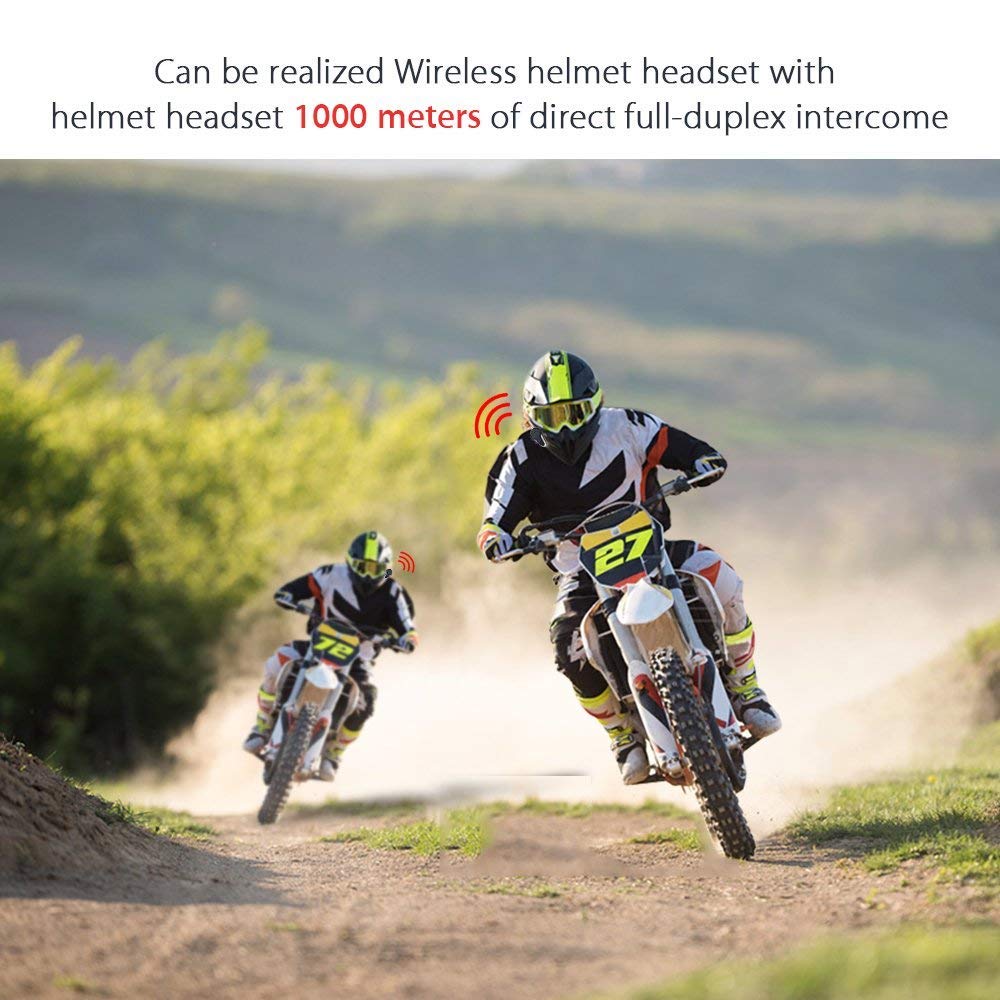
Obrázek 6: Wireless helmet headset with 1000 meters direct full-duplex intercom.

Obrázek 7: Versatile applications for the BT-S3 headset, including motorcycling and skiing.
Záruka a podpora
Specific warranty information is not provided in the product details. For warranty claims, technical support, or further assistance, please contact your retailer or the manufacturer directly. Retain your proof of purchase for any warranty-related inquiries.
Manufacturer: BOBLOV