
Zavedení
This manual provides essential instructions for the safe and efficient use of your Maxcom MM134 2G Senior Mobile Phone. Please read this manual thoroughly before operating the device and keep it for future reference.
1. Nastavení
1.1 Obsah balení
Ujistěte se, že v krabici jsou všechny položky:
- Maxcom MM134 Mobile Phone
- Baterie (Lithium-Ion)
- Nabíječka
- USB kabel
- Sluchátka
- Uživatelská příručka
1.2 Vložení SIM karty a baterie
- Odstraňte zadní kryt telefonu.
- Insert your SIM card into the designated slot. The MM134 supports a single SIM card.
- If using, insert a Micro SD card (up to 32GB) into its slot.
- Vložte lithium-iontovou baterii a ujistěte se, že kontakty jsou správně zarovnány.
- Nasaďte zadní kryt zpět, dokud nezacvakne na místo.
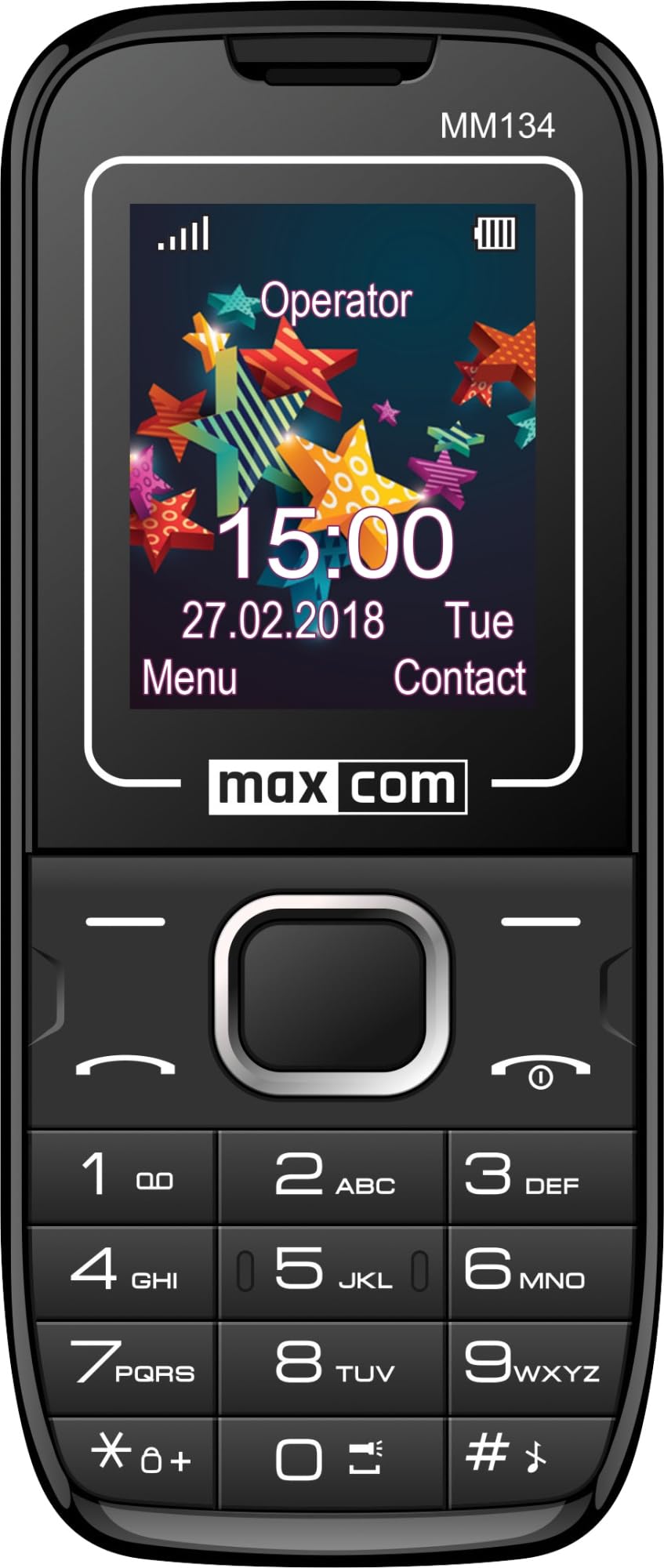
Image 1: Maxcom MM134 2G Senior Mobile Phone. This image shows the front of the phone, highlighting its compact design, screen, and large, easy-to-use buttons.
1.3 Nabíjení telefonu
Connect the charger to the phone's charging port and plug it into a power outlet. The battery indicator on the screen will show charging status. Fully charge the phone before first use. The battery capacity is 800 mAh.
1.4 Zapnutí/vypnutí
- Zapnutí: Stiskněte a podržte tlačítko Napájení/Ukončení hovoru dokud se obrazovka nerozsvítí.
- Vypnutí: Stiskněte a podržte tlačítko Napájení/Ukončení hovoru button, then confirm shutdown.
2. Návod k obsluze
2.1 Uskutečňování a přijímání hovorů
- To make a call: Enter the phone number using the keypad and press the Volání tlačítko.
- To answer a call: Press the Volání tlačítko, když telefon zvoní.
- Ukončení hovoru: Stiskněte tlačítko Napájení/Ukončení hovoru tlačítko.
2.2 Contacts (Phonebook)
The phonebook can store up to 500 entries. Navigate to the "Contacts" menu to add, edit, or delete entries.
2.3 Odesílání a přijímání SMS zpráv
The phone can store up to 200 SMS messages. Access the "Messages" menu to compose new messages or view received ones.
2.4 Připojení Bluetooth
To enable Bluetooth, go to the "Settings" menu, then "Connectivity" or "Bluetooth". You can pair with other Bluetooth-enabled devices for hands-free communication or file převod.
2.5 FM rádio
Plug in the headset (which acts as an antenna) to use the FM Radio function. Navigate to the "FM Radio" application in the menu to scan for stations.
2.6 Svítilna
The phone features a built-in flashlight. Typically, this can be activated by a dedicated button or through a quick access menu option.
2.7 Fotoaparát
The phone is equipped with a rear camera (0.08 MP). Access the "Camera" application from the main menu to take photos. Photos will be saved to the phone's memory or the inserted Micro SD card.
3. Údržba
3.1 Péče o baterii
- Nevystavujte baterii extrémním teplotám.
- Baterii nepropichujte ani nepoškozujte.
- Use only the original charger provided with the phone.
- If the phone will not be used for an extended period, charge it partially before storage and recharge every few months.
3.2 Čištění
Wipe the phone with a soft, dry cloth. Do not use liquid cleaners or aerosols. The phone is not water-resistant.
4. Řešení problémů
| Problém | Řešení |
|---|---|
| Telefon se nezapne | Ujistěte se, že je baterie správně vložena a nabitá. Připojte nabíječku a zkuste to znovu. |
| Žádný síťový signál | Zkontrolujte, zda je SIM karta správně vložena. Přesuňte se do oblasti s lepším pokrytím sítě. Pokud problém přetrvává, kontaktujte svého poskytovatele služeb. |
| Nelze uskutečňovat ani přijímat hovory | Verify that your SIM card is active and has sufficient credit/plan. Check network signal strength. |
| Baterie se rychle vybíjí | Reduce screen brightness. Close unused applications. Limit background data usage. Ensure the battery is not old or damaged. The phone has a talk time of approximately 6 hours. |
5. Specifikace
| Název modelu | Classic MM134 |
| Značka | Maxcom |
| Operační systém | Symbian |
| Buněčná technologie | 2G (GSM 900/1800 MHz) |
| Technologie připojení | Bluetooth, USB |
| Velikost obrazovky | 1.77 palce (LCD) |
| Model CPU | Cortex (1.8 GHz) |
| Popis fotoaparátu | Zadní (0.08 MP) |
| Typ baterie | Lithium-iontová |
| Kapacita baterie | 800 XNUMX mAh |
| Doba hovoru | Až 6 hodin |
| SMS Memory | Až 200 zpráv |
| Kapacita telefonního seznamu | Až 500 záznamů |
| Podpora Micro SD karet | Až 32 GB |
| Sloty pro SIM karty | Jedna SIM karta |
| Rozměry | 13 x 52 x 111 mm |
| Jack pro sluchátka | Zásuvka 3.5 mm |
| Voděodolnost | Žádný |
6. Záruka a podpora
For warranty information and technical support, please refer to the warranty card included in your product package or visit the official Maxcom webUschovejte si doklad o koupi pro případ reklamace.