
1. Úvod
Děkuji za nákupasing the Yenkee YKB 3200 Gaming Keyboard. This manual provides essential information for the proper setup, operation, and maintenance of your new keyboard. Please read this manual thoroughly before using the product to ensure optimal performance and longevity.
2. Bezpečnostní informace
- Chraňte klávesnici před tekutinami a nadměrnou vlhkostí.
- Nevystavujte klávesnici extrémním teplotám.
- Zabraňte pádu klávesnice na zem nebo jejímu vystavení silným nárazům.
- Nepokoušejte se klávesnici rozebírat ani opravovat sami. Veškerý servis svěřte kvalifikovanému personálu.
- K čištění používejte pouze suchý, měkký hadřík.
3. Obsah balení
Po vybalení zkontrolujte obsah balení. Pokud některé položky chybí nebo jsou poškozené, obraťte se na prodejce.
- Yenkee YKB 3200 Gaming Keyboard with integrated smartphone holder
- USB kabel (přiložen)
4. Konec produktuview
The Yenkee YKB 3200 is a robust gaming keyboard designed for an enhanced gaming experience. It features a durable metal construction, responsive rubber dome keys, and dynamic rainbow backlighting.
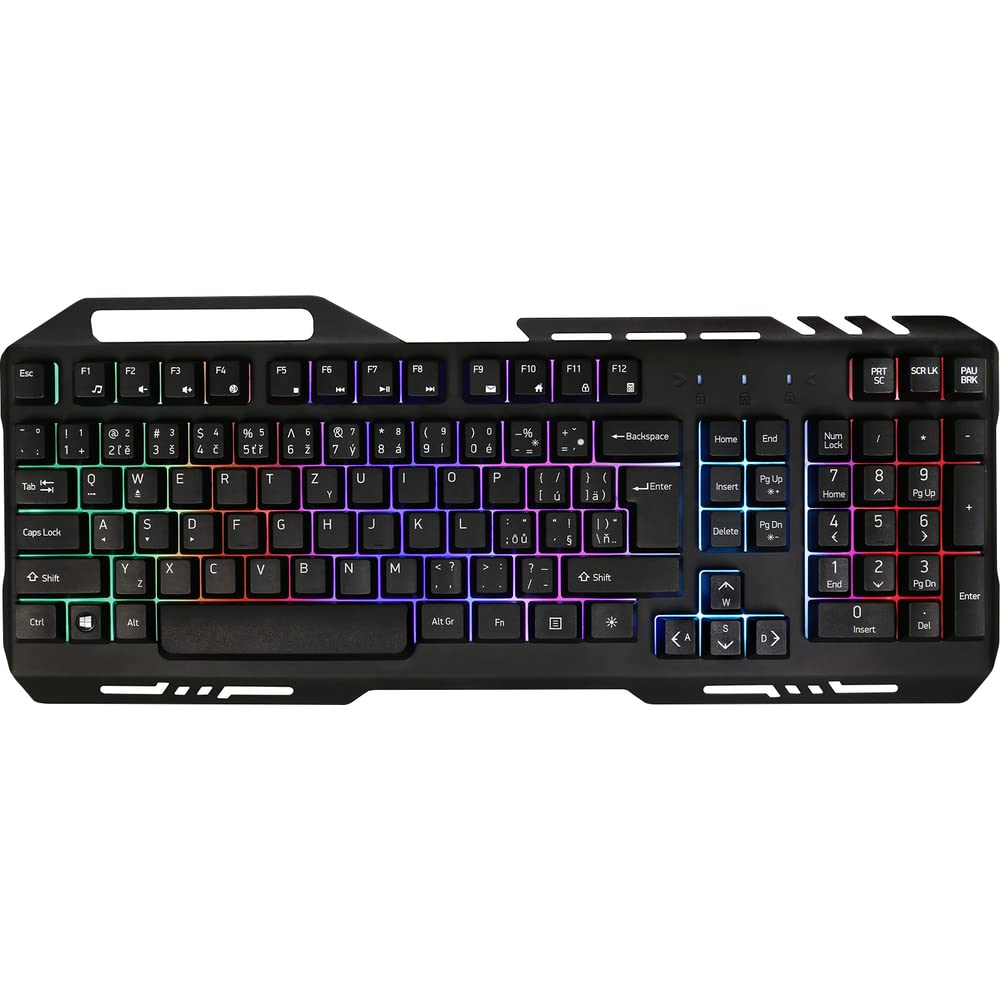
Image 1: Yenkee YKB 3200 Gaming Keyboard. This image displays the full keyboard with its metal frame and illuminated keys, highlighting the integrated smartphone holder at the top.
Klíčové vlastnosti:
- Metal Keyboard Design: Provides enhanced durability and a premium feel.
- Integrated Smartphone Holder: Conveniently located at the top of the keyboard for easy access to your mobile device.
- Durable Rubber Dome Keys: Offers a comfortable and responsive typing experience.
- Nine Rainbow Backlight Modes: Customizable lighting effects to suit your preference and gaming atmosphere.
- USB připojení: Simple plug-and-play connection to your computer.
- 1.5m Cable Length: Poskytuje ample sáhnout po různých nastaveních.
5. Nastavení
- Rozbalte klávesnici: Opatrně vyjměte klávesnici z obalu.
- Připojení k počítači: Locate an available USB port on your computer (PC or laptop). Insert the USB connector of the keyboard into the USB port.
- Instalace ovladače: The keyboard is plug-and-play and typically does not require additional driver installation. Your operating system should automatically detect and install the necessary drivers.
- Umístění: Place the keyboard on a stable, flat surface. You can use the integrated smartphone holder to position your mobile device.
- Test funkčnosti: Open a text editor or browser to test if the keys are responding correctly.
6. Návod k obsluze
Ovládání podsvícení:
The Yenkee YKB 3200 features nine distinct rainbow backlight modes. These modes can typically be cycled through using a dedicated function key combination.
- Změna režimů: Look for a key labeled 'FN' (Function) and a key with a light bulb icon or 'Scroll Lock' / 'Pause Break'. Pressing FN + Light Bulb / Scroll Lock / Pause Break (depending on keyboard layout) will cycle through the available backlight modes.
- Nastavení jasu: Some keyboards allow brightness adjustment using FN + Up/Down Arrow keys. Refer to your specific keyboard layout for exact key combinations.
- Zapnutí/vypnutí podsvícení: A long press of the backlight control key or a specific FN combination might turn the backlight on or off.
Multimediální a funkční klávesy:
The keyboard may include additional function keys (F1-F12) that, when combined with the 'FN' key, provide multimedia control or quick access to applications. Common functions include:
- FN + F1–F12: Volume control, media playback, email, web browser, etc. (Specific functions vary by model).
7. Údržba
Čištění:
- Generální úklid: K otření povrchu klávesnice použijte měkký, suchý hadřík, který nepouští vlákna.
- Odstranění prachu: K odstranění prachu a nečistot z prostoru mezi klávesami použijte stlačený vzduch.
- Odolné skvrny: U odolných skvrn mírně dampen the cloth with water or a mild, non-abrasive cleaning solution. Ensure no liquid enters the keyboard.
Skladování:
Pokud klávesnici delší dobu nepoužíváte, skladujte ji na chladném a suchém místě, mimo dosah přímého slunečního záření a extrémních teplot.
8. Řešení problémů
| Problém | Možná příčina | Řešení |
|---|---|---|
| Klávesnice nereaguje | Volné USB připojení, vadný USB port, problém s ovladačem. | Ujistěte se, že je kabel USB bezpečně připojen. Zkuste jiný port USB. Restartujte počítač. |
| Nefunguje podsvícení | Backlight turned off, low brightness setting. | Press the backlight control key combination (e.g., FN + Scroll Lock) to cycle modes or adjust brightness. |
| Klávesy se zasekávají nebo nereagují | Nečistoty nebo úlomky pod klávesami. | Clean the keyboard using compressed air and a soft cloth. |
9. Specifikace
| Funkce | Specifikace |
|---|---|
| Značka | Yenkee |
| Číslo modelu | 3200 YKB |
| Technologie připojení | USB |
| Délka kabelu | 1.5 metrů |
| Popis klávesnice | Hraní |
| Backlight Theme | Rainbow (9 modes) |
| Kompatibilní zařízení | Notebook, PC |
| Rozměry produktu | 45.2 x 20 x 3.5 cm |
| Hmotnost produktu | 841 g |
| Zahrnuté komponenty | USB cable (attached) |
10. Záruka a podpora
Yenkee products are designed and manufactured to the highest quality standards. For information regarding warranty terms and conditions, please refer to the warranty card included with your purchase or visit the official Yenkee website. For technical support or service inquiries, please contact your local retailer or the Yenkee customer support team.