
Casio MX-12B
Casio MX-12 Desk Calculator User Manual
Model: MX-12B
Zavedení
This manual provides detailed instructions for the proper use and maintenance of your Casio MX-12 Desk Calculator. Please read this manual thoroughly before using the calculator to ensure optimal performance and longevity.
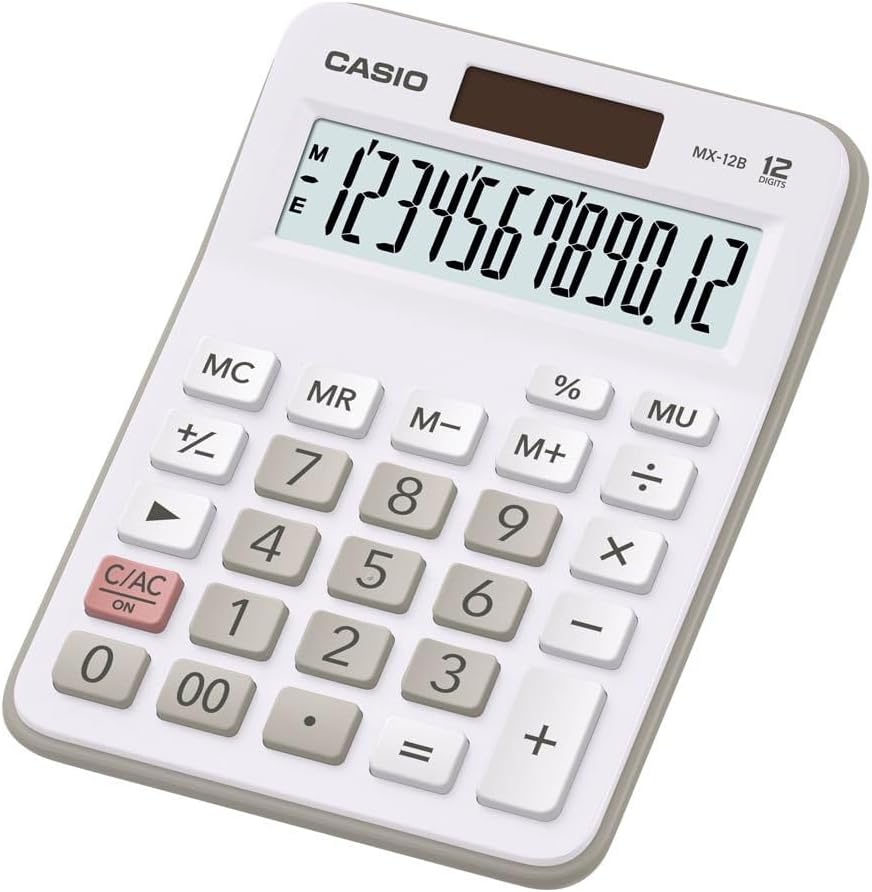
Image: The Casio MX-12 Desk Calculator, featuring a clear 12-digit display and a standard key layout for basic and advanced calculations.
Nastavení
Zdroj napájení
The Casio MX-12 calculator is dual-powered, operating on both solar energy and a battery backup. For optimal performance, use the calculator in a well-lit environment. The solar panel, located above the display, will power the unit and charge the internal battery.
Instalace/výměna baterie
The calculator requires one AAA battery (included) for backup power. If the display becomes dim or unresponsive in low light conditions, the battery may need replacement.
- Otočte kalkulačku.
- Vyhledejte kryt přihrádky na baterie.
- Remove the screw (if present) and slide the cover off.
- Insert a new AAA battery, ensuring the correct polarity (+/-).
- Nasaďte zpět kryt prostoru pro baterie a zajistěte jej.
Návod k obsluze
The Casio MX-12 features a large, clear 12-digit display and a user-friendly key layout for various calculations.
Základní aritmetické operace
- Doplnění (+): Zadejte první číslo a stiskněte +, zadejte druhé číslo a poté stiskněte =.
- Odečítání (-): Zadejte první číslo a stiskněte -, zadejte druhé číslo a poté stiskněte =.
- Násobení (×): Zadejte první číslo a stiskněte ×, zadejte druhé číslo a poté stiskněte =.
- Dělení (÷): Zadejte první číslo a stiskněte ÷, zadejte druhé číslo a poté stiskněte =.
Speciální funkce
- Clear/All Clear (C/AC): Stiskněte C/AC once to clear the last entry. Press it twice to clear all entries and reset the calculator.
- Procenttage (%): Výpočet procentatage, enter the number, press ×, zadejte procentotaghodnotu a poté stiskněte %. Napřample, to find 15% of 200: 200 × 15 %.
- Change Sign (+/-): Stiskněte +/- to change the sign of the displayed number from positive to negative or vice versa.
- Mark-up (MU): The MU key is used for profit margin calculations. For example, to calculate the selling price with a 25% profit margin on a cost of 80: 80 ÷ 25 MU.
- Dvojitá nula (00): Použijte 00 key for quick entry of two zeros.
Paměťové funkce
The calculator includes a 4-key memory function:
- Paměť Plus (M+): Přičte zobrazenou hodnotu do paměti.
- Paměť mínus (M-): Odečte zobrazenou hodnotu z paměti.
- Vyvolání z paměti (MR): Recalls the value stored in memory to the display.
- Vymazání paměti (MC): Vymaže hodnotu uloženou v paměti.
Údržba
Čištění
To clean the calculator, wipe it gently with a soft, dry cloth. Do not use abrasive cleaners, solvents, or excessive moisture, as these can damage the display or internal components.
Skladování
Store the calculator in a cool, dry place away from direct sunlight and extreme temperatures. Prolonged exposure to direct sunlight can affect the solar panel's efficiency and the display's longevity.
Odstraňování problémů
- Displej je prázdný nebo tmavý:
- Ensure the calculator is in a well-lit area for the solar panel to function.
- Check the AAA battery. Replace it if necessary (refer to "Battery Installation/Replacement" in the Setup section).
- Nesprávné výsledky výpočtu:
- Stiskněte C/AC twice to clear all previous entries and memory.
- Re-enter the calculation carefully.
- Ensure you are using the correct function keys for your desired operation.
- Klávesy nereagují:
- Clean the calculator surface and keys to remove any debris.
- Ensure the calculator is adequately powered (solar or battery).
Specifikace
| Číslo modelu | MX-12B-WE-W-EC |
| Zobrazit | 12 Digits, Large LCD |
| Zdroj napájení | Dual Powered (Solar with Battery Backup) |
| Typ baterie | 1 x AAA (součástí balení) |
| Rozměry (D x Š x V) | 5.79 x 4.21 x 1.14 palce (14.7 x 10.7 x 2.9 cm) |
| Hmotnost | 4.9 unce (139 gramů) |
| Funkce | Basic Arithmetic, Percentage, Mark-up (MU), Change Sign, 4-Key Memory |
Záruka a podpora
Casio products are manufactured to high-quality standards. For information regarding warranty coverage, service, or technical support, please refer to the warranty card included with your product or visit the official Casio webwebu. Uschovejte si účtenku jako doklad o koupi.
Pro další pomoc můžete navštívit Obchod Casio na Amazonu or contact Casio customer service directly.
Ask a question about this manual
Ask about setup, troubleshooting, compatibility, parts, safety, or missing instructions. Manuals+ will review the question and use this page’s manual context to help answer it.