
1. Úvod
This manual provides essential information for setting up, operating, maintaining, and troubleshooting your HP EliteDesk 800 G4 Small Form Factor (SFF) Desktop Computer. Designed for enterprise use, this system offers high performance and robust security features in a compact design.
Your HP EliteDesk 800 G4 SFF is equipped with an Intel Core i5-8500 processor, 16GB DDR4 SDRAM, a 256GB Solid State Drive (SSD), and comes pre-installed with Windows 10 Pro 64-bit. It also includes a DVD-Writer for optical media.
2. Nastavení
2.1 Vybalení
Carefully remove the computer and all accessories from the packaging. Ensure all components listed in the packing slip are present. Retain the packaging for future transport or service needs.
2.2 Připojení periferních zařízení
Před zapnutím připojte základní periferní zařízení:
- Monitor: Connect your display to one of the available video output ports (DisplayPort, HDMI, or VGA) on the rear of the computer.
- Klávesnice a myš: Připojte klávesnici a myš USB k libovolným dostupným portům USB.
- Napájecí kabel: Connect the power cable to the power connector on the rear of the computer, then plug it into a grounded electrical outlet.
- Network Cable (Optional): For wired internet access, connect an Ethernet cable to the RJ-45 network port on the rear.
- Zvuková zařízení (volitelné): Připojte reproduktory nebo sluchátka k výstupnímu audio konektoru.

Obrázek 2.2.1: Přední panelview. This image displays the front of the HP EliteDesk 800 G4 SFF, highlighting the accessible USB ports (including USB-C), audio jacks, and the power button for easy access.
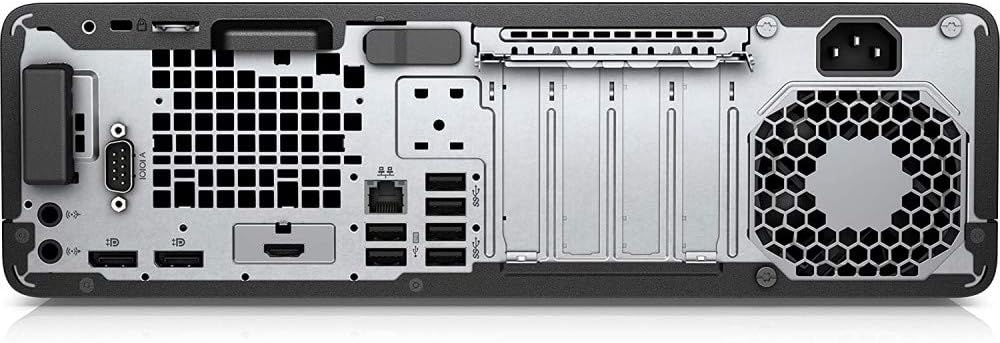
Obrázek 2.2.2: Zadní panelview. This image illustrates the back of the HP EliteDesk 800 G4 SFF, detailing the array of connectivity options including DisplayPort, HDMI, VGA, Ethernet, and additional USB ports.
2.3 Počáteční zapnutí
Press the power button located on the front of the computer. The system will boot up, and you may be guided through the initial Windows 10 Pro setup process, including language selection, network configuration, and user account creation.
3. Obsluha počítače
3.1 Zapnutí/vypnutí
- Zapnutí: Stiskněte tlačítko napájení na předním panelu.
- Vypnout: V systému Windows klikněte na tlačítko Start a poté vyberte Napájení > Vypnout.
- Restartovat: V systému Windows klikněte na tlačítko Start a poté vyberte Napájení > Restartovat.
- Spát: V systému Windows klikněte na tlačítko Start a poté vyberte Napájení > Režim spánku.
3.2 Používání optické mechaniky
The HP EliteDesk 800 G4 SFF includes a DVD-Writer. To use it:
- Press the eject button on the drive tray.
- Place a CD or DVD onto the tray, ensuring it is seated correctly.
- Gently push the tray back into the drive. The operating system will typically detect the disc and prompt you for action.
3.3 Připojení USB zařízení
The computer features multiple USB 3.1 ports (including USB-C) for connecting external devices such as external hard drives, printers, scanners, and other peripherals. Simply plug the device into an available USB port. Windows will usually install the necessary drivers automatically.
4. Údržba
4.1 Čištění
- Vnější: Použijte měkký, damp hadříkem k čištění vnějších povrchů. Vyhněte se agresivním chemikáliím.
- Větrání: Periodically check and clean the ventilation grilles to prevent dust buildup, which can impede airflow and cause overheating. Use compressed air to gently clear dust.
4.2 Aktualizace softwaru
Regularly update your operating system (Windows Update) and device drivers (via HP Support Assistant or HP's webwebu) pro zajištění optimálního výkonu, zabezpečení a kompatibility.
4.3 Zálohování dat
Důrazně se doporučuje pravidelně zálohovat důležitá data na externí disk nebo cloudové úložiště, abyste zabránili jejich ztrátě v případě selhání systému.
5. Řešení problémů
5.1 Bez napájení
- Ensure the power cable is securely connected to both the computer and a working electrical outlet.
- Ověřte funkčnost elektrické zásuvky zapojením jiného zařízení.
5.2 Žádný displej
- Check that the monitor is powered on and the video cable is securely connected to both the computer and the monitor.
- Ensure the monitor's input source is correctly selected (e.g., HDMI, DisplayPort).
- Try connecting the monitor to a different video port on the computer, if available.
5.3 System Slow or Unresponsive
- Zavřete nepotřebné aplikace běžící na pozadí.
- Check for sufficient free space on your C: drive.
- Spusťte úplnou kontrolu systému na přítomnost malwaru nebo virů.
- Ujistěte se, že systém Windows a ovladače jsou aktuální.
5.4 Peripheral Not Working
- Verify the peripheral is properly connected to the correct port.
- Zkuste připojit periférii k jinému portu.
- Zkontrolujte výrobce website for updated drivers for the peripheral.
6. Specifikace
| Funkce | Specifikace |
|---|---|
| Značka | HP |
| Název modelu | EliteDesk 800 G4 SFF (5KD28UT#ABA) |
| Procesor | Intel Core i5-8500 (8th Gen), 3 GHz (up to 4.1 GHz) |
| Paměť RAM | 16 GB DDR4 SDRAM |
| Skladování | 256 GB SSD (Solid State Drive) |
| Operační systém | Windows 10 Pro 64-bit |
| Grafika | Integrovaná grafika Intel UHD Graphics 630 |
| Optická mechanika | DVD-Writer (DVD+/-RW) |
| Video výstup | DisplayPort, HDMI, VGA |
| USB porty | Multiple USB 3.1 (including USB Type-C) |
| Síť | Ethernet (LAN), Wi-Fi (802.11ac), Bluetooth |
| Zvuk | Audio vstupy/výstupy |
| Rozměry (položka) | 2 x 4 x 8 palce (přibližně) |
| Hmotnost (položka) | 13.5 libry |
| Barva | Černý |
7. Záruka a podpora
7.1 Informace o záruce
Your HP EliteDesk 800 G4 SFF Desktop Computer comes with a Limited Warranty. Please refer to the warranty documentation included with your product or visit the official HP webPodrobné podmínky, včetně doby trvání záruky a krytí, naleznete na webových stránkách.
7.2 Technická podpora
For technical assistance, driver downloads, software updates, or further troubleshooting, please visit the official HP Support website. You will need your product's serial number or model number (5KD28UT) to access specific support resources.
Podpora HP Webmísto: www.hp.com/support