
1. Úvod
Thank you for choosing the KAIDI KD-904 Bluetooth Earphones. These wireless in-ear headphones are designed for comfort and stability, making them ideal for sports and daily use. Featuring Bluetooth connectivity and a built-in microphone, they allow for hands-free calls and high-quality audio playback. This manual provides essential information for the proper setup, operation, and maintenance of your earphones.
2. Obsah balení
- KAIDI KD-904 Bluetooth Earphones
- USB nabíjecí kabel
- Uživatelská příručka
3. Konec produktuview
The KAIDI KD-904 earphones feature an ergonomic design with ear hooks for a secure fit, especially during physical activity. The earbuds are magnetic, allowing them to clip together for convenient storage around your neck when not in use. An inline control module provides easy access to power, volume, and call functions.

Obrázek: Detail view of a single KAIDI KD-904 earphone, highlighting the in-ear bud and the flexible ear hook designed for stability.

Obrázek: Podrobný view of the earbud housing with the 'KAIDI' brand logo, showing the design and finish of the earphone unit.
4. Nastavení
4.1 Nabíjení sluchátek
- Connect the micro USB end of the charging cable to the charging port on the inline control module of the earphones.
- Připojte konec nabíjecího kabelu s konektorem USB-A ke zdroji napájení USB (např. k portu USB počítače, síťovému adaptéru).
- The LED indicator on the control module will illuminate, typically red, during charging.
- Once fully charged (approximately 1-2 hours), the LED indicator will change color (e.g., blue) or turn off.
Note: Ensure the earphones are fully charged before first use for optimal battery life.
4.2 Párování Bluetooth
- Zapnutí: Press and hold the multi-function button (usually the center button on the inline control) for approximately 3-5 seconds until the LED indicator flashes blue and red alternately. This indicates the earphones are in pairing mode.
- Aktivujte Bluetooth: On your smartphone or other Bluetooth-enabled device, go to the Bluetooth settings and ensure Bluetooth is turned on.
- Hledat Zařízení: Your device will scan for available Bluetooth devices. Look for "KD-904" or a similar name in the list.
- Připojit: Select "KD-904" from the list to initiate the connection. Once successfully paired, the LED indicator on the earphones will typically flash blue slowly or turn solid blue, and you may hear an audible confirmation.
- Znovu připojit: After initial pairing, the earphones will automatically attempt to connect to the last paired device when powered on, provided the device's Bluetooth is active and within range.
5. Návod k obsluze
5.1 Základní funkce
- Zapnutí: Stiskněte a podržte multifunkční tlačítko po dobu 3 sekund.
- Vypnout: Stiskněte a podržte multifunkční tlačítko po dobu 5 sekund.
- Přehrát/pozastavit: Krátce stiskněte multifunkční tlačítko.
- Zvýšit hlasitost: Krátce stiskněte tlačítko „+“.
- Snížit hlasitost: Krátce stiskněte tlačítko '-'.
- Další skladba: Dlouze stiskněte tlačítko „+“.
- Předchozí skladba: Dlouze stiskněte tlačítko '-'.
5.2 Správa hovorů
- Přijmout hovor: Short press the multi-function button when an incoming call rings.
- Ukončit hovor: Během hovoru krátce stiskněte multifunkční tlačítko.
- Odmítnout hovor: Long press the multi-function button when an incoming call rings.
- Znovu vytočit poslední číslo: Dvakrát stiskněte multifunkční tlačítko.
6. Údržba
- Čištění: Use a soft, dry cloth to clean the earphones. Do not use abrasive cleaners or immerse in water.
- Skladování: Store the earphones in a cool, dry place away from direct sunlight and extreme temperatures. The magnetic earbuds help prevent tangling during storage.
- Péče o baterie: To prolong battery life, avoid completely discharging the earphones frequently. Charge them regularly, even if not in use for extended periods.
- Vyhněte se poškození: Do not drop, disassemble, or modify the earphones. Keep away from sharp objects.
7. Řešení problémů
| Problém | Možná příčina | Řešení |
|---|---|---|
| Sluchátka se nezapínají. | Slabá baterie. | Plně nabijte sluchátka. |
| Nelze spárovat se zařízením. | Earphones not in pairing mode; Bluetooth off on device; device out of range. | Ensure earphones are in pairing mode (flashing red/blue). Turn on Bluetooth on your device. Move device closer to earphones (within 10 meters). Try re-pairing. |
| Žádný zvuk nebo nízká hlasitost. | Příliš nízká hlasitost; není připojeno; vybrán nesprávný zvukový výstup. | Increase volume on both earphones and connected device. Ensure earphones are successfully connected. Check audio output settings on your device. |
| Nabíjení nefunguje. | Vadný kabel nebo zdroj napájení. | Try a different USB charging cable and/or a different USB power source. |
8. Specifikace
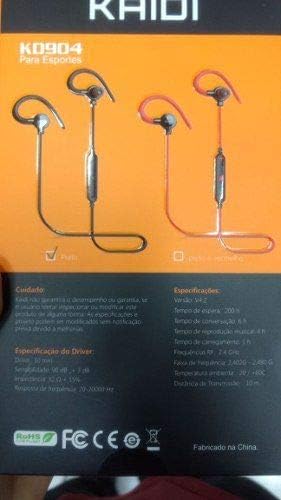
Image: Back of the KAIDI KD-904 product box, displaying detailed technical specifications and features in text.
- Model: KD-904
- Verze Bluetooth: V4.2
- Provozní rozsah: Až 10 metrů (33 stop)
- Doba přehrávání hudby: Přibližně 4 hodiny
- Pohotovostní doba: Přibližně 200 hodiny
- Doba nabíjení: Přibližně 1-2 hodiny
- Velikost ovladače: 10 mm
- Citlivost řidiče: 98 dB
- Frekvenční odezva: 20 Hz - 20 kHz
- Konektivita: Bezdrátové Bluetooth
- Umístění uší: In-ear (Intra-auricular)
- Specifická použití: Sports, Running
- Kompatibilní zařízení: Android, Samsung, iPhone
9. Záruka a podpora
For warranty information or technical support, please refer to the purchase documentation or contact your retailer. Keep your proof of purchase for any warranty claims. KAIDI is committed to providing quality products and support.