
Zavedení
This manual provides detailed instructions for the installation, operation, maintenance, and troubleshooting of the Walfront WS55-220 BLDC Motor Driver. Please read this manual thoroughly before using the product to ensure safe and efficient operation.
Bezpečnostní informace
- Před instalací nebo údržbou se ujistěte, že je odpojeno veškeré napájení, abyste předešli úrazu elektrickým proudem.
- Verify correct wiring connections according to the provided diagrams. Incorrect wiring can damage the device or connected components.
- Operate the driver within its specified voltage a aktuální limity.
- Nevystavujte zařízení vlhkosti, extrémním teplotám nebo korozivnímu prostředí.
- Do not attempt to disassemble or modify the driver. Refer to qualified personnel for repairs.
Konec produktuview
The Walfront WS55-220 is a high-performance, cost-effective 3-phase BLDC motor controller. It is designed to drive BLDC motors efficiently, whether they are equipped with HALL sensors or not, making it suitable for a wide range of applications. This driver incorporates advanced technology to provide high speed, high torque, low noise, and low vibration operation.
Mezi klíčové vlastnosti patří:
- Versatile Motor Compatibility: Supports 3-phase BLDC motors, with or without HALL sensors.
- Komplexní ochrana: Includes overcurrent protection, overload protection, phase loss protection, and phase short circuit protection.
- Pokročilé ovládání: Offers alarm output and speed signal output functionalities.
- Široká aplikace: Suitable for various small equipment and power tools such as ventilation fans, grinding machines, and vibration motors in both domestic and industrial settings.

Figure 1: Walfront WS55-220 BLDC Motor Driver with indicated dimensions (9.5cm length, 3.5cm width, 6cm height).

Figure 2: The WS55-220 driver unit showing its heat sink, terminal blocks, and connected external potentiometer and toggle switch.
Specifikace
| Parametr | Hodnota |
|---|---|
| Model | WS55-220 |
| Značka | Walfront |
| Vstupní objemtage | DC 20V-50V (Nominal 48V) |
| Maximální výkon | 500W |
| Rozměry produktu | 9.5 x 3.5 x 6 cm (3.74 x 1.37 x 2.36 palce) |
| Hmotnost produktu | 181 0.18 g (XNUMX kg) |
| Ochranné funkce | Overcurrent, Overload, Phase Loss, Phase Short Circuit |
| Speed Control Methods | External Potentiometer, External 10VDC Voltage |
| Směr rotace | Forward/Reverse (via toggle switch) |
Nastavení a instalace
Proper installation is crucial for the safe and effective operation of the WS55-220 BLDC motor driver. Follow these steps carefully:
- Připojení napájení: Connect the DC power supply to the "PWR" terminal block. Ensure the polarity is correct: '+' to positive, '-' to negative. The input voltage should be between 20V and 50V DC.
- Připojení motoru: Connect the three phases of your BLDC motor to the 'U', 'V', and 'W' terminals on the "MOTOR" block.
- HALL Sensor Connection (Optional): If your motor has HALL sensors, connect them to the "HALL" terminal block. Match the 'HU', 'HV', 'HW' to the motor's HALL sensor outputs, and 'G' to ground, '+5V' to the 5V supply. If your motor does not have HALL sensors, these connections can be left open.
- Připojení řídicího signálu:
- Ovládání rychlosti:
- External Potentiometer: Connect the potentiometer to the 'S', 'A', and 'P' terminals on the "CONTROL" block. 'S' is the signal input, 'A' is the analog ground, and 'P' is the 10V power supply.
- External 10VDC Voltage: Connect an external 10VDC voltage source to the 'S' (signal input) and 'A' (analog ground) terminals.
- Ovládání vpřed/vzad: Connect a toggle switch to the 'F' and 'R' terminals on the "CONTROL" block for direction control.
- Run/Stop Control: Connect a switch to the 'RUN' terminal and 'GND' for motor start/stop functionality.
- Výstup alarmu: The 'ALM' terminal provides an alarm output signal.
- Speed Signal Output: The 'SPD' terminal provides a speed signal output.
- Ovládání rychlosti:
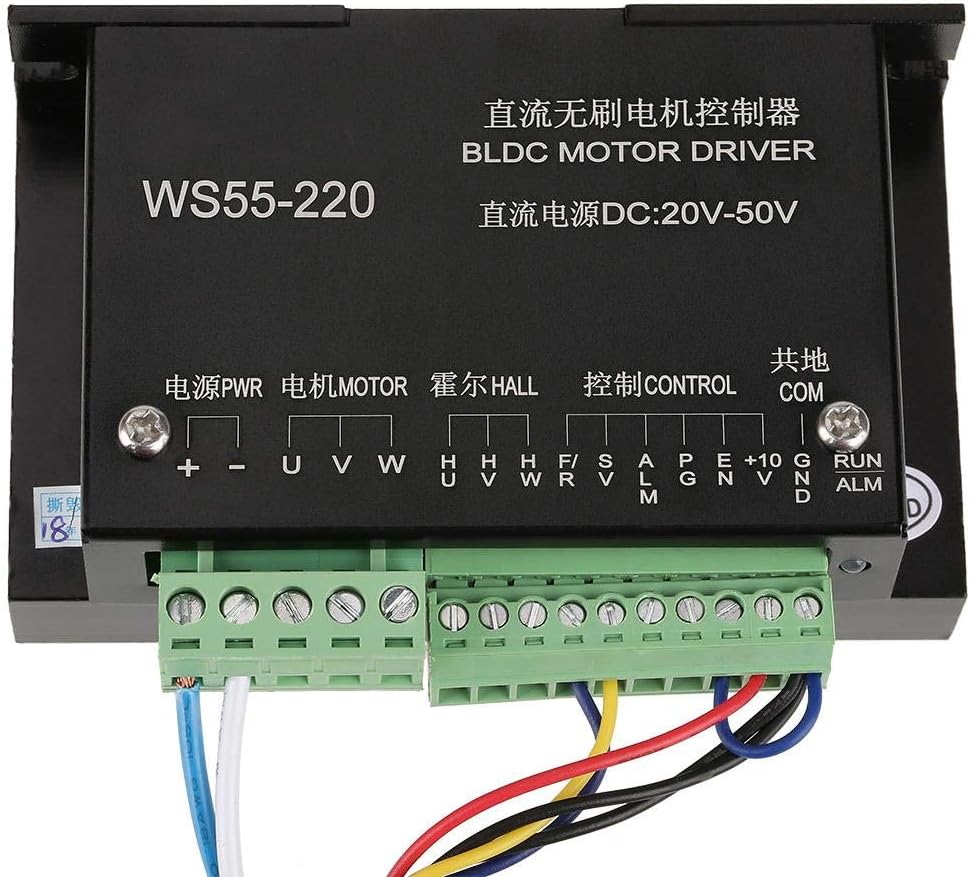
Obrázek 3: Detailní view of the terminal blocks on the WS55-220 driver, showing labels for Power, Motor, HALL, Control, and Common connections.

Obrázek 4: Přample wiring diagram showing connections for power, motor, potentiometer for speed control, and a toggle switch for direction control.
Návod k obsluze
Once the driver is correctly installed and wired, follow these steps for operation:
- Zapnutí: Apply DC power to the driver. The status indicator (if present) should light up.
- Motor Start/Stop: Use the switch connected to the 'RUN' terminal to start or stop the motor.
- Ovládání rychlosti:
- Using External Potentiometer: Rotate the knob of the connected potentiometer to adjust the motor speed. Turning it clockwise typically increases speed, and counter-clockwise decreases it.
- Using External 10VDC Voltage: Měňte vstupní objemtage (0-10VDC) to the 'S' terminal to control the motor speed.
- Ovládání směru: Utilize the toggle switch connected to the 'F' and 'R' terminals to change the motor's rotation direction (forward or reverse). Simply flip the switch to alternate directions.

Figure 5: Close-up of the external potentiometer (for speed adjustment) and the toggle switch (for forward/reverse control).
Údržba
The Walfront WS55-220 BLDC motor driver is designed for reliable operation with minimal maintenance. However, periodic checks can help ensure its longevity and performance:
- Čištění: Keep the driver free from dust and debris. Use a soft, dry cloth to clean the exterior. Do not use liquid cleaners.
- Větrání: Ensure adequate airflow around the driver, especially around the heat sink, to prevent overheating. Do not obstruct ventilation openings.
- Spojení: Pravidelně kontrolujte všechna zapojení, abyste se ujistili, že jsou bezpečná a bez koroze. Uvolněná spojení mohou vést k přerušovanému provozu nebo poškození.
- Podmínky prostředí: Ověřte, zda provozní prostředí zůstává v rámci specifikovaného rozsahu teploty a vlhkosti.
Odstraňování problémů
If you encounter issues with your Walfront WS55-220 BLDC motor driver, refer to the following troubleshooting guide:
| Problém | Možná příčina | Řešení |
|---|---|---|
| Motor se nespustí. | No power supply; incorrect wiring; 'RUN' switch is off; motor or driver fault. | Zkontrolujte připojení napájení a hlasitosttage. Verify all wiring. Ensure 'RUN' switch is engaged. Test motor independently if possible. |
| Motor runs erratically or with low power. | Incorrect motor phase connection; HALL sensor wiring issue (if used); insufficient power supply; overload. | Check motor phase connections (U, V, W). Verify HALL sensor wiring. Ensure power supply meets motor requirements. Reduce load. |
| Motor speed cannot be controlled. | Potentiometer or 10VDC input not connected correctly; faulty potentiometer/voltage zdroj. | Check connections to 'S', 'A', 'P' terminals. Test the potentiometer or external voltage zdroj. |
| Motor direction cannot be changed. | Direction toggle switch not connected correctly or faulty. | Verify connections to 'F' and 'R' terminals. Test the toggle switch. |
| Driver overheats. | Insufficient ventilation; excessive load on motor; ambient temperature too high. | Ensure proper airflow around the heat sink. Reduce motor load. Operate in a cooler environment. |
| Alarm output is active. | Overcurrent, overload, phase loss, or phase short circuit detected. | Identify and resolve the protection trigger (e.g., reduce load, check wiring for shorts). |
Záruka a podpora
Walfront products are designed for quality and reliability. For warranty information or technical support, please refer to the retailer where you purchased the product or visit the official Walfront website. Please have your product model number (WS55-220) and purchase details ready when contacting support.