
Andoer L4 PRO
Andoer L4 Pro Motorized Camera Slider User Manual
Model: L4 PRO
1. Úvod
Děkuji za nákupasing the Andoer L4 Pro Motorized Camera Slider. This compact and versatile auto dolly is designed to provide smooth, stable, and dynamic video shots for various applications, including time-lapse, macro, and low-angle filming. Its wireless remote control and adjustable speed settings offer enhanced flexibility for creative videography. This manual provides detailed instructions for setup, operation, and maintenance to ensure optimal performance and longevity of your device.
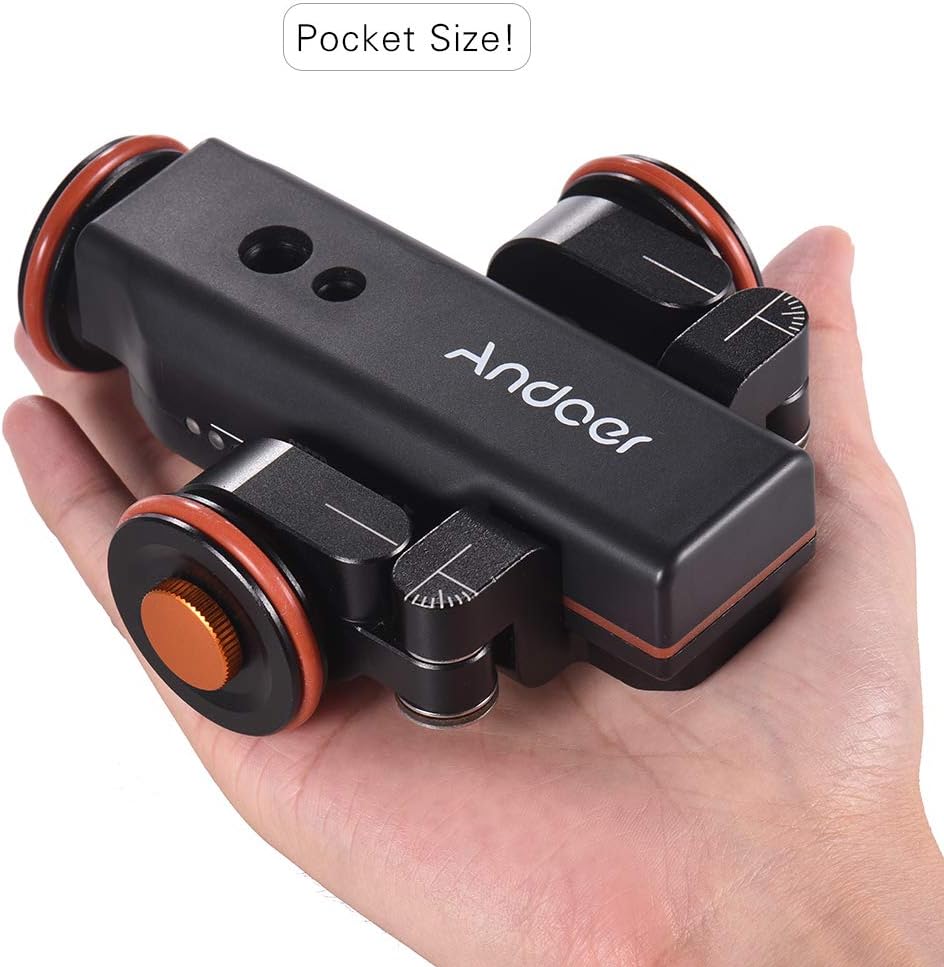
Figure 1.1: The Andoer L4 Pro Motorized Camera Slider, showcasing its compact and portable design, easily fitting into the palm of a hand.
2. Bezpečnostní informace
Please read all safety instructions carefully before using the Andoer L4 Pro. Failure to follow these guidelines may result in damage to the product or personal injury.
- Nevystavujte zařízení vodě ani nadměrné vlhkosti.
- Zabraňte pádu zařízení nebo jeho vystavení silným nárazům.
- Nepokoušejte se zařízení rozebírat ani upravovat. Opravy by měl provádět pouze autorizovaný personál.
- Používejte pouze určený nabíjecí kabel a napájecí adaptér.
- Ensure the device is placed on a flat, stable surface during operation to prevent tipping and damage to attached equipment.
- Nepřekračujte maximální nosnost 5 kg (11 lb).
- Uchovávejte mimo dosah dětí.
3. Obsah balení
Ověřte, zda jsou v balení obsaženy všechny níže uvedené položky:
- Andoer L4 Pro Motorized Camera Slider (Auto Dolly)
- Bezdrátové dálkové ovládání
- Mini Ball Head Adapter (with 1/4" and 3/8" screws)
- USB nabíjecí kabel
- Hex Key (for wheel adjustment)
- Náhradní O-kroužek
- Uživatelská příručka

Figure 3.1: All components included in the Andoer L4 Pro package, laid out for inspection.
4. Konec produktuview
Familiarize yourself with the main components of the Andoer L4 Pro Motorized Camera Slider.

Figure 4.1: Main components of the Andoer L4 Pro system, showing the motorized dolly, wireless remote, and mini ball head adapter.

Obrázek 4.2: Různé views of the Andoer L4 Pro, highlighting its design and adjustable wheel angles for different movement paths.
4.1 Dolly Components
- Hlavní tělo: Obsahuje motor, baterii a řídicí elektroniku.
- kola: Three wheels, two of which are adjustable for curved paths.
- Upevňovací šrouby: 1/4" and 3/8" screw holes on top for attaching cameras, ball heads, or smartphone holders.
- USB port: Pro nabíjení interní baterie.
- Vypínač: Spínač ON / OFF.
- Ukazatel rychlosti: LED lights indicating the current speed setting.

Obrázek 4.3: Detailní view of the dolly's top mounting points (1/4" and 3/8") and side controls (USB port, ON/OFF switch).
4.2 Součásti dálkového ovládání
- Tlačítko Start/Pauza: Initiates or pauses movement.
- Tlačítka pro nastavení rychlosti (+/-): Increases or decreases the dolly's speed.
- Direction Change Button: Reverses the dolly's direction.
- Power/Remote Control Indicator Light: Shows remote status and power.

Obrázek 4.4: Přesview of the wireless remote control and its functions, including the effective control distance of 6 meters (19.7 feet).
5. Nastavení
5.1 Charging the Dolly
Before first use, fully charge the dolly's internal battery.
- Locate the USB charging port on the side of the dolly.
- Connect the provided USB charging cable to the dolly and a standard USB power adapter (not included) or a computer USB port.
- The charging indicator light will illuminate during charging and turn off when fully charged. A full charge takes approximately 2-3 hours and provides up to 6 hours of operation.

Figure 5.1: Information on the dolly's built-in 1800mAh rechargeable battery, indicating up to 6 hours of battery life and USB charging capability.
5.2 Připojení fotoaparátu nebo smartphonu
The dolly is compatible with various cameras, camcorders, and smartphones.
- Screw the mini ball head adapter onto the 1/4" or 3/8" mounting screw hole on top of the dolly. Ensure it is securely tightened.
- Attach your camera or smartphone holder (not included) to the ball head adapter.
- Adjust the angle of your camera/smartphone using the ball head. Ensure the setup is balanced and does not exceed the maximum load capacity of 5 kg (11 lbs).
5.3 Adjusting Wheel Angles for Movement Paths
The front two wheels can be adjusted to create straight or curved paths.
- For Straight Line Movement: Ensure all three wheels are aligned straight. Use the hex key to loosen the wheel locking screws, adjust the wheels to be parallel with the main body, and then tighten the screws.
- For Circular Movement: Loosen the locking screws on the front two wheels. Angle them inwards or outwards to achieve the desired curve radius. Ensure both front wheels are set to the same angle for a smooth circle. Tighten the screws firmly.
6. Návod k obsluze
6.1 Zapnutí/vypnutí
- To power on the dolly, slide the ON/OFF switch to the "ON" position.
- Pro vypnutí přepněte přepínač do polohy „VYPNUTO“.
6.2 Používání bezdrátového dálkového ovladače
The remote control allows for convenient operation from a distance of up to 6 meters (19.7 feet).
- Start / Pauza: Stiskněte tlačítko Přehrát/Pozastavit button (▶‖) to start or pause the dolly's movement.
- Nastavení rychlosti: Stiskněte tlačítko +/- buttons to cycle through the three available speeds: 2.4 cm/s, 2.6 cm/s, and 2.8 cm/s. The LED indicators on the dolly will show the current speed.
- Změna směru: Stiskněte tlačítko Směr button (curved arrow) to reverse the dolly's direction of travel.
6.3 Režimy pohybu
- Straight Line Movement: With wheels adjusted for straight travel, the dolly will move in a linear path. This is ideal for tracking shots.
- Kruhový pohyb: By angling the front wheels, the dolly can perform smooth circular or arc movements. This is useful for orbiting subjects or creating dynamic panoramic shots.

Figure 6.1: Illustration of the dolly's capabilities for both circular and straight-line movements, achieved by adjusting the wheel angles.

Figure 6.2: The Andoer L4 Pro in action, demonstrating its use with both a camera and a smartphone for dynamic video capture.
7. Údržba
Proper maintenance ensures the longevity and optimal performance of your Andoer L4 Pro.
- Čištění: Zařízení otřete měkkým, suchým hadříkem. Nepoužívejte abrazivní čisticí prostředky ani rozpouštědla.
- Skladování: Store the dolly in a cool, dry place away from direct sunlight and extreme temperatures.
- Péče o baterie: If storing for extended periods, charge the battery to approximately 50% every three months to preserve battery health.
- Kontrola kol: Periodically check the wheels for debris or wear. Clean them as needed to ensure smooth operation.
8. Řešení problémů
If you encounter issues with your Andoer L4 Pro, refer to the following common problems and solutions:
| Problém | Možná příčina | Řešení |
|---|---|---|
| Dolly does not move. |
|
|
| Movement is not smooth or stops intermittently. |
|
|
| Dolly does not follow a straight or perfect circular path. |
|
|
| Dálkové ovládání nereaguje. |
|
|
9. Specifikace
| Značka | Andoer |
| Model | L4 PRO |
| Kompatibilní zařízení | Fotoaparát, mobilní telefon |
| Rozměry produktu (D x Š x V) | 12.2 x 10.6 x 3.8 cm (4.8 x 4.2 x 1.5 palce) |
| Hmotnost položky | 495 gramů (1.09 lb) |
| Max. Nosnost | 5 kg (11 lb) |
| Typ baterie | Vestavěná dobíjecí baterie 1800mAh |
| Max. Životnost baterie | Až 6 hodin |
| Způsob nabíjení | USB dobíjecí |
| Vzdálenost bezdrátového ovládání | Až 6 metrů (19.7 stop) |
| Nastavitelné rychlosti | 3 speeds (2.4 cm/s, 2.6 cm/s, 2.8 cm/s) |
| Materiál | Hliníková slitina |
| UPC | 799410730064 |
10. Záruka a podpora
Andoer products are designed and manufactured to the highest quality standards. For warranty information and technical support, please refer to the warranty card included in your package or visit the official Andoer webstránky. Uschovejte si prosím doklad o koupi pro případné reklamace.
For further assistance, please contact Andoer customer support through their official channels.
Ask a question about this manual
Ask about setup, troubleshooting, compatibility, parts, safety, or missing instructions. Manuals+ will review the question and use this page’s manual context to help answer it.