
1. Úvod
Thank you for choosing the Portta HDMI 4x1 Quad Multi-Viewer Switch. This device allows you to display up to four HDMI input sources on a single HDMI display, offering various viewing modes and seamless switching capabilities. Please read this manual thoroughly before operation to ensure proper use and to maximize the product's performance.
Obsah balení:
- 1x Portta HDMI 4x1 Quad Multi-Viewer
- 1x IR dálkové ovládání
- 1x DC napájecí adaptér
- 1x Uživatelská příručka

Obrázek 1.1: Obsah balení
2. Bezpečnostní informace
- Nevystavujte toto zařízení vodě, vlhkosti nebo nadměrné vlhkosti.
- Do not install in areas with poor ventilation.
- Nepokládejte na jednotku těžké předměty.
- Nerozebírejte ani se nepokoušejte o opravu jednotky sami.
- Používejte pouze dodaný napájecí adaptér.
- Udržujte jednotku mimo zdroje tepla a přímého slunečního světla.
3. Konec produktuview
Přední panel

Obrázek 3.1: Rozložení předního panelu
- ON/OFF: Vypínač pro jednotku.
- LED indikátor napájení: Svítí, když je jednotka zapnutá.
- Input LED Indicators (1-4): Označuje, který HDMI vstup je aktuálně aktivní.
- IR: Infračervený přijímač pro dálkové ovládání.
- SERVIS: USB port for factory firmware upgrades only.
- Function Buttons (Mode 1, Mode 2, Mode 3, Audio, 720P/1080P): Used to select viewing modes, audio output, and resolution.
Zadní panel

Obrázek 3.2: Rozložení zadního panelu
- HDMI Input (INPUT1-4): Connect your HDMI source devices (e.g., PC, game console, Blu-ray player).
- HDMI Output (OUTPUT): Connect to your HDMI display (e.g., TV, monitor, projector).
- STEREO Output: 3.5mm audio jack for connecting to external speakers or an audio system.
- Vstup DC 5V: Connect the provided 5V DC power adapter.
4. Nastavení a připojení
Follow these steps to connect your Portta HDMI 4x1 Quad Multi-Viewer přepínač:
- Connect up to four HDMI source devices (e.g., security camera, PC, PS4, Xbox, Nintendo Switch, Blu-Ray player, Roku, Chromecast) to the HDMI INPUT ports (1-4) on the rear panel of the Multi-Viewer using HDMI cables.
- Connect an HDMI display (e.g., HDTV, projector, monitor) to the HDMI OUTPUT port on the rear panel using an HDMI cable.
- If desired, connect external speakers or an audio system to the STEREO output port using a 3.5mm audio cable.
- Connect the provided DC 5V power adapter to the DC 5V Input port on the Multi-Viewer, then plug the adapter into a power outlet.
- Turn on the Multi-Viewer using the ON/OFF switch on the front panel.
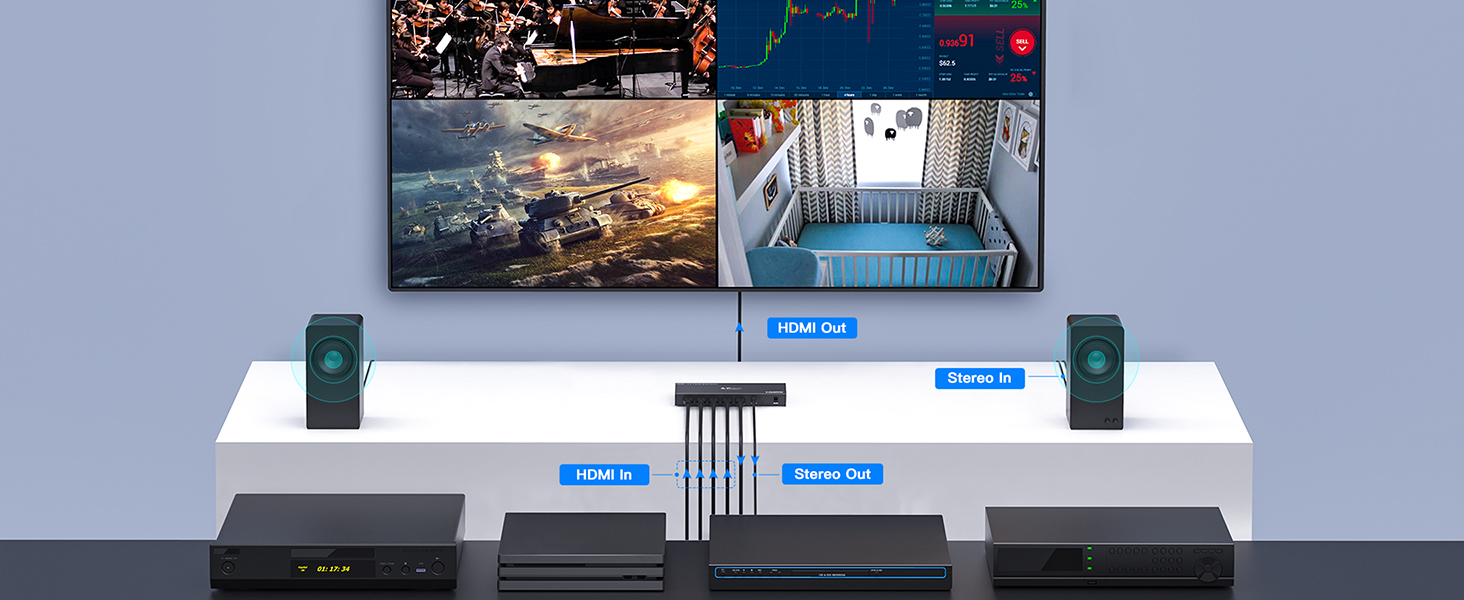
Obrázek 4.1: Schéma zapojení
5. Návod k obsluze
Zapnutí/vypnutí
Stiskněte tlačítko ON/OFF button on the front panel or the power button on the IR remote control to turn the unit on or off.
Výběr vstupu
To select an HDMI input source, press the corresponding input number button (1, 2, 3, or 4) on the IR remote control. In full screen mode, you can also cycle through inputs using the front panel buttons.
Viewrežimy
Multi-Viewer supports five distinct viewing modes. Use the 'Mode' buttons on the front panel or the dedicated mode buttons on the remote control to switch between them:
- Režim celé obrazovky: Displays a single HDMI input source across the entire screen.
- Režim dvou obrazovek: Displays two HDMI input sources side-by-side.
- Four Screen Mode: Displays all four HDMI input sources simultaneously in a grid layout.
- 'T' Type Screen Mode: Displays one large source with three smaller sources arranged around it.
- 'H' Type Screen Mode: Displays one large source with three smaller sources in a different arrangement.

Figure 5.1: Five Display Modes
Bezproblémové přepínání
In full screen mode, the Multi-Viewer supports seamless switching between the four HDMI input sources. This eliminates delays typically associated with switching, providing a smooth transition without black screens.

Figure 5.2: Seamless Switching in Action
Screen Looping (Full Screen Mode Only)
The device supports automatic cycling through inputs in full screen mode at intervals of 1, 3, 5, or 7 seconds. This feature is useful for monitoring multiple sources sequentially.

Figure 5.3: Screen Looping Intervals
Extrakce zvuku
Multi-Viewer can extract audio from the selected HDMI input source and output it via the 3.5mm STEREO jack. Use the 'Audio' button on the front panel or remote to manage audio output.
Podpora rozlišení
The device supports high-definition resolutions up to 1080p. It also features scaler functions for 720p/1080p, ensuring compatibility with various displays.

Figure 5.4: 1080p Resolution Support
6. Specifikace
| Číslo modelu | N3S41QS-E |
| Značka | Portta |
| Vstupní porty | 4 x HDMI |
| Výstupní porty | 1 x HDMI, 1 x Stereo Audio (3.5mm) |
| Verze HDMI | Kompatibilní s HDMI 1.3 |
| Verze HDCP | Kompatibilní s HDCP 1.3 |
| Podporovaná rozlišení | Až 1080p (1920x1080) |
| Funkce Scaler | 720p / 1080p up/down scaling |
| Viewrežimy | 5 modes: Full Screen, Dual Screen, Four Screen, 'T' Type, 'H' Type |
| Přepínání | Seamless switching in full screen mode |
| Napájení | DC 5V |
| Barva | Černý |
7. Řešení problémů
Pokud narazíte na problémy, podívejte se prosím na následující běžné problémy a jejich řešení:
- Bez obrázku:
- Ujistěte se, že jsou všechny kabely HDMI bezpečně připojeny.
- Verify the power adapter is correctly connected and the unit is powered on.
- Check if the input source is active and outputting a signal.
- Zkuste jiný kabel HDMI nebo vstupní port.
- Ujistěte se, že je váš displej nastaven na správný vstup HDMI.
- Žádný zvuk:
- Zkontrolujte nastavení zvuku na zdrojovém zařízení a displeji.
- Ensure external speakers are connected correctly to the STEREO output and are powered on.
- Verify the 'Audio' function button on the Multi-Viewer is correctly configured.
- Image Distortion or Flickering:
- Ensure HDMI cables are of good quality and not excessively long.
- Try reducing the resolution of the input source if possible.
- Restart the Multi-Viewer and connected devices.
- Dálkové ovládání nefunguje:
- Ujistěte se, že mezi dálkovým ovladačem a infračerveným přijímačem nejsou žádné překážky.
- Zkontrolujte a vyměňte baterii v dálkovém ovladači.
- Ensure you are within the effective range and angle of the IR receiver.
8. Údržba
- Clean the unit with a soft, dry cloth. Do not use liquid or aerosol cleaners.
- Přístroj skladujte na chladném a suchém místě mimo dosah přímého slunečního záření a extrémních teplot.
- Zajistěte řádné větrání kolem jednotky, abyste zabránili přehřátí.
9. Záruka a podpora
The Portta HDMI 4x1 Quad Multi-Viewer Switch comes with a 2letá bezproblémová záruka a doživotní technickou podporu.
If you have any questions, require assistance, or experience issues with your product, please do not hesitate to contact Portta customer service. Our friendly support team is available to help you.
For support, please visit the official Portta webwebu nebo se podívejte na kontaktní informace uvedené na obalu produktu.