
Bluesound PULSE 2i WHT
Uživatelská příručka k bezdrátovému multi-room chytrému reproduktoru Bluesound Pulse 2i
Model: PULSE 2i WHT
Zavedení
The Bluesound Pulse 2i is a premium, high-resolution streaming music speaker designed to fill large spaces with rich, clear audio. As part of the Bluesound ecosystem, it offers unparalleled sound quality and versatile connectivity options for a seamless multi-room audio experience. This manual provides detailed instructions for setting up, operating, maintaining, and troubleshooting your Pulse 2i speaker.

Obrázek 1: Přední strana view of the Bluesound Pulse 2i Wireless Smart Speaker.
Průvodce nastavením
1. Vybalení
Opatrně vyjměte všechny součásti z obalu. Krabice by měla obsahovat:
- Reproduktor
2. Počáteční umístění
Place your Pulse 2i speaker on a stable, flat surface. For optimal sound performance, ensure it is not obstructed and has clear space around it. The speaker is designed to deliver powerful audio in large rooms.

Figure 2: The Pulse 2i speaker positioned on a surface, ready for use.
3. Připojení napájení
Connect the provided power cable to the AC input on the back of the Pulse 2i speaker, then plug the other end into a wall outlet. The speaker will power on automatically.
4. Síťové připojení
The Pulse 2i supports both Wi-Fi and Gigabit Ethernet for network connectivity. For the most stable connection, especially when streaming high-resolution audio, a wired Ethernet connection is recommended.
- Wi-Fi: The speaker features leading-class dual-band Wi-Fi to ensure zero dropouts or delays. Follow the instructions in the BluOS Controller App to connect to your wireless network.
- Ethernet: Connect an Ethernet cable from your router or network switch to the LAN/USB port on the back of the speaker.
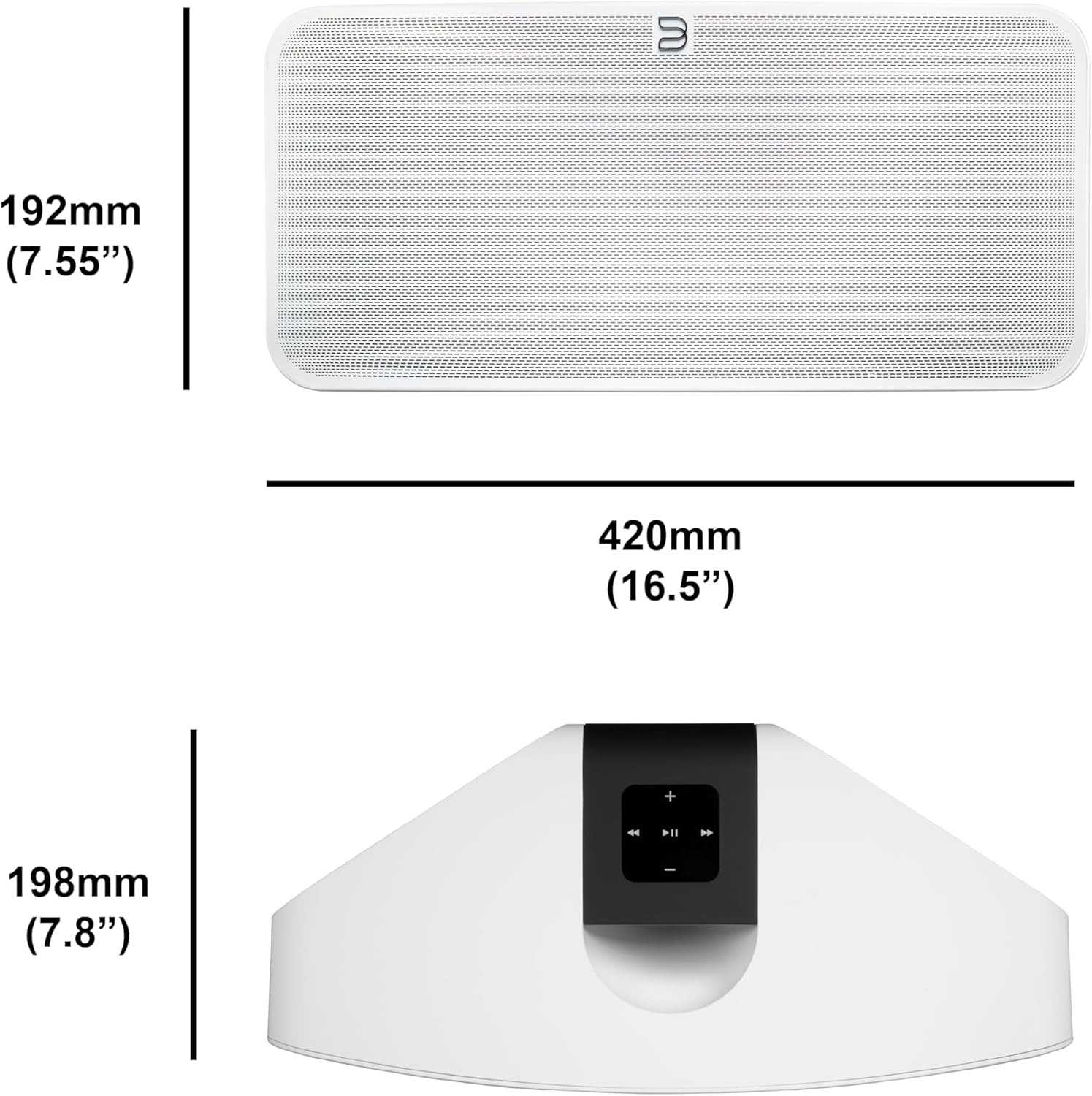
Figure 3: Rear panel of the Pulse 2i, highlighting the power input, LAN/USB, and optical/analog input ports.
Konec produktuview Video
Official product video demonstrating the features and capabilities of the Bluesound Pulse 2i speaker, including its design and connectivity options.
Návod k obsluze
1. BluOS Controller App
The primary method for controlling your Pulse 2i is through the BluOS Controller App, available for smartphones, tablets, and desktop computers. This app allows you to:
- Browse and play music from various streaming services (Spotify, Tidal, Amazon Music HD, Qobuz, etc.)
- Access your local music library and internet radio stations.
- Group multiple Bluesound players for a synchronized multi-room audio experience.
- Adjust volume, playback, and sound settings.

Figure 4: Top panel of the Pulse 2i with touch controls for playback, volume, and track navigation.
2. Streamování hudby
The Pulse 2i supports high-resolution audio playback up to 24-bit/192 kHz. You can stream directly from Apple devices using AirPlay 2 or connect via two-way Bluetooth with Qualcomm aptX HD for high-quality wireless audio.
3. Hlasové ovládání
The speaker is compatible with Amazon Alexa and Apple Siri, allowing for hands-free voice control of your music playback. Simply enable the Bluesound skill/action in your voice assistant app and link your account.
4. Vícemístný zvuk
Expand your audio system by adding more Bluesound players throughout your home. Use the BluOS app to group speakers and play the same music in multiple rooms, or different music in each room.

Figure 5: The Pulse 2i seamlessly integrates into a kitchen environment, providing background music.

Figure 6: The Pulse 2i enhances the audio experience in a social setting.
Údržba a péče
To ensure the longevity and optimal performance of your Pulse 2i speaker, follow these care guidelines:
- Čištění: Use a soft, dry cloth to wipe the exterior surfaces. Do not use liquid cleaners, aerosols, or abrasive chemicals, as they may damage the finish.
- Umístění: Neumísťujte reproduktor na přímé sluneční světlo, do blízkosti zdrojů tepla nebo do míst s vysokou vlhkostí.
- Větrání: Zajistěte dostatečné větrání kolem reproduktoru, abyste zabránili přehřátí. Neblokujte žádné větrací otvory.
- Moc: Odpojte napájecí kabel během bouřek nebo pokud jej nebudete delší dobu používat.
Odstraňování problémů
If you encounter issues with your Pulse 2i speaker, refer to the table below for common problems and their solutions.
| Problém | Možná příčina | Řešení |
|---|---|---|
| No power/No lights | Power cable disconnected or faulty outlet. | Zkontrolujte připojení napájecího kabelu. Zkuste jinou zásuvku. |
| Žádný zvuk | Volume too low, incorrect input selected, or network issue. | Increase volume. Verify correct input in BluOS app. Check network connection. |
| Nelze se připojit k Wi-Fi | Incorrect Wi-Fi password, router too far, or network interference. | Re-enter Wi-Fi password. Move speaker closer to router. Reduce interference from other devices. |
| Přerušení přehrávání hudby | Slabý signál Wi-Fi nebo přetížení sítě. | Ensure strong Wi-Fi signal. Consider using a wired Ethernet connection. |
Pokud problém přetrvává i po vyzkoušení těchto řešení, kontaktujte zákaznickou podporu.
Technické specifikace
| Funkce | Detail |
|---|---|
| Název modelu | PULSE 2i WHT |
| Typ reproduktoru | Více místností |
| Technologie připojení | Bluetooth, WiFi |
| Režim zvukového výstupu | Stereo |
| Maximální výstupní výkon reproduktoru | 25 wattů |
| Hmotnost položky | 11.11 libry |
| Rozměry produktu | 16"H x 8"Š x 7"V |
| Kompatibilní zařízení | Smartphone |
| Kontrolní metoda | Hlas |
| Výrobce | Lenbrook Group |
Informace o záruce
The Bluesound Pulse 2i comes with a limited warranty. Please refer to the warranty card included with your product or visit the official Bluesound webpodrobné podmínky týkající se záručního krytí a servisu naleznete na webových stránkách.
Zákaznická podpora
For further assistance, technical support, or service inquiries, please contact Bluesound customer support through their official website or the contact information provided in your product packaging. Ensure you have your model number (PULSE 2i WHT) and serial number ready when contacting support.
Ask a question about this manual
Ask about setup, troubleshooting, compatibility, parts, safety, or missing instructions. Manuals+ will review the question and use this page’s manual context to help answer it.